
Decktopus AI PPT Maker Review 2025: Game-Changer or Just Hype?
Decktopus AI PPT Maker Review 2025: Looking for the Best AI presentation tool in 2025 that actually delivers real results? You’re definitely not alone! With AI tools popping up everywhere,...
Looking for the Best AI presentation tool in 2025 that actually delivers real results? You’re definitely not alone! With AI tools popping up everywhere, many Indian students, professionals, and entrepreneurs are now turning to smart platforms like Decktopus AI to save time, look sharp, and impress their audience — whether it’s for college projects, client pitches, or business reports.
But here’s the catch — while tons of tools claim to make presentations “easy” or “automated,” most still leave you stuck editing slides, searching for content, or struggling with design. Sound familiar?
That’s where Decktopus AI steps in. Touted as one of the smartest AI-powered presentation tools of 2025, it promises to turn your rough ideas into polished, ready-to-present decks — all in just a few clicks. Sounds too good to be true? That’s exactly why we dug deeper.
We’ve created this post after testing the tool ourselves, reviewing expert insights, and gathering real feedback from Indian users across different professions. This way, you’re not just relying on hype — but actual, hands-on experience.
👉 In this post, you’ll explore everything you need to know about Decktopus AI in 2025 — its key features, pros and cons, how it compares with other tools, real results, and whether it’s truly worth your time and money.
Let’s dive in and find out if this tool is the game-changer you’ve been waiting for!
Creating impactful presentations used to be time-consuming and creatively draining — until tools like Decktopus AI stepped into the spotlight. If you’re tired of struggling with slide design, hunting for relevant visuals, or spending hours on formatting, Decktopus AI might just be the game-changer you need in 2025.
In this post, we’re breaking down everything you need to know:
Table of Contents
🚀 Key Features of Decktopus AI
💡 One-click Presentation Generator
🧩 Powerful Drag-and-Drop Editor
🛠️ How I Used Decktopus (Real Example)
🧪 Testing Decktopus: My Results
📥 Creating a Presentation from a PDF — Is It Worth It?
✍️ Starting from Scratch: Non-AI Mode Experience
🔍 Pros and Cons of Decktopus AI
💰 Decktopus AI Pricing Plans (2025)
🎯 Who Should Use Decktopus AI?
🧾 Final Verdict: Is Decktopus Worth It in 2025?
✅ What is Decktopus AI?
Decktopus AI is a cloud-based, AI-powered presentation maker designed to help anyone create stunning, professional presentations in minutes. Unlike traditional presentation tools, Decktopus automates the slide creation process — from content generation and image suggestions to layout design and speaker notes.

It’s perfect for professionals, students, educators, marketers, or literally anyone who needs to whip up a presentation quickly without compromising on quality.
🧠 How Does Decktopus Work?
The process is incredibly simple:
Enter your topic and audience type.
Choose from a variety of templates.
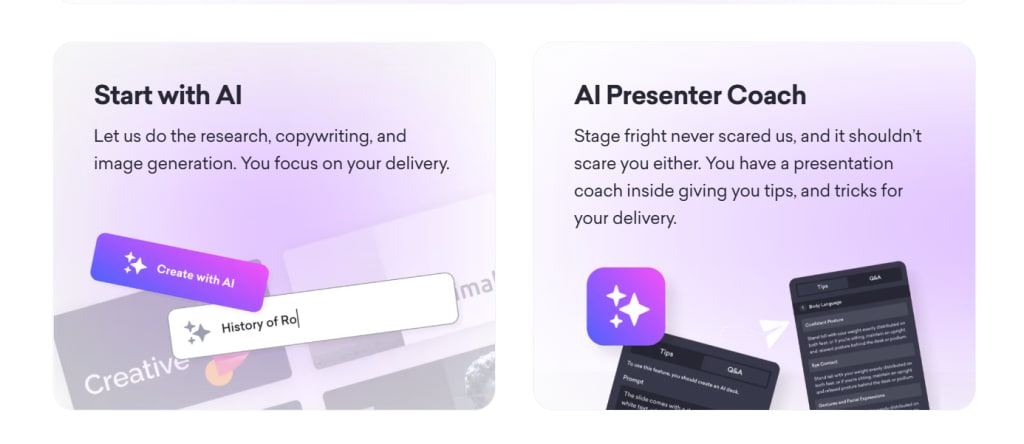
Let Decktopus’ AI engine do its thing: it generates slide outlines, content, visuals, and even speaker notes.
Use the drag-and-drop editor to fine-tune.
Share or export your deck in multiple formats like PDF, PPT, or via a live link.
It’s like having a professional designer, copywriter, and coach rolled into one.

🚀 Key Features of Decktopus AI
💡 One-click Presentation Generator
Just type in your topic and get a complete presentation structure in seconds — titles, bullet points, relevant content, and even images.
✍️ Slide Notes Assistant
Automatically generate speaker notes or scripts for each slide, helping you sound prepared and professional during delivery.
🖼️ AI Image and Icon Finder
Decktopus uses smart suggestions to offer icons and images that align perfectly with your content, saving you from endless image hunting.
🧩 Powerful Drag-and-Drop Editor
Easily tweak and rearrange elements with a user-friendly drag-and-drop interface. No design experience needed.

Click Here to Create Your First Deck with Decktopus — 100% Free!
🛠️ How I Used Decktopus (Real Example)
To test Decktopus, I created a presentation titled “Future of Remote Work in 2025”. I entered the topic, selected a clean business template, and let Decktopus generate the content.
In less than 4 minutes, I had:
12 complete slides
Custom visuals
Speaker notes
CTA slide with built-in form
I only had to tweak the language slightly to match my brand voice. That’s it. It felt like magic.

📥 Creating a Presentation from a PDF — Is It Worth It?
Absolutely. Upload any static PDF, and Decktopus will convert it into a dynamic, editable presentation. It preserved content formatting and added visual flair automatically. Great for turning reports or eBooks into engaging slide decks.
✅ Best use-case: Marketing reports, case studies, educational content.
✍️ Starting from Scratch: Non-AI Mode Experience
Prefer the DIY route? You can skip the AI and build slides manually using Decktopus’s editor. I tested this, and the interface is fluid, responsive, and intuitive. You still get access to templates, image libraries, and layouts.
Ideal for: Creative control freaks, designers, or anyone wanting full customization.


🔍 Pros and Cons of Decktopus AI
✅ Pros:
AI-generated presentations in minutes
Extensive library of templates and visuals
Built-in speaker notes and Q&A features
Supports team collaboration and workspace sharing
Exports to PDF, PPT, and live link
Built-in analytics and form integration
❌ Cons:
Limited deep customization (for designers)
Occasional AI output mismatch
Some export formats are locked behind paid plans
AI credits are limited in lower tiers
💰 Decktopus AI Pricing Plans (2025)

🎓 Student Discount: Use code SUPPORTEDUCATION to get 50% off all plans.
🎯 Who Should Use Decktopus AI?
Startups & Entrepreneurs — For pitching ideas fast
Marketers — For client presentations, case studies, campaign reports
Educators & Students — For course content, project presentations
HR & Corporate Trainers — For onboarding decks and training
Freelancers & Consultants — For client-facing proposals
🧾 Final Verdict: Is Decktopus Worth It in 2025?
In one word? Yes.
Decktopus AI is not just a tool — it’s a presentation assistant that does the heavy lifting. With time-saving automation, intelligent design, and a polished user experience, it’s ideal for busy professionals and teams alike.
While there are a few minor drawbacks, the time you save and the professional quality you gain far outweigh them. Whether you’re converting PDFs, pitching clients, or delivering a TED-style talk, Decktopus gives you a serious edge.
Check out Decktopus AI here and unlock the future of presentations.
What are the key features of Decktopus AI in 2025?
Decktopus AI offers smart templates, auto-content suggestions, real-time collaboration, and customizable design features. It streamlines the creation process with AI-powered slide designs, ensuring both efficiency and professionalism, making it ideal for business and educational presentations in 2025.
How does Decktopus AI compare to other AI presentation tools like Gamma and Beautiful.ai?
Decktopus AI focuses on speed and ease, providing automated slide creation and smart content generation. Gamma excels at creating interactive, narrative-driven presentations, while Beautiful.ai offers design-focused templates. Decktopus is more about fast content creation, whereas the others shine in customization and interaction.
What was my personal experience using Decktopus AI for presentations?
Using Decktopus AI was a game-changer. I saved hours on design and content generation. The platform’s intuitive interface and smart templates made it easy to create polished presentations quickly. I was particularly impressed with how it handled both simple and complex slide designs with ease.
How fast can Decktopus AI generate a PowerPoint slide?
Decktopus AI can generate a complete PowerPoint slide in seconds. Once you input your content or choose a template, the tool automatically designs the slide, making it one of the fastest AI-powered presentation creators available.
What makes Decktopus AI stand out from other tools like Canva and Beautiful.ai?
Decktopus AI stands out due to its focus on smart content generation, not just design. While Canva and Beautiful.ai are fantastic for custom design, Decktopus speeds up the presentation process by suggesting content for each slide and auto-designing based on that, saving tons of time.
Can Decktopus AI create a professional presentation from scratch?
Absolutely! Decktopus AI excels at building professional presentations from scratch. By choosing a template or starting with your content, the AI instantly suggests layout options, designs, and even specific text for each slide, ensuring a polished final result.
How accurate is Decktopus AI in generating slide content and design?
Decktopus AI is highly accurate in generating both content and design. It suggests relevant text, bullet points, and layout options based on your input, ensuring that your slides are well-organized and visually appealing without needing extensive edits.
Can Decktopus AI convert an existing PDF into a PowerPoint presentation?
Yes, Decktopus AI can convert PDFs into PowerPoint presentations. It extracts the content from the PDF and structures it into slides, though the conversion quality can vary depending on the complexity of the PDF.
How does Decktopus AI handle converting complex content (like tables and images) from PDF to PPT?
Decktopus AI does a solid job converting basic tables and images from PDFs into PowerPoint. However, complex elements like advanced tables or intricate visuals may need some manual tweaking for perfect formatting.
Is it possible to create presentations using Decktopus AI without AI-generated content?
Yes, you can create presentations from scratch without relying on AI-generated content. Decktopus offers customizable templates, allowing you to manually input your text, images, and design preferences, giving you full control over the presentation.
What customization options does Decktopus AI offer for presentations?
Decktopus AI offers a wide range of customization options, from color schemes and fonts to slide layouts and content organization. You can personalize templates to suit your brand or personal preferences, ensuring your presentation aligns with your style.
Can I use Decktopus AI for both business and educational presentations?
Yes, Decktopus AI is versatile and works well for both business and educational presentations. Whether you’re creating a corporate pitch deck or a classroom slideshow, Decktopus provides templates and features suitable for both contexts.
Is Decktopus AI worth the investment for making PowerPoint presentations in 2025?
If you’re looking for speed, efficiency, and professional-quality results, Decktopus AI is definitely worth the investment in 2025. Its AI-driven content generation and design options save significant time, making it a valuable tool for anyone who regularly creates presentations.
What are the limitations of Decktopus AI when creating presentations?
While Decktopus AI is a powerful tool, it does have some limitations. It may not always perfectly handle highly complex slide designs, and the free version has some restrictions on template access and customization features. Some manual editing may still be needed.
What are the advantages of using Decktopus AI for presentations?
Decktopus AI saves time by automating the content and design process, offering smart templates and AI-powered slide suggestions. It ensures a professional look without the need for in-depth design skills, making it perfect for users who need to create presentations quickly.
How does Decktopus AI save time in creating professional-quality presentations?
Decktopus AI saves time by automatically generating content for your slides, providing relevant suggestions for text, images, and layout. It cuts down on the need for brainstorming, designing, and editing, letting you focus on the content rather than the details.
What are the downsides of using Decktopus AI?
Decktopus AI may not always be able to fully replace manual design work for very complex or highly customized presentations. Also, the free version comes with some limitations, like fewer templates and design options, which may not be enough for more advanced needs.
Does Decktopus AI have any limitations when compared to traditional PowerPoint?
Unlike traditional PowerPoint, Decktopus AI’s focus is on automation, which might limit your creative control. PowerPoint, on the other hand, allows for more intricate design and customization, making it a better choice for those who want full design flexibility.
Is there a free AI PowerPoint generator?
Yes, there are several free AI tools that can help generate PowerPoint slides. Tools like Decktopus and Beautiful.ai offer free versions, allowing you to quickly generate visually appealing presentations, though some features may be limited in their free tiers.
Can ChatGPT create a PowerPoint (PPT)?
While ChatGPT can’t directly create a PowerPoint file, it can help you write the content for slides. You can use ChatGPT to generate text, bullet points, and speaker notes, then manually transfer that into PowerPoint or other AI presentation tools.
How to prepare free PPT using AI?
To create a free PowerPoint with AI, you can use platforms like Decktopus, Beautiful.ai, or Google Slides. These tools often have free plans that offer AI-powered suggestions for slide content, design, and layout, making the process quicker and more efficient.
What is the best free PowerPoint maker?
For free options, Google Slides and Decktopus AI are great choices. Google Slides offers cloud-based collaboration and basic design tools, while Decktopus AI uses smart templates to make slide creation faster and easier. Both offer free versions with essential features.
What is the difference between Gamma and Decktopus?
Gamma focuses on creating interactive and narrative-driven presentations, making it ideal for storytelling. Decktopus, on the other hand, emphasizes fast, automated slide creation with smart content suggestions. Gamma shines in interactive features, while Decktopus is known for speed and efficiency.
What is the best AI tool to make PPT from PDF?
Tools like Decktopus AI and Smallpdf can convert PDF content into PowerPoint slides. They help you transform static PDF documents into editable presentations, extracting text, images, and structure with ease, saving you hours of manual work.
Which AI website can auto-generate slides?
Decktopus AI is one of the top websites that can auto-generate slides. It uses AI to design your presentation, suggest content, and even add visuals automatically. It’s a huge time-saver, especially if you need to create a deck in a rush.
What is Decktopus AI used for?
Decktopus AI helps you create stunning, professional presentations in minutes. Whether you’re pitching a startup idea, teaching a class, or reporting results to your team, it does the heavy lifting — design, layout, and content suggestions — all with a few clicks.
Is Decktopus AI free to use in 2025?
Yes, Decktopus AI still offers a free plan in 2025, but with limited features. It’s great for testing the waters before upgrading. Think of it as a test drive — you get the feel of it, just not the full horsepower.
How to use Decktopus AI for free?
Just sign up on their website and start creating with the free plan. You’ll get access to templates and basic features — no credit card needed. It’s perfect if you want to try it before diving into the premium stuff.
Is there a free version of Decktopus AI?
Yes! Decktopus AI comes with a forever-free version. While it doesn’t include advanced AI features or export options, it’s still a handy tool for creating basic decks without paying a dime.
Can Decktopus AI replace PowerPoint?
For many users, yes. It automates design, writes content, and even finds visuals — making it faster and easier than PowerPoint. However, if you need full customization or complex animations, PowerPoint still holds its ground.
How does Decktopus AI compare to Beautiful.ai or Gamma AI?
Decktopus stands out for its simplicity and AI-driven slide content. While Beautiful.ai shines in design automation and Gamma focuses on interactive documents, Decktopus strikes a balance — great for users who want smart content and decent visuals in less time.
What is the best AI deck builder in 2025?
It’s a close race, but Decktopus AI leads for its ease of use and built-in slide notes. Gamma is catching up fast, while Beautiful.ai rules design perfection. Your best pick depends on whether you value speed, storytelling, or sleek visuals more.
Which AI tool is best for creating professional presentations?
Decktopus AI is a top contender for polished, ready-to-present decks. It handles content, layout, and even speaker notes. But if you’re all about visual storytelling, Beautiful.ai or Gamma AI might be your go-to instead.
Can ChatGPT create a PowerPoint presentation?
Sort of. ChatGPT can generate the content — headings, bullet points, even slide scripts. But you’ll need to copy that into PowerPoint or pair it with tools like Decktopus to turn words into visuals.
Can I create a pitch deck using AI tools like Decktopus?
Absolutely. Decktopus is built for pitch decks. Enter your idea, and it’ll help you shape the story, design the slides, and add speaker notes — all in minutes. It’s like having a pitch coach and designer rolled into one.
Is there a completely free AI presentation generator?
Most tools, like Decktopus, offer free versions with limited features. A 100% free, unlimited AI presentation tool is rare, but the free tiers often give enough to get started or create simple decks.
Is Decktopus AI safe and reliable to use?
Yes, it’s secure and trusted by professionals worldwide. Your data stays private, and the platform runs smoothly on the cloud. As long as you follow basic online safety, Decktopus is as safe as any major productivity tool.
What are the pros and cons of using Decktopus AI in 2025?
Pros? Fast creation, polished slides, AI writing help, and easy sharing. Cons? Limited export options in the free plan and less flexibility for design-heavy users. It’s great for speed and structure but not for intricate designs.
Click Here to Create Your First Deck with Decktopus – 100% Free!
Is Decktopus AI worth it for students and professionals?
Definitely. Students save time on assignments, while pros create client-ready decks in minutes. It’s like having a smart assistant who designs, writes, and organizes your thoughts visually — what’s not to love?
How does Decktopus AI save time in creating presentations?
Imagine skipping the blank slide anxiety. Decktopus writes, designs, and adds visuals for you in one go. Instead of hours, you get a complete deck in minutes. It’s like fast-forwarding through the boring part and landing straight on “done.”
Affiliate Disclaimer: Some links on this page are affiliate links, meaning I may earn a commission at no extra cost to you.
About the Creator
Keep reading
More stories from Anthony Moriyam and writers in 01 and other communities.
10 Best Inverter Battery for Home in India 2025
Are you searching for the best inverter battery for your home in India in 2025? You’re not alone! With frequent power cuts still affecting many parts of the country — from big cities to small towns — having a reliable inverter battery has become a must-have in every Indian household.
By Anthony Moriyam 11 months ago in 01
The Rise of AI Presentation Tools: Transforming the Way We Create Slides
Artificial intelligence is quietly reshaping how we work, learn, and communicate. One area where this shift is especially noticeable is presentation design. Creating slides used to mean hours of formatting, arranging content, and adjusting visuals. Today, AI-powered tools are simplifying that process, helping users turn ideas into polished presentations in a fraction of the time.
By charliesamuel4 days ago in 01
Hottest in the Office
Dear Rafi, You’re very distracting to work around. For the first second I saw you the other day, I thought you were some type of executive. It took a moment to realize no, you were just the new guy, dressed up for the job he wants. Be still, my heart.
By Gabriel Shames4 days ago in Pride

Comments
There are no comments for this story
Be the first to respond and start the conversation.