
CarPlay Just Got Better!
Apple’s Silent Update Adds a Game-Changing Feature

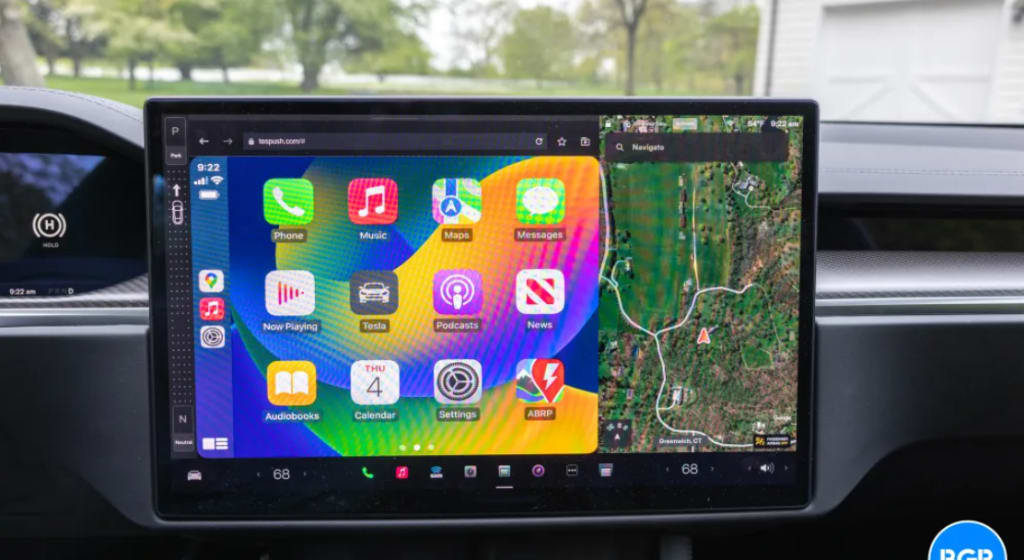
Apple has quietly rolled out a significant update to CarPlay, and it’s something every Apple user needs to know about. Without any major announcements, Apple has enhanced the CarPlay experience with a game-changing feature: a redesigned home screen with three rows of icons. This simple yet powerful tweak makes navigating your favorite apps easier than ever. So, what’s changed, and why does it matter? Let’s dive in!
What’s New in Apple’s Silent CarPlay Update?
The Introduction of Three Rows of Icons
Before this update, CarPlay users were limited to a two-row app layout on the home screen. The latest update increases the number of visible apps, allowing users to access more applications at a glance without scrolling. This small yet impactful change makes a huge difference in usability, especially for those who rely on CarPlay for navigation, music, and messaging.
Why This Change Matters for Users
More icons mean quicker access to your most-used apps. Instead of swiping through multiple screens, everything you need is right in front of you. This improvement is particularly beneficial for drivers who need to minimize distractions while on the road.
How the New CarPlay Update Enhances the User Experience
Better Accessibility and Navigation
With more icons on the screen, users no longer have to swipe through pages to find what they need. This makes accessing maps, calls, and music apps much easier and safer.
More Customization Options
Apple has also added more customization settings, allowing users to arrange apps based on their preferences. Now, you can set up your CarPlay home screen to match how you use your phone.
Faster Access to Frequently Used Apps
Do you frequently switch between maps, messages, and music? The new layout makes it faster to get where you need to go, reducing the time spent fumbling through menus.
How to Update Your CarPlay to the Latest Version
Checking for Updates
To ensure you’re running the latest CarPlay version, follow these steps:
Open the Settings app on your iPhone.
Navigate to General > Software Update.
If an update is available, download and install it.
Steps to Enable the New Interface
Once your iPhone is updated, plug it into your CarPlay-compatible vehicle. The new interface should automatically appear. If it doesn’t:
Go to Settings > CarPlay.
Select your car from the list.
Tap Customize and rearrange your apps to fit the new layout.
Troubleshooting Update Issues
If you don’t see the changes, try:
Restarting your iPhone and vehicle.
Reconnecting your phone via a USB cable instead of wireless CarPlay.
Ensuring your vehicle supports the latest CarPlay features.
Comparing the New CarPlay Update to Previous Versions
Old Interface vs. New Interface
The previous two-row interface felt a bit restrictive, requiring users to swipe through multiple pages. The new three-row layout provides a more seamless experience.
User Reactions to the Change
Early feedback from users has been overwhelmingly positive. Many appreciate the ease of access and enhanced visibility of their favorite apps.
Hidden Features You May Not Have Noticed
Improved Siri Integration
Siri’s response time has improved, making voice commands more efficient and reducing lag.
Smarter App Suggestions
CarPlay now intelligently suggests apps based on your driving habits, such as opening Maps automatically when you start driving.
Enhanced Widget Functionality
Widgets are now more interactive, allowing users to control music playback and navigation without switching apps.
How This Update Stacks Up Against Android Auto
What Apple is Doing Better
Apple’s latest update brings CarPlay closer to Android Auto’s flexibility by adding more customization and better app visibility.
Areas Where Android Auto Still Leads
Despite Apple’s improvements, Android Auto still offers more third-party app integrations and better compatibility with a wider range of vehicles.
The Future of CarPlay: What’s Next?
Apple’s Vision for the Next Generation of CarPlay
Apple has hinted at a future CarPlay version that will integrate deeper with car dashboards, including climate controls and more vehicle settings.
Potential Features We Might See Soon
A redesigned, more interactive dashboard
More support for third-party navigation apps
AI-driven smart suggestions based on user behavior
Conclusion
Apple’s silent CarPlay update might not have made headlines, but it’s a game-changer for users. With a new three-row layout, improved customization, and better accessibility, this update enhances the driving experience significantly. If you haven’t updated yet, now’s the time!
FAQs
1. How do I know if I have the latest CarPlay update?Go to Settings > General > Software Update on your iPhone and check for available updates.
2. Can I customize the new three-row layout?Yes! Head to Settings > CarPlay > Customize to rearrange your apps.
3. Why isn’t my CarPlay updating?Try restarting your phone and car, reconnecting via USB, and ensuring your car supports the latest CarPlay version.
4. What’s the biggest improvement in this update?The biggest change is the addition of a third row of icons, making it easier to access apps without swiping.
5. How does this compare to Android Auto?Apple has made strides in customization and app visibility, but Android Auto still offers better third-party app support and compatibility.
About the Creator
Apleetech
Apleetech is a Professional Technology Platform. Here we will provide you only interesting content, which you will like very much. We're dedicated to providing you with the best of Technology, with a focus on dependability and Tech.
How Tax Outsourcing Companies Are Helping U.S. Businesses Stay Compliant and Profitable
Taxes are one of the most unavoidable parts of doing business in the United States. Whether you’re running a small startup or managing a growing company, tax compliance can quickly turn into a major headache. This is where Tax Outsourcing Companies have become a game-changer for businesses across the USA. By handing over complex tax responsibilities to professionals, companies are finding smarter ways to save time, reduce errors, and stay compliant with ever-changing tax laws.
By Outsourced Bookkeeping Solutions4 days ago in 01
Elon Musk called medical school "pointless," but Jeff Bezos wants Gen Z to finish college before starting their own companies — as AI threatens entry-level jobs
The job market is becoming volatile by the minute as generative AI becomes more prevalent and gains broad adoption across organizations worldwide. Last year, Salesforce CEO Marc Benioff revealed that the company is seriously debating hiring software engineers, citing "incredible productivity gains" from agentic AIs.
By Dena Falken Esqabout 6 hours ago in 01




Comments
There are no comments for this story
Be the first to respond and start the conversation.