
Best Practices to Build Scalable Applications with Angular: A Complete Guide
Build Scalable Applications with Angular


With the growing demand to create scalable web applications, it is crucial for web developers to adopt effective practices for creating high performance web applications. Angular, which is a powerful, open-source front-end software development framework, provides a range of best practices that can assist programmers to design and maintain scalable web apps.
This blog talks about the importance of scalable web applications and how we can design them with the help of the best Angular practices.
Importance of Scalable Web Applications
The scalable web applications make it easier for them to manage high loads without compromising their quality and performance. If we talk about Angular, this scalability ranges from traffic management to the capacity to adopt new features over time.
Moreover, Angular scalable architecture’s features help to design applications that can be a good fit for larger enterprises. It also enables programmers to make sure that their applications remain responsive and flexible.
Angular best practices for Scalable Applications Development
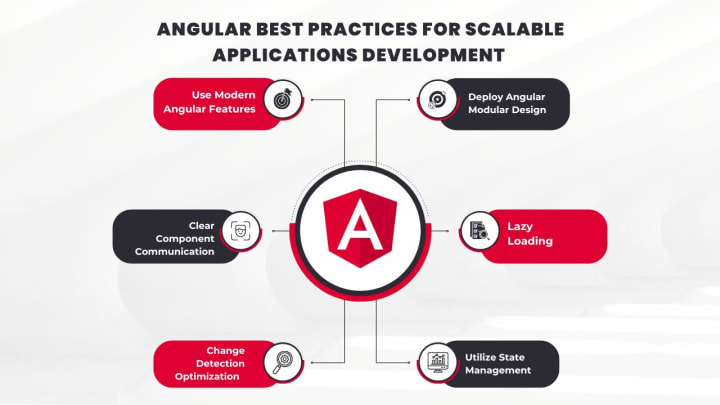
Here are the details of some best practices for creating scalable applications with Angular:
1. Deploy Angular Modular Design
If you are planning to design scalable applications, the Modular Architecture of Angular is the keystone. You can make segments of your applications in the form of modules. This division would ensure that each module and feature is designed, tested, and maintained separately.
Developers can segment the web applications into different modules such as featured modules, shared modules, and core modules.
Here’s how you can effectively use Angular Modular design:
- To keep your apps organized, start grouping related services, components, and pipes into feature modules such as user profiles or authentication.
- Align common components, pipes, and directives that are reusable and create shared modules.
- For single services design core modules.
In short, the Modular architecture of Angular will ensure your app’s scalability, testing, and updates. Also, you can hire experts who are skilled in popular JavaScript frameworks such as Angular to upscale web development.
2. Lazy Loading
Another Angular practice for developing online applications is lazy loading. Through this technique, you can target only necessary modules rather than loading the whole app front as per your project requirements.
- For implementing the lazy loading strategy define routes and deploy a preload strategy:
- Utilize the ‘loadChildren’ property in your routing configuration to define the route by slowly loading the feature module, while the customer navigates it.
Then if you want to target specific modules deploy a preload strategy. In this way, you can download required modules in the background without disrupting user experience.
3. Utilize State Management
For complicated web applications, state management is a challenging task. A well-planned state management strategy helps your applications to be predictable and maintainable. Angular does not have a built-in state management solution. However, with the help of other third-party resources such as Akita, NGXS, or NgRx you can efficiently manage your app state.
Here are some effective state management strategies:
- For managing the global state through NgRx follow a Redux-inspired pattern. You would be able to separate UI components and state logic through store patterns, enabling you to debug and maintain web applications.
- For isolated and small components use the built-in management features of Angular. These features include ‘@input ()’ and ‘@output ()’ bindings.
4. Change Detection Optimization
Angular change detection mechanism is the best for tracking changes in your model and viewing updates. When we are working on large scale web apps it becomes difficult to detect any change. Here Angular comes with its full-scale optimization for change detection.
Here we have some of the best strategies for change detection optimization including OnPush change detection and Detach change detection:
- The OnPush change detection technique is suitable for components that are less likely to change input data.
- Components like modals and background components that are not influenced by data changes or user interactions, you should detach the change detection technique on them.
5. Clear Component Communication
To create scalable Angular apps, you cannot miss out on efficient and clear communication between components. Your component tree can become complicated with the addition of new components and features. Proper communication among components would assist you in creating scalable apps.
See how to achieve clear component communication:
- For effective parent-child component communication, use ‘@input ()’ and ‘@output ()’ bindings.
- Also, you can use Angular services such as data service, logging service, or authentication service to share business logic and data among components.
- Do not use the global state for storing local component-based data.
You can also hire dedicated Angular developers if you face any difficulty in managing clear communication among components.
6. Use Modern Angular Features
Another essential practice after creating an app is to stay updated regarding new Angular features and Angular best practices. To fix scalability challenges, Angular consistently upgrades its features and tools. Every new version of Angular is launched with performance improvements, automatic APIs, and better tools.
Some key Angular features for maintaining app scalability include Angular Universal, TypeScript, and Angular CLI.
- To enhance performance and SEO for large-scale apps, enabling server-side rendering.
- TypeScript can be considered for strict typing and avoiding runtime errors. It also ensures type safety for your web applications.
- Additionally, Angular CLI is opted to ensure efficient development. You can streamline your workflow, design components, manage dependencies, and create optimized production-ready code.
Wrapping Up
This blog concludes that to create scalable Angular apps web developers need to get a deeper understanding of some best Angular practices to design apps. These practices include the implementation of Angular modular architecture, lazy loading, change detection optimization, clear communication among app components, and keeping applications updated through new Angular features.
By adopting these techniques programmers can effortlessly create scale applications through Angular. Moreover, they can cater to evolving business needs and handle online traffic influx on apps.
About the Creator
Eric Walter
Hi, I am Eric, the creative mind behind content on Vocal Media. With 12 years in coding and as an engineering lead at Devace, I share engaging stories on tech trends and practical coding techniques from my dynamic coding journey.
Keep reading
More stories from Eric Walter and writers in 01 and other communities.
Hire PHP Developers for Custom Web Development Solutions
PHP is a popular programming language in web development for creating dynamic web applications and websites. It’s the foundation for several content management systems, including Drupal, Joomla, and WordPress. PHP’s flexibility and power are indisputable, regardless of whether you hire PHP developers for a small project or need a team of professionals for a large-scale enterprise solution.
By Eric Walter5 months ago in 01
Boosting Oracle Fusion Performance with AI-Enhanced Data Insights
In the digital era, data is one of the most valuable assets a business can possess. As companies continue to rely on cloud-based ERP systems like Oracle Fusion to streamline their operations, the integration of AI-powered data insights has become a game-changer. With AI agents for Oracle Fusion, businesses can unlock deeper, more actionable insights from their data, driving better decision-making and improving overall performance.
By Rchilli Inc4 days ago in 01
How SEO Helps Small Businesses Compete with Big Brands
Imagine you own a small business and have just launched a well-designed website. Your products are good, your services are reliable, and your pricing is competitive. Yet when you search for your industry on Google, the first page is dominated by large brands. Their names appear everywhere, making it seem almost impossible for a smaller business to gain visibility.
By Henry Davids5 days ago in 01



Comments
There are no comments for this story
Be the first to respond and start the conversation.