
A Perfect Solution: Migrate Emails from Maildir to MSG Layout
Easily migrate emails from Maildir to MSG format without data loss. Discover the perfect solution to convert Maildir files with attachments, folder structure, and metadata intact.


If you want a smart and simple solution to migrate emails from Maildir to MSG layout. So, there are many user who face many problems in shifting their data from Maildir to another format. When data from Maildir to MSG format, users typically problem migrate face several challenges due to the file layout and format difference between the two.
In this blog, we’ll share with you a perfect solution to your problem and provide a simple guide to migrate emails from Maildir to MSG format without any error.
Let’s dive in!
Overview
Maildir is a way to store emails that is often used on Unix-based computers. Each email is saved as a distinct plain text file in a certain directory structure (cur, new, tmp). It's regarded as being easy to use and dependable, especially when it comes to storing email on a server.
Microsoft Outlook created the MSG email file format, which is a proprietary format. It saves one email message, along with its content, attachments, metadata, and formatting, in a binary format that Outlook uses to handle and archive individual messages.
Short Comparison
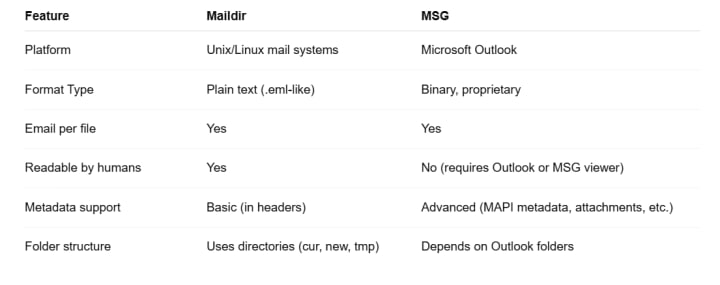
Manual Method to Migrate Emails from Maildir to MSG Format
Please note: There is no one-click way to do this. This manual method employs Microsoft Outlook and Mozilla Thunderbird as middlemen. It is best to have some basic technological expertise.
Step 1: Get Mozilla Thunderbird set up
- Go to https://www.thunderbird.net and download and install Thunderbird
- It will operate as a bridge to import Maildir emails.
Step 2: Set up Thunderbird to use Maildir. Open Thunderbird.
- To change the settings for your account, go to Server Settings and then Message Storage
- Ensure that the Maildir format is enabled.
- Shut down Thunderbird.
Step 3: Copy the Maildir files into the Thunderbird profile.
- Find the folder that has your Thunderbird mail profile:
- C:\Users\[YourName]\AppData\Roaming\Thunderbird\Profiles\xxxxx.default is where you can usually find it.
- Copy the cur, new, and tmp folders from your Maildir structure and paste them into the Mail or ImapMail folder.
- Change the names of folders as needed to fit the way Thunderbird expects them to be.
- Open Thunderbird again and make sure you can see your emails.
Step 4: Save Emails as EML
- Add the ImportExportTools NG add-on to Thunderbird.
- https://addons.thunderbird.net
- After you install it:
- Select the email folder by clicking the right mouse button.
- Choose ImportExportTools NG, then Export all mails in the folder, and choose EML format.
- Put the emails in a folder on your computer.
Step 5: Open Outlook and import EML files.
You can drag & drop EML files into an Outlook folder, like your Inbox or a new one.
- Outlook will change them and show them.
- Step 6: Save as MSG Format
- In Outlook, open each email.
- Choose File > Save As.
- Select the Unicode (*.msg) format for Outlook messages.
- Put the file where you want it.
Here are Some Limitations
- For big batches, it takes a long time (MSG saving is done manually).
- Email flags or metadata, like whether an email has been read or not, cannot all be carried across.
- You need to have both Thunderbird and Outlook installed.
A Tip to Make Things Easier
You can convert Maildir to MSG manually, but it can take a long time and requiries a lot of processes, technical knowledge, and programs like Outlook and Thunderbird. Using a specialized tool can make a great difference for people who get a lot of email or want a faster, more dependable answer.
There are third-party applications that are made just for this job. They automate the conversion, keep the folder hierarchy, and make sure that no data is lost in the process. Reputable companies offer tools like GainTools Maildir Converter that can make conversion easier and save time, especially for enterprises or professionals that have to deal with a lot of email archives.
Key Takeaway
Moving emails from Maildir to MSG format manually can be hard and take a long time, especially for people who aren't very tech-savvy or have a lot of data. The manual technique using Thunderbird and Outlook works, but it has some problems, like not being able to process multiple files at once, losing metadata, and needing additional tools.
Using a specific solution like Maildir Converter can make things much easier, especially in business or professional situations. As a result, the procedure will operate more efficiently, rapidly, and consistently. It makes sure things are right, keeps emails safe, and saves time. Choosing the appropriate tool can make a big difference in how well and easily you can move your email, whether you're managing individual messages or a vast archive.
About the Creator
Alexis Matthew
Hi am content writer
Keep reading
More stories from Alexis Matthew and writers in 01 and other communities.
How to Archive Google Workspace Emails to MBOX Layout for Thunderbird or Apple Mail
Both professionals and businesses need to know how to handle email data. A lot of people use Google Workspace to talk to each other every day. There are still instances when you need to save emails to your computer. Archiving emails helps keep essential communications safe, reduces useless online storage, and shifts data to desktop clients.
By Alexis Matthew6 months ago in 01




Comments
There are no comments for this story
Be the first to respond and start the conversation.