
5 Big Reasons for Discovered currently not indexed blog post in 2022
Why Blog posts are not indexing

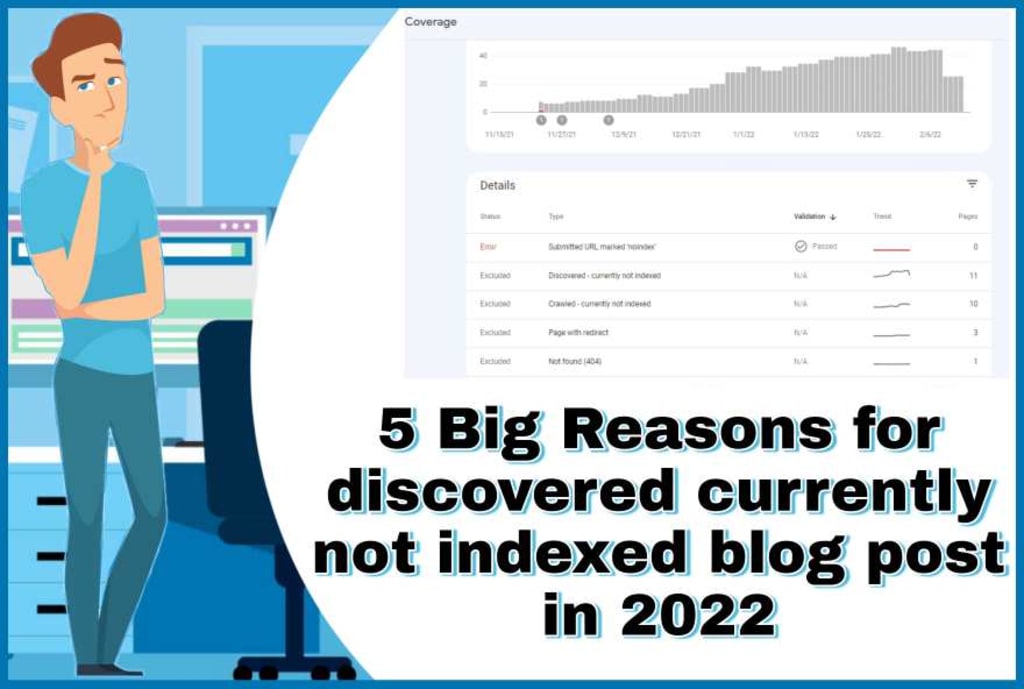
Do you know the reasons due to which blog posts of any website remain in Discovered - currently not indexed and Crawled - currently not indexed status.
If you try to find out about these reasons on Google and YouTube, then many basic reasons are explained to you, but even after rectifying these reasons, the blog posts of the website are not indexed. What is the reason for this?
A beginner blogger who is learning how to do blogging often gets nervous if he comes across technical things like Discovered - Currently not indexed, Crawled - Currently not indexed, Page is not mobile friendly, Text is too small to read and Content is wider than screen.
In this post, I will tell you about 5 Big Reasons for Discovered currently not indexed blog posts, so that a beginning blogger can easily understand why their blog posts are not indexed and what is its solution.
All these Problems and Solutions have been experienced by us, that's why if you have such problems on your website, Then you can adopt these solutions, Your Discovered - Currently not indexed and Crawled - Currently not indexed problem will be 100% fixed.
Reasons of Discovered - currently not indexed
Discovered - Currently not indexed simply means that google has found the url of your blog post or google has got the url but google is not able to index your blog post or google is having any problem in indexing your blog post.
Blog post Discovered - currently not indexed can be due to the following reasons, let's know
1. Page is not mobile Friendly
One of the most common reasons for Discovered - Currently not indexed is Page is not mobile friendly. When you use a theme on your website that is not mobile friendly or you have taken a very good theme, but you have customized that theme in such a way that Google is not accepting your website's blog posts mobile friendly.
Due to Page is not mobile friendly, whenever you do URL inspection of your blog post's link in Google Search Console, you will get
- Clickable elements too close together
- Content wider than screen
- Text too small to Read
etc. And because of this Page is not Mobile friendly, your blog post is never indexed.
If you have installed a theme in your WordPress website, in which both the website's logo and menu are kept along with the navigation menu then,
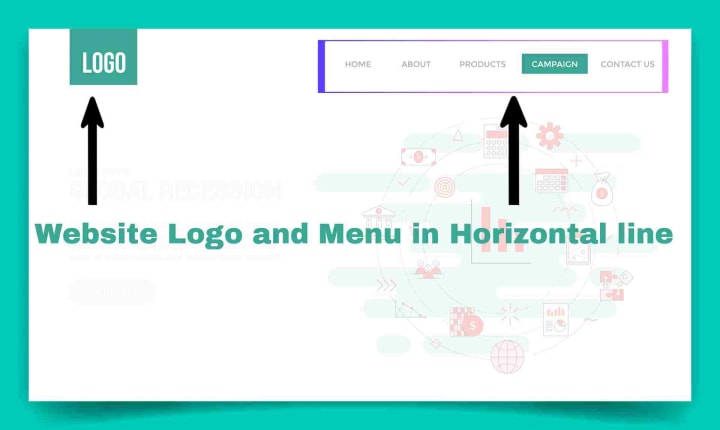
If Google inspects the URL of your blog, then it often starts showing you the page is not mobile friendly because Google in its mobile friendly test starts telling problems like
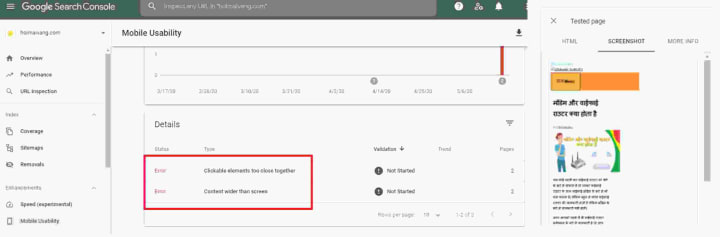
clickable elements are too close, text is too small to read and content is wider than the screen inside your website.
"Check Grahak Survey Website for Product Reviews and Surveys"
How to fix Page is not Mobile friendly
In most of the websites, when we keep our website's Identity/Logo with the Navigation Menu, then the search console definitely starts showing the page is not mobile friendly, that's why you have to, the logo and navigation
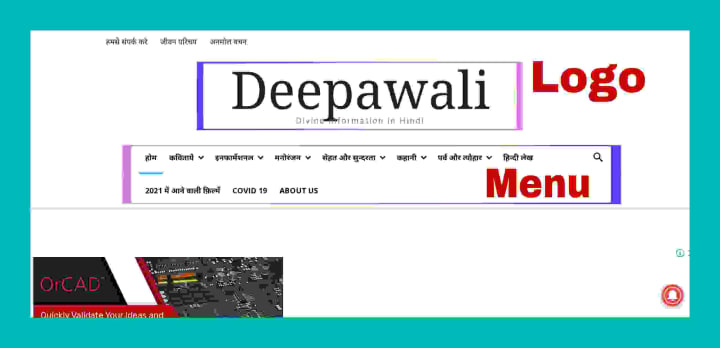
Menu of your website should be kept separate(Vertically) so that the issue of Page is not Mobile friendly should be eliminated after URL inspection of your blog post in Google Search Console.
Sometimes placing the logo and menu of the website vertically does not fix the problem of Content is wider than screen. In such a situation, if you reduce the size of the featured image in the media settings of WordPress, then the Content is wider than screen problem will be fixed forever.
Note: - Keeping Logo and Menu horizontally in every website is not a problem, but if the logo and menu of your website is placed horizontally and in your search console showing this not mobile friendly page, then customize the logo and menu vertically of your website. This Page is not Mobile friendly issue will be solved.
2. Uploading Inconsistent Blog Posts
Whether it is Blogger or WordPress, you should keep posting blog posts on your website in the interval of a regular day , whether the traffic is coming or not. When we are putting a blog post on our website every day for the last several days, then for any reason this gap should not be allowed to break.
If we post a first blog post on our website today, and then put the second blog post after two days and put the third blog post after a week, then in such a situation Google increases the time to crawl our website and until Google crawls the blog post. Till then our blog post will not be indexed.
Many times Google stops crawling our website due to uploading inconsistent blog posts. In such a situation if you go to Google Search Console and request indexing of blog posts, even then Google does not index your URL.
How to speed up indexing of Blog Post
Due to the uploading of inconsistent blog posts, Google takes a lot of time to index your new blog and article by crawling websites. In such a situation if your website is on WordPress then you can turn on instant indexing using the Rank Math plugin.
After getting complete setup of instant indexing, whenever you notify any new blog post for instant indexing to the Rank Math, then your blog post or article indexes within a few hours or max one day.
API indexing can also be enabled very easily in Blogger's website, so that blog posts on Blogger's website start indexing within a few hours. You can read Google's official article about Blogger API Indexing.
3. Website overloading while crawling
Website overloading is also the reason for being Discovered - currently not indexed. When Google goes to crawl your website and at that time if your website takes more time to load then Google is not able to crawl the information given in your URL, due to this your blog post goes into Discovered - currently not indexed.
At the time of crawling of website by Google, if the hosting of your website is not able to take the load, then in such a situation Google is unable to read the blog post completely and Google reschedules the crawling of the URL submitted by you and Puts your URL in the category Discovered - currently not indexed.
The following are the reasons for the website being overloaded or the website's opening speed being very slow.
- The server of the hosting on which your WordPress website is hosted is very useless and the website does not open even during Google's crawling.
- Many plugins to be used to decorate the website.
- Use of large size photos on the website, due to which the website is taking a lot of time to open completely.
etc. All these are the reasons for the slow speed of the website.
How to reduce website loading speed
Blog posts are not indexed due to the high loading speed of the website, so you should try to keep the loading speed of your website to a minimum. You can do the following to reduce the loading speed of the website.
- By hosting the website on a good hosting.
- By using a minimal decorative WordPress plugin.
- By using a simple and normal size font in your website.
- 30 KB - 40 KB using photos.
These are all very common ways to reduce the loading speed of the website.
By doing the things mentioned above, you can greatly reduce the loading speed of your website, so that your website opens as soon as possible at the time of Google's crawling and blog posts start getting indexed. The sooner your website opens, the better it is to rank the website in Google.
4. Google choose different canonical
You have written two different articles on your website, whose headings, sub-headings and some content also seem similar to each other, then in such a situation Google considers those two articles to be the same and the article in which more information is given, Google Takes it as Canonical URL
Therefore, your second article in which almost the same information is written, Google does not index it. Because Google understands what is the use of indexing two articles with the same information.
How to fix Google choose different canonical
If you want to index both blog posts or articles with the same information, then make the headings, sub headings and content written in both the articles different by writing in some other way, this small change will solve the problem of Google choose different canonical and your Both articles with the same information will be indexed.
5. What is Crawled Currently not Indexed
Crawled - currently not indexed simply means that Google has crawled the post containing the URL submitted by you, but Google does not want to index that URL or there is no guarantee that it will be indexed in future.
Crawled currently not indexed can be due to the following reasons.
- You have written thin content i.e. the article/blog you have given for index is very small, due to which Google is understanding that no good information has been given in it. That's why Google is not considering that blog post or article as valuable.
- Maybe you have written an article on some such topic, on which millions of people have already got their post indexed by writing articles, that's why Google is not finding your post as a special post.
- Even if everything is fine, your post is currently crawled not indexed, then Google did not have time to index your post, so it will index your post later.
etc.
How to fix Crawled Currently not Indexed
To fix Crawled currently not indexed, you can do the following things to index your blog posts.
- Write your article at least more than 650 words long.
- Try to give better and more information than your competitor.
- Keep updating new information in blog posts.
- Request to index the article yourself by going to Google Search Console.
Conclusion | 5 Big Reasons for discovered currently not indexed
All the problems mentioned in this article have been seen by solving them by themselves.
All the reasons and solutions mentioned in this article 5 Big Reasons for Discovered currently not indexed are very common.
All the methods mentioned in this blog post are the main ones, due to which blog posts are not indexed and keep showing Discovered - currently not indexed. That is why by adopting the methods mentioned in this article, your blog posts will definitely start getting indexed.
About the Creator
Hareram Kumar
My Name is Himanshu and i am Admin of grahaksurvey.com website.
I'm B.COM Student and i am passionate about blogging.
Keep reading
More stories from writers in 01 and other communities.
Complete Guide: Legitimate Gmail Password Recovery & Account Security
Forgetting a Gmail password can be frustrating, but attempting to recover it through unauthorized means can lead to security risks and legal consequences. This comprehensive guide provides verified, legitimate methods for Gmail password recovery, explains common threats to account security, and offers actionable protection strategies. We strongly advise against using any "hacking software," as these are often scams or malware that compromise your privacy and violate Google's Terms of Service.
By Alexander Hoffmann7 days ago in 01
Jeff Bezos’ Amazon takes on Starlink as Africa’s biggest telecom market expands satellite internet options
Nigeria, Africa’s largest telecom market, is opening its skies to more satellite internet providers as Amazon LEO, the tech giant’s low-Earth orbit (LEO) satellite network, secures approval to operate across the country.
By Dena Falken Esq5 days ago in 01



Comments (1)
Hi My Name is Karan Kumar and I am The Owner of the healthylifestyllers.com Website I love blogging.