
5 Best Free Screen Recorders for Windows to Consider
Here are 5 best free screen recorders for capturing video or audio on a Windows computer.


There always too many cases in which you might need to record your screen. For example, you might want to record audio from computer, record a gameplay video, record a tutorial or demo video, or even record external audio from microphone of your computer. In such cases, you need screen recorder software to complete the recording tasks. However, you might get puzzled by so many free screen recorder Windows 10/11/8/7 tools online.
The below are the 5 best free screen recorder software tools for you to record screen activity on PC. Some of these free screen recorder software tools are only available for Windows 11, which might be called Windows 11 screen recorder tools, while others can be running on all Windows computers for recording screen activity.
1. Leawo Free Screen Recorder
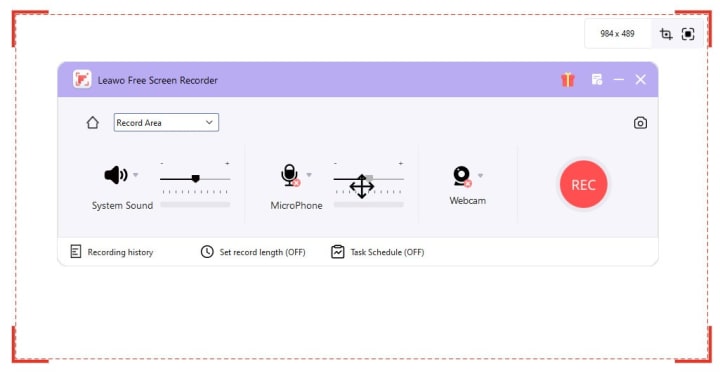
As a professional and free screen recorder software for Windows 11/10/8/7, Leawo Free Screen Recorder is actually a 4-in-1 recorder combo to help you record screen activity, record webcam video, record audio from computer or external microphone, and snap screenshots to let you get the most out of your screen activity or video. This screen recorder can record screen and webcam video to MP4 files, save audio as MP3 files, and take screenshot to JPG files for free. Besides these 4 main functions, Leawo Free Screen Recorder also provides multiple user-friendly bonus features like recording task scheduler, adding drawing and annotation, etc. It also support to recording certain movies or shows from streaming services.
Pros:
- Free to use.
- A wide selection of main features and bonus features to improve screen recording experience.
- Watermark-free recording is supported. No limit on recording length.
- Freely set recording length upon personal needs.
- High quality recording is supported.
- GPU graphics card acceleration is supported.
Cons:
- Limited output formats.
2. ScreenPal

ScreenPal is a multi-platform free screen recorder software tool that can run on Windows, Mac, ChromeOS, iOS, Android devices for recording screen easily. It is a free screen recorder, but with a watermark at the end and some other limitations. Similar to Leawo Free Screen Recorder, ScreenPal can also record screen and webcam with practical live callout tools to edit recordings easily.
Pros:
- Very easy to use interface.
- Available in multiple platforms.
- Quite plenty of recording editing features available.
Cons:
- There are quite a few limitations in the free version. You have to upgrade to its paid version to break all these limitations.
3. Camtasia

Camtasia is one of the best free screen recorder software tools for post-production editing. Camtasia comes with extremely outstanding video editing tools to let you add captions and text overlays, insert animations, add background music, clips or picture, freely choose the cursor effect, etc.
Pros:
- Plenty of video editing features after recording.
- Intuitive and easy to use interface.
- A big library of templates and assets.
Cons:
- Free version has limitations. The paid version would be expensive.
- Will require bigger storage space for handling large files.
4. OBS Studio Free Screen Recorder

OBS Studio is another free screen recorder software tool for recording streaming videos with quite a few wonderful features and functions, but in a relatively complicated interface. You can easily use this free screen recorder to capture streaming videos from sites like Twitch, though many streaming services may have limitations.
Pros:
- High quality streaming video recording is supported.
- Record computer screen activity easily.
- Available plugins for much friendlier screen recording.
Cons:
- A little bit complicated to use for novice users.
- Requires a big usage of CPU storage.
5. Loom Free Screen Recorder

Loom is another best free screen recorder software tool that can help you do far more than simply recording screen. It lets you record your screen, edit recordings, and then easily share them instantly with your friends by creating a video URL. Loom is available on multiple platforms including Windows, Mac, smartphones and even tablets, with easy-to-use UI and up to 720P screen recording support.
Pros:
- Edit recordings easily with internal editor.
- Share recordings instantly by creating a URL.
- Easy to use interface.
- Excellent integration with other workflow platforms.
Cons:
- The internal video editor offers quite limited features.
Besides the above-mentioned best free screen recorder software, you can actually still get multiple other options like Free Cam, Screencapture.com - an online free screen recorder, FlashBack Express, EaseUS RecExperts, Debut Video Capture, etc. These are all wonderful choices.
FAQ
1. What is the best format to save screen recording?
MP4 is widely recommended for saving screen recordings as it is one of the most popular video formats that can be accepted by nearly all media players and devices.
2. What is the best free screen recorder for Mac?
Some of the above-mentioned free screen recorders actually get Mac versions. However, if you don’t want to download and install extra programs on your Mac, you might try QuickTime Player, which is also a screen recorder that can record your Mac screen activities easily.
3. Can I use free screen recorder to save copy protected videos from streaming services?
Most mainstream streaming platforms employ copy protection, which prevents free screen recorders from recording these streaming videos. However, there are still quite a few free screen recorders that can record and save videos from streaming service websites such as Leawo Free Screen Recorder.
4. Can I burn screen recordings to DVD or Blu-ray?
Of course you can, as long as you get the right Blu-ray authoring software, which can help convert and burn screen recording videos to Blu-ray/DVD disc, folder and/or ISO image file to create playable Blu-ray/DVD content.
About the Creator
Faye Miller
Entertainment serves life.
Keep reading
More stories from Faye Miller and writers in 01 and other communities.
FireStick App Picks - How to Choose the Best TV Apps on FireStick?
While FireStick allows you to stream videos with your entertainment theatre system, there are thousands of apps for you to install on FireStick, including both official and unofficial ones. You could easily find a FireStick app that meets you needs most. Besides installing streaming apps on FireStick, you could still stream your local videos via FireStick when there is no proper app available. In this guide, you will learn how to choose the best apps for FireStick and learn what are the best FireStick apps for movies, TV, Live sports and more.
By Faye Miller11 months ago in 01
Best AR15 Rail Systems for Home Defense, Duty & Range Use
The AR15 platform is renowned for its modularity, and choosing the right rail system—also known as an AR15 handguard or AR15 rail—can significantly enhance performance for specific applications. For home defense, the Aero Precision ATLAS S-ONE stands out as a lightweight, slim M-LOK option that allows quick accessory mounting like lights for low-light scenarios. In duty use, the Midwest Industries Combat Rail excels with its rugged quad-rail design for heavy attachments. For range sessions, the STNGR HWK M-LOK handguard offers excellent value, balancing weight and versatility for extended shooting.
By Ar15handguard3 days ago in 01
A leading European AI startup says its edge over Silicon Valley isn't better tech — it's not being American
Arthur Mensch, CEO and cofounder of Mistral, said being non-American is a competitive edge its home market. He said European governments and regulated firms want AI that they can control without US providers. AI power will be multipolar, favoring regional players over Silicon Valley giants, he said.
By Dena Falken Esq6 days ago in 01
Affection and Healing for Yourself
During the night of the last quarter moon, I gathered my ritual supplies. I carefully handled the chunk of black tourmaline that would protect me from your overall negative and narcissistic energy. I carefully walked the house with my stick of selenite in hand, asking the universe to cleanse our working space.
By Alisha Wilkins ✒️🦋🖋️2 days ago in Fiction




Comments
There are no comments for this story
Be the first to respond and start the conversation.