
3 DVD Authoring Software for Mac and Windows That You Shouldn't Miss
Searching for the professional DVD authoring software? Look through the top free DVD authoring software to see which one works best for you.

Whether filmmaker or enthusiast, turning projects into complete viewing experiences often requires professional DVD authoring software. It transforms raw footage into DVD-ready format with menus, chapters, text, music, and more, ensuring compatibility across DVD, Blu-ray, computers, mobile devices, and streaming platforms.
Choosing the right tool ensures high-quality results and seamless integration for optimal viewing across various media. Whether seeking professional-grade or free DVD authoring software, this blog post has the best to offer you. Stay tuned for the 3 best and free DVD authoring software with their pros, cons, and detailed steps for convenience.
Best DVD Authoring Software for Mac and Windows: DVDFab DVD Creator
DVDFab DVD Creator is the best DVD authoring software for Mac and Windows that supports over 200 video formats such as AVI, MP4, MKV, and more. It enables users to burn videos onto DVD-5/DVD-9 discs, ISO files, or DVD folders with broad compatibility for standalone DVD players, gaming consoles, and media software. The software offers customizable static and dynamic menu templates, multi-language audio and subtitle support, and built-in video editing features including cropping, trimming, watermarking, and subtitle integration.
WHAT WE LIKE
- Convert 200+ video formats to DVDs, ISO, or folders
- Fast GPU-accelerated burning speed
- Customizable static and dynamic menu templates
- Built-in video editing tools
- Regular software updates
- Compatible for both Windows and Mac
WHAT WE DON'T LIKE
- Incompatible with Linux computers
How to Create DVD with This Professional DVD authoring software?
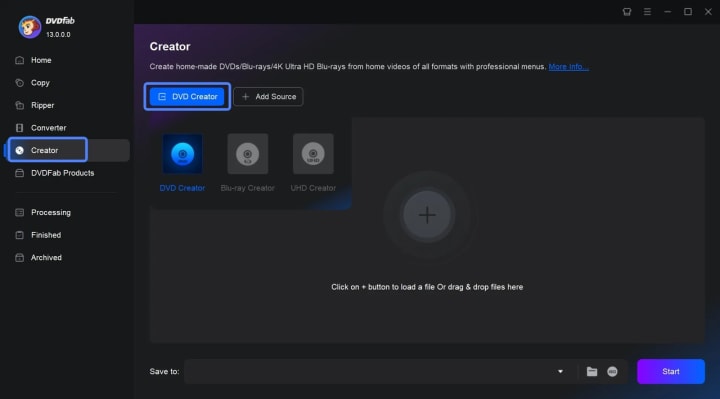
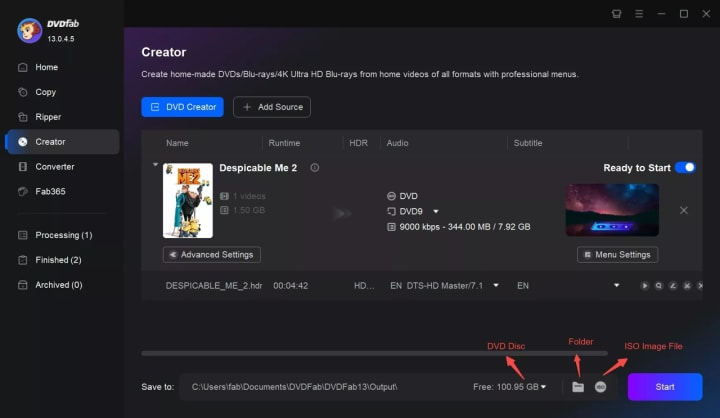
Step 1: Launch DVDFab 13 and go to Creator > DVD Creator. Add video via the "Add Source" button or drag-and-drop onto the main page.
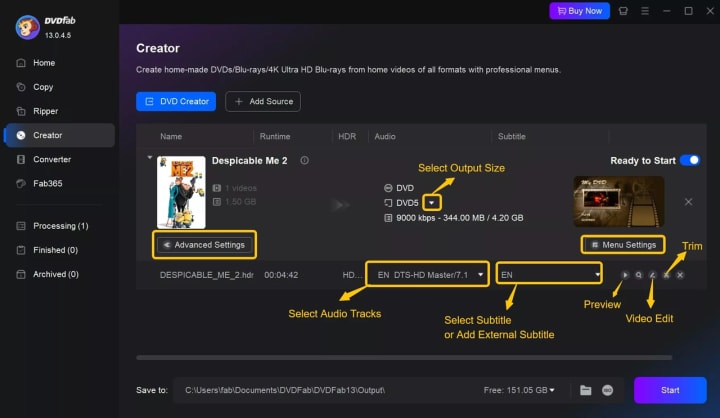
Step 2: After loading, access "Advanced Settings" to specify output size and quality and use "Menu Settings" to customize DVD menus.
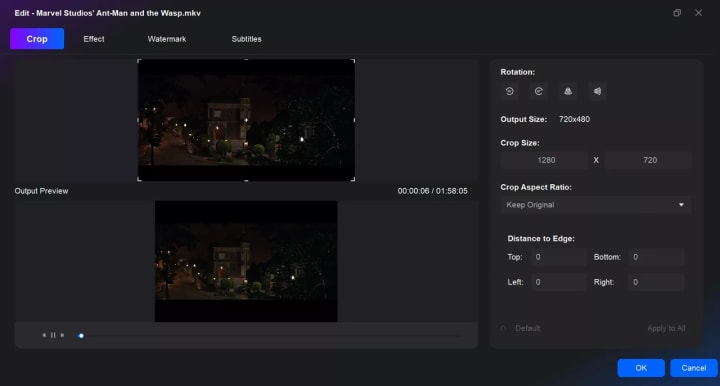
Step 3: Click the "Video Edit" module and "Trim" module on the right to start editing your DVD.
Step 4: Choose the output directory under the "Save to" part. Click "Start" to commence DVD creation. Monitor progress with detailed updates.
Free DVD Authoring Software for Windows: DVD Flick
DVD Flick is an open-source, free DVD authoring software designed for Windows. It supports importing over 60 video and audio codecs, handling more than 45 file formats including popular containers like AVI, MP4, WMV, and MPEG. DVD Flick allows users to add multiple videos, audio tracks, and subtitles from various formats (SRT, SSA, ASS, SUB) to create DVD-Video discs or ISO images easily. It includes simple menu creation and leverages FFmpeg for encoding, supporting direct stream copy for DVD-compliant MPEG-2 streams. While basic in design and interface, DVD Flick remains reliable for straightforward DVD creation tasks.
Note: DVD Flick has not been updated since 2009, which means it lacks modern video editing features and has limited menu customization. It is compatible with Windows XP through Windows 7 officially; it may work on later versions but without guaranteed support. Furthermore, DVD Flick does not support Mac or Linux platforms.
WHAT WE LIKE
- Imports multiple subtitle formats for DVD creation
- Over 60 video and audio codecs supported, including 45 file formats
- Creates DVDs with customized menus
- Free and open source
WHAT WE DON'T LIKE
- Audio re-encoding during video creation for optimized output
- Lacks advanced video editing tools
- Limited menu templates and customization
- No official support for macOS or Linux
How to Use DVD Flick DVD Authoring Software?
Step 1: Launch DVD Flick. Click "Add title" to select videos to add.
Step 2: Double-click or select and press "Edit title" to adjust chapters, subtitles, and audio.
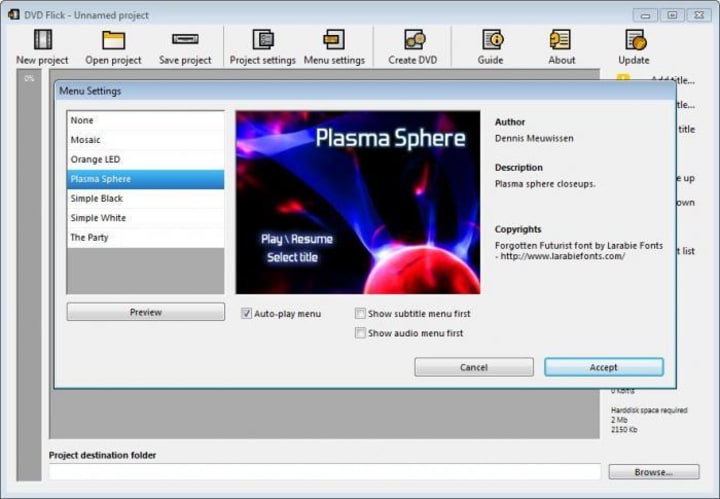
Step 3: Click "Project settings" for overall project adjustments.
Step 4: Choose a fast, spacious hard drive for encoded files and logs.
Step 5: Burn completed projects directly to a disc.
Free DVD Authoring Software: DVDStyler
DVDStyler is a free DVD authoring software available for Windows, macOS, and Linux. It focuses on creating video DVDs with customizable menus and supports a wide variety of video formats, including MPG, AVI, MP4, and VOB. The software offers drag-and-drop simplicity for adding files and designing DVD menus, allowing users to create interactive, personalized DVDs without watermarks. DVDStyler supports multiple audio tracks and subtitles and lets you use custom backgrounds for menus, providing flexibility to craft professional-looking DVDs. However, it lacks certain advanced features such as DVD size auto-adjustment and integrated preview of menus before burning.
WHAT WE LIKE
- Straightforward, quick, and free to use
- No watermark on output DVDs
- Cross-platform (Windows, macOS, Linux)
- Supports wide range of video formats
WHAT WE DON'T LIKE
- Limited control over DVD size customization
- No built-in DVD menu preview before burning
- Background images may appear low quality on menus
- Some bugs and performance lags reported (e.g., font editing slowdown)
How to Use This Free DVD Authoring Software?
Step 1: Launch free, open-source DVD authoring software on Mac or Windows.
Step 2: Import videos and drag them into the customization area.
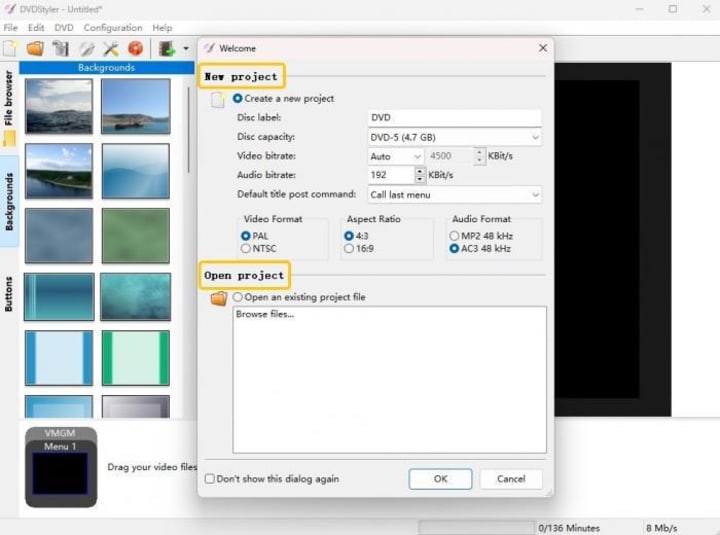
Step 3: Access video properties by tapping them twice to adjust the action and appearance settings.
Step 4: Select a DVD menu template or upload a custom background.
Step 5: Initiate the DVD authoring process by clicking the burn icon.
FAQs
What is the best free DVD authoring software for Mac?
For Mac users seeking free DVD authoring software, DVDStyler is widely recommended. It offers a straightforward interface for creating DVDs with customizable menus, chapters, and support for various video formats. However, you can also use DVDFab DVD Creator, which offers customizable options for creating discs and is known for its reliability, versatility, and ease of use on macOS without compromising quality.
Does Windows 10 have a DVD authoring software?
No. Windows 10 itself does not include built-in DVD authoring software. Windows DVD Maker was available in the older versions of Windows, like Windows 7. However, this was discontinued and not included in Windows 10.
Final Wrap
Among all the best DVD authoring software I've introuduced, DVDFab DVD Creator stands out with its extensive format support, powerful editing tools, and high-speed GPU acceleration, making it ideal for professional-quality DVD projects on both Windows and macOS. For users seeking a free, straightforward solution on Windows, DVD Flick remains a reliable choice despite its dated interface. Meanwhile, DVDStyler offers a versatile, cross-platform option with customizable menus suitable for beginners and casual users. Evaluate your requirements carefully to select the software that best fits your DVD creation goals and workflow.
About the Creator
Wenny
Hi there, I'm Wenny, a technical writer sharing multimedia solutions accessible for everyone. Read my articles to turn "how?" into "let's do it!"
Mobile App ROI for St. Louis Businesses: 2026 Guide
For a St. Louis business owner, a mobile app is essential. It is no longer just a luxury. It is a fundamental piece of business infrastructure. The shift in 2026 is very clear. Businesses are moving away from simply having an app. They now focus on proving financial viability.
By Devin Rosario4 days ago in 01
Georges Chahwan: The Marketing Director Redefining ROI Through Omnichannel Strategy
That's exactly what Georges Chahwan does. As the Marketing Director at ProMed Staffing Resources, he has built a reputation for turning fragmented marketing efforts into unified, performance-driven engines. His approach blends technical SEO, paid digital advertising, and personalized email marketing into one seamless system — and the results speak for themselves.
By Jeffrey D. Gross MD4 days ago in 01



Comments
There are no comments for this story
Be the first to respond and start the conversation.