
Why Is Your Projector Image Blurry? How to Diagnose and Fix the Issue
Why Is My Projector Blurry?

A blurry projector image can really put a damper on your viewing experience, whether you're setting up a cozy home theater or giving a business presentation. If you've ever found yourself wondering, "Why is my projector blurry?" you're definitely not alone. There are several reasons why this might happen, like the projector being placed incorrectly, not focusing it properly, or miscalculating the throw ratio.
One of the best ways to tackle this issue is by using a projector throw ratio calculator. This handy tool helps you figure out the ideal distance between your projector and the screen, ensuring you get a sharp and clear image.
By the time you finish this guide, you'll know exactly how to optimize your projector setup and achieve the best image quality possible.
Common Reasons Why Your Projector Image is Blurry
1. Incorrect Throw Distance
One of the main reasons for a blurry projector image is improper throw distance. If the projector is placed too close or too far from the screen, the image may appear distorted or out of focus.
A projector distance throw calculator helps determine how far a projector needs to be from the screen based on the throw ratio and screen size.
2. Misaligned Lens or Improper Focus
If your projector lens is not properly aligned or adjusted, the image will appear blurry. Most projectors have a manual focus ring that allows you to fine-tune the image clarity.
3. Low-Quality Lens or Optics
Some budget projectors come with low-quality lenses that struggle to produce sharp images. Investing in a high-quality projector with premium optics can significantly improve clarity.
4. Incorrect Resolution Settings
If the projector resolution does not match the source device resolution, the image may appear pixelated or blurry. Make sure your projector and source device are set to the same resolution.
5. Dirty or Smudged Lens
A dirty or smudged lens can reduce image clarity. Regularly clean your projector lens with a microfiber cloth to remove dust and fingerprints.
6. Poor Screen Surface
The surface you project onto also affects image clarity. A rough or uneven surface can scatter light and create a blurry effect. Using a high-quality projection screen can enhance image sharpness.
How a Projector Throw Ratio Calculator Can Help
A projector throw ratio calculator is a powerful tool that helps you determine the correct projector placement to achieve a clear and sharp image.
Understanding Projector Throw Ratio
The projector throw ratio is the relationship between the throw distance and the width of the projected image. It is calculated using the formula
Throw Ratio = Throw Distance / Image Width
For example, if a projector has a throw ratio of 1.5:1, it means the projector needs to be 1.5 feet away for every foot of image width.
Using a projector throw distance calculator, you can quickly determine where to place your projector for optimal clarity.
How to Use a Projector Throw Ratio Calculator
Find Your Projector’s Throw Ratio
Check your projector manual or manufacturer’s website for the throw ratio specifications.
Measure Your Screen Width
If you have a 100-inch diagonal screen, the width is approximately 87 inches or 7.25 feet.
Calculate the Throw Distance
Multiply the screen width by the projector’s throw ratio.
Example 1.5 x 7.25 feet = 10.9 feet
This means the projector should be placed approximately 11 feet away from the screen.
Adjust as Needed
If the image is still blurry, move the projector slightly forward or backward and refocus.
Short Throw Vs Long Throw Projector Which One is Right for You
The type of projector you use also impacts image clarity. There are two main types of projectors based on throw ratio
Short Throw Projectors
- Have a throw ratio between 0.4:1 and 1:1
- Can project a large image from a short distance
- Ideal for small rooms and limited space
Example A short throw projector can project a 100-inch image from just 4 feet away
Long Throw Projectors
- Have a throw ratio greater than 1.5:1
- Require 8 to 15 feet or more for large screens
- Best for large home theaters and conference rooms
If you are using a short throw projector but placing it too far away, the image will appear blurry. Similarly, a long throw projector placed too close will also produce a distorted image. Using a projector distance calculator ensures that your projector is placed at the right distance.

How Far Does a Projector Need to Be from the Screen?
To determine how far your projector should be from the screen, use the following reference table for a 1.5:1 throw ratio projector
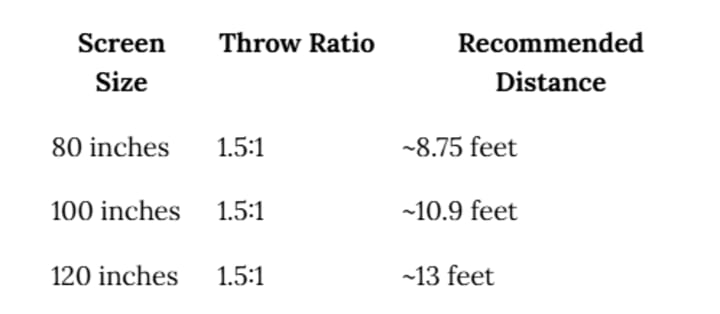
If your projector has a different throw ratio, adjust the distance accordingly using a projector calculator.
Home Theater Projector Setup Diagram
A well-planned home theater projector setup diagram can help visualize the correct projector placement.
Key Placement Tips
Measure the Room Size
Ensure there is enough space for the recommended throw distance.
Position the Projector Correctly
Use a projector distance throw calculator to find the optimal position.
Adjust the Height and Angle
The projector should be level with the center of the screen for the best image quality.
Test the Image Clarity
Make small adjustments to the focus and distance until the image is sharp.
Conclusion
A blurry projector image can be frustrating, but the solution is often as simple as adjusting the throw distance using a projector throw ratio calculator. Whether you are using a short throw or long throw projector, placing it at the correct distance from the screen is crucial for achieving a sharp and clear image.
By calculating projector throw manually or using a projector throw distance calculator, you can determine how far a projector needs to be from the screen for the best viewing experience. If you are still experiencing blurry images, check your focus, resolution settings, and screen surface for any issues.
A well-planned home theater projector setup diagram can further help in positioning your projector correctly. With the right tools and knowledge, you can enjoy a crystal-clear projection every time.
Also read: How Can I Calculate the Best Projector Throw Ratio for Viewing Distance?
Also read: Essential Features of XTEN-AV That Make AV Projector Integration a Breeze
About the Creator
Anni Grey
My name is Anni Grey, and I possess substantial knowledge and proficiency in the field of audio visual (AV) technology.


Comments
There are no comments for this story
Be the first to respond and start the conversation.