
Unlocking WordPress Potential: A Comprehensive Comparison of No-Code Tools (By: Streak Ranker)
A Comprehensive Comparison of No-Code Tools

WordPress, originally an open-source Content Management System (CMS), has evolved into a powerful no-code platform thanks to a rich ecosystem of plugins and themes. These "no-code" tools empower users to design, customize, and automate various aspects of their websites through visual interfaces, drag-and-drop functionalities, and pre-built templates. This transformation makes professional website creation accessible to a wider audience, regardless of their technical skill level.
Key Insights into No-Code WordPress
Accessibility for All: No-code tools democratize website creation on WordPress, allowing individuals without programming expertise to build and manage sophisticated online presences.
Diverse Functionality: From comprehensive page builders to specialized solutions for SEO, analytics, forms, and automation, the no-code ecosystem for WordPress offers tools for virtually every website need.
Efficiency and Cost Savings: By eliminating the need for manual coding or hiring developers for every change, these tools significantly reduce development time and ongoing maintenance costs, enabling faster deployment and iteration.
The Transformative Power of No-Code in WordPress
The essence of no-code in WordPress lies in its ability to abstract away the underlying code, presenting users with intuitive visual interfaces. This approach has revolutionized how websites are built and managed, offering significant advantages:
Reduced Development Time: Projects that once took weeks or months can now be completed in days or even hours.
Lower Costs: The need for expensive developers or specialized agencies is reduced, making web development more affordable.
Empowerment for Non-Technical Users: Marketers, small business owners, content creators, and entrepreneurs can take full control of their online presence.
Rapid Prototyping and Iteration: Ideas can be quickly tested and refined, accelerating the development cycle.
Categorizing Essential WordPress No-Code Tools
The vast array of no-code tools for WordPress can be broadly categorized based on their primary function. This organized approach helps users identify the most suitable tools for their specific needs.
Page and Site Builders: Crafting Visual Experiences
These tools are the cornerstone of no-code WordPress, allowing users to design entire websites or specific pages with unparalleled visual control. They typically feature drag-and-drop interfaces, extensive template libraries, and responsive design controls.

Elementor: The Feature-Rich Design Powerhouse
Elementor stands out as one of the most popular and versatile no-code page builders. It offers an intuitive drag-and-drop visual editor, a vast library of pre-designed templates, and advanced widgets for every conceivable design element. Users can build custom headers, footers, and dynamic content, ensuring full responsive control across all devices without writing a single line of code. Its professional plans start from $49/year.
SeedProd: Optimized for Landing Pages and Quick Builds
SeedProd specializes in creating high-converting landing pages, sales pages, and maintenance mode pages with remarkable speed and ease. Its drag-and-drop builder and ready-made templates integrate seamlessly with popular marketing tools, making it ideal for rapid deployment. SeedProd offers both a free version and paid plans.
Divi Builder: Comprehensive Visual Editing by Elegant Themes
Divi offers a rich visual editing experience with a focus on comprehensive design control and customizable templates. It's a robust solution suitable for both beginners and professional designers, enabling full website customization without deep technical knowledge.
Gutenberg Block Editor & Full Site Editing (FSE): WordPress Native No-Code
Since WordPress 5.0, the core platform has embraced no-code principles through the Gutenberg block editor and Full Site Editing (FSE). These native tools allow users to construct entire websites visually by manipulating blocks, reducing the reliance on third-party page builders for many use cases. It's built into WordPress and free to use.
Droip: The Modern, Minimalistic Builder
Droip emerges as a contender focused on clean, fast-loading sites and reusable styles. It offers a sleek alternative to more feature-heavy page builders, appealing to users who prioritize performance and modern design principles.
WPBakery: Flexible and Feature-Rich Visual Editor
WPBakery provides a flexible visual editor with an extensive collection of add-ons, offering detailed control over website elements without coding. It caters to users who desire granular customization options.
Uncanny Automator & AutomatorWP: The Workflow Orchestrators
Both Uncanny Automator and AutomatorWP are leading solutions for no-code automation within WordPress. Uncanny Automator focuses on connecting WordPress plugins, sites, and external applications through an intuitive builder. AutomatorWP provides an extensive library of integrations (over 100 services) and emphasizes simplicity, allowing users to automate repetitive tasks like marketing workflows, notifications, and data synchronization.
WP Webhooks: Advanced Data Transfer
WP Webhooks offers robust no-code automations through over 100 built-in integrations, facilitating data transfer via webhooks and HTTP requests. It's particularly useful for triggering remote actions and more complex data flow scenarios.
Axiom.ai: Bot-Based Automation
Axiom.ai functions as a no-code bot builder, automating WordPress tasks such as content uploads, data entry, and web scraping. It allows users to combine steps to replicate repetitive tasks efficiently, making it versatile for non-technical users.
Bit Integrations: Extensive & Cost-Effective
Bit Integrations is praised for its ability to connect over 290 platforms without coding, offering a free basic version. It's an excellent choice for users looking to automate their sites on a budget while still benefiting from a vast number of connectors.
Specialized Tools: Enhancing Specific Site Functions
Beyond general building and automation, many no-code tools address specific website functionalities, optimizing performance and user experience.
WPForms & Ninja Forms: Effortless Form Creation
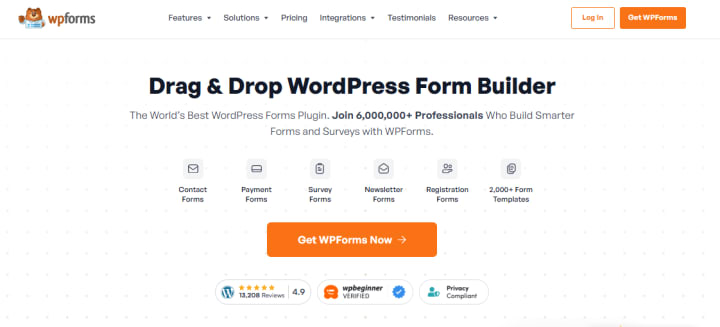
WPForms and Ninja Forms are highly popular no-code solutions for creating various types of forms, from simple contact forms to complex surveys, payment forms, and forms with conditional logic. Their drag-and-drop interfaces and pre-built templates simplify the process, allowing non-technical users to implement multifunctional forms effortlessly.
All In One SEO (AIOSEO) & Yoast SEO: Mastering Search Engine Optimization
AIOSEO and Yoast SEO are premier no-code SEO tools for WordPress. They simplify search engine optimization by providing features for meta descriptions, keyword targeting, sitemap generation, schema markup, and local SEO, all within a user-friendly interface that requires no code editing.
MonsterInsights: Intuitive Analytics Integration
MonsterInsights is the go-to plugin for seamlessly connecting Google Analytics to a WordPress site. It provides accessible, user-friendly reports and dashboards directly within the WordPress admin area, enabling site owners to understand their traffic and content performance without any coding knowledge.
Duplicator: Streamlined Site Migration and Backup
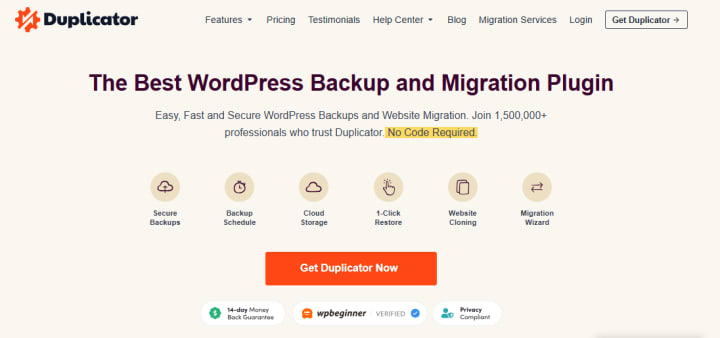
Duplicator simplifies website cloning, backup, and migration processes. It allows users to easily move or duplicate a WordPress site to a new host or domain without needing FTP access or coding expertise. This free and paid tool is essential for site management.
OptinMonster: Lead Generation and Conversion
OptinMonster is a powerful no-code tool for lead generation and conversion optimization. It features a drag-and-drop campaign builder, A/B testing capabilities, and advanced targeting rules to create pop-ups, slide-ins, and other opt-in forms designed to capture leads effectively.
Jetpack Boost: Performance Optimization
Jetpack Boost offers one-click solutions for improving site performance through caching, image compression, and minification, enhancing site speed without requiring any coding knowledge.
AI-Enabled No-Code Tools: The Future of Automation
The integration of Artificial Intelligence into no-code tools is further transforming WordPress development. Tools like Divi AI and CodeWP can generate code snippets, create content, and assist in designing websites through simple prompts, reducing the reliance on traditional coding skills and accelerating development.
Comparative Analysis of No-Code Tools
To provide a clearer picture, let's compare some of the leading no-code tools across several critical dimensions:
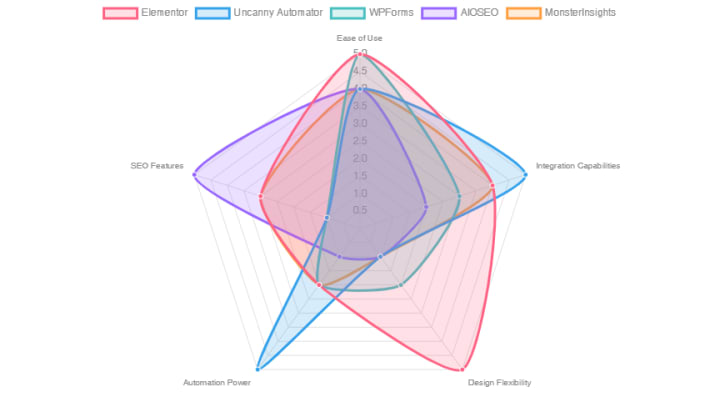
Radar chart comparing various WordPress no-code tools across key performance indicators on a scale of 0 to 5.
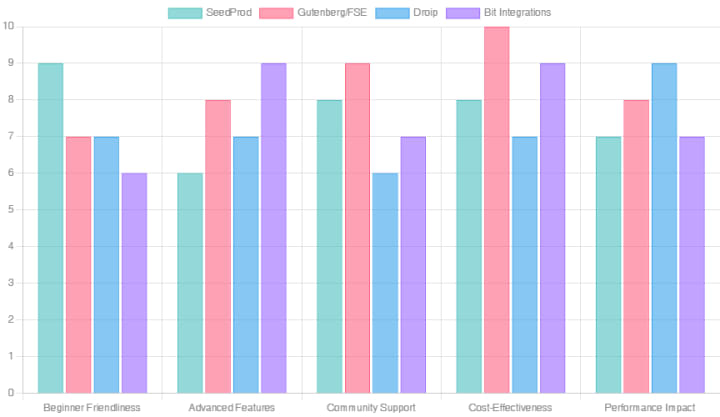
Bar chart evaluating select WordPress no-code tools based on their beginner-friendliness, advanced features, community support, cost-effectiveness, and performance impact.
The choice of a no-code tool largely depends on specific project requirements and user expertise. For comprehensive site building with rich design capabilities, Elementor and Divi are top contenders. For rapid landing page creation, SeedProd is highly effective. For powerful workflow automation, Uncanny Automator and AutomatorWP are invaluable. When it comes to SEO and analytics, AIOSEO and MonsterInsights offer accessible solutions. Form creation is seamlessly handled by WPForms. The native Gutenberg editor is a strong, free option for those comfortable with WordPress's core functionality.
The Future of WordPress is No-Code
The trajectory of WordPress development is undeniably leaning towards no-code and low-code solutions. This shift empowers more individuals and businesses to leverage the power of the web without the traditional barriers of coding. As AI continues to integrate with these platforms, the capabilities will only expand, making website creation and management even more intuitive and efficient. The proliferation of these tools underscores WordPress's role as a leading platform for accessible web development in the modern digital landscape.
Conclusion
The no-code movement has profoundly impacted the WordPress ecosystem, making website creation and management more accessible, efficient, and cost-effective than ever before. From versatile page builders like Elementor and Divi that empower visual design, to automation tools such as Uncanny Automator and AutomatorWP that streamline workflows, and specialized plugins for SEO, analytics, and forms, the array of no-code solutions is vast and continually growing. This comprehensive suite of tools allows individuals and businesses of all technical backgrounds to bring their digital visions to life, fostering innovation and independence in the online world. Choosing the right tool depends on your specific needs, but the overarching benefit remains: professional, functional, and beautiful WordPress websites are now achievable without writing a single line of code.
About the Creator
Streak Ranker
Grow Faster with the Top-Rated Digital Marketing Agency (Streak Ranker) – Trusted for Real Results and Expert Support.
Keep reading
More stories from Streak Ranker and writers in Writers and other communities.
It's Winter
Anne Bernays and Pamela Painter — What If? Writing Exercise for Fiction Writers prompts The Exercise —Write a scene involving two characters. Have the point-of-view character presume something entirely different about the situation from what the other character's overt behavior seems to imply. For example, a landlord comes to visit, and the tenant suspects that it isn't a visit but an inspection. Make up several situations in which one character can fantasize or project or suspect or even fear what another character is thinking. The Objective - To show how your characters can use their imaginations to interpret the behavior and dialogue of other characters.
By Denise E Lindquist19 days ago in Writers
Where Dreams Loved Me Back
chapter 1 Chapter One: The Quiet I Learned to Carry Matthew’s perspective, I don’t remember when life started feeling heavy. It wasn’t sudden — it was gradual, like carrying a bag that someone kept adding weight to until one day I realized I couldn’t put it down anymore.
By Anshu Giri5 days ago in Writers



Comments
There are no comments for this story
Be the first to respond and start the conversation.