
Top 10 Writing Tools for Helpless Students Revealed!
The article gives useful tips on how to approach writing, how to get started, and which is the best way to deal with writing anxiety.


Introduction
Many students find writing their assignments to be overwhelming. Studies show that over 60% of students feel buried under deadlines and complex essays. Struggling to express ideas clearly can cause stress, lower grades, and sometimes even lead to giving up. But there’s good news: the right writing tools can change everything. They can help students write better, faster, and with less frustration. This article will reveal the top 10 tools that can turn a helpless student into a confident writer, ready to take on any assignment.
Why Choosing the Right Writing Tools Matters
Better tools lead to better grades and less stress. When you use high-quality writing programs, you save time checking grammar or fixing citations. Experts like educational psychologists say digital tools boost learning and focus. Data backs this up—students who use the right resources often finish their work faster and get higher marks. Choosing the right tools isn’t just about convenience; it’s a key step toward academic success.
Essential Features to Look for in Writing Tools
Not all tools are equal. Look for ones that are simple to use, no matter your skill level. Ensuring compatibility is crucial—please verify that they function on your laptop, tablet, and phone. Good features include grammar checks to catch mistakes, plagiarism scans to avoid copying, and citation helpers to organize sources. Students who pick the right tools often see better grades and less writing stress. Imagine a student who writes clearer essays thanks to a simple editing tool—that’s the power of choosing well.
Top 10 Writing Tools for Helpless Students
1. Grammarly—The Grammar Guru
Grammarly is the go-to tool for fixing grammar, punctuation, and style issues in realtime. It helps make writing clearer and error-free. Experts praise its AI for catching mistakes even the best writers miss. Pro tip: Use the tone detector to match your writing style to the assignment. Do you want your essay to sound professional or casual? Grammarly helps you do both.
2. Hemingway Editor—Simplify and Strengthen
This tool highlights complex sentences, passive voice, and readability problems. Its goal is to make your writing clear and punchy. Students who use Hemingway often improve their essay readability. Before submitting your draft, run it through this editor to cut excess words and sharpen your message.
3. Zotero & Mendeley—The Citation Champions
Many students struggle with citations. These tools organize sources and generate accurate citations in seconds. Professors love when students avoid plagiarism, and these programs make referencing easy. Tip: Sync them with your word processor for smooth citations without breaking your flow.
4. Google Docs—The Collaborative Writing Partner
Google Docs allows friends to collaborate on one document in real-time. You can comment, suggest edits, and track changes easily. It’s perfect for group projects. Many students find they produce better work when collaborating online. Use voice typing to quickly jot down ideas or rough drafts during busy days.
5. Scrivener—The Academic Writer’s Assistant
This app is designed for long papers like theses or dissertations. It helps organize chapters, research notes, and outlines all in one place. Creators love Evernote's power for handling large projects. Consider dividing your paper into sections and addressing them individually to reduce stress.
6. Evernote—The Note-Taking Powerhouse
Evernote keeps all your ideas in one place. Add images, voice notes, or links, and tag your notes for easy finding. When research piles up, organized notes make writing much easier. Some students say this method helps them build stronger essays and avoid losing key information.
7. ProWritingAid—The All-in-One Style Checker
This is like having a professional editor by your side. It checks grammar, style, and readability, plus scans for plagiarized content. Its detailed reports train your eye for spotting mistakes. Review suggestions in groups to save time and improve your overall writing quality.
8. Thesaurus.com & Vocabulary.com—The Word Wizards
A rich vocabulary makes your writing stand out. These tools help you find synonyms and tips for using new words correctly. Students who improve their word choice often score higher. Try slowly adding new words into your essays to sound more confident and expressive.
9. NoRedInk—The Personal Grammar Coach
This platform offers customized grammar exercises based on your skill level. It tracks your progress, so you know what to focus on. Teachers praise it for making grammar practice less boring. Use it regularly to strengthen your understanding and reduce mistakes.
10. Trello & Asana—The Productivity Organizers
Planning your assignments is easier with these project managers. Create boards for each project, set deadlines, and check off tasks. Many students manage multiple papers effectively by staying organized. Set reminders to hit your deadlines and avoid last-minute panic.
Conclusion
Using these 10 writing tools transforms overwhelming tasks into manageable projects. Better tools mean clearer ideas, fewer mistakes, and higher grades. They turn struggling students into confident writers who can handle any assignment. We encourage you to begin using at least one or two of these tools today. Regular practice and smart tool use will make your writing stronger each day.
Call to Action
What’s your favorite writing tool? Share your success stories and tips in the comments below. Want more advice on academic tools and tips? Subscribe to stay updated on ways to make writing easier and grades better. Take the first step—your improved grades are just a tool away!
🙌 If you enjoyed this story, don’t forget to follow my Vocal profile for more fresh and honest content every day. Your support means the world!
About the Creator
vijay sam
🚀 Sharing proven affiliate marketing tips, smartlink strategies, and traffic hacks that convert. Follow for insights, tools, and real results to help you earn smarter—whether you're just starting or scaling up!
Unofficial Challenge: Black History Celebration
Forward: February 28th, 10:53 PM, EST... The final hour of Black History Month, 2026. Hello fellow writers. I've had this challenge waiting in my drafts for most of the month. But I held off on publishing it, until now.
By Sam Spinelli5 days ago in Writers
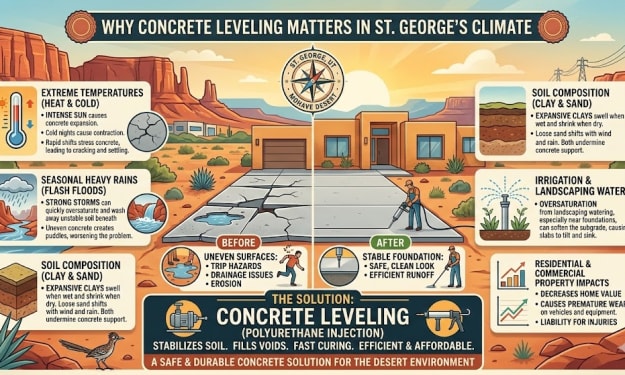
Why Concrete Leveling Matters in St. George’s Climate
Concrete is known for its durability, but even the strongest surfaces can shift over time. Driveways, patios, sidewalks, and garage floors often develop uneven areas due to soil movement and environmental factors. In places like St. George, where desert conditions meet seasonal rainfall, these changes can happen gradually yet significantly.
By Abbasi Publisher3 days ago in Writers
The Piggy Project
I’ve had so many names in this life I lose track of which ones were ever really mine and which ones I wore because someone needed me to. Some were handed to me before I had words to refuse them, before I knew what they meant, before I knew I could say no. Most weren’t meant to hurt. That doesn’t mean they didn’t leave marks. Marks that told me who I belong to, who I am by way of who claims me, recognizes me in the good and bad, who walks beside me.
By Fatal Serendipitya day ago in Confessions



Comments
There are no comments for this story
Be the first to respond and start the conversation.