
Step-by-Step Instructions to Hide Chats on Instagram
step-by-step instructions on how to keep your Instagram conversations private

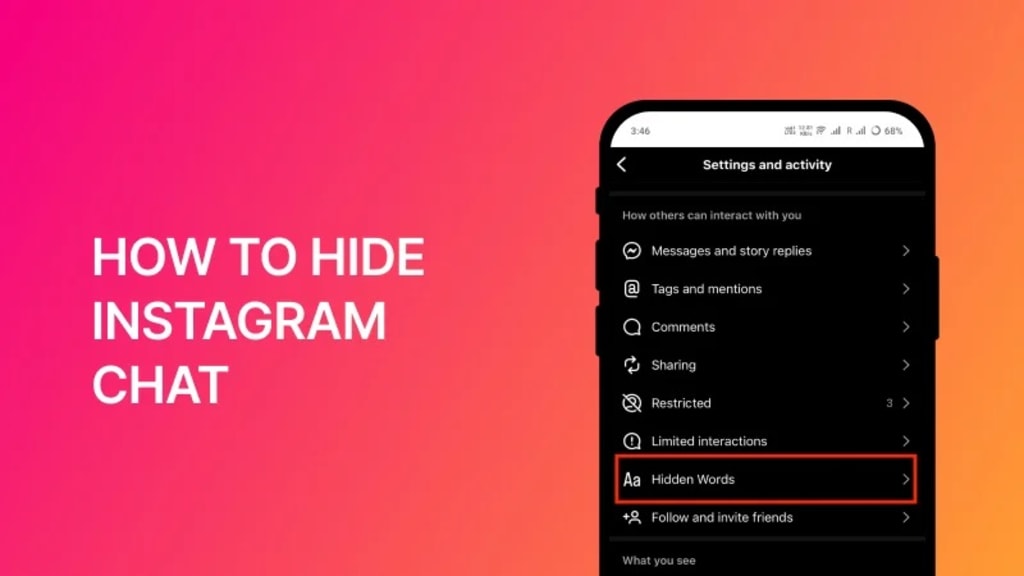
Instagram is one of the most popular social media platforms, offering a private messaging feature to stay connected with friends, family, and colleagues. However, many users look for ways to hide their Instagram chats for privacy reasons. Whether you want to keep your conversations away from prying eyes or organize your inbox, knowing how to hide Instagram chat can be useful.
Although Instagram doesn’t have a built-in "hide chat" feature, there are several effective methods to make your messages less visible. This guide will provide step-by-step instructions on how to keep your Instagram conversations private.
Why Hide Instagram Chats?
There are many reasons why users may want to hide Instagram chat instead of deleting them:
- Privacy Protection – Prevent others from seeing personal or sensitive conversations.
- Organized Inbox – Reduce clutter by keeping less important chats out of sight.
- Avoid Accidental Exposure – Hide messages from appearing when using Instagram in public.
- No Need for Deletion – Keep messages safe while making them less noticeable.
Now, let’s explore step-by-step methods to hide Instagram chats without deleting them.
How to Hide Instagram Chat: Step-by-Step Methods
1. Use Vanish Mode for Disappearing Messages
One of the easiest ways to hide Instagram chat is by enabling Vanish Mode. This feature automatically deletes messages once the chat is closed.
Steps to Enable Vanish Mode:
- Open Instagram and navigate to Direct Messages (DMs).
- Select the chat you want to hide.
- Swipe up from the bottom of the chat screen until the background turns dark—this means Vanish Mode is active.
- Messages sent in this mode will disappear once the chat is closed.
Tip: To turn off Vanish Mode, swipe up again or exit and reopen the chat.
2. Move Chats to the General Inbox (For Professional Accounts)
If you have a Professional (Business or Creator) Instagram account, you can move chats from the Primary Inbox to the General Inbox, keeping them hidden from immediate view.
Steps to Move Chats to General Inbox:
- Open Instagram and go to DMs.
- Long-press the chat you want to hide.
- Tap Move to General.
Note: The chat will remain accessible in the General inbox but will no longer appear in the main Primary inbox.
3. Mute Conversations for Less Visibility
If you don’t want a chat to be deleted but also don’t want frequent notifications, muting the conversation is a great option.
Steps to Mute a Chat:
- Open Instagram DMs.
- Long-press the chat you want to mute.
- Tap Mute Messages and Mute Call Notifications.
Now, you won’t receive notifications, making the chat less noticeable.
4. Lock Instagram Chats Using an App Locker (Android & iPhone)
If you want extra security, you can use third-party app lockers to lock your Instagram messages.
Steps to Lock Instagram Using an App Locker:
- Download an app locker from the Google Play Store or App Store.
- Set up a password or fingerprint lock for the Instagram app.
- Now, anyone trying to open Instagram will need biometric authentication or a passcode.
Tip: Some Android devices have a built-in App Lock feature under Settings > Security > App Lock.
How to Hide Instagram Chat for Maximum Privacy
Apart from moving chats or muting notifications, here are extra steps you can take for maximum privacy on Instagram:
- Turn Off Active Status – Hide your online presence by disabling Active Status in settings.
- Enable Two-Factor Authentication (2FA) – Add an extra layer of security to prevent unauthorized access.
- Regularly Delete Unwanted Messages – If a chat is no longer needed, delete it instead of keeping it hidden.
- Use Close Friends for Private Stories – Share personal updates only with selected users.
By following these steps, you can manage your Instagram messages more securely and discreetly.
Frequently Asked Questions (FAQs)
1. Can I hide Instagram messages without deleting them?
Yes! You can use Vanish Mode, move chats to the General Inbox, mute conversations, or use an app locker.
2. Does Instagram have an official "hide chat" feature?
No, Instagram does not provide a built-in hide chat option, but the methods mentioned above can help keep your messages private.
3. Can I hide Instagram chats from one specific person?
You can mute the conversation or enable Vanish Mode to keep messages private from that person.
4. Can I recover a deleted Instagram chat?
No, once a chat is deleted, Instagram does not allow chat recovery. The other person may still have the messages unless they delete them too.
5. Can I password-protect my Instagram chats?
Instagram doesn’t have a built-in chat lock, but you can use an app locker to lock the entire Instagram app.
Conclusion
If you’ve been wondering how to hide Instagram chat, now you have multiple ways to protect your private conversations. While Instagram doesn’t offer a direct "hide chat" feature, you can use Vanish Mode, move chats to General Inbox, mute conversations, or use an app locker to secure your messages.
With these methods, you can keep your Instagram messages discreet and secure without having to delete them. Try these steps today and take control of your chat privacy effortlessly.
About the Creator
Shota Ishikawa
I’m a writer specializing in technology and digital marketing. With a passion for SEO, AI, and emerging trends, I create insightful content that informs, engages, and helps businesses grow in the digital world.
Keep reading
More stories from Shota Ishikawa and writers in Writers and other communities.
Step-by-Step Instructions to Open Google Word Coach
Introduction Expanding your English vocabulary has never been easier, thanks to Google Word Coach. This interactive quiz game by Google is designed to help users learn new words, improve language skills, and test their vocabulary knowledge in a fun way. However, many users often ask, How to open Google Word Coach, especially when they can’t find it easily.
By Shota Ishikawa11 months ago in Writers
Eating in the dark
Deep into the night, I lit up a candle and served myself a plate of food. As I took my first bite, it tasted less vibrant which was exactly what I wanted that night. I wanted a less sensitive experience and an unsatisfied bite actually satisfied my mind. The flame from the candle rocked back and forth, side to side. It seemed to push its energy towards me every time it moved and it rocked me back and forth, side to side. I felt drunk after a while and the food tasted even more tasteless. My surroundings started to shift in motion on all directions like a Van Gogh painting. It was now time for some real wine. I want to get black out drunk tonight.
By Marianne Lee2 days ago in Writers



Comments
There are no comments for this story
Be the first to respond and start the conversation.