
Simplify AV Design with XTEN-AV Projector Throw Distance Calculator
Find the Perfect Projector Placement in Minutes with Automated Accuracy


Are you an AV integrator, installer, or designer seeking to expedite the projector setting process? The XTEN-AV Projector Throw Calculator is here for you! This tool makes the complicated math and guesswork of projector placement simple, to create professional designs in a fraction of the time.
This in-depth guide will evaluate the features and benefits of the XTEN-AV Projector Calculator and how it can improve your AV design workflow. We’ll also look at the reasons behind calculating throw distance, screen size, and other factors that will help us use the projector we recommend correctly.
What is a Projector Throw Distance Calculator?
A projector throw distance calculator is a device used to establish the best distance from a projector to a screen in order to achieve a specified image size. This takes into consideration the projector’s throw ratio, lens type, and screen measurements when giving the user close placement suggestions.
Using a projector calculator is crucial for several reasons:
Optimal image size: By inputting your desired screen size, a throw distance calculator ensures the projector is placed at the correct distance to fill the screen without overshooting or undershooting.
Proper projector selection: Different projectors have varying throw ratios and lens options. A projection calculator helps you choose the right projector for your specific room and screen setup.
Efficient installation: With precise distance and placement calculations, you can streamline the installation process. You can also avoid costly mistakes or adjustments.
Professional results: A well-placed projector delivers sharp, evenly illuminated images that enhance the viewing experience and reflect positively on your AV design skills.
Why XTEN-AV Projector Calculator Stands Out
Although a multitude of projector throw ratio calculators exist, the XTEN-AV Projector Calculator has unique features and advantages that you won’t get from other options. Let’s check out some of the main features.
1. Extensive Product Library Integration
XTEN-AV links its calculators to an enormous equipment library (they advertise ~1.5M products from thousands of AV brands). That means when you pick a projector model, the tool uses the manufacturer’s actual specs (throw ratio ranges, zoom range, lens shift limits, available lenses) rather than a generic or assumed throw ratio.
Why it matters: accurate specs = accurate placement.
A projector distance calculator that assumes a single throw ratio can be correct in theory, but wrong for the exact model you’ll buy. XTEN-AV’s model-level data removes that mismatch: the recommended distance, the requirement for a lens with more/less shift, and the usable zoom range are computed with the projector’s real capabilities, so what you plan on paper will actually work on site.
Real-world benefits are fewer surprise site visits, fewer SKU swaps, and fewer change orders. For integrators, this saves time and margin because you’re designing for the device you’ll actually install.
2. Environment-Aware Brightness & Screen Calculations
XTEN-AV’s brightness tool goes beyond “projector lumens → screen size.” It asks about room conditions (ambient light type/level), screen gain/type, and viewing requirements, then recommends the required lumen level (and often suggests models that meet it). That is, it treats brightness as a system problem, not a single number.
It matters because lots of “brightness calculators” only spit out a lumen number or let you enter a screen size. Without factoring in ambient light and screen gain, you can end up either over-specifying (wasting budget and energy) or under-specifying (washed-out images).
XTEN-AV’s approach gives a practical lumen target and shows which real projectors meet it under the given conditions. As a result, there is better image quality for the client, more defensible proposals (you can show the lumen math), and fewer “too bright/too dim” complaints after installation.
3. Lens Shift, Keystone, and Optical Limits Built into the Math
The projector calculator automatically considers lens shift ranges and keystone correction limits as part of positioning. In other words, it won’t simply tell you “put the projector X meters back”, but it will tell you whether you can achieve that placement without exceeding the lens shift or relying on extreme keystone correction (which degrades image fidelity).
It matters because installers frequently discover the hard way that a projector’s lens shift is insufficient for the intended mounting offset, forcing either a different mount position, a different lens, or a digital keystone that reduces image quality. By surfacing those constraints early, XTEN-AV prevents those costly mid-project changes.
Thus, there are fewer retrofits, better image geometry, and a more precise specification for mounting hardware (exact ceiling height, offset, lens model).
4. Diagrams, CAD Exports, and Proposal Integration
XTEN-AV can generate a visual throw diagram, export PDFs, and is part of a broader design/proposal workflow (X-DRAW, x.doc). You’re not left with a single number, but you get drawings and items that can go straight into a proposal/BOM. (Note: some export/download features require trial/registration for full access).
It matters as stakeholders (clients, electricians, architects) prefer visuals and deliverables. A named model with a PDF placement drawing + BOM is far more usable than “put it 3.2m from the screen.” It also makes quoting and procurement faster because the parts list can be exported into your proposal flow.
It leads to faster RFP responses, cleaner handoff to installation crews, and professional proposals that win business.
5. AI Automation for BOMs and System Validation
XTEN-AV bundles AI features (e.g., XAVIA) that can autocomplete BOMs, validate compatibility (connectors, power, accessories), and speed repetitive tasks like room templates and proposal generation. The company highlights AI automation and even a utility patent for parts of its platform.
It is essential because designing a system is more than picking a projector; you need lenses, mounts, power, cables, a screen, and accessories. AI-assisted validation reduces human error (missing cables, wrong connectors) and saves hours on large projects.
It leads to fewer field surprises, reduced rework, and higher confidence that the quoted system will arrive and install correctly.
6. Field-Friendly Tools & a Free Toolset for Quick Checks
XTEN-AV offers a set of free online calculators (throw, brightness, screen size) and advertises mobile access for field techs. That means you can do a quick check from the jobsite and then export the formal deliverable from the cloud app.
Installers don’t want to do complex math on site; they want quick verification. The mobile/online tools let techs confirm a placement or lumen requirement without switching to desktop CAD and then push the result into the whole platform if needed.
It leads to faster onsite decision-making and consistent handoffs to the office team.
7. Credibility: Wide Adoption and Third-Party Reviews
XTEN-AV lists awards and wide usage; you can also see verified user reviews on Capterra/GetApp praising the tool and the workflow benefits (with some critiques). Those third-party reviews show the platform is used and trusted by real AV teams.
These tools are essential as they survive pro workflows and accumulate positive reviews, are less likely to be toy calculators, and more likely to handle edge cases you’ll meet in real projects.
Get XTEN-AV 15 Day Free Trial By Click on The Image Below
Understanding Key Projector & Screen Specifications
To get the most out of a projector throw ratio calculator, you first need to understand the key specs that shape where the projector should go and how sharp the image will look. Let’s break it down step by step.
Throw Ratio
A projector’s throw ratio is the proportion of the distance from the lens to the screen and the width of the image. It’s calculated by dividing the throw distance by the image width. For example, a 1.5:1 throw ratio means that the projector must be 1.5 ft away for 1 ft of image width.
Short-throw projectors have smaller throw ratios (e.g., 0.5:1), allowing them to be placed closer to the screen. Long-throw projectors have larger ratios (e.g., 2:1) and require more distance.
Lens Shift & Keystone Correction
Lens shift and keystone correction are two ways to adjust the projector’s image when it’s not perfectly centered or perpendicular to the screen.
Lens shift physically moves the lens vertically or horizontally, allowing you to offset the projector while maintaining a rectangular image. It’s measured as a percentage of the image height or width (e.g., +/- 50% vertical shift).
On the other hand, keystone correction skews the image digitally to compensate for angled projection. While it does square up the image, excessive keystone correction will degrade the image quality.
Lumens & Brightness
Projector brightness is measured in lumens. More lumens will mean a brighter image and are a requirement for rooms with ambient light or in cases of larger projection screens. However, too many lumens in a dark room can cause eye strain.
A projector brightness calculator like XTEN-AV’s tool helps you determine the ideal lumen output based on your room conditions, screen size, and gain (reflectivity).
Screen Size & Aspect Ratio
Screen size is typically measured diagonally in inches, and aspect ratio is the proportional relationship of the screen’s width to height. The aspect ratios you may commonly encounter include the following:
- 4:3, which is termed a standard size
- 16:9, which is indicative of a widescreen
- 16:10, which is standard in computer displays
- 2.35:1, which is a CinemaScope screen
A projection screen size calculator guarantees your screen dimensions conform to your projector’s native aspect ratio and gives an immersive viewing experience at a set distance.
XTEN-AV Projector Calculator: Step-by-Step Guide
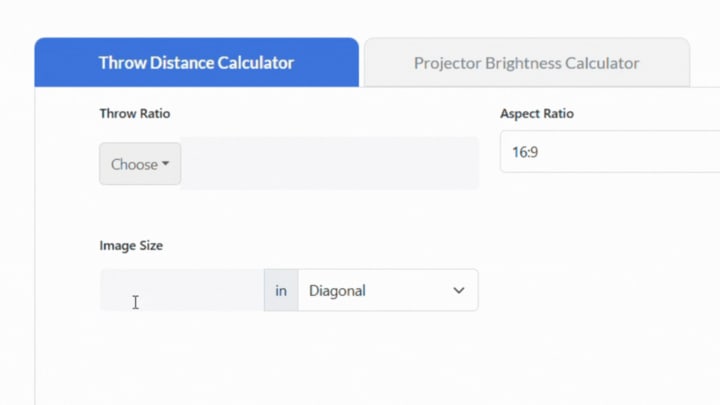
Now that we’ve covered the key features and specifications, let’s walk through how to use the XTEN-AV Projector Throw Distance Calculator for your next project.
Step 1: Access the Calculator
Go to the XTEN-AV website and look for the Projector Calculator. You will be allowed to use the basic version for free, but some of the more advanced features may involve a paid subscription.
Step 2: Enter Room Dimensions
Enter your room dimensions, which will be the width, length, and height of your room. Please be accurate, as they will influence the recommendations for throw distance and screen size.
Step 3: Select Projector Model
Next, choose the projector you would like to use from the extensive catalog of products offered by XTEN-AV. If your specific model is missing, you can also enter the throw ratio, lens shift, and other settings manually.
Step 4: Define Screen Parameters
Enter your preferred screen size, aspect ratio, and gain. The projection ratio calculator will use this information to figure out the best distance and location for the projector.
Step 5: Specify Ambient Lighting
Describe the ambient light conditions in the room, including the type of light (natural, fluorescent, incandescent) and the amount of ambient light (low, medium, high). The result will provide the brightness calculator with the necessary information to give a suggested lumen output.
Step 6: Calculate Throw Distance
Click on the “Calculate” button to generate your results. The XTEN-AV projector distance calculator will provide the recommended throw distance, lens shift settings, and mounting position as per your inputs.
Step 7: Review & Refine
Examine the calculator’s suggestions and modify any elements as required. It’s entirely acceptable to adjust from one projector model to another, change screen sizes, or modify room layouts to determine the best combination.
Step 8: Export & Integrate
When you’re satisfied with the recommendations you have, be sure to export the throw distance diagram, CAD drawings, and BOM, and utilize these professional and polished pieces in your proposal and/or project files.
Real-World Applications & Case Studies
To show the strength and flexibility of the XTEN-AV Projector Calculator, let’s dig into some real-world use cases and situations across a variety of industries and settings.
Home Theaters
You’d need to carefully place the projector and select the screen to create an immersive home theater experience. The XTEN-AV projector screen distance calculator helps enthusiasts and installers optimize their setups for maximum impact.
For instance, a homeowner has a 20' x 15' designated theater room and wants to hang a 120" diagonal, 16:9 screen, with a 1.0 gain. By entering these parameters into the XTEN-AV projection calculator, alongside the desired projector (let’s say the Epson Home Cinema 5050UB), the tool tells you how far away from the screen to set up the projector (14'6") and how high to mount it (2' above the top of the screen).
Classrooms & Conference Rooms
Educational institutions and businesses rely on projectors for effective presentations and collaboration. The XTEN-AV projector throw ratio calculator simplifies the design process for these professional spaces.
Consider a university lecture hall measuring 50' x 30' with a ceiling height of 15'. The AV team needs to install a projector that can display clear, bright images on a 150" diagonal, 16:10 screen with ambient light from windows. Using the XTEN-AV projection ratio calculator, they determine that a 5,000-lumen laser projector with a standard throw lens (e.g., Panasonic PT-MZ16KL) mounted 20' from the screen will provide the desired results.
Outdoor Events & Signage
Projectors are increasingly used for outdoor events, such as movies in the park, live performances, and digital signage. The XTEN-AV projector range calculator helps organizers and technicians determine the appropriate setup for these challenging environments.
Imagine a city planning an outdoor movie night in a park with a 40' x 20' inflatable screen. The event will take place after sunset, but there will be some ambient light from nearby streetlamps. The XTEN-AV projector screen height calculator suggests a high-brightness, 15,000-lumen projector (e.g., Christie Crimson WU25) placed 60' from the screen to ensure vivid, clear images for the audience.
Frequently Asked Questions (FAQs)
1. What is the difference between throw ratio and projection distance?
The throw ratio lets you know how far away the projector can be from the center of the screen and the width of the projected image you’ll get. Throw distance is the physical distance between the projector and the screen, and it’s measured in feet or meters.
2. How do I calculate the throw distance for my projector?
To find the throw distance, take your desired image width and multiply it by the projector’s throw ratio. For example, if you would like a 120" wide image and your projector has a throw ratio of 1.5:1, the throw distance will be 120" x 1.5 = 180" (15 feet).
3. What is the ideal screen size for my room?
The ideal screen size depends on your room dimensions, seating distance, and personal preferences. A general thumb rule is to choose a screen width that is about half the distance from the screen to the furthest viewing position. So, if your seating is 20 feet away, a 120" diagonal screen (104" wide) would be a good choice.
4. How do I know if my projector is short-throw or long-throw?
Short-throw projectors’ throw ratio is less than 1.0, meaning they can produce a large image from a short distance. Long-throw projectors have a ratio greater than 1:1 and require more distance to achieve the exact image size. You can find your projector’s throw ratio in its specifications or manual.
5. Can I use a projector in a room with ambient light?
Yes, but you’ll need a projector with high brightness (measured in lumens) to overcome the ambient light. A projector brightness calculator like XTEN-AV’s tool can help you calculate the appropriate lumen output for your room conditions and screen size.
6. How do I choose the right projector for my needs?
Consider factors such as budget, room size, desired screen size and aspect ratio, ambient light levels, and intended use (e.g., home theater, classroom, business presentations). Research projectors that meet your criteria and use a projector throw ratio calculator to ensure they’ll work with your space.
7. What is the best screen material for my projector?
The most suitable screen material for your use will depend on the type of projector you have, as well as the lighting environment in your room. Matte white screens are easily the most universal and will do well in virtually every situation.
If your room has ambient light, a gray screen may improve contrast and color. A high-gain screen can improve brightness but will have more limited lateral viewing angles.
8. How do I mount my projector?
Projectors can be mounted on the ceiling, wall, or a shelf, depending on your room layout and the projector’s throw ratio. Use a projector distance calculator to figure out the best mounting location, then follow the manufacturer’s instructions for proper installation. In addition to the installation site, think about similar items, such as cable management, power supply, and ventilation.
Conclusion
With the XTEN-AV Projector Throw Distance Calculator, you won’t have to guess on placement or screen size. Instead of trying to do manual math or using generic tools, it provides accuracy using a rich product library, AI-enabled features, as well as real-world factors, like ambient light and lens shift.
The XTEN-AV Projector Throw Distance Calculator helps make sure that whether you are setting up a home theater, classroom, or planning an ample conference space, the environment used for the projector performs as expected. With extras like CAD exports, BOM validation, and proposal-ready outputs, it saves hours of work and lets AV pros focus on creating immersive, reliable, and client-ready experiences.
About the Creator
Anni Grey
My name is Anni Grey, and I possess substantial knowledge and proficiency in the field of audio visual (AV) technology.
Public Notice
The United States now has a Ministry of Truth, just like the one where Winston Smith worked. Freedom is slavery; ignorance is strength; war is peace. We are here. You are being asked to reject the evidence your eyes and ears have given you for what they tell you. This is not a test.
By Harper Lewis6 days ago in Writers




Comments
There are no comments for this story
Be the first to respond and start the conversation.