
RC Details: How to Check Vehicle RC Online, Download RC, Format & Expiry
Learn everything about RC (Registration Certificate) for vehicles in India. Check RC details online, understand RC number format, download RC from DigiLocker, and know the expiry date.

A Registration Certificate (RC) is one of the most crucial documents for any vehicle owner in India. Whether you're driving a car or riding a two-wheeler, carrying your RC—either physically or digitally—is mandatory. In this blog, we'll cover everything from the RC full form and format to checking your RC status online and downloading it via DigiLocker.
What is an RC?
RC stands for Registration Certificate. It is an official document issued by the Regional Transport Office (RTO) that certifies your vehicle has been registered with the Indian government. The RC includes important details such as:
- Vehicle owner's name
- Vehicle registration number
- Engine and chassis number
- Fuel type
- Vehicle class (e.g., LMV, MCWG)
- Registration and expiry date
As per the Motor Vehicles Act, 1988, driving without a valid RC is illegal in India.
RC Full Form and Meaning
RC Full Form: Registration Certificate
Meaning: A government-issued proof that confirms legal ownership and registration of a vehicle.
It serves as your vehicle’s ID and is needed for insurance, transfer of ownership, or in case of theft/loss.
How to Check Vehicle RC Details Online
You can easily check your RC details online using government-approved platforms. Here’s how:
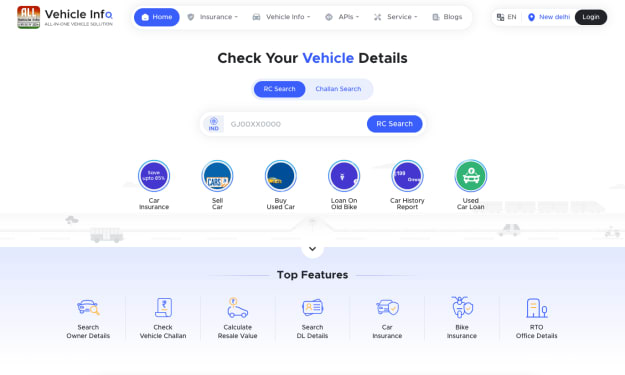
Method 1: Using Vehicleinfo
- Visit: vehicleinfo.app/rc-search
- Enter your vehicle registration number (e.g., MH12AB1234)
- Click on Search RC
- Get instant access to details like owner name, registration date, fuel type, and insurance validity
Method 2: Through Parivahan Portal
- Visit: https://parivahan.gov.in
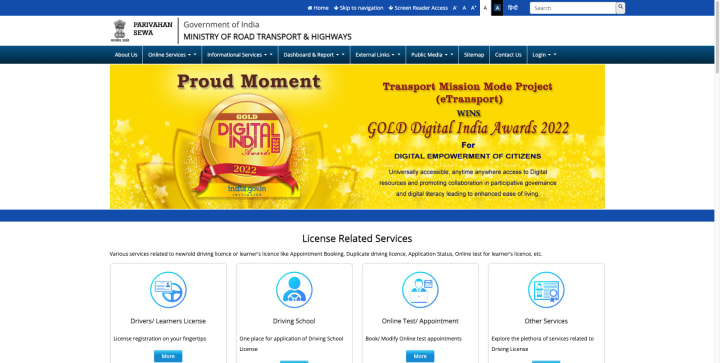
- Go to Online Services > Vehicle-Related Services
- Select your state, then choose RC Status
- Enter your registration number and captcha
- Click Search Vehicle
- Importance of RC for Every Vehicle Owner
- Proof of legal vehicle ownership
- Required for insurance claims
- Mandatory during traffic checks
- Essential for vehicle resale
- Required during vehicle loan application or hypothecation removal
- Driving without a valid RC can lead to fines or even vehicle seizure.
Difference Between Physical RC and Virtual RC
Physical RC Virtual RC
Printed smart card or paper Stored digitally via DigiLocker or mParivahan
Can be lost or damaged Always available on your phone
Needs reissue if lost Secure and accessible anytime
Legally valid Legally accepted as per government norms
According to the Ministry of Road Transport, digital RCs are valid proof of ownership under the Motor Vehicles Act.
How to Download RC from DigiLocker
Follow these steps to download your digital RC:
- Download DigiLocker App from Play Store or App Store
- Sign in using your mobile number and OTP
- Go to Issued Documents > Search Documents
- Choose Ministry of Road Transport and Highways (MoRTH)
- Select Vehicle Registration Certificate
- Enter your registration number and chassis number (last 5 digits)
- Your RC will be fetched and saved in your DigiLocker account
RC Number Format Explained
An Indian vehicle registration number follows this format:
State Code (2 letters) + RTO Code (2 digits) + Unique Identifier (4 digits)
Example: MH12 AB 1234
- MH – State code (Maharashtra)
- 12 – RTO office code (Pune)
- AB – Series code
- 1234 – Unique vehicle number
Each RTO in India has a unique code that helps identify the origin of a vehicle.
How to Check RC Expiry Date
RCs for private vehicles are valid for 15 years from the date of registration. After that, they must be renewed every 5 years.
- Steps to check RC expiry date online:
- Visit Vehicleinfo RC Search
- Enter your vehicle number
- Click on Search RC
- Your RC validity and expiry date will be displayed instantly
You can also check this on the Parivahan portal as explained above.
Conclusion
Your RC is not just a piece of paper—it’s your vehicle’s identity and legal backbone. Whether you're buying a used vehicle, selling yours, or simply doing a document check, knowing how to check RC details, download it digitally, and understand its format can save you from future hassles.
About the Creator
Vehicleinfo
Vehicleinfo is all in one vehicle solution that makes it easy to access important vehicle details online. Check RTO vehicle information, RC and DL status, challan records, and insurance updates. Stay informed with the latest RTO news.
Keep reading
More stories from Vehicleinfo and writers in Wheel and other communities.
RTO Delays: How to Track Your Vehicle Registration Status Easily
Dealing with RTO (Regional Transport Office) registration processes can sometimes feel like navigating through a maze. Whether you’ve recently purchased a vehicle, applied for a new registration, or are simply renewing your registration, RTO delays can add unnecessary stress to the process. One of the most frustrating aspects of dealing with RTO is not knowing the status of your vehicle registration or when you can expect to receive your Registration Certificate (RC).
By Vehicleinfo10 months ago in Wheel
Rego Hacks That Save Hundreds in 2026
Vehicle registration is one of those unavoidable expenses that many drivers accept without question, yet a closer look often reveals opportunities to save real money. As 2026 approaches, changes in transport policies, vehicle classifications, and digital systems mean drivers who stay informed can reduce rego costs legally and with minimal effort. Whether you own a daily commuter, a secondary car, or an aging vehicle you barely use, understanding how registration works can help you avoid paying more than necessary.
By Austin Peck4 days ago in Wheel
Reducing Scrap And Rework: How Checking Fixtures Improve Quality And Lower Costs In Automotive Manufacturing
In automotive manufacturing, where margins are tight and production volumes are high, even small dimensional errors can snowball into significant financial losses. Scrap, rework, warranty claims, and line stoppages all stem from one core issue: parts that do not meet design intent.
By Alexander Belsey8 days ago in Wheel



Comments
There are no comments for this story
Be the first to respond and start the conversation.