
Bought a Used Car? Verify Vehicle Ownership Online Easily | Vehicleinfo
Buying a used car? Ensure a safe purchase by verifying vehicle owner details by number plate online. Learn how to check RTO vehicle owner details using Vehicleinfo and avoid fraud, pending loans, or legal issues.

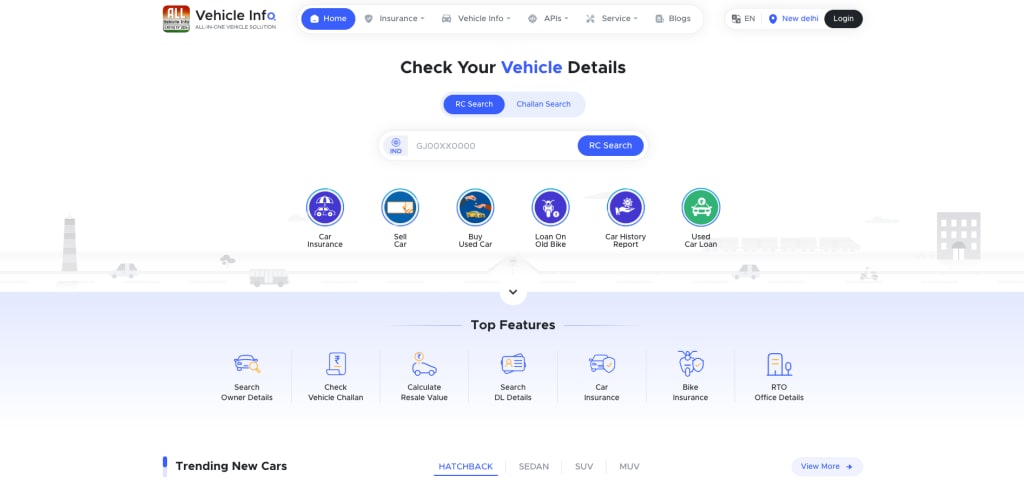
Buying a used car can be a smart choice, but it also comes with risks. Ensuring that the vehicle has a clear ownership history is essential before making a purchase. If you fail to check vehicle owner details by number plate, you could unknowingly buy a stolen vehicle, one with unpaid loans, or a car involved in legal disputes.
Thanks to online tools like Vehicleinfo, you can now verify RTO vehicle owner details quickly and make an informed decision. This guide will help you understand how to check vehicle owner details online and why it is a crucial step before purchasing a used car.
Why is Verifying Vehicle Ownership Important?
Before transferring ownership, verifying vehicle owner details online is essential for:
Preventing Fraud: Some sellers use fake documents to sell stolen cars. A vehicle owner details check helps you avoid scams.
Checking Loan Status: If a car is still under a loan, the lender can reclaim it even after you buy it.
Avoiding Legal Issues: Some used cars have pending challans or legal cases that can become a burden for the new owner.
Validating Vehicle History: A check ensures the car has not been involved in accidents or fraudulent transactions.
Confirming Registration Details: Some sellers mislead buyers about the car’s model year and registration status. An RTO vehicle owner details check helps verify authenticity.
How to Verify Vehicle Ownership Online?
1. Check Vehicle Ownership Using Vehicleinfo
Vehicleinfo is a trusted platform where you can check vehicle owner details by number plate online instantly. Here’s how:
- Visit Vehicleinfo (Click Here) or download the mobile app.
- Enter the Registration Number: Input the vehicle’s number as per the RC.
- Click on Search: The system will fetch details from the RTO database.
- Review the Results, which include:
- Vehicle Owner Details
- Vehicle Make & Model
- RTO Registration Information
- Insurance & PUC Validity
- Pending Traffic Challans
If the owner details by vehicle number do not match what the seller is claiming, take it as a red flag and investigate further before proceeding.
2. Verify Ownership via VAHAN Portal
The VAHAN website, managed by the Ministry of Road Transport & Highways, allows you to verify RTO vehicle owner details online.
Steps to Check Ownership on VAHAN:
- Visit VAHAN.
- Click on "Know Your Vehicle Details".
- Enter the vehicle’s registration number and captcha code.
- Click Search Vehicle to retrieve details.
Note: Due to privacy policies, some vehicle owner details online may not be fully visible.
3. Visit the RTO for Detailed Verification
If you need complete details, visit the Regional Transport Office (RTO) where the car is registered. Submit a formal request for ownership verification and check if the vehicle has any pending disputes.
4. Get a Vehicle History Report
A comprehensive vehicle history report provides insights into:
- Previous Owners
- Insurance & Accident History
- Traffic Challans & Legal Issues
- Loan & Hypothecation Status
- Blacklist Status
Vehicleinfo offers detailed reports, ensuring you make a safe purchase.
5. Verify Registration Certificate (RC) and Other Documents
Along with an online vehicle owner details check, always verify these physical documents:
RC (Registration Certificate): Ensure it is original and matches vehicle owner details online.
Insurance Papers: Verify the policy status and authenticity.
PUC (Pollution Under Control) Certificate: Ensure it meets emission norms.
No Objection Certificate (NOC): If the car is from another state, a valid NOC is needed for transfer.
6. Match the Chassis & Engine Number
To ensure that the vehicle is not stolen:
- Find the Chassis & Engine Number on the car body.
- Compare it with the RC and vehicle owner details online.
- If numbers don’t match, avoid the purchase.
Common Problems Buyers Face & Their Solutions
1. Owner Details Do Not Match
Issue: The seller’s name does not match the RC.
Solution: Request ID proof from the seller and compare with the documents.
2. Pending Challans on the Vehicle
Issue: The car has unpaid fines.
Solution: Use Vehicleinfo to check and ask the seller to clear dues.
3. Car is Under a Loan or Hypothecation
Issue: The vehicle has an active loan.
Solution: Ask the seller for a Loan Closure Certificate before transfer.
4. Vehicle is Registered in Another State
Issue: Registration transfer requires an NOC.
Solution: Ensure the seller provides a valid No Objection Certificate (NOC).
Final Checklist Before Buying a Used Car
✔ Check vehicle owner details by number plate using Vehicleinfo.
✔ Verify outstanding loans, pending challans, and insurance status.
✔ Match Chassis & Engine Number with the RC.
✔ Ensure the seller provides original and valid documents.
✔ Get a written sale agreement and ownership transfer receipt.
✔ Use used car valuation tools to determine a fair price.
✔ If buying from used car dealers, ensure their authenticity.
✔ Explore used car loan options if financing is needed.
Conclusion
Buying a used car can be stress-free if you verify vehicle owner details online before finalizing the deal. Using platforms like Vehicleinfo, you can check vehicle owner details by number plate online instantly and ensure a secure transaction.
Whether you want to sell a used car or buy one, always verify ownership details to avoid risks. Use Vehicleinfo today to get RTO vehicle owner details and drive with confidence!
Need to check a vehicle? Visit Vehicleinfo now!
About the Creator
Vehicleinfo
Vehicleinfo is all in one vehicle solution that makes it easy to access important vehicle details online. Check RTO vehicle information, RC and DL status, challan records, and insurance updates. Stay informed with the latest RTO news.
Keep reading
More stories from Vehicleinfo and writers in Wheel and other communities.
How to Check a Vehicle Report for Ownership and History
Thinking of buying a new set of wheels, selling your trusty old car, or just curious about your current ride? Then you absolutely need to know about vehicle reports. Consider it your car's personal dossier, packed with all the essential info you need to make smart decisions. Let's buckle up and explore what a Vehicle Report is all about, what juicy details it holds, and why it's the ultimate sidekick for any car enthusiast!
By Vehicleinfo12 months ago in Wheel
Common Mercedes Repair Issues Drivers Experience As Their Vehicle Ages
Mercedes-Benz is a constant competitor when it comes to discussing the best luxury brands. By combining high-end materials and superior craftsmanship, Mercedes models continue to be highly desirable even as they age. Buying an older Mercedes has become the go-to option for drivers looking for luxury on a more reasonable budget. Whether you’re looking at buying an older Merc, or just can't seem to part ways with your aging Bavarian, these are some of the common Mercedes repair tasks to be aware of.
By Foreign Affiars Motorsport6 days ago in Wheel
The Lunar Check-In: Engineering the First Five-Star Stay in the Stars
The silent, silver plains of the Moon—once the exclusive playground of Cold War pioneers and robotic rovers—are about to get a lot more hospitable. We aren’t just talking about research outposts or "survival pods" anymore. We are talking about high-thread-count sheets, panoramic views of the "Earth-rise," and the logistical miracle of hospitality at 1/6th gravity. The dream of the Lunar Hotel is no longer confined to the pages of 1950s pulp fiction; it is currently being drafted on the CAD programs of the world’s most ambitious aerospace firms.
By yusuf selho7 days ago in Wheel




Comments
There are no comments for this story
Be the first to respond and start the conversation.