
Create a Solana Token with SolHub Token Creator in 5 Minutes
Your Quick Guide to Building a Custom Solana Token Without Coding


Introduction
The advent of blockchain technology and cryptocurrency has opened several opportunities for businesses and individuals to create something new. SolHub’s Token Creator is the perfect tool for individuals who want their tokens to be on the Solana SPL; this is because it does not require coding to make the tokens. Below are detailed procedures that will enable you to use SolHub’s tools properly in this guide. Irrespective of the type of user basic, intermediate, or advanced this guide guarantees you all the info you need to start creating tokens.
Steps on How to Build a Token on SolHub
SolHub makes the token creation process easy. Here’s how you can create your own Solana SPL token:
1. Connect Your Wallet
The first step is to select Select Wallet in the upper right corner of the Token Creator page and enter your Solana wallet. SolHub supports multiple wallets, including:
- Phantom: A Solana wallet well renowned for its simple user interface.
- Solflare: Safe and expandable: perfect for handling Solana tokens.
- Torus: An easy choice for a user who has no initial knowledge regarding the operation of the blockchain.
- Ledger: This is for the users with more experience in internet usage and can give them a better protection level.
The first and basic process is to link your wallet to perform an interaction with the blockchain and execute transactions.
2. Customize Token Details
After your wallet is connected make sure to input the necessary details to your token. These fields allow you to define your token's identity and functionality:
- Name: Please input a unique name for your token like for example EcoToken.
- Symbol: Come up with a symbol (maximum 8 characters) such as “ECO”.
- Decimals: Decide the decimal precision (e.g., for 2 decimals, it would be 0.01).
- Supply: Define the total tokens that you require to be created, and then check it.
These parameters define how your token will be identified and acted upon throughout the blockchain.
3. Upload a Logo
Logos on these tokens look more professional to force consumers to trust the token more. Click or Drag and Drop Here box to upload a logo of your token. For optimal results:
- It should be a 1000×1000 pixels PNG image.
- Ensure the design aligns with your token's purpose or branding.
For example, a logo based on the green color will be appropriate for rendering an environmentally-oriented token.

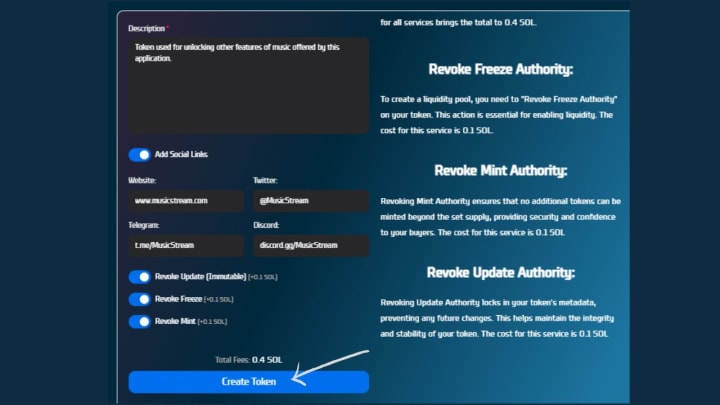
4. Add a Description and Social Links
Adding a description and social links enhances your token’s credibility and accessibility:
- Description: Provide a summary of your token's purpose, such as 'EcoToken supports the transition to green energy.'
- Social Links: Allow the Add Social Links option to contain:
- Website: Pinned to your main business site.
- Twitter: If you want to receive updates, share your Twitter handle.
- Telegram: Add your channel to the Telegram group to encourage community involvement.
- Discord: Please add your Discord server to go into the details.
These features contribute to the creation of the relevant community for your token.
5. Advanced Security Features
SolHub offers optional security features to enhance your token's integrity:
- Revoke Update Authority: Freezes or safeguards some of the token’s attribute information so that users cannot tamper with it (fee: 0.1 SOL).
- Revoke Freeze Authority: Crucial when launching liquidity pools as well as enabling tokens for usage in decentralized exchange (fee: 0.1 SOL).
- Revoke Mint Authority: As a result, prevents further token generation, preserving the token’s supply (fee: 0.1 SOL).
Engaging these features makes your token safe and hence valuable to investors as well as users.
6. Finalize Token Creation
On the lower end of the page after setting up every detail, a total fee will be shown. The base fee is SOL 0.1, additional features that are available mean adding up to a total SOL 0.4. To complete the process:
- Click on the "Create Token" button. Fill in details like Optional Fee, Token Name, Total Tokens, Token Unit, Description, and Token Image.
- Confirm this transaction in your wallet – so that the purchasing process will begin.
- Wait for your tokens to be generated and they are now ready for circulation.
Ideally, it only takes several minutes more for your Solana SPL token to come up as a customized identity.
Benefits of Using SolHub
SolHub is an ideal platform for creating tokens due to its unique features:
- No Technical Skills Required: Ideal for all those who have no background knowledge in blockchain.
- Quick Process: The tokens take less than five minutes to create.
- Affordable Pricing: Using the lowest price of 0.1 SOL, it is an affordable project.
- Robust Security: Smart contracts on the blockchain give you added security against your own assets during the course of the transaction.
- Real-World Example: Launching a Utility Token
Imagine creating a utility token for a music streaming platform:
- You should name your token MusicStream.
- Use a symbol like "MSC."
- Add an icon in the form of a Logo of headphones or musical notes.
- Create a description for example “Token used for unlocking other features of music offered by this application.”
- Add links to your streaming platform with your website and social media.
Thanks to SolHub, a token may be created in minutes so it can help power your platform!
Conclusion
SolHub helps to create tokens belonging to Solana SPL easily, effectively, and cheaply. The token creation process is not only open to SQL and programming experts, but even amateurs can create their tokens on this platform for different intentions. Whichever type of token you are creating — be it a cryptocurrency or a utility token — you will have an incredibly smooth ride with SolHub’s Token Creator at the helm. Create your token now and open up the world of infinite blockchain solutions.
Frequently Asked Questions
1. What is the cost of token creation?
The starting price is 0.1 SOL. Other choices, such as Freeze Authority or Revoke Mint, cost 0.1 SOL.
2. Which wallets SolHub supports?
SolHub supports multiple wallets, including Phantom, Solflare, Torus, and Ledger, offering users flexibility and security.
3. Do I need coding skills to create a token on SolHub?
Not at all, SolHub’s Token Creator was developed so as to be a no-code platform where anyone could create tokens.
4. Can I customize my token with a logo and social links?
Yes, in SolHub, you can even include your company logo, and social links such as Twitter, Telegram, and Discord for your created token to be unique.
5. Can I update my token after creation?
Yes, unless you using the Revoke Update Authority that makes the metadata of the token to be locked for further security increases.
About the Creator
Ali Ahmed
Discover easy-to-use Solana tools like Token Creator, Liquidity Pool, OpenBook Market, and more on SolHub.io. The perfect place to manage your Solana tokens and liquidity hassle-free.
Biodiesel Market Size and Forecast 2026–2034: Renewable Fuel Demand Accelerates Global Growth
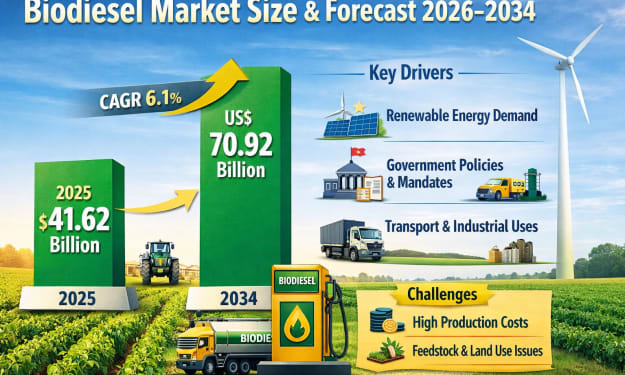
Biodiesel Market Size and Forecast 2026–2034 The global Biodiesel Market is projected to grow from US$ 41.62 Billion in 2025 to US$ 70.92 Billion by 2034, registering a Compound Annual Growth Rate (CAGR) of 6.1% from 2026 to 2034. This growth reflects the increasing demand for renewable energy solutions, global efforts to reduce carbon emissions, and the expansion of government policies supporting clean fuels.
By shibansh kumar3 days ago in Trader


Comments
There are no comments for this story
Be the first to respond and start the conversation.