
Must-Have Daily Planner Apps for Android and iOS
Daily Planner Apps for Android and iOS
Managing your day-to-day tasks, projects, and personal goals can be challenging without the right tools. Thankfully, there are plenty of daily planner apps available that can help you stay on top of everything, no matter if you're using an Android or iOS device. Among these, the PlanWiz daily planner app stands out for its versatility and effectiveness. Let’s dive into the seven best daily planner apps that can transform your productivity.
1. PlanWiz
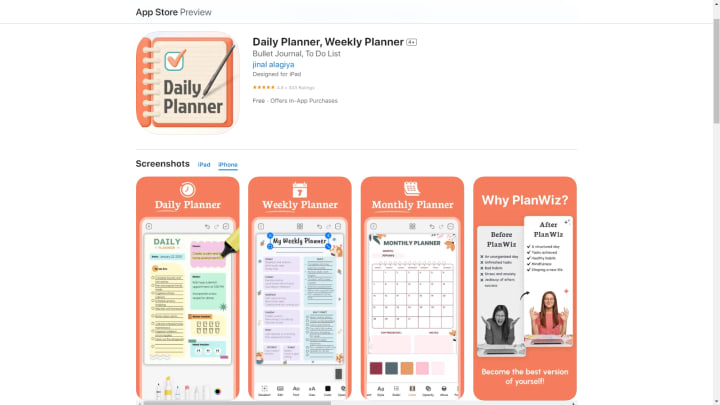
Boost Productivity and Wellness
PlanWiz is a versatile daily planner that helps you manage your work-life balance with ease. It offers powerful features that allow you to organize tasks, set personal goals, and ensure you're meeting deadlines, all while maintaining a focus on self-care. PlanWiz is highly customizable, allowing users to create the ultimate digital planner tailored to their specific needs.
Whether you're managing professional projects or planning personal activities, PlanWiz supports seamless integration and synchronization across both Android and iOS. This ensures that your tasks and schedules are always up-to-date, no matter which device you're using. With PlanWiz, you can effectively boost your productivity while staying organized in every aspect of life.
Key Features:
Highly customizable digital planner for work, personal, and creative needs.
Integration with other tools for smooth planning.
Cross-platform syncing for Android and iOS ensures real-time updates.
2. Asana

Perfect for Teams and Individuals
Asana is a favorite for teams and individuals who need robust task management. Its intuitive design lets you create projects, assign tasks, and set deadlines with ease. Asana provides multiple views, such as lists, boards, and calendars, helping you track progress efficiently.
Asana works flawlessly on both Android and iOS, allowing you to collaborate with others from any device. Its flexibility makes it a great tool for those managing complex workflows or personal to-do lists.
Key Features:
Projects and task management for individuals and teams.
Calendar, list, and board views for tracking progress.
Cross-platform syncing ensures you're always up-to-date.
3. Evernote

More Than Just a Note-Taking App
Evernote has long been known for its note-taking capabilities, but it offers much more. With Evernote, you can manage to-do lists, set reminders, and organize your notes into notebooks for better control over your tasks.
The app’s robust search functionality makes finding information easy, and its integration with other platforms makes it even more useful for those juggling multiple responsibilities. The seamless sync between Android and iOS ensures that you’ll always have access to your notes and tasks, no matter the device.
Key Features:
Note-taking, to-do lists, and reminders in one app.
Organize notes into notebooks for better management.
Sync across multiple platforms for easy access.
4. ClickUp

A Comprehensive Productivity Tool
ClickUp is a go-to solution for anyone who wants a full-featured productivity app. Whether you're managing personal tasks or large-scale projects, ClickUp has you covered. It offers a range of features such as task creation, priority setting, and time tracking, all within a single app.
ClickUp's flexibility allows you to customize your workspace and integrate it with tools like Google Calendar and Slack. With real-time sync across Android and iOS, you can ensure that your projects and tasks are always up-to-date.
Key Features:
Task management, time tracking, and prioritization.
Customizable workspace tailored to your needs.
Real-time sync between Android and iOS devices.
5. Microsoft To Do (Successor to Wunderlist)

A Simple Yet Powerful Task Manager
While Wunderlist may be discontinued, its legacy lives on through Microsoft To Do. This app retains many of Wunderlist’s key features, such as task lists, reminders, and due dates. The app integrates seamlessly with Microsoft’s suite of tools, making it a great choice for those already within the Microsoft ecosystem.
Microsoft To Do is available on both Android and iOS, syncing your tasks in real time so you can access your lists no matter what device you’re using.
Key Features:
Task lists, reminders, and due dates.
Integration with Microsoft products like Outlook.
Syncs across Android and iOS for on-the-go management.
6. Toggl Plan

Visual Task Management Made Simple
Toggl Plan is ideal for users who prefer a more visual approach to task and project management. It features a timeline view that helps you see your tasks and projects at a glance. Whether you're managing personal tasks or collaborating with a team, Toggl Plan makes planning simple with its drag-and-drop functionality.
The app syncs easily between Android and iOS, so you can access your plans and schedules anytime, anywhere.
Key Features:
Visual timeline for better task and project management.
Drag-and-drop functionality for easier organization.
Syncs across multiple platforms for seamless updates.
7. Notion

All-in-One Workspace for Everything
Notion is a versatile and powerful app that combines task management, note-taking, and project planning all in one space. Its customizable workspace makes it easy to manage personal to-do lists, team projects and notes all in one app.
Whether you're organizing personal tasks or managing a team, Notion syncs across Android and iOS devices, ensuring you have access to your workspace no matter where you are. Its powerful integration capabilities make it a great tool for anyone needing a centralized hub for their projects.
Key Features:
Manage tasks, notes, and projects in one customizable space.
Ideal for personal and professional use.
Syncs across platforms for easy access.
Conclusion
Finding the right daily planner app can make a significant difference in your productivity and organization. Each of the seven daily planner apps listed above offers unique features to help you stay on top of tasks, manage projects, and plan your day effectively. Whether you prefer a customizable experience like PlanWiz or are looking for simple task management like Microsoft To Do, there’s something for everyone. Start organizing your life more efficiently by choosing the best daily planner app among these daily planner apps, and enjoy the benefits of staying productive with the right daily planner apps, no matter which device you're using!
About the Creator
Keep reading
More stories from Daniel Bruhl and writers in Styled and other communities.
Creative Tips for Designing Eye-Catching Visuals
In today's fast-paced digital world, grabbing and holding someone's attention is more challenging than ever. Whether you're scrolling through social media, browsing a website, or flipping through a magazine, visuals play a critical role in capturing interest. For marketers, designers, and content creators, mastering the art of designing eye-catching visuals is essential. A well-crafted visual can make your message stand out, and one of the most effective tools for achieving this is a poster maker.
By Daniel Bruhlabout a year ago in Styled
Deepfake Maker Face Swap: How I Create Scroll-Stopping Content in Minutes Without Editing Skills
Face Swap Technology and the Rise of AI-Generated Visual Media Artificial intelligence has transformed the way digital content is created, shared, and experienced. One of the most widely discussed developments in recent years is the emergence of face swap and deepfake technology. Once limited to research labs and advanced visual effects studios, face swapping is now accessible through web-based platforms and consumer applications.
By Abbasi Publisher7 days ago in Styled
📢 Raise Your Voice Thread: 01/22/2026
Our “Raise Your Voice Threads” are hosted most alternating Thursdays at 12PM ET to offer creators more avenues to uncover exceptional stories on Vocal. As we are continuously searching for fresh creators and inspiring stories, this thread provides an opportunity to exchange and discuss the stories that have moved and motivated us on Vocal.
By Raise Your Voice by Vocal4 days ago in Resources



Comments
There are no comments for this story
Be the first to respond and start the conversation.