
How to Stream Amazon Video on Multiple Devices
Download Amazon video as local files

If you are looking for a way to stream your favorite Amazon videos on multiple devices, please read the article below.
Stream Amazon video on multiple devices as ruled
Amazon allows three concurrent streams within the same Amazon account, and up to two simultaneous streams of the same content. To stream Amazon video on multiple devices, please follow the steps below:
1. Check your subscription: Ensure that you have an Amazon Prime or Prime Video subscription. Streaming on multiple devices may require a subscription plan that supports simultaneous streaming.
2. Sign in to your Amazon account: Go to the Amazon website (www.amazon.com) and sign in using your Amazon account credentials.
3. Access Prime Video: Once signed in, hover over the "Account & Lists" dropdown menu in the top-right corner, and select "Prime Video" from the available options.

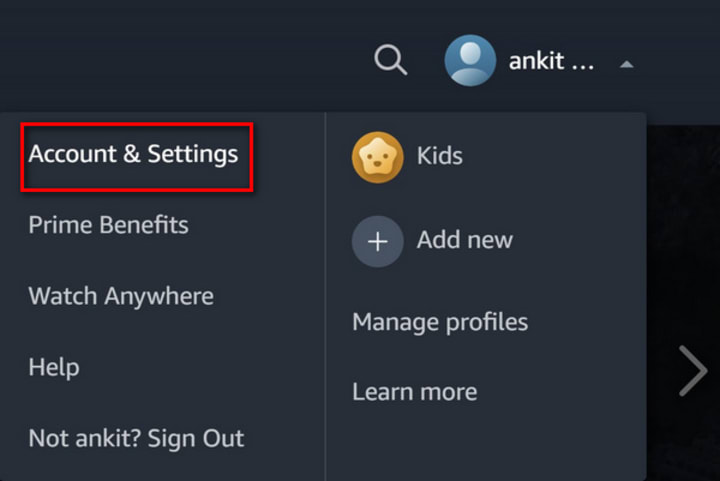
4. Manage your devices: In the Prime Video interface, click on the "Account & Settings" option located in the top-right corner (represented by an icon of a person's silhouette).
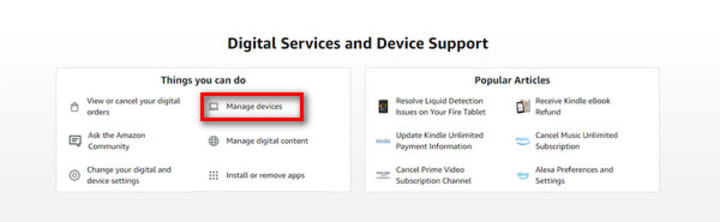
5. Select "Manage Your Devices": On the "Account & Settings" page, scroll down until you find the "Digital Content and Devices" section. Within that section, click on "Manage Devices."
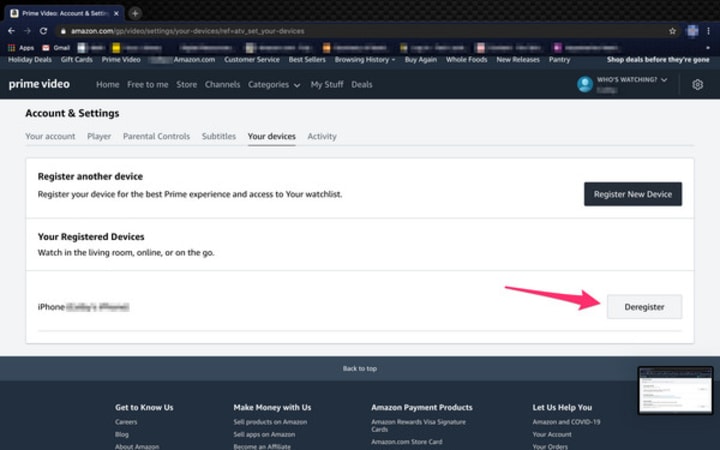
6. Deregister unwanted devices: You will see a list of devices registered to your Amazon account. Review the list and remove any devices that you no longer wish to use for streaming Amazon video. To do this, click on the "Deregister" button next to each device you want to remove.
7. Start streaming on multiple devices: Once you've managed your devices, you can start streaming on multiple devices. Simply open the Prime Video app on the devices you want to use, sign in with your Amazon account, and start streaming your desired videos. As long as you have an active subscription plan that supports simultaneous streaming, you should be able to stream on multiple devices simultaneously.
Note: The exact steps may vary slightly depending on the device you are using to access Prime Video. The above steps are applicable for accessing Amazon Prime Video through a web browser. If you are using a different device such as a smart TV, game console, or mobile device, the process may differ slightly, but the general principles should remain the same.
Stream Amazon video on multiple devices without limits
If want to stream Amazon video on more than the specified number of devices, downloading the video would be a great choice. However, to do that, you need to download the video to every device you want to stream. Also, the downloaded video should be watched within valid period. Here we can teach you to stream Amazon video on multiple devices without limits by using a professional video downloader.
NoteBurner Amazon Video Downloader is a user-friendly tool specially designed for downloading videos from Amazon Prime Video. It supports MP4/MKV formats, various quality options (240P to 1080P), and preserves original multilingual subtitles and audio tracks. It also allows batch downloads and offers fast performance.
Tutorial: Download and stream Amazon video on multiple devices
Below is a tutorial teaching you how to download videos on Amazon Prime Video and stream them on multiple devices. To better follow the operation, please install NoteBurner Amazon Video Downloader to your computer first. Click here to read the full tutorial.
Final word
With NoteBurner Amazon Video Downloader, you can not only stream Amazon videos on as many devices as you like but also transfer them to any devices you want. Install NoteBurner and start to enjoy downloaded Amazon videos without limits now!
Note: Only the first 5 minutes of each video can be downloaded with trial version, please purchase a license to enjoy the full video. It is suggested that to download the trial version and have a test before purchasing it.
About the Creator
Sock Geeks: Redefining Style and Comfort Through a Monthly Sock Subscription
In today’s fast-paced world, fashion is no longer just about big statement pieces. The smallest details often make the biggest impact, and socks are a perfect example of this shift. Once considered a basic necessity, socks have evolved into a powerful style element. At the center of this transformation stands Sock Geeks, a brand that has redefined how people experience comfort, creativity, and convenience through a premium sock experience.
By Reach Boost Agency a day ago in Styled


Comments
There are no comments for this story
Be the first to respond and start the conversation.