


The ways of cancelling a Paramount+ subscription vary depending on the platform or device that you used to for Paramount+. Normally you can visit Paramount+ official site to cancel your subscription. If you purchased from a third-party billing provider, you need to return to that platform for support.
After unsubscribing, your subscription will expire within the stipulated time. For example, if you subscribed to a one-month plan, the expiration date will be one month after the start of the subscription. Once your subscription expires, you cannot continue to watch Paramount+ videos online, nor can you watch downloaded videos. Is it possible to download movies from Paramount+ that don't have an expiration date? Read on if you want to know how to cancel the renewal and keep the downloaded video.
The ways of cancelling Paramount+ subscription
For desktop, mobile web, smart TV (LG TV, Vizio TV, Samsung TV), or gaming console (Xbox, PS4 or PS5)
- Visit paramountplus.com and click Username from the menu in the top right.
- Tap "Account."
- Scroll down the page and select "Cancel subscription."
- cancel paramount subscription site
For iPhone or iPad
If you signed up for Paramount+ via the App Store, the steps below are for you.
- Open the Settings app.
- Click your name.
- Click on Subscriptions. (Tap "iTunes & App Store" if you don't see "Subscriptions”. After that, sign in, select View Apple ID from the menu, scroll down to Subscriptions, and select Subscriptions.)
- Tap Paramount+.
- Then select Cancel Subscription. If "Cancel Subscription" is not present, the subscription has already been cancelled and won't renew.
- Click Confirm.
- cancel paramount subscription iphone
For Android phone, tablet or TV
Steps below are for you if you signed up for Paramount+ on your Android smartphone or TV through the Google Play store.
- You need a phone or computer to cancel a subscription.
- Visit g.co/play/subscriptions on a phone or computer.
- Choose the subscription that you want to end.
- Select cancel your membership.
- Follow the directions.
If you use Paramount+ on Apple TV (4th gen and later), Fire TV, Roku, Prime Video, and Apple TV channel, please go to here for more information.
Keep Paramount+ videos after your subscription expires
To keep your downloaded videos playable after your subscription expires, you need to download them locally when your subscription is still valid. How can you do that? You just need SameMovie ParamountPlus Downloader to assist you. By using SameMovie, you can download 1080p videos with multilingual subtitles and 5.1 audio kept. The video output format is MP4/MKV, which makes sure you can keep the video files on your own devices forever. So, you don’t need to keep subscribing to Paramount+ to watch your favorite content on this video platform.
To get a tutorial on keeping Paramount+ videos playable after cancelling subscription, please click https://bit.ly/40NIp0K.
Tutorial: How to download Paramount+ videos
To know how SameMovie works, please read the following instruction, and try to download Paramount+ on your own.
STEP 1 Sign in Paramount Plus Account
It is advised that you install and run SameMovie ParamountPlus Downloader on your computer before beginning any downloads. You can enter any word into the search field and then press "enter" on your keyboard. The pop-up window will prompt you to log into your account.
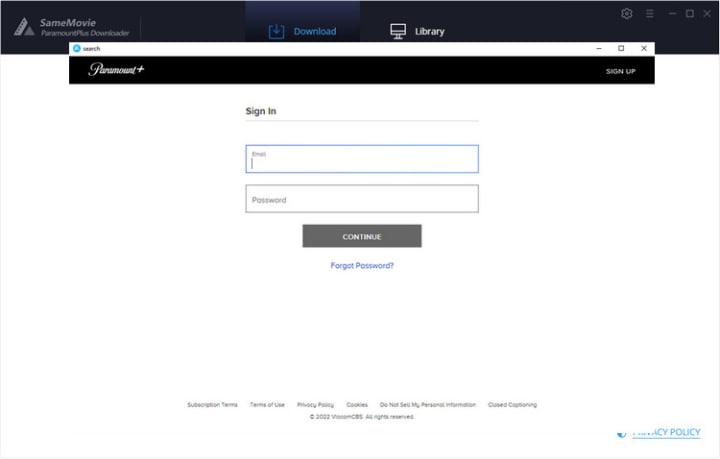
STEP 2 Customize Output Settings
Before downloading, you can modify the default settings for all videos. Simply click the setting icon in the top-right corner of the screen to open the Settings window. You can change the video format, quality, audio and subtitle languages, output folder, etc.

STEP 3 Add Video
The videos you want to download can be added in two different ways. One is typing the keyword of the video in the search box directly. The alternative is to copy the video URL from the Paramount+ site and enter it into the search box for a precise search.
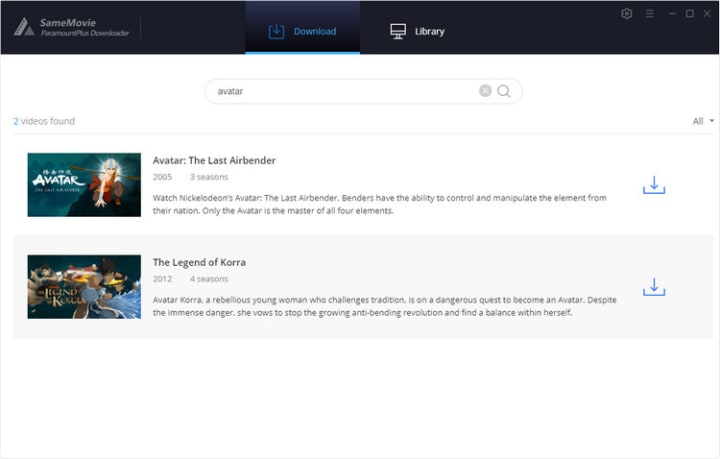
STEP 4 Start to Download
The video will start downloading immediately after clicking the download icon. It's available to download videos in batches. And you add or remove videos while downloading.
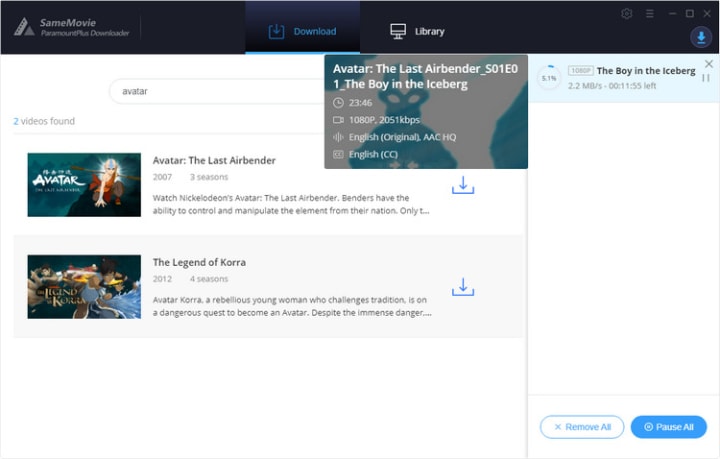
To locate the downloaed files, tap the Library icon. Now you can enjoy watching Paramount Plus content after your subscription ends!
If you want to experience Paramount+ Video Downloader, please click https://bit.ly/40NIp0K.
About the Creator
Louise Walker
Trying to find useful video downloaders.
Keep reading
More stories from Louise Walker and writers in Styled and other communities.
How to Watch Netflix Video Offline
Many of you must know how to watch videos online on Netflix. Just open the Netflix website on your browser, enter the title of the TV series or movie you want to watch, and you can watch it online on the web browser. If you have the Netflix app installed on your computer, open the app to search for the video, and then you can watch them online.
By Louise Walker3 years ago in Styled
A System That Isn’t Working Challenge Winners
Systems promise order. They organize behavior, distribute opportunity, and suggest that if everyone follows the rules, things will work. The entries in A System That Isn’t Working look closely at what happens when that promise begins to slip.
By Vocal Curation Team4 days ago in Resources



Comments
There are no comments for this story
Be the first to respond and start the conversation.