
Why do you need a graphics tablet?
What is the purpose of a graphics tablet?

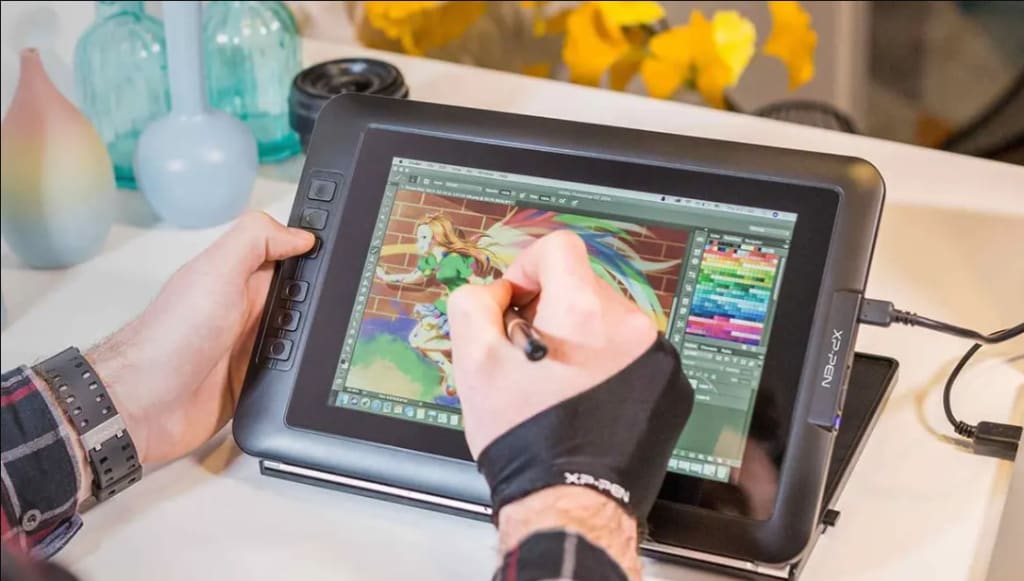
I had no idea about the graphics tablet, but I guess it would transform our workflow. A graphics tablet is a computer peripheral that enables us to use a pen or stylus to interact with the computer. It basically mimics pen and paper through digital signals. It's kind of writing with a pen on an object like a slate, no line is floating on the slate. However, a nice picture is emerging on the front monitor - it is wonderful. It's suitable for artists, photographers, designers or anyone who does any kind of digital art, drawing, or painting. This is an incredibly valuable tool. But what exactly is a graphics tablet used for and why you should use it is discussed.
What is a graphics tablet?
Graphics tablets are known by many more names. Some call it a drawing pad, some call it a pen tablet, some call it a digital artboard. As the name implies, the graphics tablet is a computer's input device. This means that the device works like a keyboard or mouse. As you may know, graphics tablets look like childhood slates. The type of work is almost the same in a graphics tablet. The slate is inscribed with chalk. And the graphics are written on the tablet's board with a pen called Stylus. The digital signal from the board scratch goes to the computer, floating on the screen in the form of pictures. That is, exactly what you draw on the board can be seen on the computer screen. Therefore, you can understand that if you can draw on paper, you can easily draw on a graphics tablet. There are many types of graphics tablets. Like slate-like boards and stylus packages are called pen tablets. The pads that have screens on the drawing board are known as pen displays. And completely independent, that is, when the drawing pad is a computer, it is called a pen computer.
Why draw pictures with a graphics tablet?
You can draw on paper or canvas, even on stone if you want. Like these mediums, graphics tablets are also a medium. Just as a paintbrush does not allow you to draw pictures, so does a graphics tablet. Pictures are drawn using paintbrushes, and graphics tablets do just that. Many people think that digital art means that the machine is drawing. Absolutely wrong thought. The artist will draw, the graphics tablet will act as a drawing material like a brush in that case. In general, graphics tablets will come in handy if you want to draw digitally. Especially for those who want to work in decoration, comics, animation, or any kind of design, it is an excellent weapon. The benefits are many. Notable among them are: saves time, mistakes can be corrected, paper-ink costs no and is varied. Another great advantage is that the power of the computer is enough to run most graphics tablets.
What can a graphics tablet be used for?
Graphic tablets have no single-use. They serve as an essential tool in various creative tasks and creative endeavors.
Drawing
You can add a graphics tablet to your computer for drawing. Traditionally drawing is always done on paper with pencils, markers, etc. But when drawing on a computer, changing the quality of each stroke of artwork requires very precise lines and pressure, which is not possible with a regular computer mouse. The graphics tablet has a stylus and a touchpad that replaces the use of pencil and paper. It helps you to write like a pen on a computer. A graphics tablet can add realistic drawing textures by combining with modern drawing programs like photoshop, illustrator, etc.
Photo editing
It will give you a lot of support when you do skin retouching in photo editing. When you start to remove stains and imperfections, you want to be as accurate as possible. Using a graphics tablet, you can be very precise where an adjustment is applied. A graphics tablet is much more effective at photo editing than using a mouse.
Graphic design
With a graphics tablet, you no longer need to draw everything by hand. As a graphic designer, you can quickly understand why graphics tablets are essential to your work. Since you are constantly working with text and size, creating and editing paths will be much easier than before with the stylus. Because using a mouse to draw fine lines is very difficult. With graphics tablets, it's much more natural and easier to work with lines and shapes. It makes you feel like you are drawing on paper which makes the whole process more enjoyable.
It is good to know some things about graphics tablets from professionals. I talked about this with cartoonist Shimul owner of Myyellowportrat. He creates digital Simpson portraits. He has been using graphics tablets for several years. His experiences can be taken as advice:
1. Many people regret that my computer's RAM is low, Photoshop is an older version, it is not, it is not. Remember, the computers used by artists in the early days of digital art had much less memory than any of today's smartphones. As a result, you can't draw without the most up-to-date or expensive machine on the market.
2. It is better to have a graphics tablet. Even if not, drawing can be done digitally. Many people paint in Photoshop by drawing and scanning on paper with ink and pen. If you have a graphics tablet, you don't need a pen and paper - this is the difference.
3. Many people think that large graphics tablets have more advantages. In fact, the opposite. Smaller graphics tablets are more comfortable in the drawing. The cost is low. Also good for carrying and maintenance. So you can start with a small tablet.
4. More important than the size difference is the sensitivity of the tablet. This means that the difference between how much pressure to put on the pen is the calculation of good and evil. Some tabs require more stylus pressure, others less. Professional artists work for 5-6 hours a day or more. As a result, it is normal to have hand pain when working with more pressure. In that case, it is better to choose the tab that has more sensitivity. However, since the newcomers do not draw for such a long time, there is no problem in the low sensitivity tab.
Of all the famous pictures in the world, the number of pictures painted digitally is negligible. However, when the author writes the story, no one asks, did he write the story on paper or in Microsoft Word? The story is the main thing here. Similarly, it does not matter which medium the picture is drawn on. It remains to be seen whether it will become a picture or not. Many people take the opportunity to copy-paste digitally. It creates confusion with digital media. So even if you choose the digital medium for drawing, at the end of the day you have to be a real one.
About the Creator
rocowi
Yellow characters Portrait - it will be perfect gift to your family, your boyfriend/girlfriend or bestfriend. We can create personalized portraits with as many people as you want
Keep reading
More stories from writers in Photography and other communities.
My Year, in Prattling and Photos
It's been a year since... last year. Ironically, it seems I've found myself a new tradition of getting sick during the New Year holidays. At least, this year (that is, this inter-year period remarkable for its shiny decorations in the streets and houses, and closed supermarkets and pretty much everything), I'm doubtlessly doing better: I've managed to come visit my friends in Germany for Christmas (which I failed to do last year) and—after having some good quality time eating machanka, playing Munchkin and swinging machetes (the last one obviously crept into this checklist only for the sake of the phonological form)—I came back home via proverbial Deutche Bahn and probably less known Schweizerische Bundesbahnen, my body hosting a family of viruses, virions and who knows what other tiny critters somewhere inside my chest.
By Andrei Z.18 days ago in Photography
The People We Meet on Vacation: Moments, Connections, and Lasting Impressions
The People We Meet on Vacation: Moments, Connections, and Lasting Impressions Vacations are more than a break from daily routines. They are a unique social experience where people from different backgrounds cross paths in unexpected ways. The people we meet during a holiday often leave strong impressions, even if the interaction lasts only a few minutes. These encounters can shape memories, influence perspectives, and sometimes turn into lifelong friendships. Understanding who we meet on vacation helps explain why travel feels so meaningful to many people.
By America today 7 days ago in Photography



Comments
There are no comments for this story
Be the first to respond and start the conversation.