
What is Shutter Speed, and? How to Use it?
How to use Shutter Speed


What is Shutter Speed?
Shutter speed or exposure time is the length of time when the film or digital sensor inside the camera is exposed to light, also when a camera's shutter is open when taking a photograph. The amount of light that reaches the film or image sensor is proportional to the exposure time.
Every camera has shutter speed control, (Canon, Nikon, Samsung, and so on). Shutter Speed is the amount of light that is hitting the sensor inside the camera, which allows how long the shutter to stay open, and expose the image to the sensor.

As you can see from above, the examples of shutter speed for each photo. The images went from correct shutter speed 1/60 sec. to dark 1/2000 sec. The amount of light that hits the sensor, determines how light or dark the image gets, with each exposure.

The other example, as shown above. By catching the rotating pin wheel fan. The slowest shutter speed makes the pin wheel blurred, to the fastest shutter speed, catches and freeze’s the pin wheel, in which you see no movement.

The last example, above. Shows one image taken at 1/160 sec. by freezing the ocean waves, and the second image, recorded at 4 sec., makes the waves a milky smooth look and feel, which gives the image a real awesome feel and a professional look.
How to use the Shutter Speed?
Depending on the camera and make model of the camera. Each camera shows, what the shutter speed control looks like. In the Canon Camera’s, it called TV – Time Value Mode; Nikon Camera’s, it is called S – Shutter Mode; Samsung Camera’s it is called Shutter. The Nikon’s, and Samsung’s are pretty much alike, when it comes to shutter control.
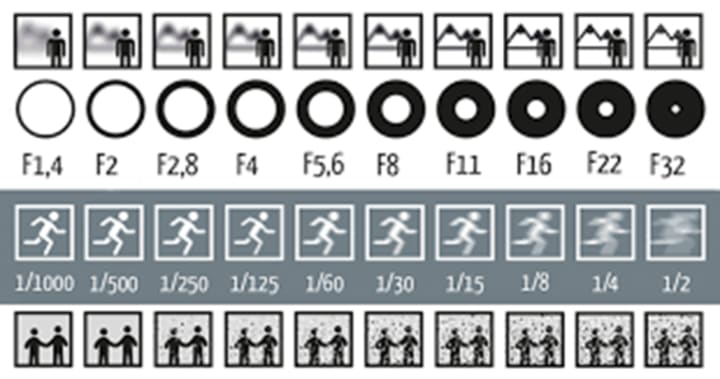
Above is a shutter speed chart, that correlates with each F/stop. The F1.4 has a faster shutter speed, and as you go to F/32 the shutter speed gets slower. The reason why F1.4 has faster shutter speed, is because the lower F/stop has the shutter blades wide open, big hole. The F32 has a slower shutter speed, due to a smaller hole in the shutter blades.
In order to use shutter speed, take look at your lens.

This 18 – 135mm lens, has different mm openings.
18mm = 1/20 sec.
24mm = 1/25 sec. to 1/30 sec.
35mm = 1/40 sec. to 1/60 sec.
50mm = 1/60 sec. to 1/70 sec.
75mm = 1/80 sec. to 1/100 sec.
85mm = 1/100 sec. to 1/120 sec.
135mm = 1/130 sec. to 1/140 sec.
Put now, there is all kinds of lens on the market now that goes from 10mm to over 600mm. That means, there will be different exposures for each increment of lens opening, and the type of lens. The types of lens that are available on the market now are as follows; kit lens 18 – 55mm, 75 – 200mm, 100 – 400mm, 500mm, and the unusual 600mm lens. Just remember the, higher the mm opening, use that shutter speed or greater.
But also, don’t forget the F/stop that lens has, your camera can detect what type of lens that is attached to it. Each lens will tell you of how low the F/stop can go and will also say how high the F/stop can go as well.
Shutter Speed, Aperture, and ISO

The chart above show how to use the shutter speed, along with the F/stop, and the usage of the ISO. In order to use the shutter speed, you need to know the Aperture, and the ISO, to get your shutter speed. This chart is just a guide to get the correct shutter speed.

The triangle chart above is much better example of how to use the shutter speed, aperture, and the ISO. Just remember this only just a guide, and that you can be creative with the use of the shutter speed controls.
About the Creator
Thomas Vasas
Hello, my name is Thomas Vasas. I'm a Professional Photographer, living and residing in Columbus, Georgia. I also enjoy art as well. I also enjoy reading books; astronomy, weather, geology, archaeology, art history.
Keep reading
More stories from Thomas Vasas and writers in Photography and other communities.
How I Shoot Landscape Photography
Researching Before I go out, and shoot any landscape photography. I do a general research about the area that I’m going to, or plan to visit. It’s better to have a simple Digital Camera, especially a point-and-shoot camera, to get pictures of areas you want to take pictures of. You also might want to, take notes about the area, and what or any towns next to the area that are of interest. Take as many photo’s as possible, to add to your research. The data and information you collect about an area, the more you will know about the area.
By Thomas Vasas6 years ago in Photography
Leavie Scott
ORDER HERE Chicago – A Radiant Urban Masterpiece by Leavie Scott Arts & Culture Review – Feature Story In his striking new work Chicago, photographer Leavie Scott captures the soul of the Windy City with a level of vibrancy and emotional resonance that is impossible to ignore. The image immerses viewers in a dazzling skyline bathed in mesmerizing tones of purple, pink, and gold—a palette rarely seen in traditional urban photography and one that instantly distinguishes Scott’s artistic voice.
By Organic Products 3 days ago in Photography
Curious Photography Tips Every Beginner Should Try
Have you ever wondered why two people using the same camera can produce completely different photos? The answer often lies in how well the photographer understands the camera itself. For beginners, cameras can seem filled with confusing buttons, dials, and settings. But what if those settings are actually the key to better photos?
By Craig Spiesmanabout 9 hours ago in Photography



Comments
There are no comments for this story
Be the first to respond and start the conversation.