
What Is a Packaging Mockup?
What Is a Packaging Mockup? – A Simple Guide for Designers, Brands, and Creators
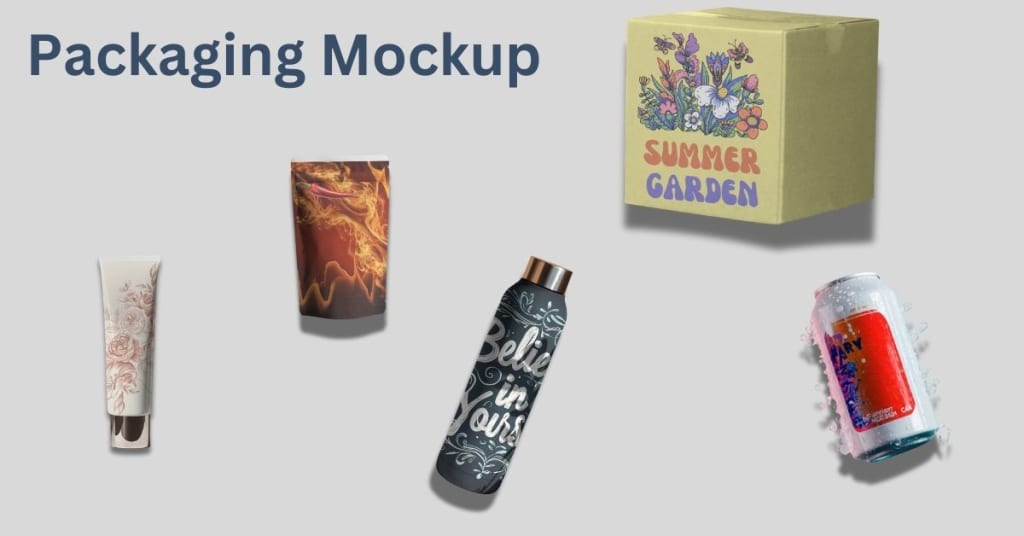
In today’s world, where first impressions matter more than ever, product packaging plays a big role in grabbing attention. But before a product hits the shelves or your online store, how can you see how it will actually look in real life?
That’s where packaging mockups come in.
If you’re a designer, small business owner, or someone who sells physical products, you’ve probably heard of packaging mockups. But what exactly are they, why are they useful, and how can you make your own?
In this guide, we’ll explain everything in a simple and clear way. No complicated terms or design jargon—just helpful tips and practical info.
What Is a Packaging Mockup?
A packaging mockup is a realistic model or preview of how your product packaging will look once it’s printed or produced. It’s like a visual sample that shows your design on the actual type of package—whether that’s a box, bottle, jar, pouch, or bag.
Mockups help you see what your design looks like in the real world before you spend money on printing or manufacturing.
There are two main types of mockups:
- Digital Mockups – These are created using graphic design tools or online mockup generators. You upload your design, and it gets placed onto a realistic packaging image.
- Physical Mockups – These are printed samples or prototypes, usually made for testing or presentations.
For most people, digital packaging mockups are the easiest and most cost-effective way to preview their packaging.
Why Are Packaging Mockups Important?
Let’s say you’ve just created a beautiful label for a coffee bag or designed a new box for your skincare brand. How do you know if the design will really stand out? Will the colors look right? Is the logo big enough? Does the text fit?
A packaging mockup helps answer all those questions.
Here’s why using a mockup is so helpful:
✅ Visual Preview
You can see your packaging in action—how it looks from the front, side, or even in someone’s hand.
✅ Saves Time and Money
Instead of printing samples over and over, you can make changes on your screen until it’s perfect.
✅ Client and Team Approval
If you're working with a client or team, mockups make it easier to show your ideas clearly and get feedback fast.
✅ Better Marketing
Mockups look professional and can be used in ads, websites, product launches, and social media—even before the real product is made.
✅ Stronger Brand Presentation
Good packaging mockups help tell your brand story and make your product more appealing to customers.
Types of Packaging Mockups
Packaging mockups come in many forms depending on the product. Here are some common ones:
1. Box Mockups

Used for items like electronics, cosmetics, gifts, food, and subscription boxes. Box mockups show your design on the front, sides, and top.
2. Bottle Mockups

Perfect for drinks, perfumes, lotions, and vitamins. Bottle mockups show how your label wraps around a round surface.
3. Label Mockups
Great for jars, containers, or even wine bottles. You place your design on a blank label and see how it fits.
4. Pouch and Bag Mockups
Often used for snacks, coffee, tea, or health products. They’re ideal for flexible packaging types.
5. Tube and Can Mockups
Used for products like chips, toothpaste, or ointments. These help with round or tall packaging formats.
6. Eco-friendly Packaging Mockups
With more brands going green, mockups for recycled boxes, compostable pouches, or paper wraps are becoming popular too.
How to Create a Packaging Mockup
There are two main ways to create your packaging mockup: using design software like Photoshop or using an online mockup generator.
📌 Option 1: Using Design Software (like Photoshop)
This is great for advanced users who want total control.
Steps:
- Find a packaging mockup PSD file online.
- Open it in Photoshop.
- Double-click the smart object layer.
- Place your design.
- Save and see it placed on the packaging.
Pros:
- High control
- Good for designers
Cons:
- Can be complex
- Requires software and skills
📌 Option 2: Using an Online Mockup Tool (like Mockey.ai)
This is perfect for beginners and non-designers.
Steps:
- Go to Mockey.ai
- Choose a packaging mockup style (box, bottle, pouch, etc.)
- Upload your design
- Adjust if needed
- Download the final mockup
Pros:
- Super easy and fast
- No design skills needed
- Free to use
- No downloads required
Cons:
- Limited customization compared to Photoshop
Best Choice for Most People: Use an online mockup tool like Mockey. It’s quick, simple, and completely free.
Where Can You Use Packaging Mockups?
Once you have your mockup, you can use it almost anywhere:
- On your online store (Shopify, Etsy, Amazon)
- In your social media posts
- For pitch presentations to clients or partners
- In your portfolio or Behance profile
- As part of your product launch campaign
- For label or design approvals
Mockups make your products look finished, polished, and professional—even if they haven’t been made yet.
Best Practices for Using Packaging Mockups
To get the best results, keep these simple tips in mind:
✅ Use high-resolution images – Your design should be clear and sharp
✅ Pick the right scene – Match your mockup with your product’s purpose or setting
✅ Keep it realistic – Choose mockups with natural lighting and shadows
✅ Stick to your brand colors – Make sure your mockup stays on-brand
✅ Show multiple angles – Display the front, back, and sides when possible
Where to Find Packaging Mockups
You can find great packaging mockups on these platforms:
- Free Websites – Freepik, Unblast, Mockey.ai
- Paid Platforms – Creative Market, Envato Elements
- Mockup Generators – Mockey.ai (free and easy), Placeit (paid)
- Custom Design Services – Hire a designer for unique or branded mockups
For most people, starting with a free tool like Mockey is more than enough!
Final Thoughts
Packaging mockups may seem small, but they make a huge difference in how your product is seen. They help you preview, improve, and present your design before it goes into production.
Whether you’re showing your idea to a client, launching a product, or building your brand online, a great packaging mockup will make you look more professional and prepared.
And the best part? You don’t need any fancy tools or experience. Just head over to Mockey.ai, upload your design, and see your packaging come to life in seconds.
So go ahead—give it a try, and make your packaging pop!
About the Creator
Keep reading
More stories from Backlink Wizard and writers in Photography and other communities.
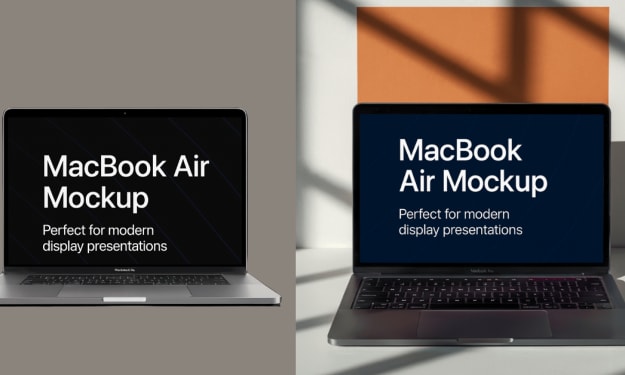
How to Showcase a Website Using MacBook Mockups
If you’ve created a website and want to show it off in a more eye-catching way, using a MacBook mockup is one of the best things you can do. Instead of sharing just a plain screenshot, you can place your website design into a stylish MacBook frame — it instantly makes your work look more professional, real, and ready to impress.
By Backlink Wizard10 months ago in Photography
How eCommerce Product Photo Editing Reduces Returns & Increase Conversions?
In eCommerce, the quality of product images plays a pivotal role in customer decision-making and return rates. A visual mismatch—where online representations don’t match the actual product—can lead to significant customer dissatisfaction and increased returns. Inaccurate colors, low image quality, and insufficient detail contribute to expectation gaps that undermine the customer experience.
By Brown Walsh17 days ago in Photography
Belle of the Bayou
Bad move, cher. Not just the slip of her kitten heel on the rainy February cobblestones in the Fourth Ward. She got caught snooping. Detective Deleon clucked and strutted like a rooster in his rush to clear her from the scene, waving cigar smoke to and fro as he gesticulated amid the thick air of the speak easy. An experienced crime reporter, Marie knew better than to let the coppers catch her on the wrong side of the line, but curiosity had gotten the better of her.
By Maia Gadwall the metAlchemist7 days ago in Fiction

Comments
There are no comments for this story
Be the first to respond and start the conversation.