
Highly Rated Printers On The Market
Printer Article


In a world where digital convenience reigns, printers remain a vital tool for both home and office use—whether it’s printing important documents, scanning old photographs, or copying school projects. As technology evolves, modern printers have transformed into smart, efficient, and user-friendly devices that can do much more than simply print.
For home users especially, the demand for all-in-one printers that are compact, wireless, and affordable has never been higher. Take the HP Envy 6120e All-in-One Printer, for example—perfect for home use, offering vibrant colour prints, wireless functionality, automatic 2-sided photo printing, and even a 3-month Instant Ink subscription for added convenience. Similarly, the Canon PIXMA TS5150 Series caters to households looking for seamless smartphone printing and versatile functionality in a sleek package. Meanwhile, the Epson Expression Home XP-2200 is a reliable 3-in-1 printer offering Wi-Fi connectivity, crisp 1440dpi resolution, and even a 3-month ReadyPrint Flex trial, making it a great pick for everyday tasks.
With so many options on the market, choosing the right printer can feel overwhelming. This article breaks down the different types of printers, key features to consider, and what makes certain models stand out—so you can find the perfect fit for your home or work setup.
The HP Envy 6120e All-in-One Printer is a versatile and user-friendly device designed to meet the printing, scanning, and copying needs of home users. Combining sleek aesthetics with practical features, it offers a reliable solution for everyday tasks.

Key Features
• All-in-One Functionality: Print, scan, copy, and send mobile faxes, catering to a variety of home office requirements.
• High-Quality Printing: Delivers sharp text and vibrant images with a print resolution of up to 4800 x 1200 optimized dpi for color and 1200 x 1200 rendered dpi for black and white documents.
• Wireless Connectivity: Equipped with dual-band Wi-Fi (802.11a/b/g/n/ac) and a Hi-Speed USB 2.0 port, facilitating easy printing from smartphones, tablets, and computers.
• User-Friendly Interface: Features a 2.4-inch colour capacitive touchscreen for intuitive navigation and control.
• Automatic Two-Sided Printing: Supports duplex printing, helping to conserve paper and reduce environmental impact.
• HP Smart App Integration: Allows for seamless setup and management of printing tasks directly from mobile devices.
• HP+ Enabled: Provides access to exclusive features, including 6 months of HP’s Instant Ink subscription service, advanced app functionalities, and enhanced security measures.
• Sustainable Design: Constructed with 60% recycled plastic, aligning with eco-friendly practices.
Performance and Usability
The HP Envy 6120e offers print speeds of up to 10 pages per minute (ppm) for black and white documents and up to 7 ppm for colour prints. While it may not be the fastest printer in its category, it compensates with high-quality output, producing crisp text and detailed images. The printer’s compact dimensions (433 x 361 x 136 mm) and lightweight design (5.13 kg) make it suitable for various home environments.
Ink Management and Cost Efficiency
The printer is compatible with HP’s Instant Ink service, which can lead to significant savings on ink costs. By subscribing to this service, users can receive ink deliveries based on their printing habits, ensuring they never run out of ink unexpectedly.
Conclusion
The HP Envy 6120e All-in-One Printer stands out as a reliable and efficient choice for home users seeking a multifunctional device. Its combination of quality printing, user-friendly features, and sustainable design makes it a valuable addition to any home office setup.
The Canon PIXMA TS5150 Series is a compact and affordable all-in-one inkjet printer designed for home users seeking reliable performance and modern connectivity. With its sleek design and user-friendly features, it caters to everyday printing, scanning, and copying needs.

I Key Features
• All-in-One Functionality: Print, scan, and copy with a single device, streamlining your home office setup.
• High-Quality Printing: Achieve sharp text and vibrant images with a maximum print resolution of up to 4800 x 1200 dpi.
• Wireless Connectivity: Enjoy seamless printing from your smartphone or tablet using Wi-Fi, Bluetooth, Apple AirPrint, Google Cloud Print, and the Canon PRINT app.
• User-Friendly Interface: Navigate effortlessly with a 6.2 cm colour LCD screen and intuitive controls that mirror the Canon PRINT app.
• Automatic Two-Sided Printing: Save paper and reduce waste with built-in duplex printing capabilities.
• Dual Paper Feeds: Handle both plain and photo paper simultaneously with separate rear and front paper trays.
• Cost-Effective Ink Options: Utilize optional XL ink cartridges to print more pages and reduce the frequency of replacements.
Performance and Usability
The PIXMA TS5150 delivers print speeds of approximately 13 pages per minute (ppm) for black and white documents and 6.8 ppm for colour prints. Its flatbed scanner offers an optical resolution of 1200 x 2400 dpi, ensuring detailed scans of photos and documents.
With a compact footprint measuring 425 x 315 x 147 mm and weighing around 6.5 kg, the printer fits comfortably in various home environments.
Conclusion
The Canon PIXMA TS5150 Series stands out as a practical and efficient choice for home users seeking an all-in-one printer with robust features and wireless convenience. Its combination of quality output, ease of use, and cost-effective operation makes it a valuable addition to any household.
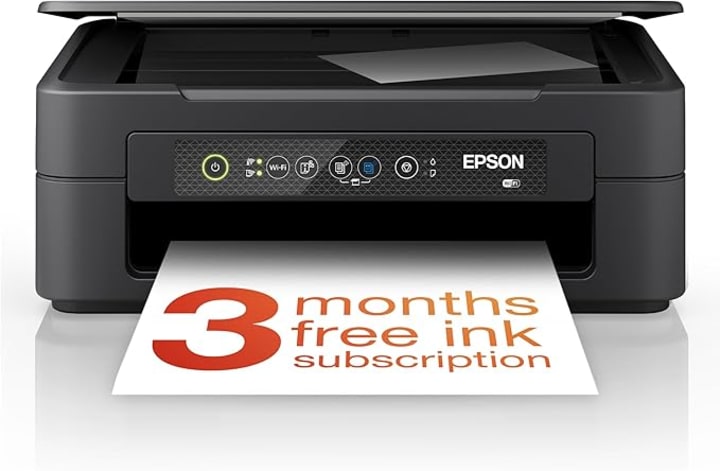
The Epson Expression Home XP-2200 is a versatile 3-in-1 inkjet printer designed for home users seeking an affordable and space-saving solution for everyday printing, scanning, and copying tasks. With its sleek design and user-friendly features, it offers reliable performance for various home printing needs.
Key Features
• All-in-One Functionality: Combines printing, scanning, and copying capabilities in a single compact device, making it ideal for home use.
• High-Quality Printing: Delivers sharp and vibrant prints with a maximum resolution of up to 5760 x 1440 dpi, ensuring detailed documents and photos.
• Wireless Connectivity: Supports Wi-Fi and Wi-Fi Direct, allowing seamless printing from smartphones and tablets using the Epson Smart Panel and Creative Print apps.
• Compact Design: With dimensions of 390 x 300 x 146 mm and a weight of 4 kg, it fits easily into various home environments without occupying much space.
• Individual Ink Cartridges: Utilises Epson’s four-colour Pineapple 604 ink set, allowing users to replace only the colour that runs out, reducing waste and cost.
• ReadyPrint Flex Subscription: Offers a 3-month free trial of Epson’s ReadyPrint Flex ink subscription service, providing automatic ink deliveries before you run out.
Performance and Usability
The XP-2200 offers print speeds of up to 8 pages per minute (ppm) for black and white documents and 4 ppm for colour prints, suitable for typical home printing tasks. Its flatbed scanner provides an optical resolution of 1200 x 2400 dpi, ensuring clear and detailed scans.
The printer supports manual duplex printing and can handle various paper sizes, including A4, A5, A6, B5, and envelopes. Its 50-sheet input tray accommodates standard paper, while a separate tray holds up to 10 photo sheets.
Conclusion
Choosing the right printer for your home can make everyday tasks smoother, whether you’re printing school projects, scanning documents, or copying family photos. The HP Envy 6120e, Canon PIXMA TS5150 Series, and Epson Expression Home XP-2200 each offer unique strengths tailored to different needs and preferences. The HP Envy 6120e stands out for its smart features and photo printing capabilities, the Canon PIXMA TS5150 shines with user-friendly smartphone connectivity and dual paper feeds, while the Epson XP-2200 is a compact, budget-friendly option with solid print quality and efficient ink usage.
The Ultimately, the best choice depends on your specific requirements—whether it’s wireless convenience, photo quality, compact design, or affordability. By understanding what each model offers, you’ll be better equipped to invest in a printer that complements your home setup and keeps your workflow running smoothly.
About the Creator
Keep reading
More stories from Kyle Ross-Waddell and writers in Photography and other communities.
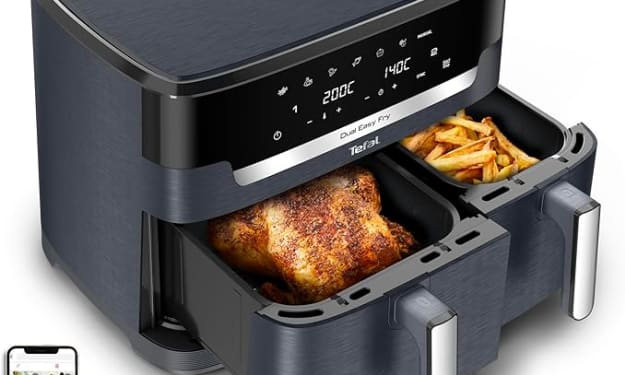
Top 3 Rated Air Fryers On The Market
Air fryers have taken the kitchen appliance world by storm, offering a healthier, faster, and more convenient way to prepare your favorite meals. Whether you’re looking to crisp up frozen fries, roast veggies, or even bake a batch of cookies, these compact devices are designed to do it all — often without a drop of oil. One of the standout features of modern air fryers is their versatility, with many models offering multiple cooking modes and generous capacities to suit various household sizes.
By Kyle Ross-Waddell11 months ago in Families
Leavie Scott
ORDER HERE Chicago – A Radiant Urban Masterpiece by Leavie Scott Arts & Culture Review – Feature Story In his striking new work Chicago, photographer Leavie Scott captures the soul of the Windy City with a level of vibrancy and emotional resonance that is impossible to ignore. The image immerses viewers in a dazzling skyline bathed in mesmerizing tones of purple, pink, and gold—a palette rarely seen in traditional urban photography and one that instantly distinguishes Scott’s artistic voice.
By Organic Products 5 days ago in Photography
Curious Photography Tips Every Beginner Should Try
Have you ever wondered why two people using the same camera can produce completely different photos? The answer often lies in how well the photographer understands the camera itself. For beginners, cameras can seem filled with confusing buttons, dials, and settings. But what if those settings are actually the key to better photos?
By Craig Spiesman3 days ago in Photography



Comments
There are no comments for this story
Be the first to respond and start the conversation.