
Get Creative with PhotoCut's Book Cover Maker
Get Creative with PhotoCut's Book Cover Maker

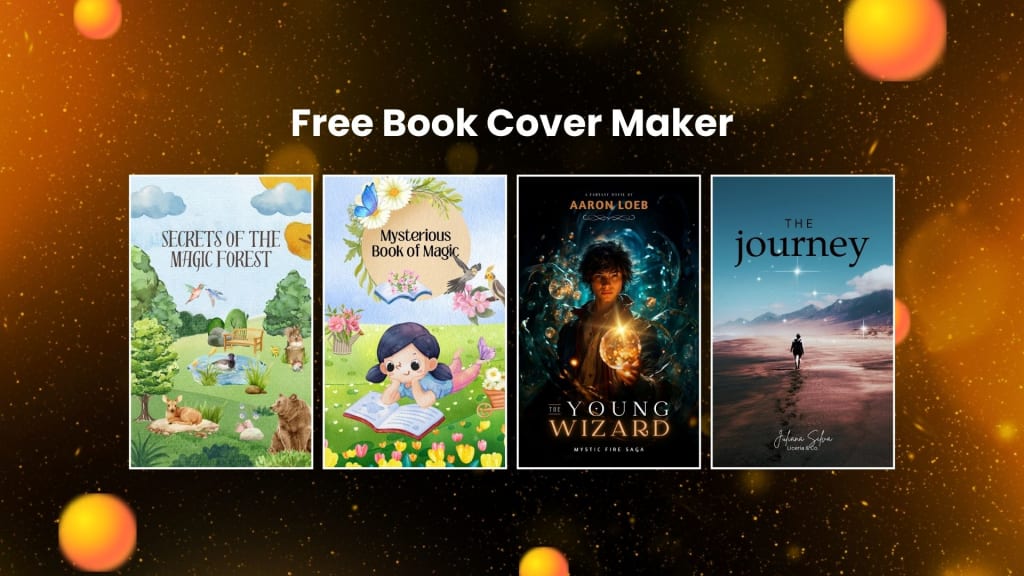
Among all the various important steps required in promoting the book and eventually drawing the target audience, this one is pretty essential: design an unforgettable cover for your book. A great cover often foretells what the actual book content holds inside, getting people interested to browse through more. With PhotoCut’s Book Cover Maker, you do not need prior knowledge of a specific design application. In this elaborate tutorial, we are going to guide you step by step into the benefits and features of designing an amazing book cover using the creative tools on PhotoCut. Be it creating a cover for a foodie book, a romance novel, a science fiction tale, or something else, PhotoCut has the tools for the job!
Why Your Book Cover Matters
Thus, it's crucial to understand the importance of your book cover to its success before discussing how to utilize PhotoCut's book cover creator. The first thing prospective readers see about your book is its cover. Frequently, their attention is initially drawn to the book's visual attractiveness, which piques their interest and prompts them to click on the eBook link or read the book.
Similar to the saying, "You can't judge a book by its cover," an eye-catching, captivating cover sets expectations for what's within. For instance:
- Genre Representation: A cover that portrays the theme and genre of your book can show readers what type of story or information they should expect. Whimsical and mystical imagery can be applied to a fantasy novel, while a self-help book can be placed with a clean and minimalist design.
- Professionalism: A cover design is an indication to the reader that your book will be professional, conveying a sense of quality that may give it more credibility.
- Differentiation: With millions and millions of books floating around a market, book cover artwork is in the process of differentiating and helping your book be noticed on such a level as Amazon.
With PhotoCut's user-friendly book cover maker, you don't need to hire a professional designer for a cover that will show your book. Let's discover how you can use this fantastic tool to create a beautiful cover.
Features of PhotoCut’s Book Cover Maker
Choose from a Variety of Templates
The popularity of PhotoCut's book cover generator is mostly due to the abundance of templates available, which may be altered based on the genre of the book. Finding a template that suits your style and vision is therefore simple, regardless of the genre your book is in. PhotoCut provides templates for many genres, including:
- Food & Cooking Books: Select templates that have images of appetizing dishes or ingredients. This will work well for cookbooks or culinary guides.
- Romantic Novels: These are lovely and romantic themes that create an atmosphere of love, passion, and emotion. You can edit these templates according to the theme of your love story.
- Science Fiction & Fantasy: Futuristic cosmic designs or fantasy-inspired ones that take you away to another world and help you set the right mood for an adventure beyond imagination.
- Self-Help & Business Books: Professional clean designs with your message or expertise. This is ideal for non-fiction books where the author writes more on personal growth, motivation, or business approaches.
- Mystery & Thriller: Dark Suspenseful and engrossing templates that draw the reader's interest and create suspense.
PhotoCut's template library is flexible and easily customizable, allowing you to start with a basic design and personalize it according to your book's needs. This will help you get started in no time without having to create everything from scratch.
Customize Your Design with Ease
Creating a book cover is pretty easy when you use the tool provided by PhotoCut. The website was created to be user-friendly so that you have ample time for creativity without complicating the design process. Whether you are a designer, PhotoCut also provides an interface that is not hard to understand, which allows you to step through the process of designing a book cover.
Some of the customization options include:
- Text Editing: Modify the book cover's text's typefaces, size, color, or style. Include whatever text you choose, like the book's title, your name as the author, a subtitle, and more.
- Image Adjustments: You may use PhotoCut's extensive collection of royalty-free stock photographs, drawings, and graphics, or you can contribute your images. If you are unhappy with the photo's backdrop, PhotoCut employs artificial intelligence (AI) to eliminate it, leaving you with a clear image for additional processing.
- Color Scheme: You may alter the cover's color scheme to fit your book's topic or mood. You may use PhotoCut's editing capabilities to create a cover that is vibrant and colorful or one that is more subdued and simple.
- Layering Elements: Add elements such as shapes, icons, borders, and more to layer and make your book cover visually appealing. With PhotoCut, you can quickly layer and edit these elements so that your final design is perfectly balanced.
These customization tools ensure that you're able to make a book cover that is truly unique to your book.
Access Royalty-Free Images and Fonts
Probably, one of the hardest things about a book cover is to get the appropriate images and fonts. However, PhotoCut eases that by offering you millions of royalty-free stock images, graphics, and fonts, thus making copyright issues out of your problem while using images or fonts in your design. Explore thousands of images and fonts that come with diversity so that you get to select a suitable visual and typography combination for your book.
You would get high-resolution photographs, illustrations, or abstract graphics, depending on what you require to give the cover a professional look. Its fonts are also included in the library, with an emphasis on readability and impact, ensuring that the perfect typography for the book title and text will be picked.
Generate stunning pixel art using PhotoCut’s AI Pixel Art Generator.
Smart Resizer Tool
Now that you have finalized your design, PhotoCut can easily download your book cover in different file formats. If you are designing an eBook cover, you can download the file in a high-resolution format optimized for digital purposes. The smart resizer tool in PhotoCut also enables resizing the cover for various uses such as promotions on social media, printing, or any marketing materials. Whether you need a high-quality print version or a smaller digital version, PhotoCut can handle it with ease.
Create a cool Instagram profile picture using the best tips and tricks.
Share Your Design
After creating your book cover, it’s time to share your masterpiece! PhotoCut makes it simple to download and share your design across multiple platforms. You can easily save your book cover in high-resolution format for printing or use it as an eBook cover. Moreover, PhotoCut allows you to share your design on social media directly from the platform, helping you promote your book before its release.
Color correct your photos using PhotoCut effortlessly.
Step-by-Step Guide to Creating a Book Cover with PhotoCut
Creating your book cover using PhotoCut’s book cover maker is straightforward. Follow these simple steps:
Step 1: Visit PhotoCut.com and Create a New Design
Click the "Create a Design" option after visiting PhotoCut.com. Choose the "Book Cover" template layout while you're in the design interface. A range of pre-made templates created for various genres will be shown to you for selection.
Step 2: Choose a Template
Look through the vast library of book cover templates available on PhotoCut. Whether you're writing a recipe, non-fiction book, or novel, there's a template that fits your style and genre. Click on the one that best fits your vision to bring up the customization page.
Step 3: Customize Your Cover
It's here that the fun starts! PhotoCut offers user-friendly tools that make it easier for you to change the template as you see fit. Alter the text, replacing it with your book title, author's name, or other text if desired. Use your favorite fonts, sizes, and colors. You can also upload your pictures or use some free stock images and graphics.
Step 4: Refine Your Design
Now, after all your changes, step back and evaluate your design. Tweak the positioning of elements, the colors, and the correct alignment of everything. PhotoCut's tools are designed for moving and resizing elements to end up with a final, highly professional look.
Step 5: Download and Share
Once you have finalized your design, download it in high-resolution format. For resizing, there is a smart resizer that can be applied to different formats for various social media platforms. You can share your design right on social media to start getting the word out about your book before it hits the shelves!
Conclusion
The book cover maker by PhotoCut is the tool that every author needs to give their book the professional and attention-grabbing cover it deserves. With its vast template collection, unique design tools, and royalty-free fonts and pictures, PhotoCut helps you realize your imaginative ideas. Regardless of your level of experience as a designer or as a first-time writer, PhotoCut's intuitive interface enables you to build the ideal book cover that appeals to you and potential readers. Begin designing your dream book cover now and make it the book that everyone wants!
Turn your photos into artwork using PhotoCut’s AI Art Generator.
FAQs
Q1. What are the best tips for designing a book cover?
Ans. Here are a few guidelines while designing an attention-grabbing book cover:
- Match the Genre: your book's genre will be well-projected with this cover. This is very generic, for instance, a fantasy novel can be bolder and full of colors whereas in thriller can include dark or dimly lit photos.
- Keep it Simple: Do not overcrowd the cover with too many elements. Much of the time, a clean and simple design is more effective.
- Key Elements: Ensure that the title, the name of the author, and other key design features stand out.
- Readability: Choose fonts that are readable even in thumbnail size.
Q2. What are the best fonts for book covers?
Ans. Sans-serif fonts, such as Tahoma and Arial, are great choices for a clear and readable look. For a more classic style, you can experiment with serif fonts. Be sure to choose fonts that align with your genre and tone.
Q3. Do I need any design experience to create a book cover?
Ans. No, you don't need design experience! PhotoCut's book cover maker is simple and intuitive, so anyone can make a professional-quality cover in minutes, without a single prior design experience.
Q4. How can I create a book cover for free?
Ans. PhotoCut's book cover maker provides you with templates and other tools for creating eBook or print book covers. You can even create your cover using royalty-free images and fonts that are provided to them for free, thus easy to get started without any upfront costs.
Q5. How do I resize my book cover for different platforms?
Ans. Easy to resize from PhotoCut on smart resizer for your various book covers because it allows resizes easily either for the eBook version, social networks, or your printed copy depending on what output you are interested in.
About the Creator
PhotoCut
AI Photo Editing Tool - Remove or Change your Background & Enhance Product Photos
Keep reading
More stories from PhotoCut and writers in Photography and other communities.
Create a Transparent Digital Signature with PhotoCut
Nowadays, it is the world of technology; signing papers online is needed for everyone, for personal and professional purposes. One efficient and streamlined method for this would be a clear digital signature. PhotoCut gives an easy, quick solution to eliminate the background of your signature image, resulting in a clean, professional, and versatile digital signature. In this article, we will take you through how to create a transparent signature with PhotoCut's online AI-powered tool and explain the various benefits and tools involved in background removal.
By PhotoCut11 months ago in Photography
Why Printed Photographs Still Matter: The Art and Value of Preserving Memories in Print
In a world where most photographs live on phones, laptops, and cloud storage, it is easy to assume that printing pictures is a thing of the past. Yet something meaningful gets lost when memories stay locked inside a device. A photograph printed on high quality paper carries a weight and warmth that no screen can fully replicate. It can be held, shared, framed, and passed down through generations.
By The Iconabout 4 hours ago in Photography
The Gold Tone (Orotone) Technique
She picked it up from a dusty shelf at an estate sale, thinking it was just an old frame. Then the light caught it. The image glowed, not like a print, not like a painting, but like something that seemed to carry its own inner warmth. That was her first encounter with an Orotone, and she bought it without asking the price.
By CurlsAndCommas4 days ago in Photography


Comments
There are no comments for this story
Be the first to respond and start the conversation.