
Comparison between Vocal Media and Medium
which is better?
They look very similar. I'd like to try them both and compare their pros and cons.
First, when writing an article, vocal.media shows "Submit for review will become available after you add a title, subtitle, plus a featured image, video, and content." That seems to mean you must write a subtitle and add an image before you can publish your article. I add an image and a subtitle, then click the "Save changes" button, but do not see the "Submit for review" or "Publish" button. Do I need to add a video? That would be a great trouble for me. I don't think Medium require its users to add a subtitle/image/video to be able to publish an article. Finally, I see the "Submit for Review" button replaces the "Save changes" button, which means you do not need to add a video. But I'm still not clear if it requires a subtitle and an image. g
Second, on the editing tool bar, there is a button to create an unordered list and a button to create an ordered list. This is better than Medium as it has so such options although you can do it using other methods. There is also a heading button to make a paragraph be a header. Medium has also such functionality and it has two buttons to make medium-large headers and large headers.
Third, on Medium, you can add an alt text and a caption for an image, but on Vocal.media, it seems you can only add a caption for an image.
Fourth, when I try to submit this article for a review, it shows the following information:
Not enough words
This community requires stories with at least 600 words. Your story might be rejected because it has not reached the minimum word count.
and I find you must choose a related community for this article to be reviewed. Medium does not require you to submit your article for a review although I think it also has some kind of review mechanism to enure the quality of articles. And this submission for review step caused some trouble to me. As I decided to go back to add some words to my article to reach the minimum 600 words requirements, I found after clicking the "Save change" button, the "Submit for review" button did not show up. After investigation, I found the subtitle I added disappeared and the caption I added to the feature image also disappeared. But I remember I clicked the "Save changes" button after adding them so this should be a bug. After adding back the subtitle and the image caption and clicking the "Save changes" button, the "Submit for review" showed up finally.
Fifth, when you type the content of your article, vocal.media shows the number of characters you have typed at the bottom of the composition page. This is a great advantage compared to Medium. Users can easily know how much content they have written.
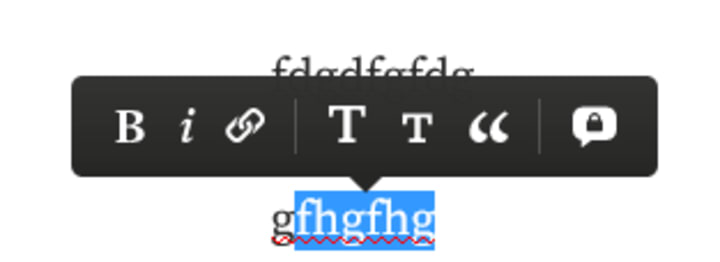
Sixth, Medium has a functionality that adds private notes for some text, i.e, you highlight some text and click the lock icon on the editing toolbar, then add some notes for the selected text. These private notes are not publically seen. Vocal.meida has not such functionality.
Seventh, the review system of vocal turns out not accurate and efficient. I submitted this article for a review, and the article was rejected for the reason of potential spam or not disclosure of AI content, which is nonsense. I sent emails to [email protected] for a re-consideration but got no reply.
Conclusion, both of vocal.media and Medium are good publishing platforms with almost the same functionalities. There are some new features of vocal.media such as submission for review. But the new features seems not mature yet. Vocal is lack of some features such as the notes-adding functionality of Medium. Will add more to this article when I get more experience of using vocal.media.
About the Creator
Keep reading
More stories from writers in Men and other communities.
Shutter Island Ending Explained: The Hidden Truth That Changes Everything
When Shutter Island premiered in 2010, audiences expected a gripping psychological thriller. What they received was something far more complex. Directed by Martin Scorsese and starring Leonardo DiCaprio, the film quickly became famous for its haunting atmosphere, mysterious storyline, and an ending that sparked endless debate among viewers.
By Lukáš Hrdlička2 days ago in Men
Blood Diamond: The Shocking Truth Behind the Gems That Fueled a War
When Blood Diamond premiered in 2006, audiences were confronted with a story that combined thrilling action with the harsh realities of modern conflict. Directed by Edward Zwick and starring Leonardo DiCaprio, Djimon Hounsou, and Jennifer Connelly, the film explores the devastating impact of conflict diamonds in Sierra Leone during the 1990s. Beyond its adventure and suspense, Blood Diamond reveals how greed, corruption, and human suffering intersect in ways that few viewers could imagine.
By Lukáš Hrdlička2 days ago in Men
A More Human Vocal
When we launched Vocal nearly a decade ago, the world was a very different place. LLMs did not exist, and stories were created one at a time by people sitting down to write, revise, and share something personal. Many of our assumptions about publishing, trust, and participation were built for a world where effort and output were inseparable.
By Justin @ Vocal7 days ago in Resources
TUS NUA - ch 53
TUS NUA – ch 53 New Beginnings – Mia and Midnight (*)(*)(*) Finola knew Ali’s brother-in-law needed to put his mind at rest. She fed her arm through his and led him outside. “We’ll sit here. If you like, I can put a block around us so our conversation will be private.”
By Margaret Brennan3 days ago in Fiction



Comments
There are no comments for this story
Be the first to respond and start the conversation.