
The ultimate place to find, edit pictures online
The search for the perfect website for finding free high-quality images, and editing it online ends right here!


A picture speaks a thousand words. And every one of us wants a good image for our blogs and website. The question is where to get quality images, and how to edit the images.
Finding a good image for the blog and website is sometimes a difficult task. We need a high-quality image that can relate well with the content. Often many of us just Googled and use the image whatever throws up on Google search. Though this may be the easiest way, it can sometimes land you in legal copyright issues.
Even after finding that great image, we sometimes need to edit it, maybe add some texts, crop, remove backgrounde, etc to blend well with the website design or with your blog post.
There are many great software like Photoshop for editing your pictures. However, many of us are not skilled with Photoshop and every one of us may not have the software.
The alternative option is to find for online image editing tools where you can access it from anywhere. There are many online image editing tools and services. However, I mostly use the following services for my websites and blogs because of its features, functionality, and ease of use.
But wait, before we jump to photo editing tools, let us find out where to get high-quality images for free, like really free and where you can use it for commercial use as well.
Yes, such websites exist! S
So here are my go-to places for finding great images!
UNSPLASH
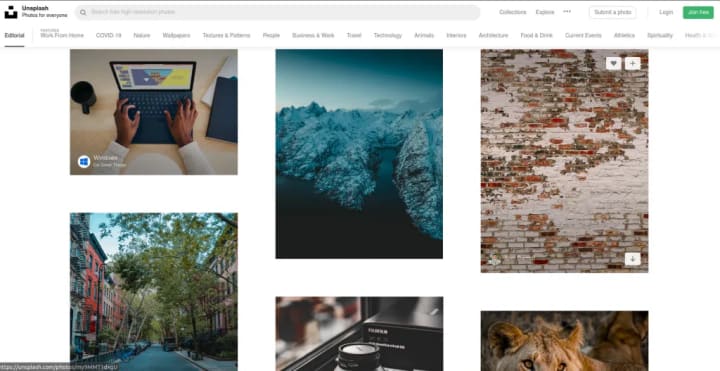
My first go-to source for finding awesome hi-definition pictures to use on my website is Unsplash.
Well, Unsplash needs no introduction as it is nicely integrated with Vocal. But for those who are news to Unsplash, the website has thousands of impressive photos from photographers from around the world, which you can use it for free!
Here’s what the Unsplash license says
All photos published on Unsplash can be used for free. You can use them for commercial and noncommercial purposes. You do not need to ask permission from or provide credit to the photographer or Unsplash, although it is appreciated when possible.
More precisely, Unsplash grants you an irrevocable, nonexclusive, worldwide copyright license to download, copy, modify, distribute, perform, and use photos from Unsplash for free, including for commercial purposes, without permission from or attributing the photographer or Unsplash. This license does not include the right to compile photos from Unsplash to replicate a similar or competing service.
PIXABAY
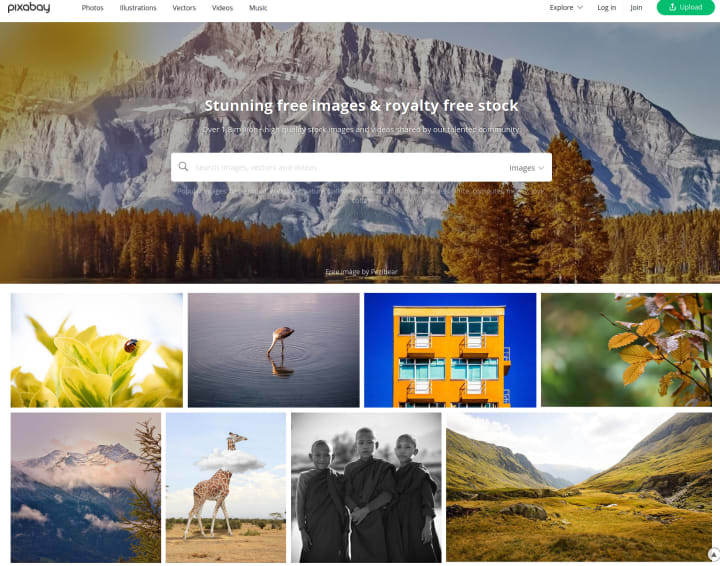
Pixabay is a vibrant community of creatives, sharing copyright free images and videos. All contents are released under the Pixabay License, which makes them safe to use without asking for permission or giving credit to the artist - even for commercial purposes.
As per Pixabay License, you can use the content
- All content on Pixabay can be used for free for commercial and noncommercial use across print and digital, except in the cases mentioned in "What is not allowed".
- Attribution is not required. Giving credit to the contributor or Pixabay is not necessary but is always appreciated by our community.
- You can make modifications to content from Pixabay.
However Pixabay License doesn't permit you to
- Redistribute or sell someone else's Pixabay images or videos on other stock or wallpaper platforms.
- Sell unaltered copies of an image. e.g. sell an exact copy of a stock photo as a poster, print or on a physical product.
- Portray identifiable people in a bad light or in a way that is offensive.
- Use images with identifiable brands to create a misleading association with a product or service.
PEXELS

Another great website where you can find high-quality images for free is Pexels.
As per Pexels license, all photos and videos on Pexels are free to use. Also, attribution is not required. Giving credit to the photographer is also not required. You are also allowed to modify the photos and videos from Pexels. You can read the license here
Now that we know where to get those high-quality images, it's time to move on to the second part. The editing Part!
Though many professionals use high-quality image editing software, for many of us, a simple editing tool is enough to get the job done.
Here are my favorite online editing websites that I have been using for quite some time.
PIXLR

I have been using Pixlr for quite a long time. Whether for a simple job of cropping an image or even to make a logo, this website has been very helpful.
Pixlr is a free online photo editor right in your browser. It has an intuitive photo editing with AI-powered tools for quick and professional edits. Pixlr editor works with almost any image format such as PSD (Photoshop), PXD, JPEG, PNG (transparent), WebP, SVG, and more.
Pixlr comes with two powerful editor options. Pixlr X with simpler functions and Pixlr E for advanced use.
Pixlr also comes with an impressive background removal tool. It helps you remove a background in just one click!
REMOVE.BG

Talking of removing image background, here's another great website that gets the job done pretty well.
I often struggle with Photoshop to remove the background of the picture. Well, after I came to know about this website, I have been using it for almost all my background removal works.
This website gets things done quickly and effectively. In just a matter of seconds, your image background will be automatically removed without compromising on the quality.
Go check it out for yourself!
And let me know if you find these websites helpful!
ps: Find my blog useful? Grab me a coffee for my next blog post!
About the Creator
Shimray
Midnight Blogger | Tea is ❤️ |
I write about Tech, and sometimes about life.
And a little bit of Poetry.
Review of 'Man on the Run'
My wife and I saw Man on the Run, a nearly 2-hour documentary on Amazon Prime, about Wings, Paul McCartney's group that flew around the world from shortly after The Beatles broke up in early 1970 to shortly after John Lennon was murdered at the end of 1980, making a Beatles reunion forever impossible.
By Paul Levinson7 days ago in Beat



Comments
There are no comments for this story
Be the first to respond and start the conversation.