
The New DJI Mic 3 Landed in My Bag. Here’s What It’s Actually Like to Use
I was filming a craftsman in his workshop, the light was perfect, his stories were gold, and I was floating on a cloud of directorial bliss...


I’ll never forget the first time I lost an entire interview to bad audio. I was filming a craftsman in his workshop, the light was perfect, his stories were gold, and I was floating on a cloud of directorial bliss. Then I got back to my computer. A faint, hissing hum—the shop’s industrial fan—had laid itself over his every word like a filthy blanket. My heart sank. No amount of fiddling with knobs and sliders could fully rescue it. That clip, and the lesson it taught me, is burned into my memory: great video is nothing without clean, clear, reliable sound.
That’s why my ears perked up when the news broke: the DJI Mic 3 released – up to 4 TX and 8 RX units, timecode support, no 3.5mm lav mic input. On paper, it’s a monster upgrade. But as someone who’s been burned before, I don’t trust spec sheets. I trust real-world use. So, after spending some time with this new little powerhouse, I wanted to share not just what it does, but what it feels like to use it when the pressure is on.
Goodbye, Cable Tangles? The Big Lavalier Question
Let’s address the elephant in the room first, because it’s the one thing everyone is talking about. The previous DJI Mic had a little 3.5mm port on its transmitter. You could plug in a tiny lavalier mic and hide it under a shirt for a super-clean, clothing-rustle-free sound. It was a pro feature on a consumer device.
The new DJI Mic 3… doesn’t have that. No 3.5mm lav mic input. Full stop.
My first reaction was a loud, “Wait, why?!” It felt like a step backward. But then I thought about it. How often did I actually use it? For my run-and-gun documentary work, almost never. The built-in mics on these units are so good that clipping it on a collar gives you broadcast-quality audio 95% of the time. Removing the port likely made the new transmitters even smaller, more reliable, and more waterproof.
But I feel for my fellow filmmakers who specialize in corporate interviews or narrative work where a hidden lav is non-negotiable. For you, this is a genuine drawback. It makes me wonder if DJI is planning a “Pro” version down the line. For now, if you absolutely need to hide a mic, this system might not be your first choice. It’s a conscious design trade-off, and whether it’s a dealbreaker depends entirely on your specific needs.
The Party Starter: Why 4 TX and 8 RX is a Game Changer
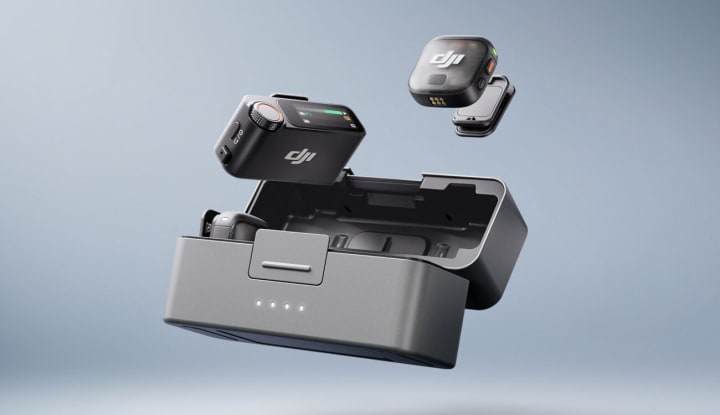
Now, let’s talk about the feature that has me genuinely excited. The original DJI Mic was a brilliant two-person system. The new one? It’s a full-blown audio production studio that fits in a small pouch.
The fact that the DJI Mic 3 now supports up to 4 TX and 8 RX units is not just a bigger number. It completely changes the kinds of projects you can tackle without renting a small fortune in gear.
Picture this: You’re shooting a roundtable discussion with four participants. The old you would be sweating, trying to manage multiple recorders, sync clips in post, and praying the audio levels were all set correctly. The new you, with a DJI Mic 3 system, simply places one transmitter in front of each person. One receiver on your camera records all four clean, isolated tracks simultaneously. No sync issues. No post-production nightmare. Just hit record and focus on directing.
Or imagine a wedding. One receiver on the main camera, one on the secondary. You have a transmitter on the groom, one on the officiant, and you can hand a third to the best man for the speech. Everything is recorded directly to the camera and backed up internally on each transmitter. That’s not just convenient; it’s peace of mind. You’re covered from every angle.
Finally Speaking the Same Language: Timecode Support
If the previous paragraph made your eyes glaze over, stick with me. Timecode support might sound like the most boring, technical thing in the world, but it’s arguably the most professional feature DJI has ever added, and it’s a secret weapon for saving hours of your life.
Here’s the simple version: Timecode is like a universal clock that you sync between all your devices—your camera, your audio recorder, your smartphone. Every single frame of video and audio gets stamped with the exact same time.
Before timecode, syncing audio from a separate recorder meant finding the clap of a slate or, heaven forbid, manually aligning waveforms by eye and ear. It worked, but it was slow and tedious.
Now, with the DJI Mic 3, the transmitter bakes this precise timecode directly into its internal recording. When you import your footage into editing software like Adobe Premiere Pro or DaVinci Resolve, you just click “Synchronize” based on timecode. The software instantly matches everything up, perfectly, across all your cameras and audio sources. It’s literal magic. For anyone working on multi-camera shoots or who values their editing time, this single feature is worth its weight in gold.
Smarter Sound: Your New Audio Assistant
Beyond the big headlines, DJI has packed the Mic 3 with intelligent features that feel like they were designed by filmmakers who’ve been in the trenches.
Adaptive Gain Control is like having an expert sound mixer sitting on your shoulder. There are two modes:
Automatic Mode is your savior at loud events. If someone suddenly laughs or shouts, it instantly prevents the audio from “peaking” or distorting. No more blown-out, unusable audio from unexpected outbursts.
Dynamic Mode is for controlled environments like a studio or a quiet interview. It gently rides the gain up and down to keep everyone’s volume consistent, so you don’t have to. The person who mumbles and the person who projects will sound like they’re speaking at the same level.
Then there are the voice tone presets (Regular, Rich, and Bright). Think of these as quick audio filters. Interviewing someone with a deep, booming voice that’s a little muddy? Try the “Bright” preset to add clarity. Talking to someone with a thin, high voice? The “Rich” preset can add a little warmth and body. It’s not a substitute for good mic placement, but it’s a fantastic tool for quickly tailoring your sound on the fly.
And the two-level noise cancelling? It’s not for cleaning up audio in post; it’s for eliminating constant, low-end background noise while you record—think the rumble of an air conditioner or a refrigerator. You can choose a strength setting and just forget about it.
The Safety Net: Why Internal Recording is Your Best Friend
I mentioned my early audio disaster. The DJI Mic 3 has a built-in safety net that would have saved me: dual-file 32-bit float internal recording.
Let’s demystify that. 32-bit float is a recording format so powerful that it almost doesn’t matter what your recording levels are set to. If your audio peaks, in a 24-bit system, it’s destroyed. In 32-bit float, you can often recover it perfectly in editing software. It’s basically “un-peakable” audio.
Each transmitter not only records this super-safe 32-bit file internally but also saves a second, algorithm-enhanced version. So you have a clean safety copy and a polished ready-to-use copy, all on the tiny device itself. With 32GB of storage, you can record for over 14 hours. This means even if your receiver disconnects or your camera cable fails, your audio is safe. This feature alone should let any filmmaker sleep soundly at night.
The Takeaway: Who Is This Actually For?
The DJI Mic 3 isn’t just an incremental update. It’s a statement. With the ability to scale to 4 TX and 8 RX units, rock-solid timecode support, and incredibly smart features like adaptive gain control, it’s bursting out of the “consumer” category and landing squarely in the hands of serious indie filmmakers, documentarians, and wedding studios.
The removal of the 3.5mm lav mic input will sting for some, and it’s a valid criticism. But for many others, the trade-off for a more streamlined, robust device is worth it.
This isn’t just a microphone; it’s an entire audio solution designed to remove worry and technical barriers. It’s for the creator who wants to focus on the story they’re telling, not the knobs they’re turning. It’s the tool that ensures the next time you capture a perfect moment, the sound will be just as perfect.
What about you? Does the new feature set solve your biggest audio headaches, or does the missing lav input hold you back? I’d love to hear what you think—share your own audio war stories and hopes for this system in the comments below. Let’s talk shop.
About the Creator
John Arthor
seasoned researcher and AI specialist with a proven track record of success in natural language processing & machine learning. With a deep understanding of cutting-edge AI technologies.
Keep reading
More stories from John Arthor and writers in Lifehack and other communities.
iPhone 17 pricing: Here’s the rumored cost for each new model
I remember the feeling. It was autumn, the air was getting crisp, and a new iPhone was on the horizon. I’d saved up, my current phone was starting to show its age with a battery that quit by 3 PM, and I was buzzing with that peculiar modern excitement. Then the keynote happened. The specs were dazzling, the camera features were mind-blowing, and then… they flashed the price on the screen.
By John Arthor5 months ago in Lifehack
Healthy Eating Habits Teenagers Wish They Knew Sooner
Teen years shape lifelong health. What teenagers consume nowadays affects their energy, mood, focus, confidence, and overall well-being. On the Talk Gen Z platform, we talk about real life. We prioritize meal options that accommodate hectic school days, sports, social activities, and limited finances. This guide discusses the healthy eating habits teenagers truly need, without lecturing, guilt, or extremes.
By Relationship Guide7 days ago in Lifehack
Fair Exchange, No Robberies
Dark Memoirs - Index There are at least two kinds of people in the world: those who write this half-arsed kind of intro to a story that looks to separate the rare and the norm, and those who realise it's an overused framing device and don't.
By Paul Stewart7 days ago in Chapters



Comments
There are no comments for this story
Be the first to respond and start the conversation.