
Review of the Skyview App
Professional version for IOS Cell Phone
The stars fascinate me from my earliest memories of camping and star gazing with my Dad. In college, I was lucky enough to be the teaching assistant for the Astronomy class. My main job was to set up and put up equipment. As this was dozens of years ago, my memory of the star names and constellations has dwindled in time to my sorrow. My grandchildren ask, and I would only know the big dipper and a few more common constellations. I remember my Dad saying how amazing the stars would be if they only came out once every 100 years, and we get to see them every night.
Recently, I traveled with family members to the Carolina Coast. On the beach, after dinner, we could see a planet. We were still determining which one it was, so my Uncle opened an app and said - Mars. I was surprised to get an identification that quickly. I gained a new obsession. The App is fantastic.
My Uncle often uses the Lite set-up, a free app version. I splurged for the pro edition, $1.99, with no in-app purchases. The disclaimer states that the user experience varies with different smart devices; however, I saw little difference between his iPhone's free version Lite and my IOS Samsung version, professional edition.
The SkyView App identifies all celestial bodies at any time in the past, present, or future. Are you curious to see what the sky looked like the night you were born? SkyView App will show you.
Detailed information on planets, stars, our moon, constellations, satellites, the International Space Station, and rocket bodies are easy to find. SkyView gives full details, such as the name, distance from the Earth, radius, and coordinates. I have identified many satellites in my backyard by pointing my phone camera at the slowly moving blinking dot across the dark sky.
The trajectory of the objects in space is easy to follow with a thin dotted line on the screen. It is easy to download. There is an Augmented Reality mode for a more realistic experience. I like to put my finger over the camera and see what is below the horizon. I can see what my friends in Asia are seeing. Outside, the App builds the constellations around the stars I see. I have a telescope, but I will stick with my SkyView App for my stargazing. The beauty of it is on cold nights or rainy days; I can still stargaze to my heart’s content at my convenience.
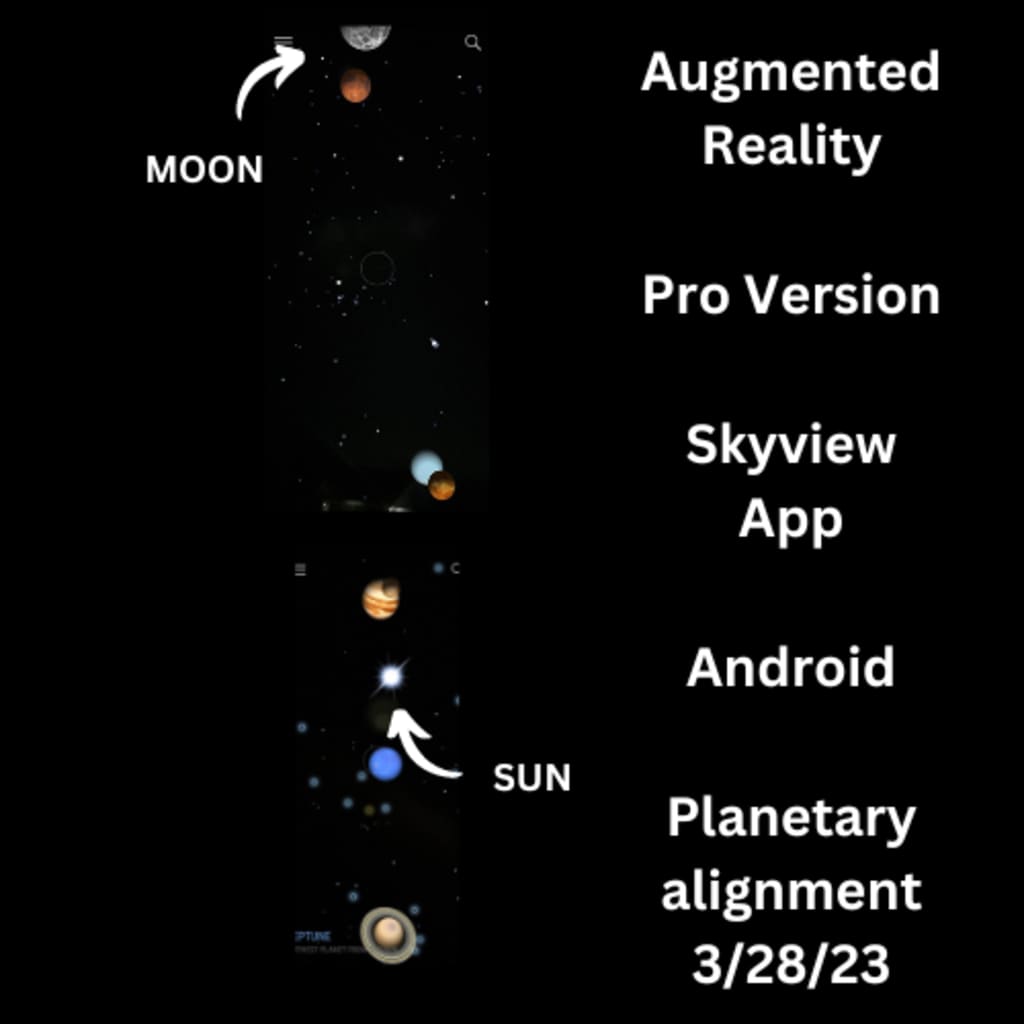
Recently, we were all agog about the planetary alignment. We could see the alignment of some of the planets with our naked eyes. The rest were below the horizon, out of sight. One thing I love about the SkyView app is that it shows me what is below the horizon. That is how I was able to make the picture with this story. I uploaded two screenshots using the Augmented Reality feature—one above and one below the horizon- into CANVA software. I combined the two to create this picture.
About the Creator
Cat Turner
My stories range from the whimsical to the down and dirty of a serial killer. A balanced left and right brain with my varied life experiences make me an eccentric bird. I have been blogging two years now. I hope you enjoy my stories.
Keep reading
More stories from Cat Turner and writers in Lifehack and other communities.
ETSY/PRINTIFY Business Model
Most of us are looking hard for side hustles. If we can set it up and let it run to generate passive income, that’s the best. Youtube videos showing how to make money seamlessly are prolific and pop up constantly on my social media. I watch, read, take notes, research, and consider multiple options. One that continuously pops up for passive income is using original designs and a print-on-demand service.
By Cat Turner3 years ago in Lifehack
Rustic Country Farmhouse Cottage Living Room Furniture Guide
Rustic Country Farmhouse Cottage Furniture is a popular interior trend that delivers a traditional aesthetic to a collection of furniture that is rich in history, as it provides the appearance that the furniture has been passed down through generations rather than recently purchased and manufactured. One of the most favourable factors of country farmhouse furniture is its large, rugged format, as it makes it highly durable and therefore long-lasting. Solid woods like oak and pine are typically used for construction; however, not only do they provide a strong and resilient structure, but they also celebrate the natural details in the wood, like knots, textured grains and cracks, all adding interest and character to each individual piece of furniture. Rustic Country farmhouse cottage living room furniture is an excellent choice for many living rooms, as it is known for its weathered finish that delivers layers of texture alongside uneven live edges and rough peeled paint finishes. This unique design trend is renowned for displaying a warm and welcoming aesthetic that instantly creates a relaxed and homely feel.
By Picture Perfect Home7 days ago in Lifehack
productivity principles
I’m going to show you the habits that will either make you angry or set you free. The choice is yours. Because honestly, most of you already know how to study a lot or work hard. Hardcore studying is not the reason you’re not where you want to be in life. The real reason is that you don’t understand how to take control of your time and squeeze everything possible out of it.
By Mahboubeh Fallahi8 days ago in Lifehack
Review of 'Man on the Run'
My wife and I saw Man on the Run, a nearly 2-hour documentary on Amazon Prime, about Wings, Paul McCartney's group that flew around the world from shortly after The Beatles broke up in early 1970 to shortly after John Lennon was murdered at the end of 1980, making a Beatles reunion forever impossible.
By Paul Levinson3 days ago in Beat


Comments
There are no comments for this story
Be the first to respond and start the conversation.