
Remove Noise and Echo from Audio in Seconds with AI Tools
Clean up background noise and echo from audio recordings quickly using AI audio tools. Learn how to get studio-quality sound without technical editing skills or costly gear.

In the digital age, audio clarity has become a necessity—not a luxury. Whether you’re recording a podcast, uploading a YouTube video, joining a virtual meeting, or creating course content, your voice needs to be sharp, clear, and distraction-free.
But reality often disagrees. Room echo, background noise, humming fans, barking dogs, and traffic sounds can ruin a great recording. If you’ve ever listened back to your audio and cringed at how unprofessional it sounds, you’re not alone.
Fortunately, there’s now a quick fix—and it doesn’t involve mastering complicated software or investing in expensive studio equipment. Thanks to AI audio tools, removing noise and echo from audio is easier and faster than ever.
Why Noise and Echo Are So Problematic
Let’s start with the problem. Unwanted noise and echo can:
Distract your audience
Reduce comprehension
Make content sound unprofessional
Hurt your credibility
Lead to higher bounce rates on videos or podcasts
Even the best content can be ruined by poor audio quality. While it's easy to assume that fixing these issues requires expensive hardware or expert-level editing knowledge, that’s no longer the case.
How AI Tools Are Revolutionising Audio Editing
Traditional audio editing required tools like Audacity, Adobe Audition, or Pro Tools—along with patience and technical know-how. You needed to manually apply filters, tweak EQ levels, and carefully isolate voice from background sounds.
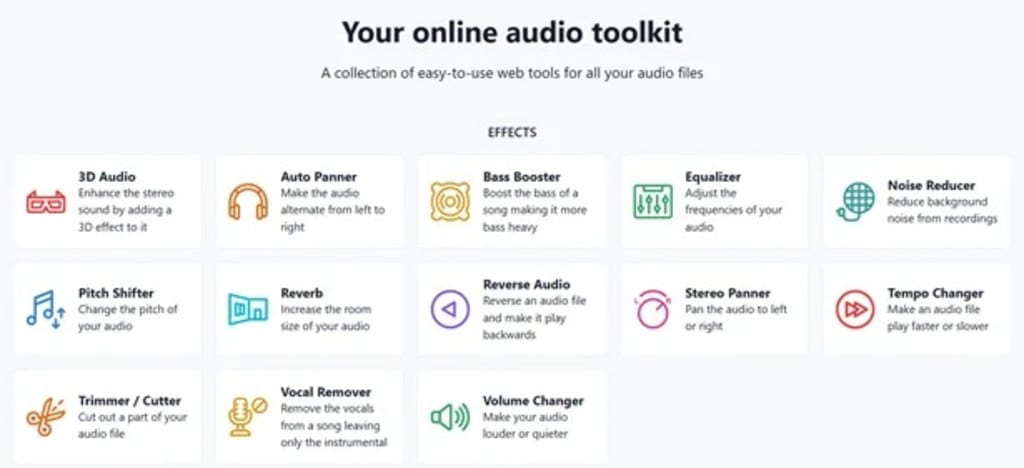
Now, AI audio tools do the heavy lifting for you. These tools use machine learning to detect human voices and separate them from background noise. They also analyze reverberation and reflections, removing echo while preserving the natural quality of your voice.
One such modern solution is Audio Alter voice editing, a platform that offers noise reduction and echo removal features in a simple, fast interface. While professionals may still prefer deep editing, AI tools make quality sound accessible to everyday users.
How Echo Happens—and How to Eliminate It
Echo is created when your voice bounces off walls, ceilings, and hard surfaces before reaching the microphone. This delay causes a repeating or hollow sound that’s difficult to listen to.
Here are common causes:
Recording in empty rooms
Using built-in laptop or webcam mics
Speaking too far from the microphone
Having multiple input/output devices running
AI-powered software identifies these patterns and subtracts them from your audio. This results in a clean, focused sound—almost as if you were recording in a soundproof studio.
Step-by-Step: How to Clean Audio Quickly Using AI
Here’s a quick 5-step guide to remove noise and echo from your audio using modern tools:
1. Record Your Audio
Use whatever setup you have available—smartphone, USB mic, or laptop mic. Try to minimize background noise where possible, but don’t worry too much. The tool will handle most of it.
2. Upload Your File to an AI-Based Editor
Choose a browser-based tool or app that supports quick cleanup. Many creators use tools like Audio Alter voice editing for a fast, drag-and-drop experience.
3. Select the Noise & Echo Reduction Option
Most AI editors will have presets for common fixes—like “Noise Clean,” “Echo Remove,” or “Speech Enhance.” These filters use algorithms trained on thousands of voice samples.
4. Let the Tool Process
This step typically takes a few seconds to a minute. The AI works in the background to clean your file without requiring any manual tweaking.
5. Download and Review
Once the file is processed, you can download and listen to the final version. If needed, some tools let you reprocess or adjust intensity.
Who Can Benefit from Quick Audio Cleanup?
🎙️ Podcasters & Streamers
Voice clarity is everything. A noisy or echo-filled track loses listener engagement quickly. Clean audio makes you sound professional—even if you’re recording in a spare room.
📹 Content Creators & YouTubers
Many creators record videos in makeshift home studios. AI tools help you get clear narration without building an actual booth.
👨🏫 Online Educators & Coaches
If you’re selling a course or offering coaching, students expect premium-quality audio. Echo and hiss can lower your course ratings—even if your content is valuable.
🧑💼 Remote Workers & Professionals
For meetings, presentations, or webinars, sounding clear improves how you’re perceived. With remote work becoming the norm, AI voice cleanup is essential.
What Makes AI Audio Tools Stand Out?
Here are some standout advantages of using AI-driven audio editors:
Feature AI Tools Traditional Editing
Speed Fast (1-2 minutes) Slow (20+ mins per file)
Skill Level Needed Beginner-friendly Intermediate to advanced
Cost Often free or low-cost Premium tools can be pricey
Hardware Requirements None Often need quality mic
Results Consistency High Depends on user skills
With platforms that require no installation or subscriptions, the barrier to quality voice recording has never been lower.
Best Practices for Better Audio Input
While AI does a great job, you can further enhance results by optimizing your recording environment:
Record in small rooms with curtains, carpets, or cushions
Turn off fans and background appliances
Use a pop filter or windscreen
Keep your mic at a consistent distance
Avoid speaking directly into reflective walls
These tips give the AI tool better material to work with, ensuring even sharper results.
Final Thoughts
You no longer need a recording studio or technical degree to produce clean audio. Thanks to advancements in AI, cleaning up your sound has never been easier. Whether you're a solo creator, online educator, or remote worker, tools like Audio Alter voice editing and other AI audio tools provide fast, effective ways to remove noise and echo from your recordings.
With just a few clicks, you can go from messy to professional—saving time, money, and frustration. In a world where first impressions matter and clarity is key, smart audio tools help you put your best voice forward—fast.
About the Creator
AIChief
AIChief is the #1 AI tools directory created exclusively for businesses, AI explorers, and curious minds alike! Each tool is manually tested and verified by our expert editors.
We’re here to keep you updated with latest news insights
How to Recover a TikTok Account: The Complete 2026 Guide for Hacked, Suspended, or Deleted Accounts
Losing access to your TikTok account can feel like losing a part of your digital identity. Whether you are a casual user with cherished memories or a creator who has spent years building a community, a sudden lockout is stressful. With over a billion active users, TikTok accounts are prime targets for hackers, and automated moderation systems can sometimes make mistakes.
By Alexander Hoffmann2 days ago in Lifehack
Common Mistakes to Avoid When Using Whey Protein Powder
Whey protein looks simple. Mix it, shake it, and drink it done. Yet a lot of people use it the wrong way and then wonder why they don’t see results. Whey isn’t magic. It’s a supplement. When you use it properly, it supports strength, recovery, and lean muscle growth. When you misuse it, it becomes expensive flavoured milk.
By Lakshay Gulati6 days ago in Lifehack



Comments
There are no comments for this story
Be the first to respond and start the conversation.