
QR Code API: Guide to Usage and Integration
Learn how to integrate a QR code Generator API to create, customize, and manage QR codes effortlessly

Have you ever wondered what keeps the QR codes you see everywhere working seamlessly? For example, the unique QR code you generate for mobile payment or the QR code receipt you receive when you order online.
The system behind the process is a QR code API. It allows the generation of thousands of accurate codes without manual effort, just based on simple triggers.
This article will help you understand how you can integrate an Application Programming Interface (API) to enable you to customize your own QR codes and track their impact.
Let's help you make the most of this tool regardless of your technical skill level.
What is a QR code API and how does it work?
A QR code API is a tool that allows you to automate the creation, customization, and management of QR codes. This programmed approach to code creation allows for faster and more efficient code creation, especially for large-scale projects.
For example, if you have an online ordering system, the API automatically generates a unique QR code for each customer’s order, like leading them to their order status. You don’t have to create QR codes one by one—they can be generated on demand.
The API interacts with a backend server that generates functional codes that match the inputted data. This data can be URLs, text, or contact information, and the codes are presented in formats like PNG, PDF, and SVG.
Why should I use a QR code API instead of a free online generator?
An API for QR codes will streamline tasks and your team's workflow, eliminating manual, repetitive work.
Many platforms with API services for QR codes allow users to customize their codes by adding logos, changing colors, and adjusting error correction levels so that they are readable even when there are tears or scratches.
Find the best QR code generator API that lets you integrate the platform into your website or app. Then, you'll be able to create accurate and branded codes at scale while saving time and costs.
What are the features that I should look for in a QR API?
Here are some of the key features to look out for when selecting a dynamic API QR code platform:
Customization options
A good API QR code provider allows users to personalize their QR codes. This includes changing colors, adding logos, and modifying patterns to match your brand's aesthetics. This ensures that codes look professional and recognizable even though they're created in bulk.
Multiple output formats
Generally, API QR code services support the creation of codes in formats like PNG, SVG, EPS, and PDF. You can create high-resolution codes for printing or digital use in any of these formats. This ensures that your codes work well across different platforms.
Dynamic QR code creation
Static codes cannot be changed or edited after they've been created. They may be useful for things like sharing contact information, but dynamic QR codes are more flexible for long-term use cases like marketing campaigns or event registrations.
Tracking and analytics
Advanced QR code-making platforms with API integration offer insights from scans by tracking details like location, device type, and time of scan. Businesses can then use these data to understand engagement patterns and optimize their strategies.
Bulk QR code generation
Businesses that need thousands of QR codes for things like product labeling or event tickets can use the bulk generation feature to create several codes at once. This ensures that deadlines are met regardless of project scale, helping to save time and effort.
Error correction
The error correction feature ensures that codes remain scannable and functional even if they get slightly damaged or distorted. By adjusting error correction levels, you can ensure that your codes remain functional even in challenging situations.
Security and password protection
Some API QR code platforms allow the creation of encrypted codes with features like password protection and expiry settings. This helps to prevent unauthorized access to information and protect confidential information.
Choosing the right QR code service: Comparison of the top QR Code Generator APIs
To successfully integrate QR codes into your business, it is important to choose an API that matches your business requirements. Let’s explore the top five QR code platforms with API so you can make the best choice.
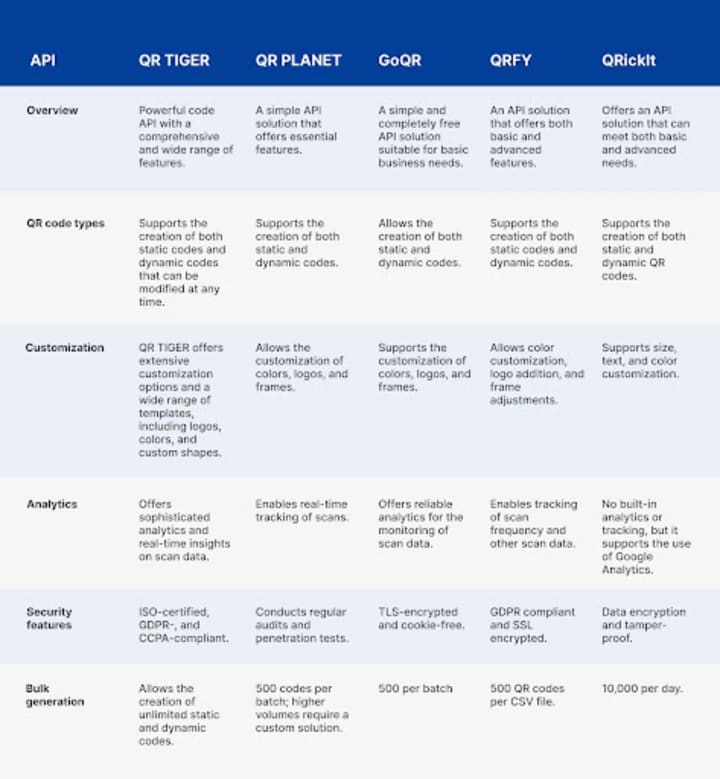
Key highlights:
- QR TIGER is best for businesses that need a high level of customization, security, and real-time analytics.
- QR Planet is suitable for businesses with simple needs
- GoQR.me is a good option for small businesses or developers.
- QRFY is a suitable option for marketers with basic needs.
- QRickIt is suitable for developers with expertise
- Use a reliable code API with strong security to ensure data privacy and prevent unauthorized access.
- Read the API documentation carefully to understand available features, authentication methods, and possible limitations.
- Test QR codes across multiple devices and scanning apps to ensure they work consistently before deploying them.
- Choose the right QR code format, whether static or dynamic, based on your needs.
- Optimize your QR codes for readability by maintaining a proper contrast ratio and avoiding excessive customization that may affect scannability.
- Implement error handling in your integration to detect issues like invalid API keys, incorrect parameters, or network failures.
- Avoid adding too much data in QR codes to prevent distortion and make scanning easier.
How do I integrate a QR code API into my application?
Here’s a step-by-step guide to help you connect your chosen API:
1. Choose the best QR code generator API for your needs
The most important step is choosing the code API that fits your needs. What’s the number of codes you need to create per day? What level of analytics do you need?
A careful assessment of the features offered by each option will help you make the right choice.
2. Get your API key
Once you decide on an API provider, go to the platform and sign up to get your API key. To get your key, sign in to your account and go to the API section. Then, copy the API key.
3. Set up your web development environment
Before you start, ensure you have the right tools. You will need SDKs or libraries depending on the API documentation of your provider.
You’ll also need a text editor and basic knowledge of HTML, CSS, or JavaScript. You can seek a developer’s assistance if you do not have a basic understanding of these concepts.
4. Choose an API endpoint
Every API has endpoints and they serve different functions. You can have an endpoint for creating QR codes and another for QR code tracking. An endpoint like the POST endpoint can be used for QR code generation.
5. Send the request to the API
If you decide to use the POST endpoint, for instance, you will need to send a POST request to the API to generate a QR code. You can do this using JavaScript.
6. Customize your QR code
Customizing your code is optional, but since most APIs support customization, you can modify its design to complement your branding efforts. You can add a logo, change the template, or change the color scheme.
7. Manage the API response
After you send the request, the API will return a JSON response containing the URL of the generated QR code. You can then insert the generated QR code into your webpage or application.
8. Track QR code scans
Good QR code software APIs support tracking and analytics. This feature is mostly useful when running marketing campaigns. To access tracking and analytics, you can use the GET request.
9. Error handling, debugging, and deployment
QR code integrations sometimes produce errors. These can be caused by issues with the key, improper formatting, or network issues. You can manage these errors by debugging. Tools like console.log can help identify and resolve these integration issues.
Once everything is working smoothly in your web environment, you can then deploy the integration to your live website or app.
What are common use cases for a QR code API?
Lots of industries now use code APIs to quickly generate branded codes.
At the forefront are the marketing and advertising industries, where QR codes are often needed on printed materials such as product packaging, flyers, posters, and billboards.
These codes may also be used to link to websites, special promotions, or the sharing of interactive content.
QR codes offer convenience and speed, boosting campaign engagement. Additionally, the tracking and analytics feature allows businesses to measure and attribute their efforts while optimizing strategies in real time.
Another key application is in the retail and e-commerce industry. These QR codes are used for product labeling and payment systems, helping to improve shopping experiences. Businesses also use scan data to optimize their sales strategies based on analytics.
Other sectors where these codes are being applied include supply chain management for shipment monitoring, healthcare for patient care management, education for providing digital learning experiences, and hospitality to simplify booking systems.
What are the best practices for designing QR codes with an API?
Here are some best practices to help you make the most of your chosen code generator API:
How can I use a QR code generator API in my business?
QR APIs are your one-stop solution to improved operational efficiency.
They are transformational tools regardless of the industry you're operating in, be it marketing, logistics, or healthcare.
Using the best QR code API, you'll be able to simplify all touch points in your business while turning scans to business insights.
About the Creator
Alex Payton
I believe the right technology can transform lives. I spend every day decoding the latest SaaS trends or championing the next big digital breakthrough to make tech work for people (not the other way around!).
Keep reading
More stories from Alex Payton and writers in Lifehack and other communities.
Who is your "Person"?
It's important to recognize that you cannot go through life as easily on your own. My name is Elizabeth and I'm a survivor of child abuse and horrific trauma. Healing from trauma is not a quick fix and recognizing that it will take time, is part of the struggle.
By Elizabeth Woods2 days ago in Psyche


Comments
There are no comments for this story
Be the first to respond and start the conversation.