
Lost Your iPhone? Discover Alternative Ways to Locate It Without Find My iPhone
Step-by-step guide to locating your lost iPhone without Find My iPhone. Use Google Maps, iCloud, family devices, and more to track it down.

Losing an iPhone can send anyone into a spiral of panic. It’s not just a gadget—it’s a vault of personal memories, from irreplaceable photos to critical messages and contacts. The dread intensifies when you realize Find My iPhone isn’t activated. Fortunately, all hope isn’t lost. This guide unveils a variety of alternative methods to locate your missing iPhone, including a powerful tool called Scannero, ensuring you have multiple avenues to recover your device and protect your data.
Retrace Your Steps with Google Maps Timeline
Google Maps Timeline can be a lifesaver when your iPhone goes missing. This feature logs your location history, offering a glimpse into where your phone has been, even if it’s currently offline. To use it, open Google Maps on a web browser or another device’s app, sign in with the Google account linked to your iPhone, and select "Your Timeline" from the menu. Scroll through the recorded days or weeks to pinpoint your phone’s last known location. This method leverages data Google has already collected, making it an effective way to retrace your steps and narrow down possible search areas.
Tap Into a Family Member’s Device
If a family member owns an Apple device, their Find My app can become your tracking ally. Open the app on their iPhone or iPad, log in with your Apple ID, and select your lost iPhone from the device list. The map will display its last known location, provided it was online recently. For newer models like the iPhone 8 or later, Bluetooth enhances tracking precision up to approximately 800 feet (250 meters). If your phone is nearby, you can trigger a sound to locate it, making this a practical option for quick recovery.
Navigate the iCloud Website
The iCloud website provides another route to find your iPhone’s last synced spot. Visit iCloud.com, sign in with your Apple ID, and click "Find iPhone." Choose your device from the list to view its most recent location on the map. This works best if your iPhone is backed up to iCloud before going offline, relying on a strong signal and sufficient battery at the time. It’s a straightforward method that can offer critical clues about where to start your search.
Leverage Third-Party Tracking Apps
Third-party apps can also aid in your quest. Apps like Life360, designed for location sharing among family or friends, can reveal your iPhone’s last position if you had it installed and active. Log in from another device to check your location history. Similarly, platforms like Google Maps, WhatsApp, or Facebook Messenger offer location-sharing features that might hold answers if you’d enabled them. These tools require prior setup, but they can be invaluable for tracking your device’s movements.
Reach Out to Your Cellular Provider
Your cellular provider has network tools that can assist in locating your iPhone. Contact their customer service, provide your phone number and device details, and request tracking help. They may identify the last cell tower your phone pinged, giving you a general area to investigate. While not pinpoint-accurate, this method can complement others, especially in urban areas with dense tower coverage.
Unlock Precision with Scannero
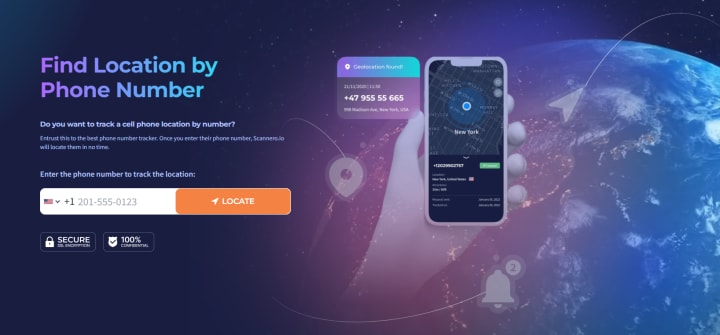
Scannero offers a cutting-edge solution for tracking your iPhone. This service allows you to input your phone number on their website and initiate real-time location tracking. Visit the Scannero site, enter your iPhone’s number, and follow the prompts to start the process. Using advanced technology, Scannero provides precise location data, making it a standout option when other methods fall short. It’s particularly useful for urgent situations requiring fast, accurate results.
Investigate Security Features
Your iPhone’s security settings can double as a tracking tool. Log in to your Apple ID account page online and review recent login activity. Unfamiliar locations or devices could hint at where your phone is being used. Monitor your email for alerts about unauthorized access attempts, which might also provide location-based clues. This approach not only aids in recovery but also helps secure your data from potential misuse.
Extra Strategies to Boost Your Search
Beyond digital methods, practical steps can enhance your efforts. Retrace your recent paths, checking under furniture, in pockets, or at frequented spots. Ask friends, family, or local businesses if they’ve seen your phone—establishments like cafes or stores might have it in their lost and found. Authorities, such as police stations, can also assist, especially if they have security footage or recovered items. Posting about your lost iPhone on social media might alert someone who’s spotted it, expanding your search network.
Final Thoughts
A lost iPhone doesn’t have to spell disaster, even without Find My iPhone. From Google Maps Timeline and family devices to iCloud, third-party apps, cellular providers, and Scannero, you have a robust toolkit at your disposal. Combine these with hands-on tactics like checking physical locations and rallying community support for the best outcome. Act swiftly, stay methodical, and you could soon reunite with your device, keeping your precious data safe. Technology offers more than one way to solve this modern predicament—use it wisely.
About the Creator
StartDigital
Helping startups grow with smart SEO, AI-powered marketing, and conversion-focused web design. Strategy meets creativity—from idea to impact.
Reader insights
Nice work
Very well written. Keep up the good work!
Top insight
Excellent storytelling
Original narrative & well developed characters
Keep reading
More stories from StartDigital and writers in Lifehack and other communities.
The Ultimate Guide to Tracing Phone Number Locations for Free: Tools, Tips, and Ethical Considerations
In today’s fast-paced, digitally connected world, knowing how to trace a phone number’s location has become a valuable skill. Whether it’s the sinking feeling of misplacing your smartphone, ensuring a loved one’s safety, or managing workplace efficiency, the ability to pinpoint a device’s whereabouts offers practical solutions to everyday challenges. The rise of advanced tracking technology means that peace of mind is just a few clicks away, accessible to anyone with a phone and an internet connection.
By StartDigital7 months ago in Lifehack
How Big Game Hunting in Namibia Supports Wildlife Conservation
Namibia is widely recognized as one of Africa’s greatest wildlife conservation success stories. Unlike many countries where wildlife populations have declined, Namibia has seen steady growth in key species such as elephant, black rhino, lion, and plains game. A major reason behind this success is the country’s carefully regulated big game hunting namibia model, which directly supports conservation, habitat protection, and rural livelihoods.
By Aru Game Lodges 6 days ago in Lifehack
A Priceless Lesson of Life
There was once a man who had four sons. He deeply wished that his sons would learn one of the most important lessons of life: never be quick to judge others. He believed that true understanding comes only with patience and time. To teach them this lesson in a meaningful way, he decided to send them on a journey.
By Sudais Zakwan3 days ago in Lifehack



Comments (1)
nice