
Life's Stupid Mysteries 2
The Right (Close) Quotation Mark

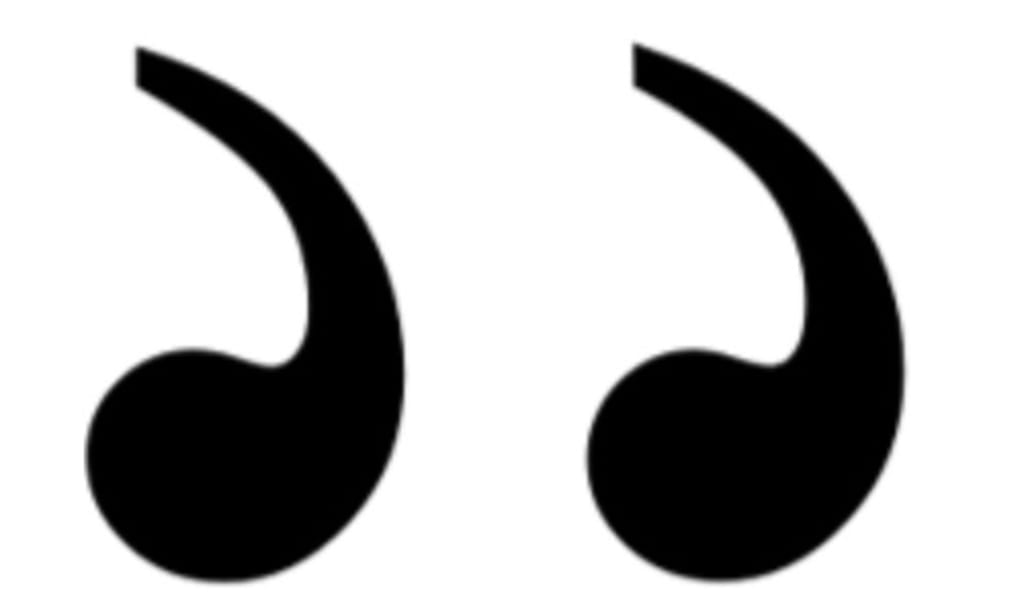
Has a question ever occurred to you that is totally stupid? I mean really, really dumb. A question so inconsequential and meaningless that it is barely worth the effort to ask, yet alone take the time to find an answer. A question so ridiculous that it may have occurred to at most ten people in the entire history of the world. Welcome to part 2 of life’s stupid mysteries (LSM) a series in which I ask, and sometimes bother to try and answer, depending on how lazy I am feeling, questions no one else is asking and no one else cares about.
In the first installment of life’s stupid mysteries I asked the question, why does nobody make a caffeinated ginger ale? That’s right, I wrote an entire article about ginger ale, the soda you only see in hospitals, and when you visit your grandpa or grandma’s house and always wonder to yourself, who drinks that crap whenever you encounter a discarded can by the side of the highway. That particular story was a runaway smash hit garnering a record 15 page views. Ever since my rabid fan base has been clamoring for a follow up, and for those who have not long since clicked away or fallen asleep that follow up is presented to you below.
Today I bring you the mystery of the right quotation mark, also known as the close quotation mark. You did read that correctly, I'm talking about the right quotation mark, not the left quotation mark which any doufus knows is easily accessible on any standard keyboard as the upper character just to the left of the enter key (see below image for an example). How do we know it is the left quotation mark?
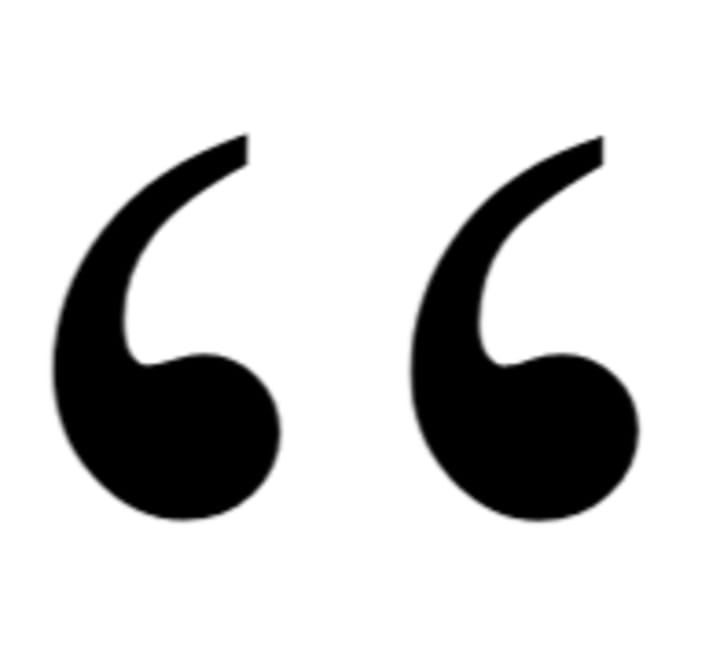
Simple, it curles around facing to the right, whereas we all know the right quotation mark curles facing to the left. Combined, the two quotation marks surroud the quotation, hugging them in a halo of double curved lines which lets the reader know that the words they are currently reading were actually spoken by someone or something in a human, semi-human, or robotic voice, and therefore are a representation of that person/things speach and/or possibly thoughts (see below). For example if I were to write the words, that previous sentence is a massive run on and barely intelligeble, those words were not spoken (or thought) by anyone. In contrast if I were to write the words "Dan is a really terrible writer and suffers from diarrhea of the keyboard. That guy uses more run on sentences than something or other he cant come up with because his knack for clever analogies is sub par at best" that would be words someone, for example Dan, said out loud or in my own head. The question of whether or not thoughts should be quoted is no doubt long studied and well understood by good writers, but Dan, not being such a writer, has never really been sure, and continues to not be sure to this day.
In any event, if one scans ones keyboard they quickly (or not so quickly in my case) realize there is no right quotation mark. Some (lazy) people simply use the left quotation mark (") as a right quotation mark ("). After all, if one does not look too closely by, for example, zooming in on the mark, it is probably good enough. But, for this writer at least, there is no such thing as good enough and I never settle for less than excellence and perfection. Thus began my online quest for the mysteriously missing right quotation mark. Naively, I thought the answer would be easily forthcoming and well settled, but boy was I mistaken. Turns out there are more options (suppossedly, though many failed miserably in my real world testing) for generating a right quotation mark than for something else with tons of options that Dan would use here if he were a better writer with any sort of knack for clever analogy. Since he is not, as he already once mentioned previously, just imagine your own thing that is well known for having tons of options and pretend I wrote it in that previous sentence. Take a moment to smile at your own cleverness and laugh at my ineptitude, then continue on.
Oneeasy but not very helpful) way to get a right quotation mark is to use the method d (escribed in the caption of the header image to this story. Unfortunatley image files are not all that easy to manipulate in text based formats like writings. According to Zesolution.com, the leading source of solutions for problems beginning with the letters z and e, another way to get a right quotation mark (in Windows) is to press the alt key and while holding it down type the numbers 0148. When I tried this method on my laptop keyboard in both MS Word and right here in the Vocal writing emulator I got absolutely nothing, no mark at all. When I attempted the same thing on my bluetooth external keyboard I ended up opening Adobe creative cloud, Microsoft Edge, and the Windows HTML editing screen. No right quotation mark however. I came across a number of other Alt key plus four number string solutions none of which were successful but did manage to cause me to open up no less than ten different programs or applications when using my external keyboard and resulted in a whole lot of nothing on my laptop keyboard.
Next up I decided to visit the good old Miscrosoft forum where surely some real answers could be found. I quickly located a question from a quotation less fool much like myself also puzzled by this strange mystery. His name was Jonathan Post and he wrote. "Normally when using US (International keyboard) settings, typing [ Shift + ' + Space ] gives you [ " ]. However, for me both typing [ ' + Space] and typing [ Shift + ' + Space ] all give me [ ' ]. In order to type a quotation mark, my only option is to type [ Shift + ' + ' ], which gives me [ ' " ], and then I can delete the single quote. I have tried different keyboard settings, but they don't fix the problem. Does anybody know how I can fix the issue?.." Microscoft agent and moderator Nikhar_k wrote a long response with no less than three possible options to solve the issue none of which worked for Mr. Post. And so, much like myself, Jonathan Post, still to this day remains puzzled by this most perplexing of life's stupid mysteries. Nice huh? Like how I closed the story by bringing back the title of the series. Quality writing my firend. Quality writing.
About the Creator
Everyday Junglist
About me. You know how everyone says to be a successful writer you should focus in one or two areas. I continue to prove them correct.
Keep reading
More stories from Everyday Junglist and writers in Lifehack and other communities.
Top 10 Questions to Ask Every Perth NDIS Service Before You Engage Them
Choosing the right National Disability Insurance Scheme (NDIS) provider shapes the quality of care, independence, and outcomes a participant experiences. In Perth, families and participants face a growing number of service options, which makes informed decision-making essential.
By Anshul Vijay4 days ago in Lifehack
Miss Persephone's Manual to a Seemingly Ordinary Life
Miss Persephone was found at the dining table, her blue eyes swollen, her tears arriving and retreating like the tides of the ocean. Earlier that day, her family had visited her in the retirement home where she had lived for eight years. It was her eightieth birthday.
By Imola Tóth6 days ago in Fiction



Comments
There are no comments for this story
Be the first to respond and start the conversation.