
Enhance Your Email Tone with a Touch of Politeness
Struggling with writing polite and professional emails? Discover how you can refine your messages with the Polite Post email rewrite tool. Learn practical solutions to sound more respectful, clear, and confident.

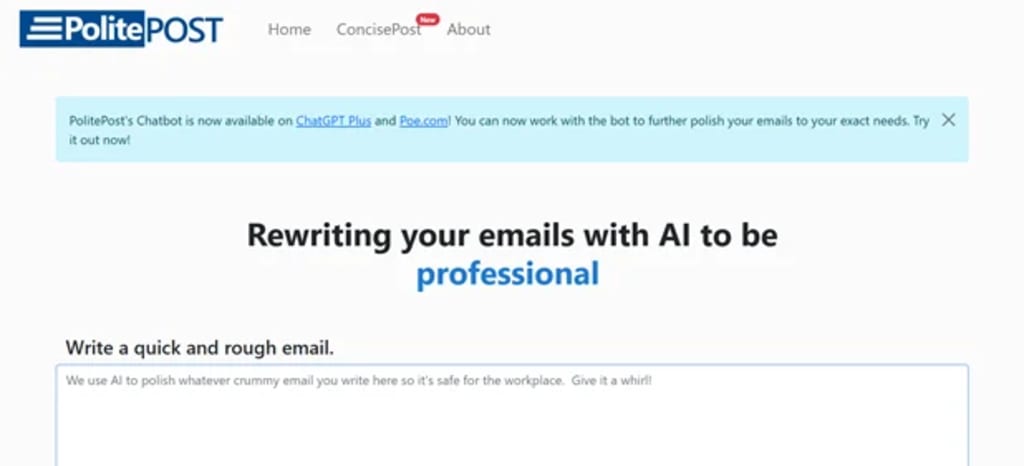
Email is one of the most widely used communication tools in both professional and personal settings. But while it’s easy to type a quick message and hit “Send,” crafting an effective and polite email isn’t always that simple. Miscommunication, unintentional rudeness, or overly casual tone can create confusion or even offend the recipient. This is where email refinement tools come in—and in this article, we’ll explore a smart and efficient way to polish your emails and communicate more effectively.
Why Email Tone Matters
Tone is everything in written communication. Unlike face-to-face conversations, emails lack vocal tone, facial expressions, and body language—elements that help convey your intentions. What you meant as a harmless suggestion might come across as a criticism, or a short reply might be seen as dismissive. Whether you're writing to a colleague, client, or supervisor, maintaining a polite and respectful tone is essential.
Polishing your emails can:
Improve clarity and understanding
Strengthen professional relationships
Reflect positively on your personal or company brand
Reduce the risk of miscommunication
In today’s fast-paced world, where we send dozens of emails daily, taking the time to refine them can significantly improve your communication outcomes.
Common Email Mistakes That Hurt Your Tone
Even with the best intentions, common mistakes in emails can make you sound abrupt, disinterested, or unprofessional. Here are a few examples:
1. Overuse of Direct Language
Saying “Send the file now” instead of “Could you please send the file when you have a moment?” may sound commanding rather than cooperative.
2. Lack of Greetings and Sign-Offs
Jumping straight into the message without a greeting or closing remark may seem rushed or impolite.
3. Use of Jargon or Ambiguity
Not everyone understands your internal company abbreviations or complex phrases. Simplicity is key.
4. Poor Formatting
Long paragraphs with no spacing or bullet points can make your email hard to read and may seem careless.
The Solution: A Smarter Way to Refine Emails
To avoid these pitfalls, one efficient solution is using an intelligent tool that helps you revise your emails for clarity, tone, and professionalism. The Polite Post email rewriter tool is designed to do just that. It analyzes the tone of your draft and suggests refined, respectful, and natural-sounding alternatives. The result? Emails that sound like you, only better.
This kind of solution is particularly useful for:
Non-native English speakers who want to ensure politeness and formality
Busy professionals who don’t have time to write and revise every email
Customer service teams that require consistently courteous communication
Freelancers who interact with clients and want to build trust
How It Works: A Step-by-Step Guide
Although specific features may vary across tools, most email rewriters follow a similar process:
Step 1: Paste Your Draft
Write your email as you normally would. Don’t worry about perfection—just get your message out.
Step 2: Choose the Desired Tone
Many tools allow you to select a target tone—professional, friendly, assertive, or empathetic—depending on your audience.
Step 3: Let the Tool Suggest Improvements
The tool analyzes your text and suggests ways to rephrase, soften, or clarify your language. This could include changing phrases like “You didn’t respond” to “Just checking in to see if you had a chance to look at my last message.”
Step 4: Review and Send
Once you’re happy with the suggested improvements, simply copy and paste the revised message into your email platform and send it off.
Benefits of Email Refinement Tools
Using an email rewriter is not about losing your voice—it’s about enhancing it. Here are some of the biggest advantages:
✅ Increased Professionalism
Your emails will always maintain a polite and respectful tone, no matter how rushed you feel.
✅ Better Relationships
Clear and courteous messages can build trust and rapport with colleagues and clients.
✅ Time Savings
You no longer have to agonize over every word or phrase—just write naturally and let the tool refine it for you.
✅ Confidence Boost
Knowing that your communication is polished and appropriate helps you send emails with greater confidence.
When to Use an Email Refinement Tool
You might not need to refine every single message, but there are certain situations where doing so is particularly helpful:
Job applications and cover letters
Client proposals and negotiations
Apology or complaint responses
Follow-ups or reminders
Cross-cultural communication
In these cases, sounding too casual or blunt can have unintended consequences. Refinement tools act as a safety net to ensure your message hits the right note.
Real-World Example
Before Refinement:
“I haven’t heard from you. Please get back to me ASAP.”
After Refinement:
“Just following up on my previous message—please let me know when you get a chance. Looking forward to your response.”
The second version sounds more polite, less confrontational, and maintains the same purpose: prompting a reply. This is a simple yet powerful way to improve communication outcomes.
Final Thoughts
In a world where written communication is central to nearly every profession, the ability to send clear, respectful, and well-structured emails is a must-have skill. Fortunately, you don’t have to master formal writing overnight. With AI tools like the Polite Post email rewriter, you can take what you already write and turn it into something better—without losing your authentic voice.
Whether you're responding to a job offer, negotiating with a client, or just following up on a project, refined emails make a difference. Invest a little time into how you say things, and you’ll be surprised how much smoother your communication becomes.
About the Creator
AIChief
AIChief is the #1 AI tools directory created exclusively for businesses, AI explorers, and curious minds alike! Each tool is manually tested and verified by our expert editors.
We’re here to keep you updated with latest news insights
How Sherman Lai Integrates Natural Therapies for Whole-Body Wellness
Many people have begun searching for natural methods to enhance their general health and well-being in recent years. Holistic healthcare concentrates on balancing the overall body rather than just treating symptoms. Because they promote long-term wellbeing, natural treatments including acupuncture, herbal medicine, and lifestyle counseling are growing in popularity. Sherman Lai, a practitioner renowned for this well-rounded approach, combines many natural healing techniques to assist people in achieving whole-body wellbeing.
By Sherman Lai Guelph7 days ago in Lifehack
Healthy Lifestyle Habits for Sustainable Weight Management
Living a healthy lifestyle has become a challenge for many people today. Modern routines often include long hours of sitting, irregular eating habits, fast food consumption, and limited physical activity. These habits can slowly affect the body and make it difficult to maintain a healthy weight.
By Backlinks Cart7 days ago in Lifehack




Comments
There are no comments for this story
Be the first to respond and start the conversation.