
5 Best QR Code Generators—Plans, Features, and Pricing
An honest, hands-on review of top QR code platforms for 2026, tested by a real user to help you find the perfect fit for your business

All QR code generators swear they’re the best for businesses, throwing out the same tired promises: “A trial is all you need to be convinced.”
But whether you’re a small brand, a marketer, or an enterprise owner looking for something reliable and safe, finding the best one for your needs can be a frustrating experience.
This is especially true if you’ve ever started a free trial for popular online QR software only to quit within hours in disappointment.
To save you time and trouble, I tested out the top options for generating, customizing, tracking, and managing QR codes for 2025. Here are some excellent platforms based on my experience.
What are the top picks for QR code software and why do they stand out?
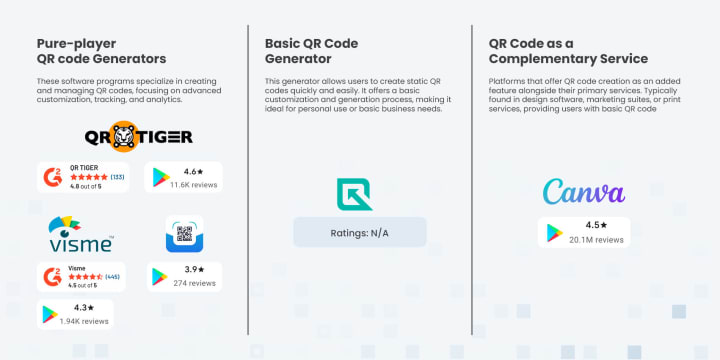
I tested the top-rated QR code generators and their pricing, analyzed user feedback, and reviewed ratings. After careful evaluation, these five stood out:
- QR TIGER QR Code Generator
- Free QR Code Generator
- QR Code Maker: Generate and Scan
- Canva QR Code Generator
- Visme QR Code Generator
What are the testing metrics for choosing the most reliable QR code maker?
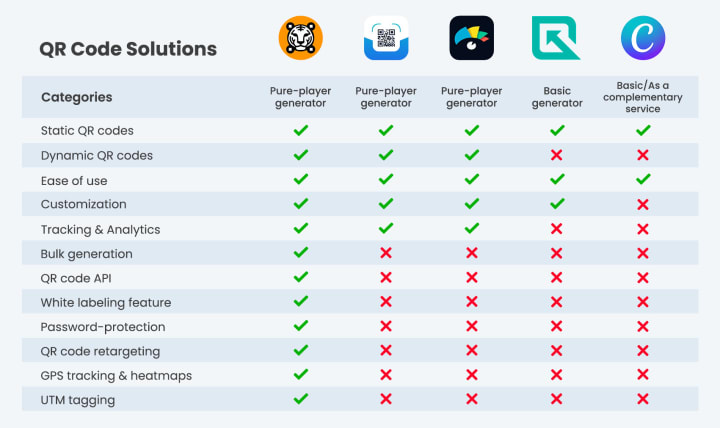
In testing each of these, I considered the above metrics, which are all commonly looked for in an online QR code platform. These categories balance simple and advanced features, encompassing a true all-in-one generator.
1. QR TIGER QR Code Generator
QR TIGER is a popular QR code software, generally regarded as an advanced tool with a user-friendly interface with high customer satisfaction rates on G2 and Trustpilot. It is available as a web app and a mobile app.
Overview
- Name: QR TIGER QR Code Generator
- Google Play Store rating: 4.4 based on 11k+ reviews and 1M+ downloads
- G2 rating: 4.8 stars based on 144 reviews
- Trustpilot rating: 4.8 stars based on 120 reviews
- Entry price: $0.00
- Subscription model: It offers both free and paid plans, with the paid plans providing access to sophisticated features. Tiers include $7, $16, $37, and $89 per month, as well as custom solutions and custom annual plans.
My experience trying out the free plan and trial for paid plans
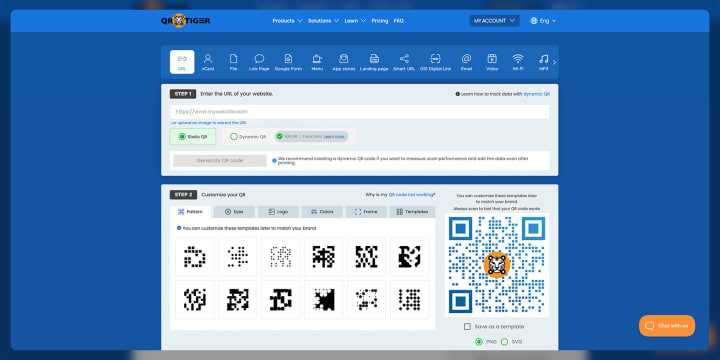
I found the interface pretty simple. It’s straightforward and easy to navigate. I was able to create different types of QR codes with ease, including URL, social media, and dynamic business card QR codes.
I also played around with customization, and the logo addition process was easy too. I’m not a professional graphics designer, so I felt blending the colors would be a challenge, but it wasn’t.
Ease of use
The dashboard is clean and quite organized. Even without technical expertise, I was able to navigate the platform, create codes, and update the content linked to dynamic codes with just a few clicks.
Customization features
As a marketer or small business owner, the customization features of the generator you choose are very important for branding purposes.
QR TIGER allows the addition of logos to all types of QR codes, modification of code’s colors to match brand aesthetics, and the option to choose from different patterns. There are also available QR code templates you can use.
This ensures you can create visually appealing codes that are consistent with your brand’s identity.
Tracking and analytics
The robust analytics offered by the platform allows users to access real time data on:
- Number of scans
- Time of scans
- Geographical location of scanners; and
- Devices used in scanning
From reviews, users found this feature to be very effective in helping them assess their marketing campaigns and audience engagement styles.
Advanced features
QR TIGER offers several advanced features designed for businesses, marketers, and tech-savvy and non-tech-savvy users. These features include:
- Dynamic QR codes, which allow users to change their destination URL or content without altering the code’s functionality.
- Bulk QR code generation that is perfect for large-scale campaigns and product packaging.
- Multi-URL QR codes, which allow businesses to direct users to different destinations based on location, device type, or time of scan.
- QR code API that enables the automation of QR code generation and integration with websites, CRM software, or apps.
- White labeling feature, which lets users customize links with their own domain for a seamless brand experience.
- Password-protection feature that restricts access to QR code content for secure sharing.
- QR code retargeting for re-engaging users that scan your QR code through Facebook Pixel or Google Ads integration.
- GPS tracking and heatmaps that monitor where and when QR codes are scanned for deeper audience insights.
- UTM tagging for the automatic addition of UTM parameters to QR codes for detailed campaign tracking in Google Analytics.
- File QR codes that allow sharing of PDFs, images, videos, and other files via a QR code even without a website.
Reliability, scan efficiency, and error correction
In terms of performance, QR codes generated by QR TIGER have consistently performed well across various devices and scanning applications.
Even under suboptimal conditions, such as low lighting or smaller sizes, the codes can still be scanned quickly and easily.
The software also supports high-level error correction, ensuring that codes remain scannable even if it is partially damaged.
Plans and pricing
The free plan includes most features, including the creation of dynamic QR codes. However, the number of dynamic codes that can be created is limited.
The premium tiered plans, starting at $7 per month, offer access to more sophisticated features such as bulk code generation and extensive analytics.
Pros and cons
Taking into consideration the advantages and disadvantages of using this software, here’s what I’ve noticed:
✔️ Pros
- Highly reliable
- Advanced customization
- Robust analytics
- Strong security features such as password protection and GDPR compliance
- Affordable pricing plans
Cons
- The free plan has limitations that may not be sufficient for large campaigns
- Some of the advanced features are only available in the higher-tied plans
Overall user experience with QR TIGER
The general user experience is positive. The platform caters to both beginners and advanced users, offering a range of features that support various marketing and branding needs.
2. Free QR Code Generator
Free QR Code Generator is what it says it is. It’s completely free and simple, and creates functional codes quickly.

Overview
- Name: Free QR Code Generator
- Ratings: N/A
- Entry price: $0.00
- Subscription model: All the features are available for free!
My experience with Free QR Code Generator
It offers QR codes for a range of uses, such as URL sharing, payments, social media, and many more.
I tried creating a standard QR code for a URL, and the process was straightforward. What I appreciated the most was how quickly I could generate and download my code without having to sign up.
Ease of use
The platform is user-friendly. All you have to do is input the information, and you’re ready to download your code. The interface is also clean and simple, so you don’t need any prior experience to get started. It's perfect for users who want something quick and simple.
Customization features
Although the customization options are relatively basic, there’s still a whole lot you can do. You can add and adjust colors, add a logo, and even choose your preferred design style.
Tracking and analytics
This generator offers relatively good analytics that can help in informing your marketing decisions. You can assess scan frequency, location, and time to better understand your audience.
Advanced features
You can create different types of codes for a range of purposes, including static and dynamic codes. As for QR code expiry, considering the service is free, you never have to worry about that since the codes created with this tool do not expire.
Reliability, scan efficiency, and error correction
The codes created with these tools are reliable. Based on my experience, they scan smoothly on both Android and Apple devices. The tool also offers error correction, ensuring the code remains scannable even after slight damage.
Plans and pricing
This QR code generator is entirely free and is among the best free QR code generators available. It can be the perfect option if you are working with a budget and running small- to medium-scale campaigns.
Pros and cons
Here’s what I observed while using the software:
✔️ Pros
- You don’t have to sign up or pay to create your code
- Quick and easy to use
- Offers good customization options
🙁 Cons
- The customization is relatively basic
- The built-in analytics is limited
- Overall user experience with Free QR Code Generator
It offers good value in terms of simple QR code creation, especially if you’re on a budget. It is reliable, quick, and easy to use.
3. QR Code Maker: Generate and Scan
QR Code Maker provides the function of both code generation and code scanning. You get 10 free coins when you download the app and you can watch ads to win more coins.

Overview
- Name: QR Code Maker: Generate and Scan
- Google Play Store rating: 3.9 based on 265 reviews and 50K+ downloads
- Entry price: Free
- Subscription model: monthly, quarterly, bi-annual, and yearly
My experience with QR Code Maker
The app is both simple and efficient. I was able to generate a URL QR code and a contact information QR code. The software offers a wide range of QR code types and the scanning feature works accurately, too.
Ease of use
The app appears user-friendly and has clear instructions. The main dashboard makes navigation easy. To create a code, you simply have to select the data type, enter the necessary information, customize your design, and download.
Customization features
This QR code generator offers color adjustment, logo addition, and a wide range of templates to choose from. With the right tweaks, you can make codes that match your brand’s identity.
Advanced features
QR Code Maker may not have many advanced features, but it allows the batch generation of a limited number of QR codes. It also offers several export options to ensure codes are distributed in high-quality formats.
Reliability, scan efficiency, and error correction
The software offers a good level of error correction, and the codes scan efficiently across different devices and applications.
Plan and pricing
The app is free to use, but some of its advanced features can only be accessed on paid plans. It offers tiers, from $1.99 per month, $2.99 for three months, and $4.99 for six months to $6.99 for a year.
Pros and cons
Based on my experience:
✔️ Pros
- The interface is friendly
- It offers various design features for customization
- The premium plans are affordable
🙁 Cons
- The free version contains ads that can disrupt the user experience
- It is primarily available on mobile devices
- The analytics version is limited
Overall experience with QR Code Maker
The tool is suitable for anyone looking for an affordable tool to create QR codes and manage simple QR code campaigns.
4. Canva QR Code Generator
Canva is a famous graphics design tool that also supports the creation of functional QR codes, making it an efficient alternative.
Overview
- Name: Canva
- Google Play Store ratings: 4.5 based on 19M+ downloads
- Entry price: Free
- Subscription model: Free and paid versions starting at $12.99
My experience with Canva (free plan and paid trial)
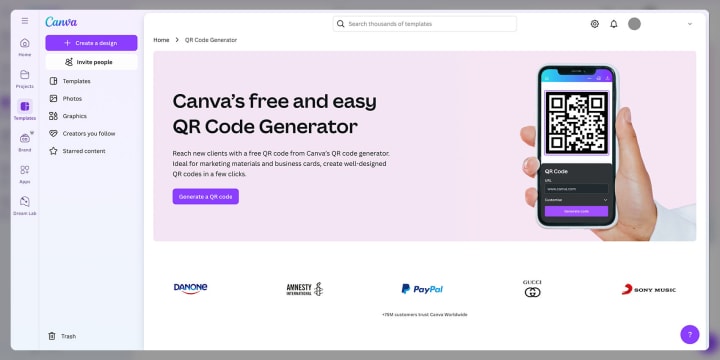
I was able to create a static code on Canva with just a few clicks. However, the free one is for URLs only.
When I wanted to try out the dynamic code option, I was prompted to create an account with a third-party QR code generator to integrate the feature into the platform.
As such, you'll need to create a separate account to fully use Canva for your static and dynamic code needs.
Ease of use
Canva is generally user-friendly, and the QR code generator is no exception. You do not need technical skills, and you can create a professional-looking code in minutes.
Customization features
When integrated with third-party apps, Canva QR Code Generator allows users to add logos, change colors, select designs and patterns, and choose from a wide range of pre-designed templates.
Its free QR code maker, however, has limited design options. It only allows you to change the background and foreground colors and the margin (quiet zone).
Tracking and analytics
Canva does not provide tracking and analytics. Users must integrate third-party tools or analytics platforms, such as Google Analytics, to track and monitor engagement on their codes.
Advanced features
On the paid plan and with integration to third-party tools, users can access advanced features such as dynamic QR code creation, bulk code generation, and cloud storage.
Reliability, scan efficiency, and error correction
QR codes created on Canva are reliable and easy to scan across different devices and scanning tools. It also offers error correction allowing efficient code scanning even if the code is printed in low quality or gets ruffled.
Plans and pricing
The free plan offers basic features; however, advanced features require a subscription. The current plans are $12.99 per month for individual accounts and $14,99 per month for teams.
Pros and cons
When using the platform for QR code creation, here’s a few things I’ve noted:
✔️ Pros
- User-friendly tool
- Reliable service
- Ability to work on other design projects in one place
🙁 Cons
- Limited customization option for free QR codes
- Lacks built-in analytics
- Requires third-party integration to use most of the advanced features
- No direct integration with software like CRM or marketing platforms
Overall user experience
Canva is a great tool if you are already familiar with it. However, it does not offer the all-in-one comfort that the other dedicated QR code generator services offer.
5. Visme QR Maker
Visme is another reliable QR code creator. Its interface is easy to navigate. Although the free plan has limited features, the paid plan offers many additional features, including detailed analytics for tracking user engagement.

Overview
- Name: Visme QR code generator
- Google Play Store rating: 4.3 based on 1k reviews and 100k downloads
- G2 rating: 4.5 out of 5
- Entry price: $0.00
- Subscription model: free plan and paid tiered plans starting from $12.25 monthly
My experience trying out Visme
I liked the free plan because it was very easy to navigate. However, features like customization, tracking, and analytics are very limited unless you upgrade to a paid plan.
Ease of use
The Visme web app's interface is clean. Beginners with no technical knowledge can easily use the tool with little to no assistance.
Customization features
Visme QR Maker allows the addition of a logo, color customization, as well as the addition of a custom text near the QR code. Users can also customize the QR code’s appearance using any of the different shapes and styles available.
Tracking and analytics
You can track the performance of your QR code on Visme to track the number of scans, locations, and devices. However, the level of detail provided in the free plan is quite basic.
Advanced features
Visme offers a range of advanced features, including:
- Dynamic QR code creation
- Analytics and tracking
- Customizable templates
- Access to a wide range of design templates
Reliability, scan efficiency, and error correction
Visme’s QR codes are reliable and can be easily scanned across different devices. It also offers a decent level of error correction to ensure the code keeps functioning well, even if it gets a little torn or damaged.
Plans and pricing
The free plan offers basic QR code creation features. The personal plan costs $12.25, while the business plan costs $24.75.
Pros and cons
Here’s a few things I’ve liked and disliked while using the QR maker:
✔️ Pros
- Easy to use
- Provides advanced customization options
- Offers access to design templates
- Provides real-time scan data
🙁 Cons
- Features on the free plan are quite limited
- High cost for access to advanced features
- Overall experience with Visme QR Maker
The platform provides good design options, but those needing advanced features for their marketing campaigns may need to upgrade to the paid plan.
What is the best QR code generator? Here's the verdict
I'm sure you've made your choice by now. If you're still unsure and considering your best option, take your time.
Remember, the QR code generator that's best for you is one that offers the features you need and one that matches your brand's needs and budget.
If you are looking for a free and simple solution that gets the job done without the pressure to upgrade plans, I'd recommend QR TIGER. Most of its features are available in the free plan; it's reliable and has been used by over 850,000 brands and businesses globally.
About the Creator
Alex Payton
I believe the right technology can transform lives. I spend every day decoding the latest SaaS trends or championing the next big digital breakthrough to make tech work for people (not the other way around!).
Keep reading
More stories from Alex Payton and writers in Lifehack and other communities.
Don’t Feel at Home in Your Own Home? Interiors Expert Reveals Subtle Design Shifts That Instantly Elevate Your Space
Our homes are meant to be the place we love the most – yet many people feel disconnected from them. Approximately 36% of UK homeowners reported being unhappy with their current housing situation in 2025.
By Millie Bradbury5 days ago in Lifehack
Review of 'Man on the Run'
My wife and I saw Man on the Run, a nearly 2-hour documentary on Amazon Prime, about Wings, Paul McCartney's group that flew around the world from shortly after The Beatles broke up in early 1970 to shortly after John Lennon was murdered at the end of 1980, making a Beatles reunion forever impossible.
By Paul Levinson4 days ago in Beat




Comments
There are no comments for this story
Be the first to respond and start the conversation.