
10 Smart Apps to Make Your Home Smarter
Top Smart Apps to Make Your Home Smarter


There are millions of apps in the Google play store and app store. For making the lives easier, technology is constantly working.
Around 800,000 healthy apps are there in the Google play store and many more are in process, which makes it hard to separate the wheat from the chaff in terms of custom mobile application development.
Although there are hundreds of app in the market which are working really well for IoT, still here in this article you can find a few powerful apps that are wonderful to not miss.
Here are the 10 smart apps, which help in making your home smarter:
- SmartThings
- Ninja blocks
- WeMo
- Savant Truecontrol
- Nest
- Control4 MyHome
- Alarm.com
- The simple Universal Remote
- Nokia Home Security Camera
- Alexa
1. SmartThings
Isn't it sound amazing if your smartphone becomes the remote control for all major functions in your house.
Almost all devices and sensors can be attached to the Smart Thing. It becomes too easy to connect, control, and monitor all the devices from the coffeemaker machine to the garage doors.
Customers can buy the Smartthing hub, and sensors and simply connect them to the home devices.
Mobile app development company are relying on the SmartThing to let you control your home apparels and monitors them from iPhone and the cost of $300 is not much for the level of easiness the kit offers.

The kit is ultimate in nature and allows the operator to connect any compatible device. Choose any compatible device and connect it to the app.
Noticeably, the most popular apps are also suggested by Smartthing mobile app developers, which ensure compatibility with almost every home device.
The best part of device integration comes when devices start communicating with each other. This is made possible with the help of Smartthing.
If by mistake you left the device on, Smartthing helps you fix the issue from remote.
The app creates a flow of information from the device to the device, which itself is an exciting work for the user schedule.
There are endless possibilities for these kits and therefore seem to control the market.
The intercommunication between devices is a fantastic feature supported by Smartthing.
In case the door is left open, then the AC temperature is automatically managed, saving cost.
The tool kit is so popular that probably you would have to be waiting for the same.
2. Ninja blocks
Ninja block is an open source software and vision technology for building the future home.
The tools fall under the IoT category and allow the user to connect several sensor devices and control them.
In fact, Ninja Block also creates Ninja Sphere, which is the missing brain for your smart devices.

Ninja Spheres learns from the preferences, behaviors, and then manage the devices elegantly.
Ninja block is the simple hardware but the powerful one, which are supported by the ninja cloud.
Ninja Cloud is an amazing web service that can be considered as the engine of Ninja Blocks.
The working with ninja block is smooth, where the device comes equipped with RGB LED, built-in temperature, and the accelerometer.
The inputs and outputs can be integrated with the available USB ports and functioning four expansion ports. Ninja Blocks does not put technical restrictions over the user.
A non-technical user can easily program Ninja Block without using the code practice.
No line of code is needed to make your Ninja blockwork. The tasks are done in the form of triggers and actions.
You are in charge here to the Ninja Rules engine, where you can create our own rule for how the app behaves that too without programming knowledge.
Ninja Starter kit is available at $199 with an additional sensor cost of $5-$15.
3. WeMo
WeMo is a powerful yet small device, which indiscriminately turns almost everything into the smart device.
Wemo is compatible with Home apps and apple devices. Using the Wemo bridge/dimmer or Wemo mini and the Apple Home app, you can connect Wemo connected appliances from your iphone iPad and Home Pod.
Linking the Wemo with Alexa, it becomes easy to connect with lights. The Google Assistant also can be enabled with the app.

Wemo is accessed with the app on your smartphone. In case you forgot to turn off the geyser, you can simply check your phone and turn it off on the way to work.
Also, it is possible to put devices on the schedule. You can get your cup of coffee when you wake up; Close the door as the AC is turned on.
There is a lot of fun with Wemo and the add on is that it is completely up to you to synchronize as little as possible and as many as you want.
4. Savant Truecontrol
Savant is known as the first true home automation company. The company has built the entire Savant Truecontrol platform on the Apple operating system.
The platform is simple to use, incredible in functions and features the like appearance of the Apple user interface.
The true control platform makes smooth communication between two Apple machines, which make operation easy and quick.

Savant gear works over the Apple Platform; it connects with the apple enable smart device and enables the two-way control.
Remote access is given to the user. The control system is made for the iphone and iPad devices, which operate over the Wi-Fi network and the cell network.
You can control the devices when you are at home and when you are away.
The interesting part of the control system is that it offers the feature for customization.
The user interface can be changed and customized as per our choice.
User can change the background, convert icons and control the categories over the Savant's true control system
5. Nest
What does the name say? Doesn't it feel cozy and comfortable? Yes, Nest is the home automation system, though not full-fledged like other products in the line.
For using Nest, you need to install the Nest thermostat, download the Nest app and voila, it is done. You can straight forward control the home temperature.
The app is made to acclimatize your home according to the temperature.
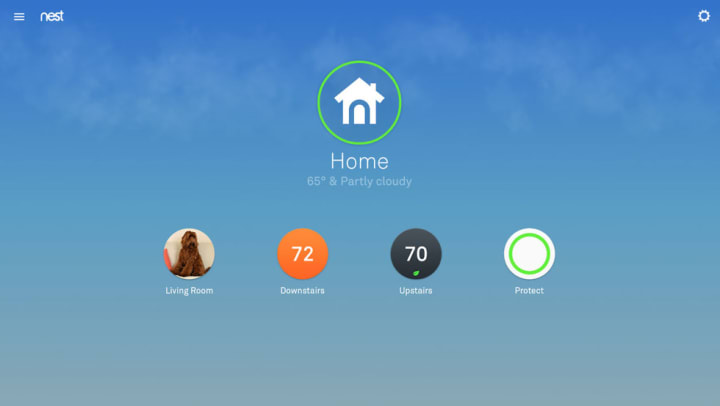
If you are on the way and it is snowing on the way, you can turn up the temperature at your home using your smartphone.
The app is easy to handle and is popular due to its easy setup and less complicated utility.
A user who does not want to plunge onto the full-fledged home automation system developed by software development companies in USA, and yet feels the need for a little control over your home, Nest is the best app for them.
The app is available at $250, where the optional installation charge is $119.
6. Control4MyHome
Control4MyHome is the end-to-end control system for your home. The app is enabled with the 4sight that ensures the entirely secure 4G connection for lighting, energy, security, comfort, and entertainment system at your home.
This all is done via the android smartphone, and apple enabled iphone or iPad. Control4 system goes beyond the control of lights and security and empowers to control the entire hoe apparels.

You can lock al the doors of the home, when you are away and feels your child is unsafe.
You can also turn the consoles on or off when you see that your child is sparing his time in an internet game instead of finishing his homework.
The technology is built complex whereas the user interface is too simple, also one of the reasons behind the popularity of the app.
7. Alarm.com
Alarm.com is a highly popular home automation system. The system work with the Alarm.com enabled automation system.
Alarm.com works beyond the remote monitoring capabilities, where you can do much more than alarming your office.

The app is equipped with location-based Geo services. The app knows where you are and accordingly it can handle the tasks such as adjusting the temperature, lights, and several more tasks.
The app raises push notification whenever any trigger is there such as your kids arrive home or the garage door is open.
8. The simple Universal Remote
The universal remote system is a fantastic tool for all devices and used widely in custom mobile application development.
The various remote for different devices such as TV, DVD player, DTH, Music player, AC, and others make the tasks difficult to handle.

URC, RCA, RTI, and Logitech are prominent manufacturers, whereas there are many others available in the market.
The benefit of the simple push-button remote is that you can learn the button by touch and handle the functions.
In addition, you can learn the buttons by touch and execute them. The universal remote eliminates various remotes from your home apparels.
9. Nokia Home Security Camera
Nokia home camera is the security-ensuring device, which parents can buy for their children, and others can buy for ensuring the safety of their home.
For using the Nokia home security app, you need to have the Nokia home camera.
The Nokia home camera offers the 130 wide-angle, two-way audio, and night vision.

The Nokia home diary stores the record for 48 hours, which allows you to review the events that happened within the time. Also, you can lull your child using Lulla light and music.
Smartphone technology has gone beyond the limits of device and expanded to the mix of your home devices.
This has shaped your world in a way, which eases out the daily task with the help of integrated home apps.
10. Alexa
Amazon Alexa, also known simply as Alexa, is a virtual assistant AI technology developed by Amazon, first used in the Amazon Echo smart speakers developed by Amazon Lab126.
It is capable of voice interaction, music playback, making to-do lists, setting alarms, streaming podcasts, playing audio books, and providing weather, traffic, sports, and other real-time information, such as news.
Alexa can also control several smart devices using itself as a home automation system.

Users are able to extend the Alexa capabilities by installing "skills" (additional functionality developed by third-party vendors, in other settings more commonly called apps such as weather programs and audio features).
Alexa can perform a number of preset functions out-of-the-box such as set timers, share the current weather, create lists, access Wikipedia articles, and many more things.
Users say a designated "wake word" (the default is simply "Alexa") to alert an Alexa-enabled device of an ensuing function command.
Alexa listens for the command and performs the appropriate function, or skill, to answer a question or command.
About the Creator
Tarun Nagar
Tarun Nagar is the Founder & CEO of Dev Technosys, a global ranking Web and Mobile App Development Company USA. With 10+ years of experience of enabling then Startups which are now global leaders with creative solutions
Keep reading
More stories from Tarun Nagar and writers in Lifehack and other communities.
How To Use Search Engines
Ah, search engines. From Google to Yahoo, Bing, and even more indie-styled ones such as DuckDuckGo, these popular websites can be very useful tools for finding information on various matters in life and in the world — even if they don’t necessarily have much information of solely their own to give.
By Snarky Lisa5 days ago in Lifehack


Comments
There are no comments for this story
Be the first to respond and start the conversation.