
Why should you be switching to Screen Recording tools for Team Communication?
Screen Recording tools for Communication

It has been months ever since the world switched to the concept of working from home and one can say that it has its ups and downs. Apart from working from the comfort of your couch, wearing the most cosy pajamas and no more getting stuck in traffic, I found out that there is one thing that I really struggled with, and that was easier communication with my team.
When you are at your workplace with a 100-odd coworkers, it is easy to communicate with them by just going up to them and discussing the task at hand but now, everyone is working miles apart and the only forms of internal communication are setting up a time to get on a video call (which just takes up unnecessary time as one has to wait for everyone to join) and writing long drafted emails, tirelessly, to share work updates and ideas.
That is why my team and I have now switched to a more visual form of communication by switching to instant video messaging through Fluvid- a productivity tool that lets users record and share quick videos by capturing their screen, audio and webcam. It has drastically smoothened out the communication and collaboration process across functional teams in our organisation and it has just made the workflow faster and easier. Instead of wasting time on explaining & writing our work updates and thoughts, we now just simply show it by recording a video and sharing it with our coworkers. All this with just one click instead of using a 3rd party sharing platform.
How does Screen Recording Tools help with Internal Communication?
Be it the marketing team sharing the new social media campaign ideas in the form of a video, the tech team capturing code bugs & instantly sharing video feedback with the development team or the sales team video-fying their product demos and sales pitch for client communication, screen recorder tool Fluvid has been quite effective in speeding up project progress and internal communication even during such a time when half of my team is spread out throughout the country. We are still able to complete critical product enhancements, solve technical bugs, close the deals with big accounts & facilitate simultaneous product demos seamlessly by being 1000 KMs away from each other.
The best part of video communication is that it's very simple, informative, interactive and through a screen recording tool one can simply focus more on attention to detail.
We do use instant messaging through hangouts for a bulk of our communication but when it comes to a scenario where text cannot solve the issue or we need to demonstrate complicated ideas or updates and it's not possible for a screen-share meeting through google Meet, a screen recording tool is the best option. Such has been the transition in my small organisation that now we have reduced our daily group calls to just one per day compared to the earlier 7-8 group calls that we used to have to track the progress or address any issue.
“We have transitioned from Let's Have a Meeting in 5 minutes to just send a Fluvid video. And this has saved a lot of time for my company which comprises 50-60 people across domains”
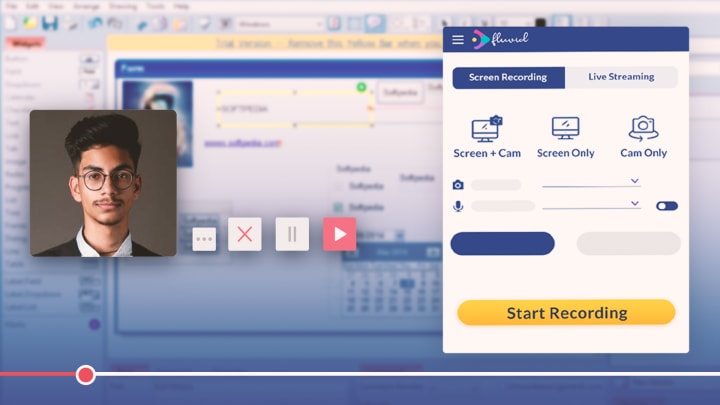
Why Do We Choose Fluvid?
1) It is Free
The screen recording domain is flooded with a lot of options and various companies provide different features, pricing plans, enterprise packages etc. Unlike other screen recording tools which have a short free trial period, Fluvid provided us with a free version that is not limited by time but limited by cloud storage. This helped us in putting this new change in technology & internal communication process to extreme test. It also allowed our customers (both internal & external) to get used to it before we went for the paid enterprise plan allowing us to have additional features & storage space. The pricing for the paid plan was solely based on the features that we choose to have for us.
2) First of it’s kind screen recorder with LIVE Streaming
Though there are a lot of features related to Live Streaming that are yet to be launched, this helped us a lot in our onboarding & training process for new joinees in our team. We are still figuring out ways to use Live streaming in other ways but it has been a productive feature offered by Fluvid that is missing in other companies.
3) Group Sharing
Very few alternative companies provide this feature but it's a gold mine in case you are using a screen recording tool for internal communication or for training & development purposes for your employees. One click and you can share your Fluvid videos with many. There is no restriction on the number of people that can be added into a group.
Other features like adding a thumbnail, customised title and description, adding a call to action button, notifications bar, video library etc are also provided by Fluvid just like any other screen recording tools.
There has been certain issues with Fluvid, but again there isn’t a tool out there that is completely free of problems. Fluvid has a dedicated support team for enterprise plan customers and we are very much happy with the TAT for any ticket raised from our side.
Other leading players in the Domain
The writer is a product manager in a leading India based Fin-tech company.
About the Creator
Fluvid
Fluvid is a futuristic Online screen capture and video recording software. Right from recording videos and editing them to communicating over screen capture and sharing the same.developers.
Keep reading
More stories from writers in Journal and other communities.
The goals I did not achieve
Every writing goal I made for the year is a wash. It has been this way for a while, but I think it's important to be open about my failures and the reality of how life can get in the way. This is especially true considering the several times I have posted on Vocal about my writing goals, how I was changing my approach, and where I was hoping to be for the upcoming year. I will probably do that again in a couple months, but for now, it is time to acknowledge where I am today.
By Kay Husnick21 days ago in Journal
Why Catholics Believe Faith and Works Go Together
Why Catholics Believe Faith and Works Go Together A question often asked by non-Catholics is how faith and works relate in the Catholic understanding of salvation. Some believe that Catholics rely on “good works” to earn salvation, while others think faith alone is sufficient. The truth in Catholic teaching is that faith and works are inseparably connected, and both are essential for a living, authentic Christian life. Understanding this balance begins with Scripture, is explained through Church teaching, and is supported by centuries of theological reflection.
By Sound and Spirit3 days ago in Journal



Comments
There are no comments for this story
Be the first to respond and start the conversation.