
Why Amazon Revoked Your Brand Registry and How to Get It Back?
The Guide for Amazon Brand Registry Revocation and Recovery


Are you losing listing visibility or sales because your Amazon Brand Registry was revoked?
Amazon Brand Registry establishes verified brand ownership, offering protection from counterfeit listings, control over product detail pages, and access to advanced brand management tools. However, many sellers face unexpected revocations due to trademark inconsistencies, policy violations, or verification issues—often disrupting visibility, brand control, and revenue.
This blog explains the primary causes of Brand Registry revocation, including attorney blacklisting and non-compliance with Amazon’s IP protection standards. It also outlines the impact on seller accounts, such as loss of listing authority, analytics access, and storefront functionality, and provides a step-by-step recovery process to reinstate your brand’s verified status. Let’s dive into the details!
6 Causes of Amazon Brand Registry Revocation
#1 Trademark Issues
Amazon requires that sellers submit a valid, active, and registered trademark from an eligible trademark office (such as the USPTO, EUIPO, or other accepted offices) to enroll in the Brand Registry program. If Amazon finds that the trademark registration is:
- Invalid,
- Expired,
- Filed under incorrect details (such as the wrong brand name or mismatched registration number) can lead to revocation.
#2 Incomplete or Incorrect Brand Information
If Amazon detects incomplete or incorrect brand information linked to your products or account, your account may be flagged. Common discrepancies include:
- Brand Name Inconsistencies – Even minor variations, such as spacing or capitalization (e.g., “UrbanThreads” vs. “Urban Threads” or “URBAN THREADS”), can cause verification issues.
- Outdated Business or Ownership Details – Using a different company name, old address, or outdated contact email from your trademark record.
- Mismatched Logos or Visual Branding – If your listing or A+ Content uses a redesigned logo that doesn’t match the one filed in your trademark application.
- Unbranded or Incorrectly Branded Products – Product images or packaging that don’t visibly show your brand name or use a different mark altogether.
- Incorrect Product Categorization – Listing branded products under unrelated categories or associating your brand with unrelated ASINs.
- Incomplete Documentation – Failing to provide trademark certificates, packaging images, or proof of brand ownership when Amazon requests verification.
#3 Unauthorized Access or Ownership Disputes
If Amazon suspects that the ownership of your brand is being misrepresented or that the trademark owner is not the same as the account holder, this can trigger a revocation. For instance, resellers, distributors, or third-party agents who attempt to enroll a brand under someone else’s name without proper authorization might face account revocation issues.
Additionally, if an ownership dispute arises over the trademark or intellectual property, Amazon may temporarily or permanently revoke access to the Brand Registry.
#4 Violation of Amazon’s Policies
Amazon enforces strict guidelines for how sellers use Brand Registry tools, and any misuse can lead to immediate revocation. This includes actions that misrepresent information or unfairly harm competitor listings. Common examples include:
- Misusing IP Enforcement Tools– Filing false infringement complaints or reporting legitimate resellers as counterfeiters to suppress competition.
- Manipulating Product Reviews or Feedback – Offering incentives, using fake accounts, or colluding with other sellers or buyers to manipulate ratings to boost listings.
- Uploading Misleading or Non-Compliant Content – Adding exaggerated product claims, unverified certifications, or branding that doesn’t align with your trademark.
- Engaging in Counterfeit or Parallel Import Sales – Selling products that violate IP laws or infringe on another brand’s rights.
- Repeated Policy Violations or Non-Responsiveness – Ignoring Amazon’s warnings or failing to correct misuse after prior infractions.
#5 Non-Compliance with Amazon’s IP Protection Systems
Even if you haven’t violated any policy, neglecting brand protection obligations can also cause Amazon to revoke your registry access. A few instances include:
- Ignoring infringement alerts or counterfeit reports that Amazon’s system flags for your brand.
- Failing to act on unauthorized sellers or hijacked listings that misuse your trademark.
- Not updating trademark ownership or business details after a merger, acquisition, rebranding, or before expiration.
- Leaving your brand inactive for extended periods suggests that it is either abandoned or unmanaged.
#6 Attorney Blacklisting
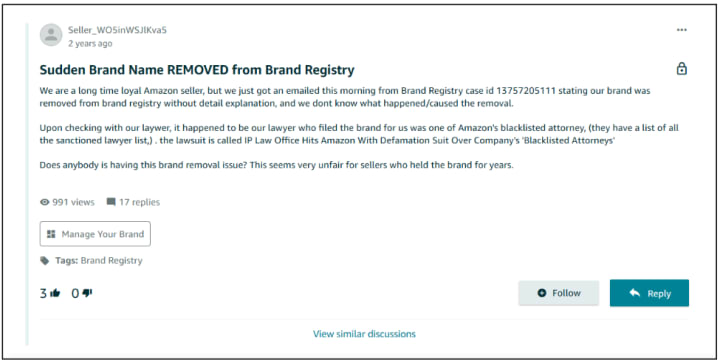
Amazon’s automated compliance systems sometimes flag or blacklist trademark attorneys. While intended to prevent fraudulent registrations, these bots have also affected legitimate attorneys in good standing with the USPTO, causing valid brand applications to face delays, rejections, or unexpected Brand Registry revocations.
To avoid such complications, sellers should verify their attorney’s current standing with both the USPTO and Amazon Brand Registry support before filing or updating trademark information.
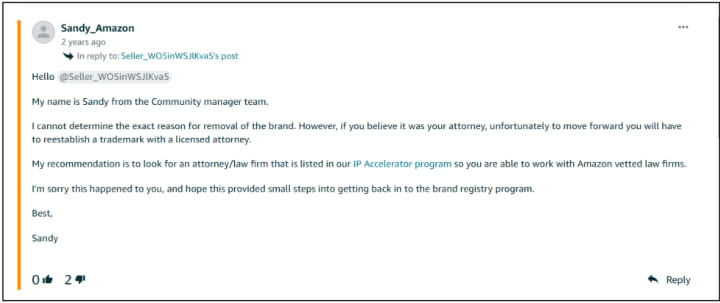
For instance, this seller reported a blacklisted attorney as a reason why his Amazon Brand Registry got revoked.
In response, Amazon’s team suggested:
Impact of Amazon Brand Registry Revocation on Seller Accounts
1. Loss of Control Over Listing
When Brand Registry access is revoked, you lose editorial authority over your product detail pages. Amazon or other sellers sharing your ASIN can modify content attributes such as:
- Product titles and feature highlights
- Descriptions, images, and brand messaging
- Technical specifications like dimensions, materials, or color variations
2. Limited Access to Brand Analytics and Insights
Brand Registry unlocks Brand Analytics, a data suite available exclusively to sellers enrolled in Amazon Brand Registry. These reports provide actionable insights such as:
- Search Term Reports—displays the most-searched keywords on Amazon and the top-performing products for each term.
- Market Basket Analysis—reveals which products customers frequently purchase together, helping identify bundling or cross-selling opportunities.
- Item Comparison and Alternate Purchase Behavior—displays what competing products shoppers viewed or purchased instead of yours.
- Demographics Reports (available for US stores)—offers visibility into buyer segments by age, income, gender, and location.
What Does Losing Brand Registry Access Mean?—It revokes access to these analytics dashboards, leaving you without performance data for informed ad targeting, pricing strategy, and content optimization. This limits your ability to make data-driven decisions, analyze customer intent, or identify competitive trends for measurable growth.
3. Removal of Brand Storefront
Your Brand Store on Amazon enables you to create a custom storefront that showcases all your products in one location. Without Brand Registry, your Brand Store remains visible initially but might lose functionality later on, which means;
- Reduced brand visibility, as shoppers can no longer browse a centralized storefront.
- Disrupted internal links from ads or listings that previously directed to the Brand Store.
- Lower conversion rates, since buyers are taken to generic search pages rather than curated brand environments.
- Limited cross-selling and bundling opportunities, as related products are no longer showcased together.
4. Increased Risk of Counterfeit or Infringed Listings
Brand Registry plays a crucial role in protecting your intellectual property by automatically detecting and removing listings that misuse your brand name or imagery. Once revoked, this protective layer disappears, making your catalog far more vulnerable to unauthorized activity.
Without Brand Registry,
- Counterfeit or lookalike products can appear under your ASINs, diverting sales and damaging product credibility.
- Unauthorized resellers may list substandard or outdated versions of your products, resulting in poor reviews that negatively impact your overall brand rating
- Fraudulent listings can use your trademarked brand name, logo, or images without permission, misleading buyers and eroding customer trust.
- You also lose access to tools like “Report a Violation” and transparency codes, limiting your ability to act quickly against infringers.
5. Broken Brand Links and Store Navigation Issues
Brand Registry revocation can disrupt internal links and navigation across your branded content. Your Amazon Store may become inaccessible or display incomplete pages, and product-level brand links may redirect to generic search results instead of your storefront. This not only interrupts the customer journey but also reduces discoverability and overall engagement with your brand.
How to Recover Amazon Brand Registry
1. Identify and Resolve the Root Cause
Start by carefully reviewing Amazon’s revocation email or performance notification. It will typically specify one or more reasons such as trademark invalidation, ownership discrepancies, policy violations, or incomplete information. Steps to resolve the possible causes;
- Renew or update your trademark registration if it has expired or has incorrect details.
- Update ownership records if your brand has undergone a merger, acquisition, or rebranding.
- Correct any non-compliant product listings or remove content that violates Amazon’s guidelines.
- Respond to any pending IP or infringement complaints directly through Seller Central or Brand Registry support.
2. Gather Evidence and Supporting Documentation
Compile every document that verifies your brand’s authenticity and compliance. This should include:
- A valid trademark registration certificate (issued by USPTO, EUIPO, or another recognized office).
- Screenshots or copies of communications with the trademark office confirming ownership or renewal.
- Proof of business identity—matching the company name, address, and contact details with the registered trademark.
- Product and packaging images clearly showing the trademarked brand name.
Note: If attorney blacklisting was the issue, update your attorney of record through the USPTO and include that confirmation in your appeal.
3. Prepare and Submit a Detailed Plan of Action (POA)
Your POA is the core of your appeal—it must clearly demonstrate that you’ve resolved the issue and taken preventive measures. Keep it concise, professional, and evidence-based.
Your POA should include:
- Acknowledgment: Briefly explain the cause of revocation as stated by Amazon.
- Corrective Actions: Describe what steps you’ve taken to fix the problem (e.g., trademark renewal, ownership update, listing corrections).
- Preventive Measures: Outline what systems or processes you’ve implemented to prevent recurrence (e.g., regular trademark monitoring, internal compliance checks).
Steps to submit your POA in two different cases;
Case 1: If the Revocation Notice Came from Brand Registry (Most Common Case)
If your Brand Registry revocation is connected to brand verification or trademark validity, the appeal must be filed through the Brand Registry portal, following these steps;
- Go to Brand Registry Support → Contact Us.
- Select “Update your brand information” → “Brand Registry revoked or removed”.
- Provide your case ID (from the revocation email, if available).
- Upload your Plan of Action (POA) and supporting documents (e.g., trademark certificate, ownership proof, attorney update confirmation, etc.).
Case 2: If the Performance Notification Appeared in Seller Central
If your Brand Registry revocation is connected to a policy or account-level violation, you may also receive a performance notification in Seller Central, following these steps:
- Go to your Seller Central account → Performance → Account Health → Account Health Dashboard.
- Locate the performance notification or appeal link.
- Click “Appeal” or “Submit Plan of Action.”
- Attach your POA detailing:
- The cause of the violation (e.g., policy breach, IP complaint).
- The corrective actions take
- The preventive measures you’ve implemented.
5. Upload supporting documents, such as your active trademark certificate, proof of ownership, updated listing screenshots, or communications with Brand Registry Support confirming corrections.
6. Click Submit Appeal and monitor your case log for Amazon’s response.
4. Monitor and Follow Up
Amazon typically responds within a few business days; however, more complex cases may take longer.
- Check your case log in Seller Central regularly for updates.
- If you haven’t received a response within 7–10 days, send a polite follow-up message referencing your case ID.
- Be prepared to provide additional documentation if requested.
5. Re-Verification and Reinstatement
Once Amazon approves your appeal, you’ll receive an email confirming reinstatement. Your Brand Registry dashboard, A+ Content Manager, and Brand Analytics will be reactivated within a few days.
After reinstatement:
- Review all product listings to ensure they reflect correct brand details.
- Reconnect your Brand Store, ads, and content modules if they were disconnected.
- Maintain updated brand and trademark records to avoid future revocations.
Losing Amazon Brand Registry impacts more than brand protection—it weakens visibility, trust, and revenue. Prevent Amazon brand registry revocation through proactive compliance, timely trademark updates, and accurate listing maintenance. Treat Brand Registry as an ongoing compliance framework, not a one-time setup.
For sellers managing extensive catalogs or multi-brand operations, pairing these efforts with Amazon reconciliation and reimbursement services adds strategic value—ensuring not only brand compliance but also recovery of overlooked revenue from inventory discrepancies, chargebacks, and lost FBA reimbursements. Together, these measures help stabilize your brand’s operational health, protect your margins, and sustain consistent marketplace performance.
About the Creator
Lisa Russel
Hello, it's Lisa. I am working for Data4Amazon, an organization that helps e-Commerce sellers boost their sales on Amazon. My organization deals in Amazon Virtual Assistant Services.
Keep reading
More stories from writers in Journal and other communities.
New Video Emerges Showing Alex Pretti Confronting Federal Agents 11 Days Before Fatal Shooting
The Video in Question The newly surfaced video shows Alex Pretti engaging with federal agents 11 days before his fatal shooting, raising questions about the sequence of events leading to the tragedy. The footage, shared by local media outlets and circulated widely on social media, depicts Pretti in a heated confrontation, though details remain partially unclear due to the nature of the recording.
By Aarif Lashariabout 2 hours ago in Journal




Comments
There are no comments for this story
Be the first to respond and start the conversation.