
The Ultimate Guide to Buying a Job Sheet App
In today's fast-paced business environment, efficiency and organization are paramount. For companies that rely on fieldwork, such as construction, maintenance, and service industries, a Job Sheet App can be a game-changer. If you're considering purchasing one, this guide will help you navigate the selection process.
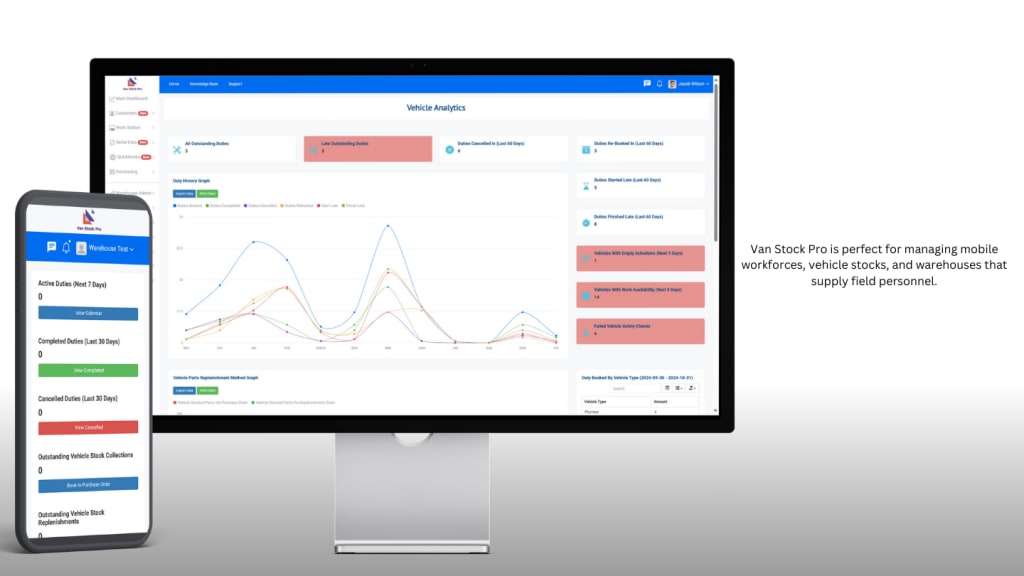
What is a Job Sheet App?
A Job Sheet App is a digital tool that helps businesses manage and document job assignments, track progress, and streamline communication between teams. It typically includes features such as task management, scheduling, time tracking, and reporting capabilities. By replacing paper-based systems with a digital solution, companies can enhance productivity and reduce errors.
Benefits of Using a Job Sheet App
Improved Efficiency: Automating job sheets saves time and minimizes paperwork, allowing teams to focus on their tasks.
Real-Time Updates: Instant updates ensure everyone is on the same page, reducing miscommunication and delays.
Enhanced Reporting: Detailed reports provide insights into performance, helping managers make informed decisions.
Cost Savings: By optimizing operations, businesses can reduce overhead costs and improve profitability.
Key Features to Look For
When shopping for a Job Sheet App, consider these essential features:
User-Friendly Interface: A clean, intuitive design makes it easier for team members to adapt to the new system.
Customizable Templates: The ability to create and modify job sheets according to your specific needs is crucial.
Mobile Compatibility: Ensure the app is accessible on various devices, allowing field workers to update job sheets on-the-go.
Integration Options: Check if the app can integrate with existing tools, such as project management software and accounting systems.
Offline Functionality: This feature is vital for teams working in areas with poor internet connectivity.
Secure Data Storage: Look for apps that prioritize data security and offer cloud storage solutions.
Steps to Purchase a Job Sheet App
Assess Your Needs: Identify the specific requirements of your business. Consider factors like team size, types of jobs, and reporting needs.
Research Options: Compare different apps available in the market. Look for reviews, testimonials, and case studies to gauge their effectiveness.
Request Demos: Many providers offer free trials or demos. Take advantage of these to see how the app works in practice.
Evaluate Pricing: Compare pricing models, whether subscription-based or one-time fees, and consider your budget. Be aware of any hidden costs for additional features.
Check Customer Support: Reliable customer support can make a significant difference, especially during the transition phase. Ensure the provider offers robust support options.
Make the Purchase: Once you’ve made your decision, follow the purchasing process, and ensure that you receive all necessary documentation and support.
Post-Purchase Considerations
Once you’ve acquired a Job Sheet App, focus on the implementation phase:
Training: Provide training for your team to maximize the app’s potential.
Feedback: Regularly collect feedback from users to identify areas for improvement.
Regular Updates: Stay informed about new features or updates from the app provider to continually enhance your workflow.
Investing in a Job Sheet App can significantly enhance your business operations, leading to increased efficiency and profitability. By following this guide, you’ll be well-equipped to select the right app that meets your needs, ensuring a smoother, more organized workflow for your team. Make the leap into digital management and watch your productivity soar!
Benefits of Using a Job Sheet App
Improve Efficiency in Task Management: By organizing tasks in one central location, teams can prioritize effectively and reduce the time spent searching for information.
Enhance Communication Among Team Members: Job sheet apps facilitate better collaboration, ensuring that all team members are on the same page regarding project status and responsibilities.
Streamline Documentation and Reporting: Automating documentation processes reduces errors and saves time, allowing teams to focus on their core activities.
Key Features to Look For
Customizable Templates: Look for apps that offer templates tailored to your industry’s specific needs.
Integration with Other Tools: Seamless integration with CRMs, project management software, and other tools enhances functionality.
Mobile Accessibility: A mobile-friendly interface allows users to access job sheets on-the-go, ensuring that information is always at their fingertips.
Industries That Benefit Most
Construction: In construction, job sheet apps help track project timelines, manage resources, and ensure compliance with safety regulations.
Field Service: For field service providers, these apps enhance scheduling and tracking, allowing technicians to manage multiple jobs efficiently.
Manufacturing: In manufacturing settings, job sheet apps streamline production processes, ensuring quality control and timely delivery.
Healthcare: Healthcare professionals use job sheet apps to manage patient care tasks, document treatments, and maintain accurate records.
Transportation and Logistics: These apps provide real-time tracking of shipments, improving delivery accuracy and customer satisfaction.
How to Implement a Job Sheet App in Your Organization
Choosing the Right App: Evaluate different job sheet apps based on your specific needs, budget, and team size.
Training Employees: Invest time in training to ensure all team members are comfortable using the new system, maximizing its potential.
Best Practices for Maximizing Usage: Encourage regular updates to job sheets, foster a culture of accountability, and continuously gather feedback to improve processes.
To learn more about how Van Stock Pro can manage everything mentioned above, visit our application page.
About the Creator
Van Stock Pro
Van Stock Pro is Field Service & Job Management Software built for the trades and services industry.
To find out more information or request a demo, please call +44 1244 722 473 or email [email protected]
Keep reading
More stories from Van Stock Pro and writers in Journal and other communities.
Discover the Power of CMMS Software for Efficient Maintenance Management
Key Takeaways CMMS software centralizes maintenance data, enhancing decision-making It evolves from simple record-keeping to comprehensive management solutions Organizations gain increased productivity and cost savings CMMS ensures improved asset performance and reliability Integration with IoT and AI marks the future of CMMS
By Van Stock Proabout a year ago in Chapters
The CEO of Everything
They say "jack of all trades, master of none," but they forgot to mention the part where the jack of all trades is also the camera woman, the makeup artist, and the person currently yelling at a tangled Wii microphone cable in a her own bathroom while recording herself singing and trying to make it look realistic and professional. (As professional as you can make it with nothing but a cell phone camera and a mic that doesn't work)
By Sara Wilson5 days ago in Humans




Comments
There are no comments for this story
Be the first to respond and start the conversation.