
The Role of UI/UX Design in Building MVPs That Users Actually Use
How thoughtful design validates ideas, improves usability, and drives early user adoption


A great business idea is backed by solid MVP development. Similarly, a successful MVP is powered by clean UI/UX Designs. The objective of a Minimum Viable Product (MVP) is to validate your idea and bring the most basic version into reality. However, most founders mistakenly think that adding features is the only goal of an MVP. They are neglecting the most essential element, its UI/UX design.
An effective MVP UI/UX design makes your solutions easily accessible, intuitive, and engaging for continuous usage. But exactly how? What’s the role of UI/UX design in MVP development? This blog will help you explore every detail about UI/UX, providing deep knowledge and actionable insights.
What is MVP Software Development (and What It Doesn’t)?
A Minimum Viable Product (MVP) is a simplified version of your product with only essential features and a sleek UI/UX design that helps you validate the idea/solution before full-fledged development in today’s competitive market. MVP software development ensures you can receive valuable user feedback, which allows software developers to iterate on the product based on user requirements. In other words:
A modern MVP is:
- A learning tool, not just a launch milestone.
- A way to validate assumptions through real user behavior.
- A focused solution to a specific problem.
What it isn’t:
- An ugly or confusing interface.
- A feature-heavy product with no clarity.
- An excuse to ignore design.
If users struggle to understand your product, they won’t stick around long enough to give you meaningful feedback. Ultimately, making the MVP ineffective from day one.
Why UI/UX Is Critical in MVP Development?
Whether it is an MVP or a fully-designed product, the first few minutes a user spends on your digital solution determine everything. Let's understand the role of UI/UX design in MVP development in detail.
First Impressions Matter
User opinion spreads faster than you think. That’s why a clean and intuitive UI/UX design for MVP development builds trust and makes your product feel reliable. In case the first impression of your application disappoints the user, the chances of them returning are very low.
Lower Friction = Better Validation
A seamless UI/UX design for MVPs improves the user navigation experience and allows them to reach the core value faster. This ultimately helps you validate the idea based on real-life user experiences. In short, results based on data, no guesswork.
Better Retention
If your MVP design strategy provides a smooth, user-friendly experience, it encourages early adopters to stay longer and return. To achieve this, every menu must be self-explanatory, helping users reach the solution efficiently.
Clearer Feedback
Good UX removes confusion from the equation. When users aren’t struggling with navigation or usability, their feedback focuses on what actually matters: the product’s value and features.
Wins Competitive Edge
A well-designed MVP sets your idea and solution apart in a crowded market. That’s why it’s important to prioritize UI/UX design for startups from the start if you want to stand out and win user loyalty.
Key UI/UX Principles That Make MVPs Usable
Explore the role of UI/UX design in MVP development through key design principles for better clarity, simplicity, and intent.
Research First Approach
Every UI/UX design should start with understanding real users, pain points, and business goals. This way, the foundation of your product design will be based on in-depth research rather than assumptions.
- Shorter for a slide
- More beginner-friendly
- More data-driven for the strategy section
Simplicity Over Features
One of the most important MVP design principles is keeping the MVP design simple and aligned with all necessary features. That means the role of UI/UX design in MVP development isn’t just about making it pleasing, but making it functional.
- Focus on one primary user goal
- Remove anything that doesn’t support that goal
- Keep screens uncluttered and actions obvious
Fast Onboarding & Clear Value Communication
If users don’t understand your value in seconds, they leave. It’s that simple. The UI/UX design for MVPs opens a window to capture attention. Always ensure the user onboarding experience is quick and answers two simple questions: First, how does this help me? And second, what do I do next?
- Clear headlines explaining what the product does
- Simple onboarding flows
- Helpful microcopy and visual cues
User-Centered Design from Day One
MVP software development plays a crucial role in the success of your idea. However, when it comes to UI/UX, designing for yourself or internal teams is a common mistake. Always follow user-centric designs to solve real problems for your target audience.
This includes:
- Defining user personas
- Mapping user journeys
- Designing flows around real pain points
Common UI/UX Mistakes to Avoid in MVPs
Many startups unknowingly compromise their MVPs through avoidable design mistakes.
- Over-designing before validating the idea
- Ignoring mobile-first experiences
- Skipping usability testing altogether
- Copying competitors without understanding users
- Overloading users with too many features
- Unclear user flows and navigation
UI/UX Design Process for MVP Development
A step-by-step design approach that helps startups validate ideas faster and avoid costly mistakes.
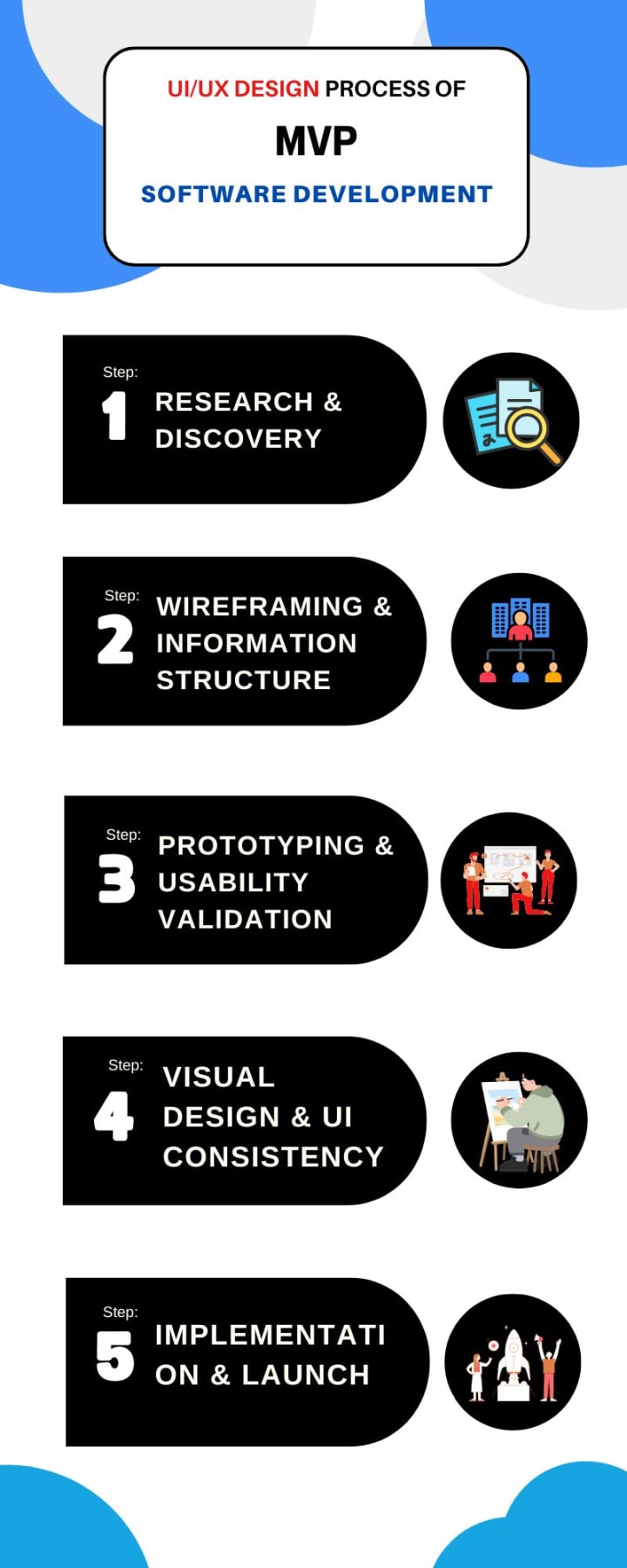
Step 1: User Research & Problem Discovery
First, thoroughly understand your core idea to see how it can resolve user problems and match their expectations. This ensures UI/UX design in MVP development is built with practical utility.
Step 2: Defining User Flows & MVP Scope
The next step is to map out a clear user flow that can help you determine what the MVP should focus on and what can be excluded. This keeps the product simple, purposeful, and easy to use.
Step 3: Wireframing & Information Structure
It’s time to outline the layout and structure with low-fidelity wireframes. Doing this will reduce confusion and give a clear blueprint for MVP development.
Step 4: Prototyping & Usability Validation
Interactive prototypes in MVP UI/UX design empower your team to test key functionalities with actual users. As a result, friction points are identified and resolved before moving forward to the development stage.
Step 5: Visual Design & UI Consistency
Once usability is confirmed, visual elements are added to create clarity and trust. The focus remains on readability, consistency, and brand alignment.
The next step is to design tailored visual elements for clarity and trust. It makes your UI/UX design for MVP development user-friendly and focuses on readability and brand alignment.
Step 6: Design–Development Alignment
Designing and core development are collaborative efforts to build a successful MVP. This prevents usability compromises during implementation.
Step 7: Post-Launch Feedback & Iteration
The final step begins after launching your built MVP. Here, real user behavior guides further improvements. Also, continuous iteration through UI/UX design in MVP development refines the product for a mass user base.
Conclusion
We hope the role of UI/UX design in MVP development is crystal clear. When startups treat UI/UX design as a core strategy rather than an afterthought, they create products that users actually enjoy using. So, start with your MVP, design with intent, focus on core features, and let your product do what it’s meant to do: solve problems and scale.
About the Creator
Priyanka Sharma
Priyanka Sharma holds a bachelor's degree in business administration and works as a senior business development executive at CodeAegis Pvt Ltd. She always loves to share insight about business tech help, business growth, marketing, etc.
Keep reading
More stories from Priyanka Sharma and writers in Journal and other communities.
What are the Legal and Licensing Requirements for Online Businesses in Dubai?
The UAE, and especially Dubai, continues to develop as a stronghold for digital innovation, remote entrepreneurship, and e-commerce. If you are trying to launch a business online, understanding the legal and licensing requirements is the first and most important step.
By Priyanka Sharma7 months ago in Education


Comments
There are no comments for this story
Be the first to respond and start the conversation.