
Simplified Master Document Register (MDR) in the Construction Industry
The MDR stores information for review and approval in a RACI-like matrix, so it is essentially a very large spreadsheet. This widely used format makes it simple to share information between companies and to easily sort, filter, highlight, and process the data contained in the MDR, both from the contractor and client sides.


INTRODUCTION
The Master Document Register (MDR), also known as the Master Document List (MDL) or Master Deliverable Register, is a comprehensive list of documents that must be delivered across all disciplines and phases of a capital project. All incoming and outgoing documents are included in the MDR. The MDR stores metadata (attributes) such as discipline, document classification, document type or nature, revision number or code, document description, document transmittal reference number, document reference number, and revision status for each of these document deliverables. The method used to handle the documents (for example, email, transmittal, courier, etc.), the date submitted (document date), the date the document was delivered, the date closed or approved, the date received by, and the approval code.
The MDR stores information for review and approval in a RACI-like matrix, so it is essentially a very large spreadsheet. This widely used format makes it simple to share information between companies and to easily sort, filter, highlight, and process the data contained in the MDR, both from the contractor and client sides. The MDR is typically a document owned by the document controller of the contractor. The DC is usually in charge of updating the MDR and sending it to the client on a regular basis: usually weekly, but sometimes (rarely) monthly. In that sense, the MDR can be viewed as a document of communication between the contractor(s) and the client regarding the status of project deliverables. Upon receipt, the client's document controller can check the information and cross-check whether what the contractor indicates as "issued" has actually been "received" by the client.
The MDR aids in project tracking.
The MDR is a critical tool for both the Document Control team and the Project Management and Project Controls/Services team in general to monitor the inflow and outflow of documents, track project progress, and identify potential problems as early as possible. The MDR data can be used to identify late documents from the contractor, late client comments, lost documents, potential delays with deliverables, and thus the impact on the project schedule, as well as any overall documentation-related problems for the project. It is also a document that is used during project progress meetings (both internal and client-contractor meetings) to track and ensure the progress of documents. Although it is maintained by document controllers, it contains information useful to many other disciplines such as commercial, contract, drawings and design, equipment and other resources, health, safety, and environment (HSE), human resources, logistics, project management, external provider, technical, quality, and so on. This is why, in general, it is a good practice to agree on the template, format, and frequency of issuance of this critical document from the start of the project.
Keywords: Master Document Register (MDR), Master Document List (MDL) or Master Deliverable Register (MDR), Document Controller (DC)
1.0 SCOPE
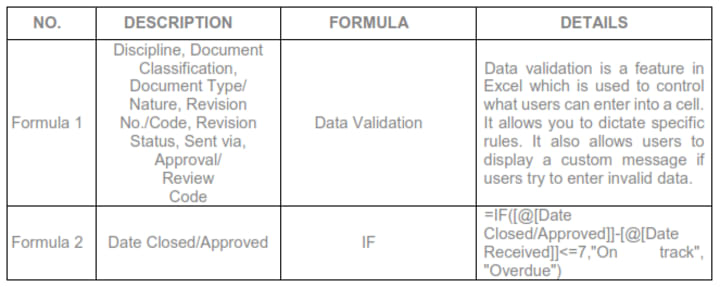
Documents received and transmitted, also known as "incoming" and "outgoing," must be recorded promptly and accurately in the appropriate Master Document Register (MDR) or master deliverable register. This is a simplified master document register that includes slicers, data validation, and the IF formula.
2.0 PURPOSE
2.1 To ensure proper, accurate, and complete document identification and traceability.
2.2 To ensure the timely delivery of the documents to their proper recipients.
2.3 To put in place a more efficient and effective system for recording incoming and outgoing communications.
3.0 RESPONSIBILITY
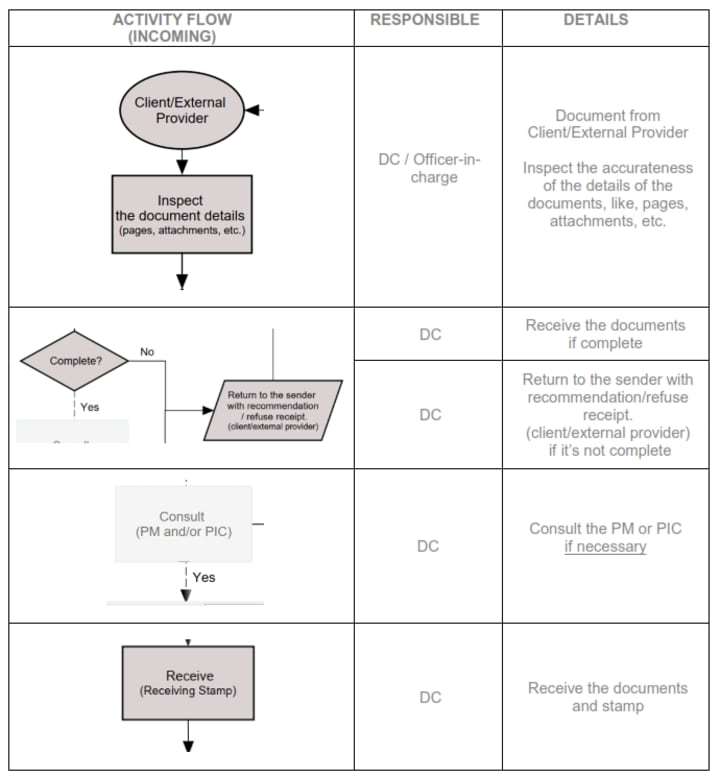
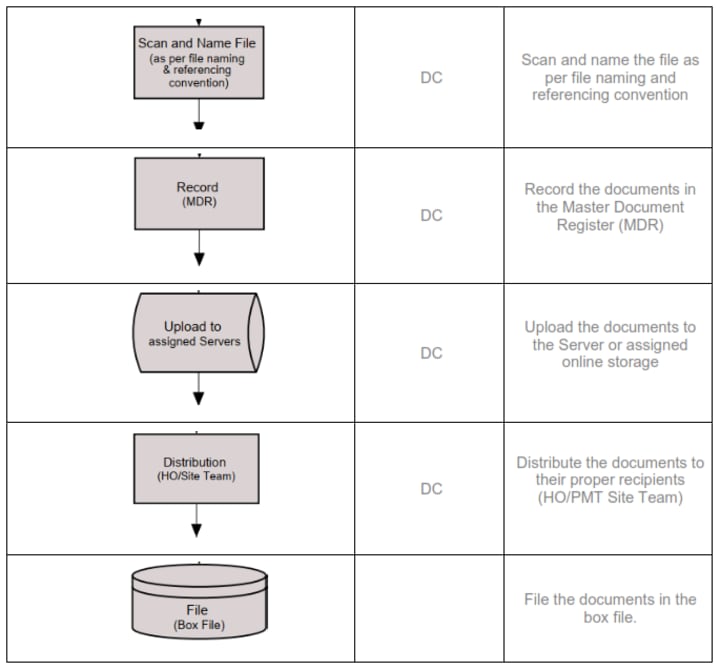
The DC is in charge of managing the processing of documented communications on project or construction sites. If there is no assigned DC, the project manager and/or PIC are responsible for document development at project sites.
4.0 DEFINITION OF TERMS AND DEFINITION
Incoming documents are documents from the client or external provider that are sorted out and arranged according to their subject, content, and description.
Outgoing documents are official documents received within the company that are immediately delivered to an external person or entity concerned.
The Master Document Register (MDR) is a comprehensive list of documents that must be delivered across all disciplines and phases of a capital project.
5.0 PROCEDURES
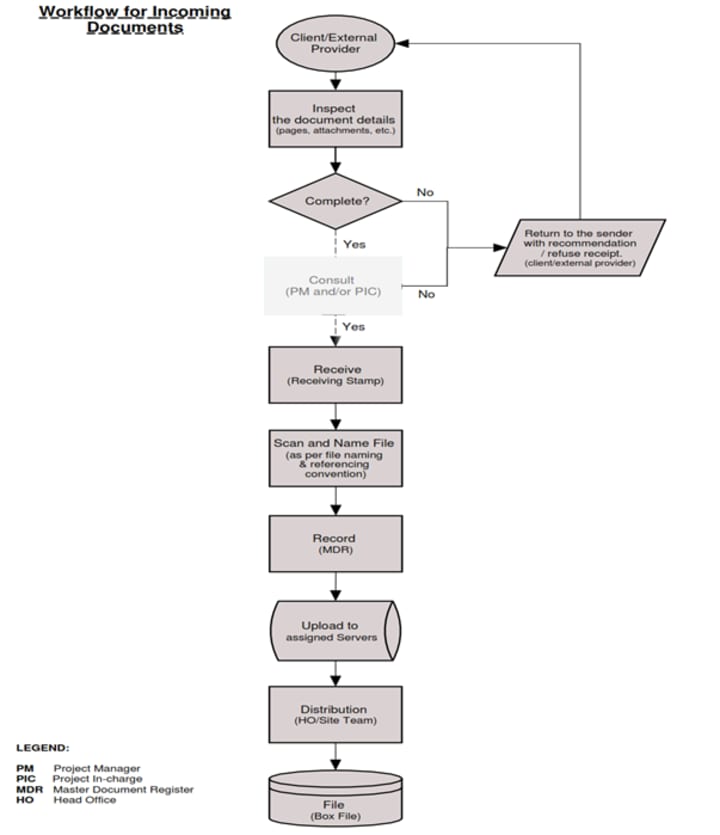
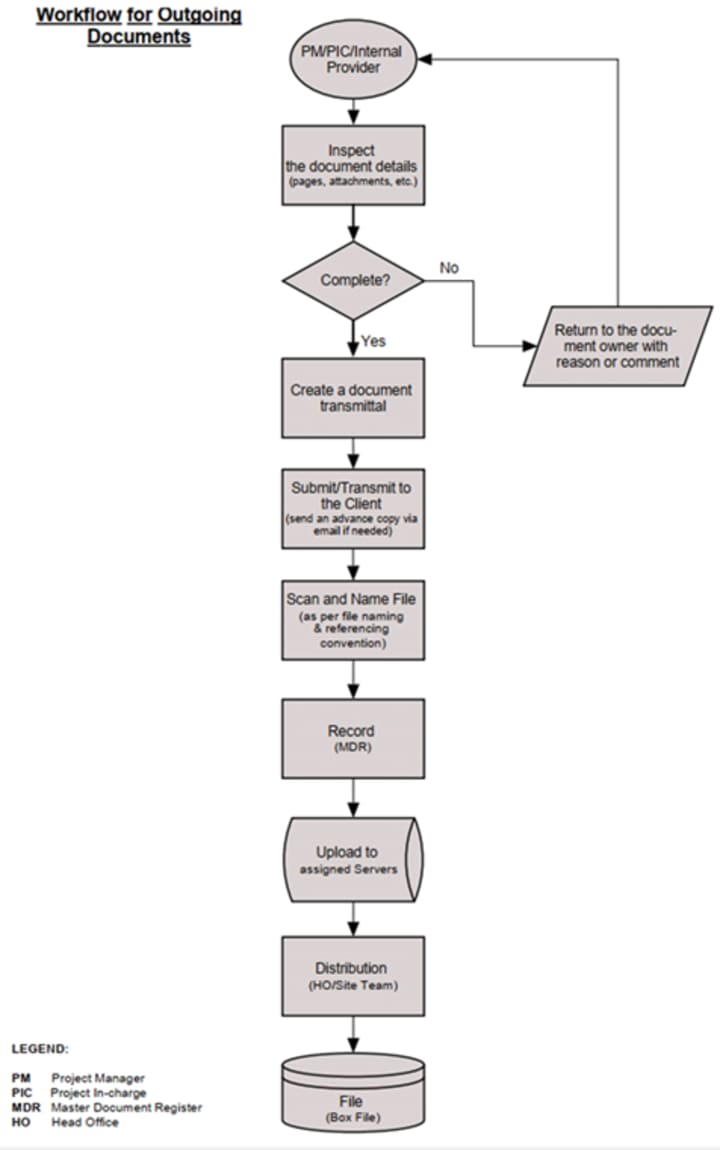
This procedure covers activities such as document receipt, classification, recording, delivery to appropriate recipients, and filing; thus, the actions described here are related to organizing the company's construction documents and ensuring an appropriate response.
5.1 All incoming and outgoing documents are sorted and classified based on the document's type, description, and activity classification.
5.2 Documents are distributed as soon as possible after the DC process is completed. Incoming documents must not be delayed after receipt unless there is a valid instruction or reason.
5.3 Documents received and submitted are properly recorded in the Master Document Register (MDR) for the most recent generic version of the register. Entries are organized in chronological order by reference number and date.
6.0 PROCESS FLOW
6.1 Incoming Documents
6.2 Description of Procedure
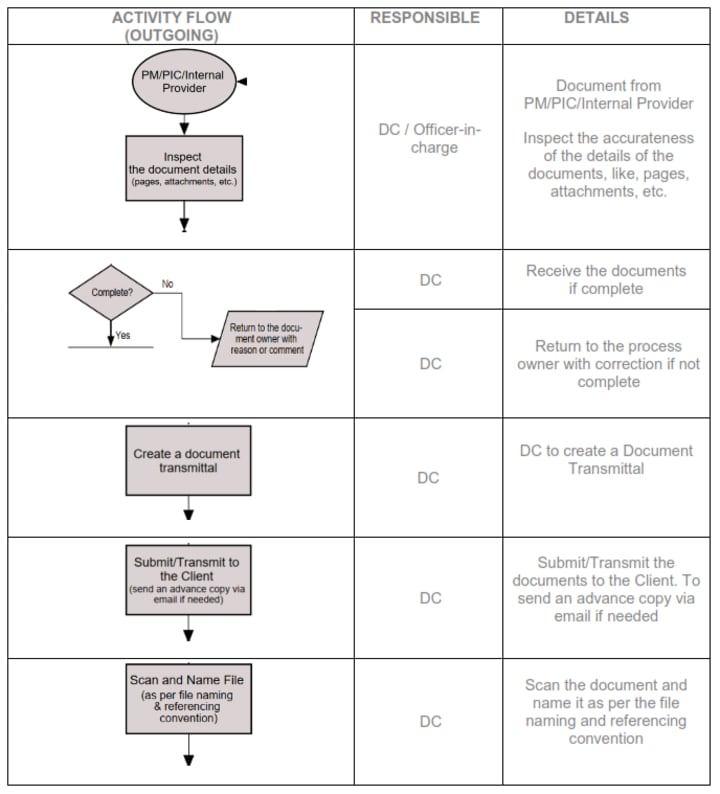
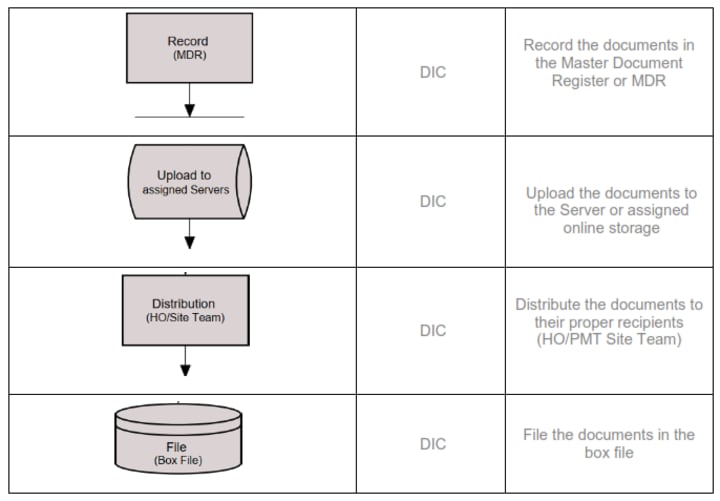
6.3 Outgoing Documents
6.4 Description of the Procedure
7.0 FORMULA AND COMMON CODES/INITIALS
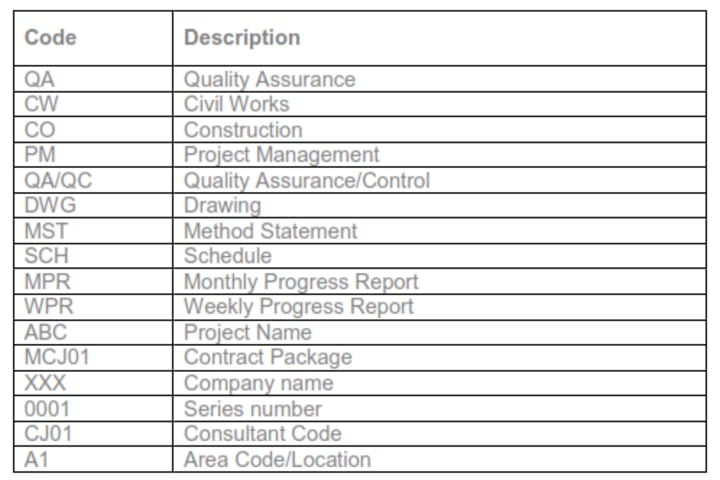
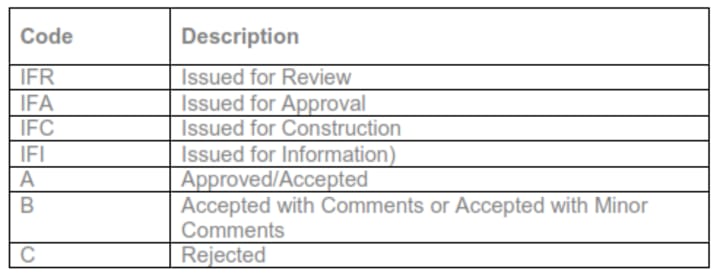
Common Code/Initials used in the MDR:
Common Status Code:
8.0 MDR INTERFACE
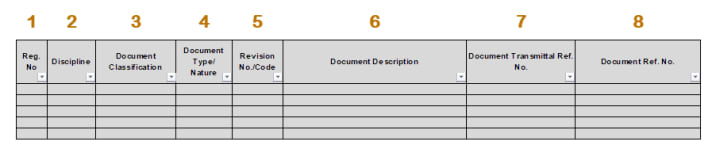
1. Reg. No. is the series number.
- (ex. 1, 2, 3, etc.)
2. Discipline
- (ex. QA, CI, CO): Quality Assurance, Civil Works, Construction
3. Document Classification
- (ex: technical document, technical drawing, non-technical document, etc.)
4. Document Type/Nature
- (ex. QA/QC, DWG, MST, SCH, MPR, WPR... Quality Assurance/Control, Drawing, Method Statement, Schedule, Monthly Progress Report, Weekly Progress Report)
5. Revision No./Code
- (ex. 00, 01, 02, A, B, C...)
6. Document Description
- A short description of the documents
7. Document Transmittal Reference No.
Unique transmittal reference no. (ex. ABC-MCJ01-XXX-TRN-0001)
- ABC is the name of the project
- MRS01 is the contract package
- XXX is the name of the company, and
- 0001 is the unique 4-digit series number.
8. Document Reference No.
Unique document reference (ex. ABC-MCJ01-CJ01-A1-XXX-CO-WPR-0001)
- ABC is the name of the project,
- MRS01 is the contract package,
- CJ01 is the code of the consultant,
- A1 is the area location,
- XXX is the name of the company,
- CO is the code for construction,
- WPR is the document type or nature, and
- 0001 is the unique 4-digit series number).
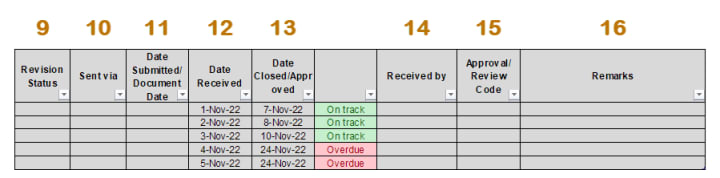
9. Revision Status
- (ex. IFR, IFA, IFC, IFI)
- Issued for Review,
- Issued for Approval,
- Issued for Construction,
- Issued for Information
10. Sent via:
- The method by which the documents are handled (for example, email, transmittal, courier, etc.).
11. Date Submitted/Document Date
- When was the document submitted and when was the document created?
12. Date Received:
- The date the document was delivered.
13. Date Closed/Approved
- The date on which the case was closed and/or approved.
14. Received by
- Name of the person receiving the documents
15. Approval Code
A unique code used in the project (ex. Code A, Code B, Code C, etc.).
- A stands for Approved/Accepted.
- Code B means "accepted with comments" or "accepted with minor comments," and
- Code C means "rejected."
16. Remarks
9.0 PERFORMANCE EVALUATION
The following criteria can be used to evaluate this MDR in collaboration with the person in charge of documenting and maintaining the register:
9.1 Accessibility
9.2 Completeness
9.3 Internal audit: daily monitoring
9.4 Management review: weekly and monthly
DC must be aware of the need to determine what, how, and when things will be monitored, measured, analyzed, and evaluated. An internal audit is also included in this process to ensure that the document management system meets the requirements of the organization as well as the standard, and that it is successfully implemented and maintained. The final step, management review, determines whether the management system is appropriate, adequate, and effective.
10.0 IMPROVEMENT
In today's fast-paced corporate environment, not everything goes as planned. The improvement examines ways to address nonconformities, corrective actions that can be managed, and opportunities for continuous improvement.
10.1 Nonconformity and corrective action.
10.2 Continuous improvement
This MDR can be fully automated using Excel with VB (an Excel macro-enabled workbook) or any other program of your choice.
Like what you read?
Don't forget to please subscribe and like my story.
Thank you.
Please send me an email if you'd like a copy of the editable MDR. I would be delighted to share it with you. [email protected]
About the Creator
Domingo Añasco-Gaces Samontina, Jr.
.Professional Member of the Mechatronics and Robotics Society of the Philippines
.Certified Documented Information Controller with TUV Rheinland Qualifications
.Master of Science in Engineering (on-going) with Professional Teacher Certificate
Keep reading
More stories from Domingo Añasco-Gaces Samontina, Jr. and writers in Journal and other communities.
Author’s Advice
If you would’ve asked me 20 years ago did I know I’d become a writer and an author, I would’ve said “nope, ain’t happening”. As fate would have it I did become an author and I can honestly say I’m loving it so far. It really does feel good to be a writer. I’ve learned a lot on this journey and I feel like with even me being as new to this world as I am, there’s some wisdom I need to share with every other aspiring author.
By Joe Patterson2 days ago in Journal
My First Time Skiing and I Got Lost, Alone, in the French Alps
Looking back, I can trace some of my life’s biggest adventures to a simple action from my sister. She’d introduced me to Tommy (a very long time ago), a colleague of hers, who had overshared his penchant for Italian-looking women, and I ticked that box.
By Chantal Christie Weissabout 17 hours ago in Humans




Comments
There are no comments for this story
Be the first to respond and start the conversation.