
Level Up Your Ops Game: How Google Cloud BigQuery Turns OS Logs into Gold
From System Meltdowns to Data-Driven Insights: Real-World Stories of Using BigQuery for Operating System Analysis
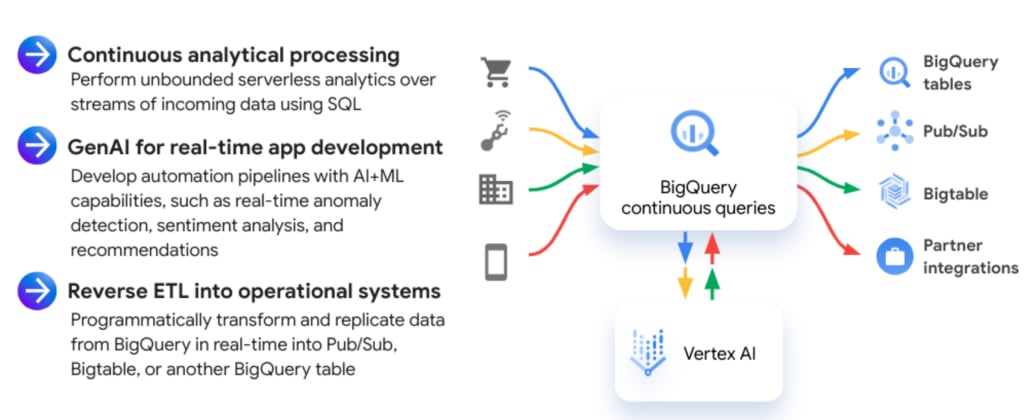
For those in operations, system hiccups are all too familiar – CPU spikes, memory overflows, disk I/O bottlenecks, and a chaotic mess of error logs. Back in the day, it was a frantic scramble of SSH sessions, top commands, and endless log file digging. Sleepless nights were practically a job requirement.
But ever since I discovered Google Cloud BigQuery, my life as an ops person has completely changed. It's not just a massive data warehouse; it's my trusty sidekick for quickly diagnosing and fixing system issues, saving me a ton of time and brainpower. Let me share a few real-life "battles" where BigQuery came to the rescue.
1. Choking on CPU Spikes: BigQuery Hunts Down the Culprit
One time, our web system suddenly slowed down to a crawl. Customers were yelling. The monitoring dashboard showed CPU usage on our servers skyrocketing. We used to have to SSH into each one, run top and htop to see which process was hogging resources. It took forever to find a misbehaving cron job running at peak hours.
With BigQuery, that scenario is history. I configured system and application logs to stream to Cloud Logging and then directly into BigQuery. When CPU spikes happen now, instead of server hopping, I fire off a targeted query.
Boom! Instantaneously, I see which server is struggling the most. Then, another quick query filtering logs on that server during the high CPU period reveals the problematic process.
the culprit is exposed in no time, sometimes before I've even finished my coffee. Seriously, with BigQuery, CPU spikes are way less terrifying!
2. Driven Mad by Mysterious App Errors: BigQuery Gets to the Root Cause
The application would run smoothly for a while, then suddenly throw these weird, unexplainable errors. Users were complaining, and the log files were an absolute jungle. We used to spend hours sifting through that mess, using grep and tail -f, often ending up cross-eyed and still clueless.
BigQuery made error hunting a much more "scientific" process. I configured the application to log everything (errors, warnings, stack traces, etc.) and dump it all into BigQuery. When errors pop up, I summon BigQuery and issue a command.
I even got fancier by using BigQuery's string analysis functions to extract information from the log messages, like the exception type, the class causing the error, the line of code, etc. Then, I'd group by these to see which errors were happening most frequently, allowing me to focus on the most critical issues first.
3. Losing Sleep Over Security Suspicions: BigQuery Follows the Intruder's Trail
Security is always the nightmare scenario for ops folks. Whenever there was a hint of a system being compromised, I'd be glued to the security logs, scrutinizing every IP address and suspicious activity. It was time-consuming and easy to miss things if the attacker was sophisticated.
BigQuery proved its worth again in this area. I configured firewalls and intrusion detection/prevention systems (IDS/IPS) to send logs to BigQuery. When something felt off, I used SQL to filter out unusual IPs and suspicious actions during the suspected timeframe.
I even dabbled in BigQuery ML to build anomaly detection models based on historical security logs, helping me catch subtle attacks that human eyes might miss. BigQuery is like a brilliant detective, leaving no bad actor untraced!
4. (Initial) Headaches Predicting Resource Needs: BigQuery Shows the Way
As the system grew, predicting when we needed to scale up resources (add servers, increase RAM, etc.) became a real puzzle. We used to just guesstimate based on experience, often undershooting and causing outages, or overshooting and wasting money.
BigQuery helped me solve this puzzle with much greater accuracy. I gathered all the performance data (CPU, memory, network) into BigQuery and used SQL to analyze usage trends over time.
Then, I used BigQuery's window functions to calculate moving averages and predict growth trends, allowing us to plan resource upgrades proactively, ensuring both performance and cost efficiency.
That resource prediction thing? It's not just about looking at a simple growth chart, folks. Our systems would experience these "undercurrents" that were hard to spot with the naked eye. Think massive marketing campaigns on weekends or flash sales causing sudden traffic surges. Without concrete data to anticipate these spikes, we'd inevitably face system crashes, leaving the whole team bewildered.
BigQuery helped me dissect these factors. I didn't just analyze performance by day or week; I drilled down to the hour, even the minute. I combined performance data with information about marketing events and promotions to find correlations.
This query allowed me to clearly see the "peak hours" coinciding with the start of promotions, enabling proactive resource provisioning. I even built "smart" dashboards displaying resource demand forecasts based on upcoming events, making the entire team more prepared.
5. The Memory Leak Monster: BigQuery Points to the "Hole"
A chronic ailment for applications, especially older Java ones, is the dreaded memory leak. Back in the day, dealing with this was a full-blown "war." We had to use all sorts of profilers, dump heap memory, and painstakingly analyze every object to find the culprit. It was time-consuming and required specialized knowledge.
BigQuery doesn't directly fix memory leaks, but it's an incredibly effective "pointer." I collect memory usage metrics for each process and container and "dump" them into BigQuery. When I see memory steadily increasing over time without any signs of decreasing, I know something's up.
The memory usage chart generated on Looker Studio from this query becomes solid evidence of the application slowly "eating" memory. At this point, I know it's time to call in the development team to dive into the code and find the "leak." BigQuery doesn't solve the root cause, but it helps us detect the problem early and provides visual data for the dev team to diagnose it faster.
6. Disk I/O Bottleneck Blues: BigQuery Exposes the "Greedy One"
Disk I/O bottlenecks are another frustrating issue, making the system crawl without an obvious cause. It could be excessive application logging, a database query doing a full table scan, or some process constantly reading/writing data.
With BigQuery, I can pinpoint the "greedy" process hogging all the disk I/O. I collect metrics on disk read/write bytes and I/O wait from the servers and "throw" them into BigQuery.
When I spot unusually high latency, I check the load balancer and firewall logs to see if there's any abnormal traffic or suspicious IPs causing trouble. I even use BigQuery to analyze traffic flow between services, helping identify bottlenecks or unusual connections that might be contributing to latency.
Advanced BigQuery "Moves" for OS Data Wrangling:
- Leveraging Window Functions: For analyzing trends, calculating moving averages, comparing current values to previous ones, etc.
- Utilizing Arrays and Structs: For storing and analyzing complex data within logs or metrics.
- Employing Regular Expressions (REGEXP_CONTAINS, REGEXP_EXTRACT): For dissecting detailed information from complex log strings.
- Integrating with BigQuery ML: For building anomaly detection models, log clustering, or sentiment analysis from logs.
- Creating Views and Materialized Views: To simplify complex queries and speed up querying for frequently used reports.
- Using Scheduled Queries: To automatically run periodic analysis queries and store results in other tables for dashboards or alerts.
Final Thoughts
BigQuery has truly transformed how I approach system operations. It's not just a tool; it's a smart "partner" that helps me go from being a reactive "firefighter" to a proactive "architect" building more stable and efficient systems. The "battles" I've described are just a small glimpse into the countless situations where BigQuery has been my savior.
If you're still wrestling with log analysis and performance monitoring the old-fashioned way, I strongly encourage you to give Google Cloud BigQuery a shot. It might just be the "key" to unlocking a new world in your work, helping you sleep better and have more time for things you enjoy outside of work. Trust me, investing time in learning BigQuery is a high-return investment for your system operations career! 😉
About the Creator
How I Learned to Adapt When Google’s AI Changed the Rules of SEO
I still remember the moment I realized SEO had changed forever. It wasn’t dramatic. No sudden traffic crash. No warning email. Just a slow, unsettling pattern pages that once ranked comfortably were slipping, while content that felt more thoughtful and human started rising. That’s when it clicked. Google wasn’t just ranking keywords anymore. It was reading intent.
By Anthony Rodgers3 days ago in Journal



Comments
There are no comments for this story
Be the first to respond and start the conversation.