
How to Use Nano Banana Image Generator (Gemini 2.5 Flash Image)
A Complete Guide to Mastering Google’s AI-Powered Nano Banana for Stunning Image Creation

Google's Nano Banana image generator, powered by Gemini 2.5 Flash Image technology, marks a major step in AI-driven visual creation. As demand for high-quality images grows in marketing, social media, and personal projects, mastering this tool is key to staying competitive.
Whether you're a creator streamlining workflows, a business owner needing visuals, or an AI enthusiast, Nano Banana offers accessible, efficient solutions. This guide will cover everything you need to get started with this advanced tool.
Key Points Covered in This Article:
• Understanding what Nano Banana is and how it works
• Exploring the main features of this image generator and image editor
• Step-by-step instructions for using Nano Banana through different platforms
• Comparing Google AI Studio, Vertex AI, and Xole AI options
• Why Xole AI stands out as the best choice for most users
• Tips for getting the most out of your image generation experience
What Is the Nano Banana Image Generator?
The Nano Banana image generator is Google's latest innovation in artificial intelligence-powered visual content creation. This sophisticated tool represents a breakthrough in how we approach digital image generation, making professional-quality visual content accessible to users regardless of their technical background or design experience.
Built on advanced machine learning algorithms, Nano Banana transforms simple text descriptions into stunning visual representations. Unlike traditional image creation methods that require extensive design skills or expensive software, this image generator democratizes the creative process by allowing anyone to produce high-quality images through natural language commands.
Understanding Gemini 2.5 Flash Image Technology
At the heart of Nano Banana lies Gemini 2.5 Flash Image, Google's most advanced multimodal AI system designed specifically for visual content generation. This technology combines natural language processing with sophisticated image synthesis capabilities.

Key Features of Nano Banana Image Generator
The Nano Banana image generator offers a comprehensive suite of features that make it stand out among AI-powered creative tools.
Advanced Image Generation Capabilities
• Create original images from detailed text descriptions
• Support for multiple styles: realistic photography, abstract art, technical illustrations, cartoon graphics
• Professional-grade output suitable for commercial applications
• Consistent quality across different prompts and use cases
• Perfect for marketing materials, social media content, and educational resources
Smart Image Editor Functions
• Change backgrounds and adjust colors seamlessly
• Remove unwanted elements from existing images
• Add new components to enhance visuals
• Create variations while maintaining core visual elements
• Fine-tune generated content without additional software
• Support iterative creative processes for optimal results
How to Use Nano Banana Image Generator
Getting started with Nano Banana involves choosing the right platform for your needs and understanding the basic workflow for creating images. Several access methods are available, each offering different advantages depending on your technical requirements and usage patterns.
Method 1. Getting Started with Google AI Studio
Google AI Studio provides direct access to Nano Banana through Google's official development environment. This platform offers the most comprehensive feature set and regular updates directly from Google's development team.
The studio environment allows for experimentation with different parameters and settings, making it ideal for users who want to explore the full capabilities of the Nano Banana system. However, this platform may require some technical knowledge and might be overwhelming for casual users seeking simple image generation.
Step-by-Step Guide for Google AI Studio:
Step 1: Visit the Google AI Studio website and create a free account using your Google credentials. Once logged in, navigate to the image generation section and select Gemini 2.5 Flash Image as your model.
Step 2: Familiarize yourself with the prompt interface by reviewing the provided examples and documentation. Write your image description in clear, detailed language, including style preferences, colors, and composition details.
Step 3: Adjust generation parameters such as image size, quality settings, and output format. Click generate and wait for the system to process your request. Review the results and refine your prompts as needed for better outcomes.
Method 2. Using Vertex AI for Advanced Projects
Vertex AI represents Google's enterprise-level solution for accessing Nano Banana capabilities. This platform is designed for developers and organizations requiring scalable image generation solutions integrated into larger applications or workflows.
The Vertex AI approach offers greater control over API calls, batch processing capabilities, and integration options with existing systems. While this platform provides powerful capabilities, it requires more technical expertise and typically involves costs associated with API usage.
Step-by-Step Guide for Vertex AI:
Step 1: Set up a Google Cloud account and enable the Vertex AI API in your project console. Configure billing and authentication credentials to access the Gemini 2.5 Flash Image services through the API endpoints.
Step 2: Install the necessary SDKs or use the REST API to integrate Nano Banana functionality into your application. Structure your API calls with proper authentication headers and request parameters for image generation.
Step 3: Implement batch processing workflows if needed, monitor usage costs through the Google Cloud console, and optimize your API calls for efficiency. Test thoroughly before deploying to production environments.
Method 3. Xole AI - The Easiest Way Forward
For most users, Xole AI represents the optimal balance between functionality and ease of use when accessing Nano Banana capabilities. This platform simplifies the entire process while maintaining access to the powerful underlying image generation technology.
Xole AI streamlines the user experience by providing intuitive interfaces that don't require technical knowledge. The platform's approach to democratizing AI image generation makes it particularly attractive for content creators, small businesses, and individuals who want professional results without technical barriers.
Step-by-Step Guide for Xole AI:
Step 1: Sign up for a free account at Xole AI and explore the Nano Banana image generator section. Browse through the available preset prompts and style templates to understand the different creative options available.
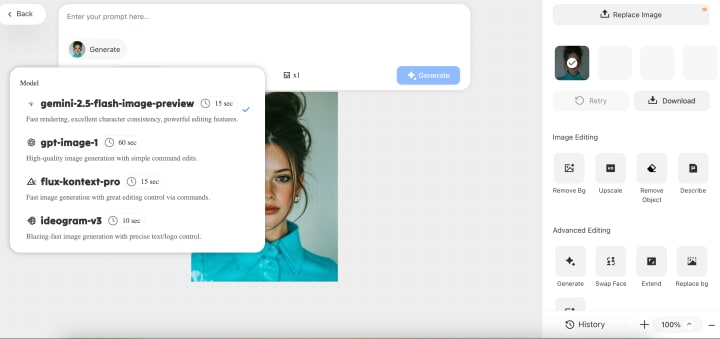
Step 2: Select your preferred style template or create a custom prompt describing your desired image. Choose from multiple AI model options if you want to experiment with different approaches, or stick with the recommended Nano Banana model for consistent results.
Step 3: Generate your image and use the built-in editing tools to make adjustments if needed. Download your final image in your preferred format, or save it to your Xole AI gallery for future reference and sharing.
Why Xole AI Is the Best Choice for Nano Banana
When comparing available platforms for accessing Nano Banana image generator capabilities, Xole AI consistently emerges as the superior choice for most users. Several key factors contribute to this advantage, making it the recommended solution for both beginners and experienced users.
Preset Prompts and Style Selection: Xole AI offers a wide range of preset prompts and style options, helping users create high-quality visuals without complex prompt writing. From business presentations to social media graphics or artistic works, each preset is optimized and tested for consistent results. Users can easily switch between photorealistic, artistic, or stylized designs through a simple interface.
Multiple AI Model Options: Beyond Nano Banana, Xole AI provides multiple AI models to match different project needs. Intelligent model selection guides users, especially beginners, to the right tool. This unified platform allows experimentation without managing multiple accounts or learning separate interfaces.
Final Thoughts on Nano Banana Image Generator
The Nano Banana image generator uses Gemini 2.5 Flash Image technology to create high-quality visuals for a broad audience. Xole AI adds an intuitive interface, preset optimization, and multi-model access, helping creators and businesses produce impressive images easily.
For affordable API access, GPT Proto complements Xole AI with cost-effective solutions for various needs and budgets. As AI image generation evolves, Nano Banana simplifies professional-grade visual creation with speed and efficiency.
About the Creator
Keep reading
More stories from Daily Blog and writers in Journal and other communities.
H Beam Production Line: Complete Guide to Manufacturing and Suppliers
H beams are critical in the construction of contemporary buildings; they are found in high-rise buildings and industrial warehouses. A project’s success and the structure’s integrity are dependent upon the specific production processes, welding, and supplier selection. This document explores the automation processes in H beam manufacturing, as well as the basic concepts, covering all the necessary topics.
By Daily Blog7 months ago in Journal
Author’s Advice
If you would’ve asked me 20 years ago did I know I’d become a writer and an author, I would’ve said “nope, ain’t happening”. As fate would have it I did become an author and I can honestly say I’m loving it so far. It really does feel good to be a writer. I’ve learned a lot on this journey and I feel like with even me being as new to this world as I am, there’s some wisdom I need to share with every other aspiring author.
By Joe Patterson4 days ago in Journal
Hottest in the Office
Dear Rafi, You’re very distracting to work around. For the first second I saw you the other day, I thought you were some type of executive. It took a moment to realize no, you were just the new guy, dressed up for the job he wants. Be still, my heart.
By Gabriel Shames5 days ago in Pride



Comments
There are no comments for this story
Be the first to respond and start the conversation.