
How To Set Up and Manage Multiple Shopify Stores | StageBit
Set Up and Manage Multiple Shopify Store


Before we start on How to Set Up and Manage Multiple Shopify Stores, Let’s Discuss;
How many stores can you create with one Shopify Account?
And the answer is ONE.
However, You can create any number of Shopify Stores you want with one Email Address.
Using the same Email Credentials, You can definitely open Multiple Shopify Stores, but each one has its own account and is accessed through a different Admin Panel.
Once you have logged into your Shopify admin, you can switch between your Shopify Stores that are linked to the same email address.
Here You must be questioning If there is any way to open Multiple Shopify Stores within one Shopify Account.
Yes, There is an option to Set Up Multiple Shopify Stores within one Shopify Account. But it’s limited to Shopify Plus Plan Users. The majority of Shopify store owners do not have the extremely high traffic that Shopify Plus is reserved for. And that’s the reason for it.
Shopify Plus Plan is the only way to Create Multiple Shopify Stores within one Shopify Account. And if you’re looking to set up multiple Shopify stores with Basic Shopify, Shopify, or Advanced Shopify Plans, you need to set up multiple Shopify Accounts. And Yes, The same email address can be used to set up these accounts.
We’ll be covering the following topics in this blog, Jump to your preferred one or keep reading the article 🙂
Reasons for Building Multiple Shopify Stores:
Having Multiple Shopify Stores entirely depends on the specific business requirements.
A successful Shopify store requires the store owner to manage several business processes at the same time, much like juggling multiple balls. Creating another Shopify store in this situation can be stressful for some as they will need to look after multiple tasks at the same time.
But your Single Shopify store may not be sufficient enough to grow your business further in this fast-expanding market. You may need to create more than one online store in a variety of situations. However, it will need a team to manage them but they’ll have their own benefits 😉
And the reason behind having multiple stores can be anything, such as; having different stores for B2B, B2C, B2G, C2B, C2C, or any other business module. Or you’ve end number of products and you’re looking to categorize them differently, or any other.
How to Set Up & Manage Multiple Stores on Shopify?
As we told you earlier, the only option to open numerous Shopify stores is to create a separate account for each one.
Whereas you can register all of these Shopify Stores with a single email address, they will be run independently on distinct Shopify Accounts.
Once you’ve completed that, Follow the following steps:
Step:1 Create Another Store
You can Create a Shopify Store directly from the Store Login Screen, Where you have the list of all the stores under the account.
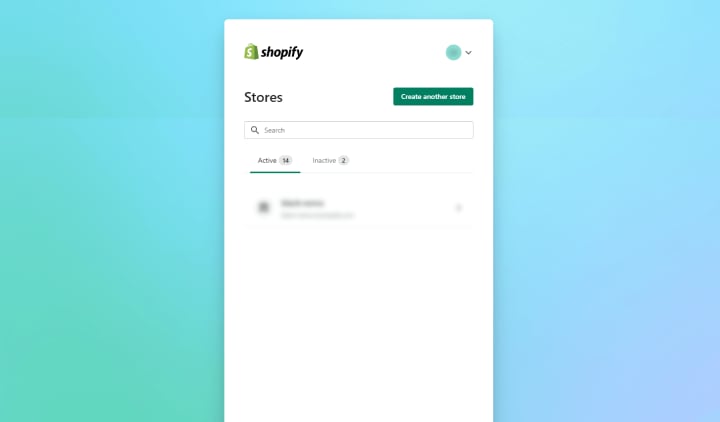
One thing to keep in mind is that the multiple-store feature is only available for Shopify Plus Users only. And Other Shopify Plans do not cover an option of Multiple Stores, And If you want to launch Multiple Shopify Stores with a plan other than the Plus Plan, you may need to purchase extra Shopify plans for each Shopify store.
While Working with Shopify Plus Multiple Stores, Go to the Shopify login page, enter your Shopify account credentials, and then select the Create Another Account button.
Step:2 Add Products to Your Store
Once you’ve created another Shopify Store, it’s much better to put your products first and foremost. And whether you want to add some products or different products in your second Shopify Store, it’s just up to your business needs.
So, add products as needed and establish multiple Shopify collections to display products in categories; this will undoubtedly provide your customers with a great user experience.
And while adding Products to your Shopify Store, the thing you don’t have to forget (not even by mistake) is targeting local keywords, promoting country-specific offers and deals, SEO Friendly Product Descriptions, Meta Descriptions, Meta Titles, Sitemaps, configuring robots.txt, and more.
Furthermore, if you’ve built another Shopify store to sell your products in multiple countries, you’ll need to optimize each store to make it relevant to the population it’s targeting.
For example, if North America is your targeted market, you’ll need to optimize your store for the US market.
Because SEO is more important when you’re working with multiple eCommerce Shopify Stores. Don’t take it for granted!
Step:3 Real-Time Inventory Updates
Consider implementing real-time inventory updates if you want to effectively manage your inventory across Shopify Plus Multiple Stores. It’s also a good idea to have inventory management APIs in place to keep track of your stock levels.
This will prevent overselling and a variety of other fulfillment disasters that can cost you money, damage your brand’s reputation, and result in angry customers.
Popular Shopify tools such as Stock Sync can provide low-inventory notifications and automatic updates as frequently as once per hour.
By ensuring that you always have adequate products in store, a real-time inventory management system can greatly improve your consumers’ shopping experience.
Step:4 Change the Language of your Shopify Store
If you want to reach International customers with Multiple Shopify Stores, you’ll need to translate your website into several languages. Log in to your dashboard and go to Settings to add another language to your Shopify website.
Then click the Add Language option after selecting “Language.”
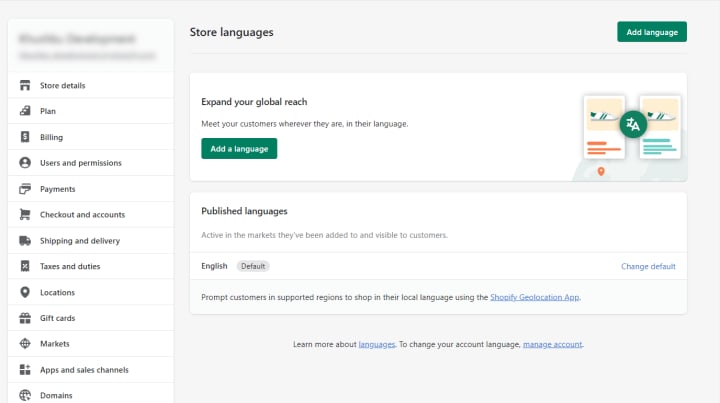
Choose the language(s) you want to add to your Shopify store and you’re done.
Step:5 Customize Shopify Store Design
The appearance and feel of your Multiple Shopify stores are quite important. Your weapon for attracting the right people to your brand is using similar designs for all your stores. It conveys your brand’s essential principles while also establishing trust and reliability in a couple of seconds.
When Building Multiple Shopify stores, Make sure that the Style and Design of the stores reflect your brand.
Shopify has a plethora of paid and free Shopify themes to design your storefront. You can also Hire Shopify Theme Developer to customize the theme and select colors that complement your brand.
It is crucial to note that the theme of your online store can have a big impact on the overall performance of your store. As a result, selecting an SEO-friendly Shopify Theme is critical.
Step:6 Centralize your Customer Service
With a centralized customer support system, you can keep track of all orders and customer inquiries in one place, giving your customer service team a quick and efficient way to address any concerns.
Also, just to make you aware, no store is ever truly complete without customer service! You would lose your clients’ faith and loyalty without it, that’s why.
By implementing such a support system in place, you may prevent miscommunications among the members of your customer care team and improve client satisfaction, which will boost customer retention.
You can use email or a ticketing system like Zendesk to keep track of customer support tickets across your multiple Shopify stores.
We advise Zendesk since it is a well-liked and simple-to-use ticketing solution.
For More Information, Visit:- How to Set Up and Manage Multiple Shopify Stores
About the Creator
StageBit
We are a leading custom eCommerce Website Design & Development Company, offering top-quality eCommerce web & mobile app development Services.
The Missing Ingredient
The first time I saw her, she was wearing a velvety, red ribbon in her hair. She carried a small leather backpack everywhere. She searched the forest by turning stones, checking beneath shrubs, listening to the wind as if it might carry an answer.
By Imola Tóth5 days ago in Fiction




Comments