
How To Rank Your Blog On Google’s First Page
These tips helped me rank my 12+ articles on Google.


Google is a tricky search engine.
What worked in 2010, won’t work in 2021. That’s a proven fact. Google is always adapting and improving its algorithm to provide the best user experience.
Decades ago, ranking on Google was easier. Write an article and hit the publish button. But don’t forget to stuff it with keywords. Boom! Your article is ranking on Google’s first page. Congrats!
The story is different now. Google has gone through lots of algorithmic changes in the past few years. Google Panda and Penguin are the major updates in Google’s search algorithm which completely changed the way of content creation.
Now, it is hard to rank on Google if you are a total newbie. In fact, there are 200+ ranking factors that affect the position of your content on Google. Wait! I’m not telling you that it is not possible to rank on Google. Blogging is dead and you shouldn’t be doing it. This is not what I mean. Actually, with proper research and implementation, you can rank on Google quickly than you think.
Here are my working tips to help you understand Google even better.
Do your keyword research properly
Keywords are what help Google to relate to your topic. When people search for anything on Google, it matches those keywords with the ones used in your relevant articles.
For my keyword research, I use Google Keyword Planner, as it’s free. If you can afford it, try using Ahrefs or Semrush for more extensive keyword research. They can even tell you on what keywords your competitors are ranking.
Free tools like Google Keyword Planner can tell you the amount of monthly traffic a keyword is getting, related keywords, and their CPC. Select only those keywords that have high search volume and low competition.
Include keywords in the title and description
Headlines are the first thing anyone sees. If your headline is not a catchy one or can’t hold attention, you can never attract traffic to your blog. It is the most crucial part of attracting traffic. So take time and decide which headline suits your article the most.
That’s for the people who visit your blog. But what about Google? Does Google also look for a catchy headline? The answer is yes and no. For no, Google prefers headlines with keywords (especially at the start) you want your blog to rank for. For yes, if people do not click on your blog just because of your shitty headline, Google takes it as a negative sign and pushes your blog deep down in the online world.
As for the description or meta description, it serves as a help for Google to understand your blog even better. It is a vital part of your on-page SEO.
The first 200 words are important
When you are getting started with your introduction, the first 200 words matter. Because Google tries to look for the keyword within the first 200 words. Say you are writing an introduction for "How to lose weight quickly". Your preferred keyword is: lose weight. Simply add this keyword in your first 200 words like this:
If your doctor recommends it, there are ways to lose weight safely. A steady weight loss of 1 to 2 pounds per week is recommended for the most effective long-term weight management. Here are some ways to lose weight that employ healthy eating and potentially lower carbs. (Source: Healthline)
This is how you make Google rank your content on your preferred keyword.
Use Alt Tags for images
An image says a lot without saying anything. Using attractive pictures in your blog increases the avg. reading time and holds the attention of your visitor. But the only trick is not to use any random images you find on the internet. It can be a matter of copyright. Instead, either buy stock images or try to create one using photo editing software like Adobe Photoshop.
Say you found an attractive stock photo for your blog. But when you downloaded this image, the name appeared like this: 14400–2020–12–04. For you, it might not be a problem, but for Google, it is. Google can actually read the image text you use in your blog. So, if you have images with a name like something above, it will harm your SEO. That’s where Alt Tags plays its role.
Alt Tags allow you to give your image a name within your blog. It helps Google, even people to see the text of your image when it isn’t loading due to slow internet connections. Here’s what Google says about Alt Tags:
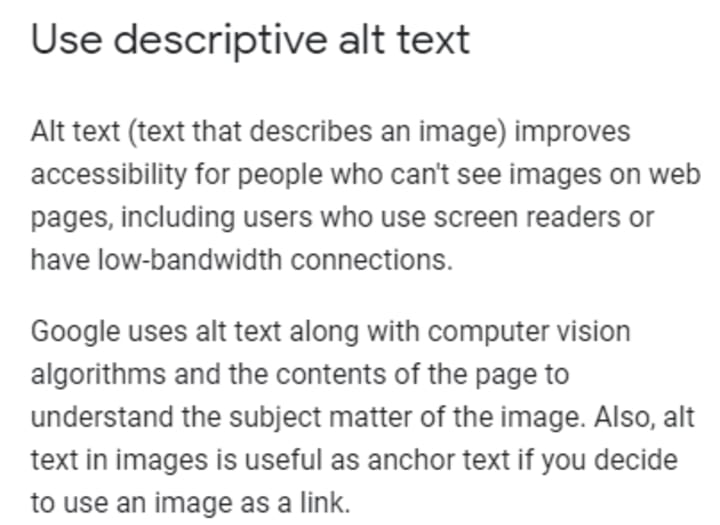
So make sure, when you are adding images to your blog, don’t forget the alt tags.
Optimize your blog speed
Do you know: When a site takes more than 3 seconds to open on mobile, you lose half of your traffic.
Optimizing your blog speed should be your everyday preference so you might not get push away from your SERPs. Since more than 90% of traffic comes from mobile, your target should be to increase your site speed on mobile. You can check your site speed from Google PageSpeed Insights.
- Some tricks to reduce site load time:
- Use Webp or JPEG compressed images
- Download cache plugins to reduce cache memory
- Prefer Accelerated Mobile Pages (AMP) for lightning speed
- Avoid adding high-quality videos
The only plugin you will ever need
I know it’s difficult to remember every SEO trick to improve your SERP position. However, if you find one and only plugin to help you at least improve your on-page SEO can do wonders. I am using this plugin from day one and trust me, it has helped me to understand SEO even better. You can download this plugin from here.
P.S. It’s a WordPress plugin:)
Join my email list for weekly insights!
About the Creator
Abhi Thakur
Trying to make the world a better place with my writing. Join my email list to get weekly tips: https://abhithakur.ck.page/67f8aa0e98
Keep reading
More stories from Abhi Thakur and writers in Journal and other communities.
7 Reasons You Failed As A Blogger
Blogging can be fun if it yields better results and frustrating if it turns out bad. According to a study, only 5–8% of bloggers earn a full-time income from their blog. The rest of them either quit or earn less than $100 to support their family.
By Abhi Thakur5 years ago in Journal
The goals I did not achieve
Every writing goal I made for the year is a wash. It has been this way for a while, but I think it's important to be open about my failures and the reality of how life can get in the way. This is especially true considering the several times I have posted on Vocal about my writing goals, how I was changing my approach, and where I was hoping to be for the upcoming year. I will probably do that again in a couple months, but for now, it is time to acknowledge where I am today.
By Kay Husnick22 days ago in Journal
How to Begin a Relationship with Jesus
A Step-by-Step Guide to Faith, Presence, and Transformation in Everyday Life Step 1: Find a quiet space Begin in a place where you can notice yourself. This could be a room, a park, or the space between heartbeats. The quiet is not about absence of sound but about presence of attention. Bring no agenda, only awareness. The first step is to show up.
By Sound and Spiritabout 11 hours ago in Journal


Comments
There are no comments for this story
Be the first to respond and start the conversation.