
How to Handle Different vCard Files in One Simple vCard file?
Merge Multiple vCard Contacts Files into a Single One

Users of today's online world frequently save their contact in multiple ways. vCard, electronic business cards with contact data like names, phone numbers, email addresses, and more, are one often used method. These vCard files help keep contact details organized, but as users accumulate more contacts, managing multiple vCard can become a challenge.
Imagine wanting to locate a contact from many independent vCard files and then combining them into one single file. The procedure could be challenging and confusing. The upside is also that automating the merging of these vCard files will save users a lot of time and considerably simplify things.
This article will show how users can handle many vCard files by automating the merging process using both online tools and professional applications.
The Challenges of Managing Multiple vCard Files
Users can end up with many vCard files, each with a unique set of contacts as their contact lists expand. The main problem is that managing all these separate files can be very time-consuming. For example, users may forget where a specific contact is saved, or they might have several duplicate contacts in different files. Especially when handling hundreds or even hundreds of vCard, determining the appropriate contact across several files can be challenging.
This disorder could cause errors and time lost. The solution? Combining all these vCard files into one orderly file. This will help one to maintain data in one location, eliminate duplication, and access contacts.
Why Users Should Automate the Merging Process
Manual vCard file handling not only slows down but also raises error risk. Consider the time required to copy the contact details, open each vCard file, and then paste it into a new one. The process is not only tedious but also prone to errors.
By automating the merging process, users can:
- No more manually copying and pasting contact details. Automation will do the work for users.
- Automated technologies help to guarantee that data remains accurate and unaltered.
- Combine many vCard into one file to keep all contacts in one location and under simpler access.
- Many automated programs will assist in identifying and deleting duplicate contacts, therefore guaranteeing only one record for every individual.
How to Merge vCard Files Using Online Tools
Without installing any program, online applications give users a quick and simple method to combine vCard files. If users want a quick solution and want not to worry about installing anything on their computers, these tools are excellent.
Benefits of Using Online vCard Merging Tools
- Most internet tools are free to use and are not required for installation. Users merely have to upload their files; the tools will do the merging for them.
- Using online tools, merging a limited number of files is rather quick and easy.
- Online tools are meant to be easy to use, hence users do not require any technical knowledge to operate them.
- Users have no need to worry about installing programs or running out of hard disk space as everything is done via a browser.
How Online vCard Merging Tools Work
Using an online vCard merging tool just requires a simple technique.
- Find an online tool that suits users’ needs. There are many available, and most of them are free to use for basic functions.
- Upload the vCard files to combine. A lot of tools let drag and drop files straight into their interface.
- Click the "Merge" button. The tool will automatically combine all the files into one.
- Download the newly merged vCard file to users’ computers.
How to Merge vCard Files Using Professional Tools
Using a professional solution such as WholeClear Merge vCard Software is the ideal choice if users want more control over the merging process or are handling many vCard files. Professional solutions can be particularly useful for those who handle extensive contact lists as they provide more features. This software can merge vCard files in minimal steps without any data loss.
Advantages of Using Expert Solution
- Professional tools offer more advanced features than online tools.
- Since the software runs on users’ computers, their data stays safe and private. They don’t have to worry about uploading their contact information to third-party servers.
- A large number of vCard files can be rapidly handled by expert software, therefore minimizing users time and effort.
- Using professional software relieves users of concern about losing any contact information throughout the merging procedure.
How to Use Professional vCard Merging Software
- On your device, install and configure the software.
- To include your contacts, click Merge vCard.
- Browse the VCF files to combine them.
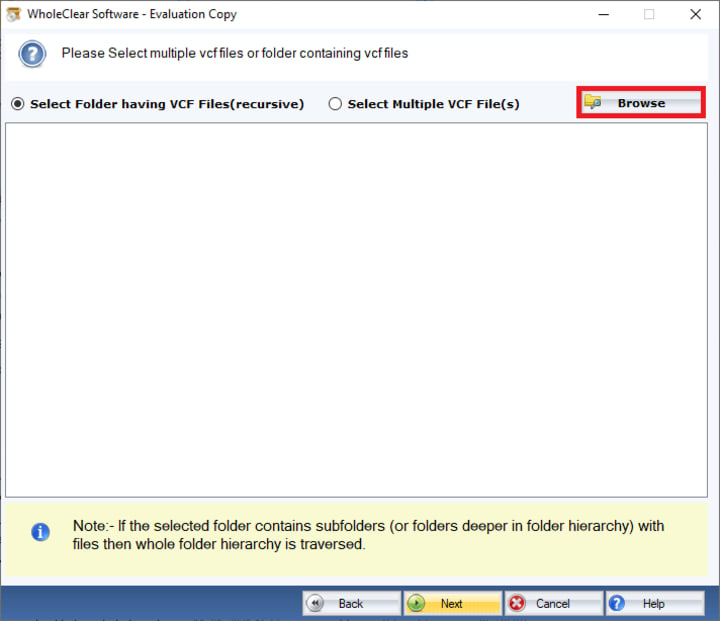
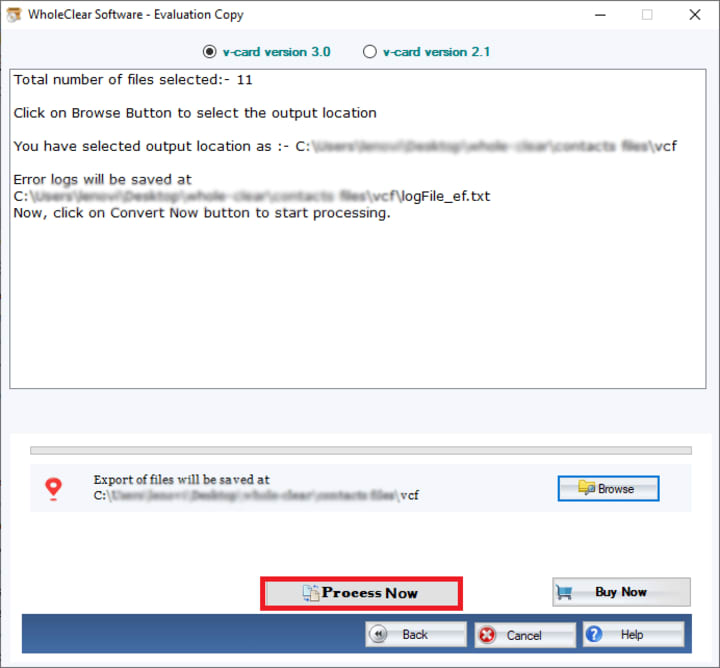
- Decide where you want to keep the generated file.
- Click the "Process Now" button to start processing contacts.
Comparison- Online Tools vs. Professional Tools
Here’s a quick comparison to help users decide which option is best for them-
Ease of Use
- Online Tools- Very simple and quick to use
- Professional Tools- Easy to use but requires installation
Features
- Online Tools- Basic merging, some have duplicate removal
- Professional Tools-Advanced and multiple features
Security
- Online Tools- Data uploaded to a server (privacy risk)
- Professional Tools- Data stays on users’ computers (more secure)
Speed
- Online Tools- Fast for small files, but may slow down with large files
- Professional Tools- Fast and efficient, even for large files
Cost
- Online Tools- Free for basic use
- Professional Tools- Requires purchase, but offers more features with a free trial edition
Support
- Online Tools- Limited support
- Professional Tools- Better customer support available 24/7
Which Solution is Best for Users?
Make use of online tools if:
- Users must only combine a few vCard files.
- Users want for a quick and free solution.
- Users do not require sophisticated capabilities such file splitting or thorough customizing.
- Users are okay with uploading their files to a third-party server.
Use Professional Tools if:
- Users manage many contacts or handle a lot of vCard files.
- Users want to have their data confidential and safe.
- Users have to function effectively free from concern about slowdowns or data loss.
Final Words
Automating the procedure is the ideal approach to save time and maintain the contact list orderly whether users need to combine few vCard files or hundreds. While professional solution give more control, privacy, and advanced capabilities for larger, more difficult tasks, online tools are an excellent option for small, quick work.
All while saving time and effort, users can maintain vCard files orderly, and access contacts quickly by selecting the appropriate solution for their requirement.
About the Creator
Keep reading
More stories from Alla crook and writers in Journal and other communities.
How to Load iCloud Contacts to Outlook With no Compatibility Issues?
One of the most important aspects of our digital lives for many of us is our contacts. While Outlook is frequently used for email, meetings and business communication iCloud is Apple default solution for storing contacts. If you use both you might need to import contacts from iCloud into Outlook so that everything is in one location.
By Alla crook6 months ago in Journal
Author’s Advice
If you would’ve asked me 20 years ago did I know I’d become a writer and an author, I would’ve said “nope, ain’t happening”. As fate would have it I did become an author and I can honestly say I’m loving it so far. It really does feel good to be a writer. I’ve learned a lot on this journey and I feel like with even me being as new to this world as I am, there’s some wisdom I need to share with every other aspiring author.
By Joe Patterson3 days ago in Journal
Reasons Why Sinners and Frankenstein Could Win the Oscar for Best Picture
Horror fans are in luck: this year, two horror films are in the running for the Oscar for Best Picture. As if that weren't enough, both films have multiple nominations for this award. This year, Sinners, a gothic horror film, has been crowned the film with the most nominations in Oscar history. This movie received 16 nominations, an absolute record that never ceases to amaze.
By Ninfa Galeanoabout 17 hours ago in Journal




Comments
There are no comments for this story
Be the first to respond and start the conversation.