
How Screenshot Monitoring Software Helps Prevent Time Theft?
Screenshot Monitoring Software

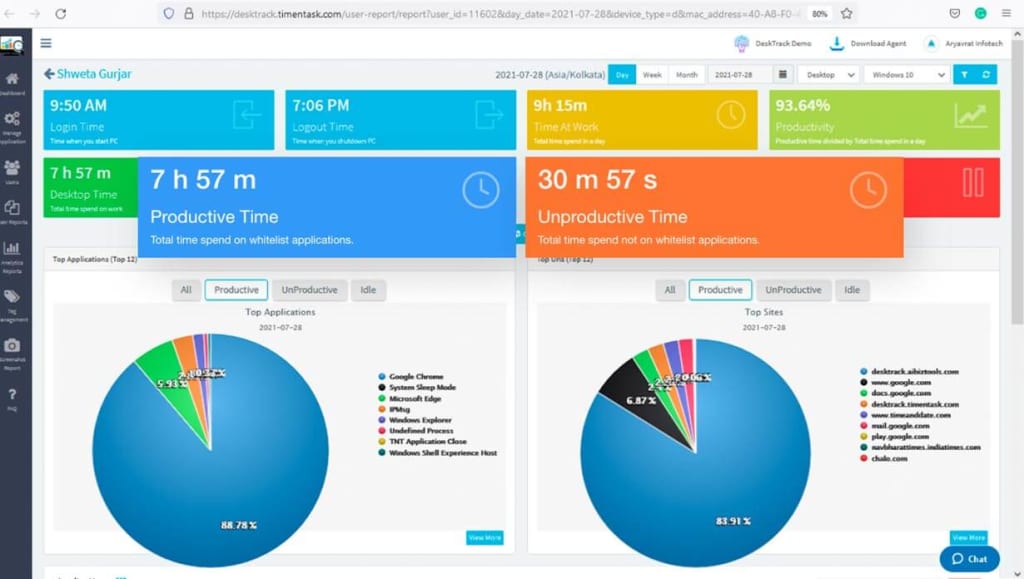
Time theft is a significant challenge for employers, especially in remote work environments where direct supervision is limited. Employees may be tempted to waste time during work hours, leading to reduced productivity and potential loss of revenue. Screenshot monitoring software is an effective solution to combat this issue. By capturing periodic screenshots of employee screens, this software helps ensure that employees remain focused and productive throughout their workday. This article explores how screenshot monitoring software can help prevent time theft and improve overall workforce management.
What is Screenshot Monitoring Software?
Screenshot monitoring software is a tool that takes periodic screenshots of an employee's computer screen during work hours. These screenshots are then stored and analyzed by employers to track work activity and productivity.
Core Function: Captures real-time images of the desktop at regular intervals.
Goal: To monitor employees’ screen activity and ensure that they are working on job-related tasks.
When integrated into an employee management system, screenshot monitoring software provides valuable insights into how time is being spent during working hours, helping employers prevent time theft.
The Connection Between Time Theft and Employee Productivity
Time theft occurs when employees use work hours for personal activities that are unrelated to their job duties. This could include browsing social media, shopping online, or simply being away from their desk. Time theft can negatively impact a company's bottom line by reducing overall productivity.
Impact on Productivity: When employees waste time during work hours, they are not completing tasks or contributing to team goals.
Lost Revenue: Even small amounts of time theft, when aggregated across a team, can result in significant financial losses for businesses.
Trust Issues: Lack of supervision can lead to a culture of mistrust, which can negatively affect employee morale and team dynamics.
Implementing a screenshot monitoring software solution is a proactive step towards reducing time theft and promoting a culture of accountability within the workplace.
Read more : Agile Planning: The Complete Guide
How Screenshot Monitoring Software Helps Prevent Time Theft
Screenshot monitoring software provides several advantages in preventing time theft by offering transparency and real-time oversight. Here’s how it works:
1. Provides Visual Proof of Work Activity
Real-Time Monitoring: Captures screenshots of employee screens at regular intervals, offering a visual record of their activities.
Immediate Insights: Employers can immediately assess whether employees are engaging in productive work or engaging in personal tasks.
2. Promotes Accountability
Constant Awareness: Knowing that their screens are being monitored encourages employees to stay focused and avoid distractions.
Self-Discipline: Employees are more likely to stay on task when they are aware that their activities are being documented.
3. Identifies Non-Productive Behavior
Automatic Alerts: Screenshot monitoring software can be programmed to alert employers when employees are spending excessive time on non-work-related activities, such as social media.
Detailed Reports: The software generates detailed reports that highlight time spent on various applications or websites, helping employers identify inefficiencies.
4. Enhances Transparency and Trust
Clear Expectations: When employees know that their activities are being monitored for accountability purposes, they are more likely to maintain high standards of productivity.
Improved Communication: Screenshot monitoring helps create clear lines of communication between employers and employees about what is expected in terms of productivity and work behavior.
Benefits of Integrating Screenshot Monitoring Software with an Employee Management System
Integrating screenshot monitoring software with a robust employee management system enhances its effectiveness and streamlines workforce management. Here’s how:
1. Comprehensive Employee Monitoring
Holistic View: Combining screenshot monitoring with other tools in the employee management system, such as time tracking and task management software, gives managers a complete picture of employee performance.
Real-Time Monitoring: The integration allows managers to monitor employee activities in real time and ensure tasks are being completed on schedule.
2. Easier Time Tracking
Accurate Time Logs: With screenshot monitoring, employers can cross-reference employee activity with time logs to ensure that employees are accurately reporting work hours.
Productivity Measurement: By tracking screenshots and activities, businesses can measure how effectively employees are spending their time on tasks.
3. Increased Efficiency and Focus
Reduced Distractions: Employees are less likely to engage in time theft when they know their screens are being monitored.
Goal Alignment: Screenshot monitoring software can help ensure that employees are focusing on the tasks that matter most and that they are in alignment with company goals.
PC Activity Trackers: A Complementary Tool for Monitoring Employee Performance
While screenshot monitoring software is essential for preventing time theft, PC activity trackers can provide even deeper insights into employee behavior. These trackers monitor keyboard strokes, mouse movements, and application usage, giving managers a more detailed picture of how employees spend their time.
1. Tracks Activity Levels
Real-Time Tracking: PC activity trackers record every action employees take on their computers, including mouse movements and keystrokes.
Identifies Time Wasting: The software can highlight periods of inactivity or excessive time spent on non-work-related tasks, such as browsing the internet or checking personal emails.
2. Measures Productivity
Focus on Results: PC activity trackers can show how much time employees spend on productive tasks versus time spent on distractions.
Helps Improve Efficiency: With data on activity levels, employers can provide feedback and support to improve employee productivity.
Read more : Attendance Tracking Software: A Complete Guide
How to Use Screenshot Monitoring Software Effectively
To prevent time theft and improve employee productivity, screenshot monitoring software should be used strategically. Here are some tips for effective use:
1. Set Clear Expectations
Communicate with Employees: Let employees know that screenshot monitoring software will be used and explain how it will help improve productivity and accountability.
Establish Guidelines: Set clear guidelines about what constitutes acceptable use of work time and what activities are not permitted during work hours.
2. Focus on Productivity, Not Surveillance
Balance Monitoring with Trust: While screenshot monitoring helps prevent time theft, it’s important not to create a culture of micromanagement. Use the data to support employees, not penalize them.
Use Data to Improve Performance: Use the screenshots and activity data to identify areas where employees may need additional support or training.
3. Be Transparent and Respectful of Privacy
Respect Employee Privacy: Clearly communicate how often screenshots will be taken and ensure that private information is not captured inappropriately.
Avoid Over-monitoring: Focus on monitoring work-related tasks and avoid unnecessary intrusion into personal spaces.
Conclusion
Screenshot monitoring software is a powerful tool for preventing time theft and improving employee productivity. By providing employers with visual insights into employee activities, it ensures that time is spent effectively on job-related tasks. When combined with a comprehensive employee management system and PC activity trackers, businesses can enhance accountability, streamline operations, and boost overall performance. Implementing screenshot monitoring software, along with clear guidelines and transparent communication, helps create a more productive and efficient work environment, especially for remote and hybrid teams.
About the Creator
DeskTrack
DeskTrack is an employee monitoring software designed to assist companies in tracking the time spent by their employees on the activities they do at work.
Unlocking the Secrets of Longevity
What if living to 90 or even 100 wasn’t an exception—but something many people could realistically achieve? Across the world, there are regions where extraordinary longevity is surprisingly common. These areas, often called “Blue Zones,” have fascinated scientists, health researchers, and curious observers for decades. The residents of these regions live longer than average and often remain active and mentally sharp well into their later years.
By People Unlimitedabout 14 hours ago in Journal




Comments
There are no comments for this story
Be the first to respond and start the conversation.