
Best POS Systems for Managing Multiple Payment Methods in Australia
Top POS Systems in Australia: Find the Right Solution for Seamless Transactions and Business Growth


In today's business landscape, a robust POS (point of sale) system is essential for handling various payment methods, from credit and debit cards to digital wallets and contactless payments. A well-integrated POS system supports seamless transactions, inventory tracking, and data analytics, which are crucial for any business operating in Australia.
Here’s a list of some of the best POS systems in Australia for managing multiple payment methods, including MetricsERP, a flexible ERP solution with integrated POS capabilities.
1. MetricsERP
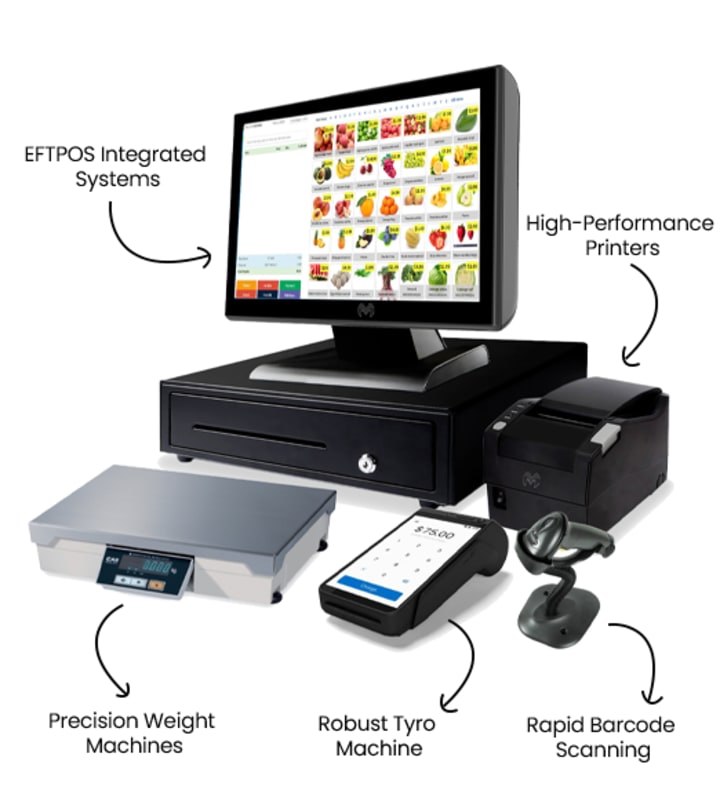
Overview
MetricsERP is a robust ERP (Enterprise Resource Planning) solution with an integrated POS module. It's designed for medium—to large businesses in Australia and manages various business functions, including sales, inventory, accounting, and customer relationship management (CRM). The POS feature within MetricsERP handles multiple payment methods, ensuring smooth transactions while centralizing data for enhanced business insights.
Key Features
Multi-Payment Compatibility: Supports all major credit and debit cards, along with digital wallets like Apple Pay and Google Pay.
Customizable Modules: The ERP nature of MetricsERP allows for custom modules, letting businesses integrate other functions directly with POS, like inventory or customer management.
Real-Time Reporting: Gain insights into sales trends, customer preferences, and payment methods, enabling better decision-making.
Omnichannel Capabilities: Suitable for both online and offline sales, MetricsERP allows businesses to manage various channels in one place.
Ideal For
Medium to large enterprises need advanced reporting, inventory control, and customer management with POS functionality.
Businesses looking for a customizable, all-in-one ERP and POS solution.
Pros and Cons
Pros: Highly customizable, handles complex inventory, supports multiple payment methods, and integrates with other business modules.
Cons: More complex setup, best suited for larger businesses with dedicated IT resources.
2. Square POS

Overview
Square POS is known for its ease of use and versatility, making it a popular choice among Australian small to medium-sized businesses. It’s ideal for retail and hospitality settings where fast, efficient transactions are essential.
Key Features
Supports Multiple Payment Methods: Accepts all major cards, contactless payments, and digital wallets like Apple Pay and Google Pay.
Transparent Pricing: Pay-as-you-go model with no setup fees or monthly subscriptions.
Inventory and Customer Management: Basic features for tracking inventory, setting up loyalty programs, and managing customer data.
Mobile-Friendly: Compatible with mobile devices, making it an excellent option for pop-ups, outdoor markets, and events.
Ideal For
Small to medium-sized businesses looking for a budget-friendly, simple POS solution.
Pros and Cons
Pros: User-friendly, affordable, flexible, works well for mobile setups.
Cons: Limited customization and advanced reporting features compared to ERP-integrated systems.
3. Vend by Lightspeed

Overview
Vend by Lightspeed is a cloud-based POS system popular in Australia for its powerful retail features. It’s especially suited for businesses needing advanced inventory management and reporting tools.
Key Features
Payment Flexibility: Accepts multiple payment methods, including credit cards, mobile payments, and integrations with payment gateways.
Advanced Inventory Management: Allows multi-store and multi-warehouse tracking, making it great for businesses with larger inventories.
CRM Capabilities: Tracks customer purchase histories and supports loyalty programs.
Offline Mode: Ensures functionality even without internet, which is beneficial for areas with connectivity issues.
Ideal For
Retail businesses with a strong focus on inventory management and customer loyalty.
Pros and Cons
Pros: Excellent inventory features, suitable for multi-location setups, supports offline transactions.
Cons: Can be more expensive and less suited to non-retail businesses.
4. Shopify POS

Overview
Shopify POS is part of the Shopify e-commerce platform, making it a powerful tool for businesses that operate both online and offline. It integrates seamlessly with Shopify’s website platform, providing a centralised solution for retail businesses.
Key Features
Omnichannel Sales: Combines online and in-person sales, with easy syncing across channels.
Payment Flexibility: Accepts major credit cards, debit cards, mobile payments, and gift cards.
Inventory Management: Syncs inventory across online and offline channels.
Loyalty and Discount Programs: Customize promotions and loyalty programs for enhanced customer engagement.
Ideal For
Retailers with both online and brick-and-mortar locations, especially those already using Shopify for e-commerce.
Pros and Cons
Pros: seamless online and offline integration, excellent for e-commerce businesses.
Cons: Limited advanced inventory capabilities compared to specialized POS systems like Vend.
5. Revel Systems

Overview
Revel Systems is a POS solution primarily aimed at the food service and hospitality industries. With robust tools for restaurant management and easy payment options, Revel is highly regarded among Australian food and beverage establishments.
Key Features
Payment Options: Supports a variety of payment methods, including credit/debit cards, mobile payments, and even invoicing for events or catering services.
Table and Order Management: Customizable features for managing tables, orders, and even customer seating arrangements.
Detailed Reporting: Offers in-depth reporting on sales, labour costs, and inventory.
Integrations: Works with third-party apps for delivery services, payroll, and accounting.
Ideal For
Restaurants, bars, and cafes looking for an all-in-one POS with specialized hospitality features.
Pros and Cons
Pros: Excellent for food service businesses, great table management tools.
Cons: Can be costly; features are more tailored to hospitality and may not fit retail.
6. Clover POS

Overview
Clover POS is another versatile option with strong support for different payment methods, a range of hardware options, and flexibility across business types. Known for its user-friendly setup, Clover has gained a solid foothold in Australia’s small business market.
Key Features
Payment Acceptance: Accepts credit and debit cards, digital wallets, and cash.
Modular System: Choose from a variety of hardware setups, including mobile and countertop terminals.
App Market: Access apps that allow for additional functionalities, such as inventory management, employee tracking, and loyalty programs.
Customizable Features: Configurable to specific business needs, especially with the variety of apps.
Ideal For
Small to medium businesses want a customizable, scalable solution with multiple hardware options.
Pros and Cons
Pros: Highly customizable, user-friendly, mobile options available.
Cons: App integrations can increase costs and may not offer as comprehensive ERP features as MetricsERP.
Choosing the Right POS for Your Business
When selecting a POS system for your business, it’s essential to consider factors such as payment method compatibility, scalability, ease of use, and industry-specific features. Here’s a quick comparison to help you decide:
Best for All-in-One ERP Integration: MetricsERP
Best for Small Retail and Hospitality: Square POS
Best for Advanced Inventory Management: Vend by Lightspeed
Best for E-commerce and Retail Hybrid: Shopify POS
Best for Foodservice Businesses: Revel Systems
Best for Customizability and App Integrations: Clover POS
Each of these POS systems brings something unique to the table, whether it’s ease of use, advanced reporting, or specific industry tools. Evaluating your business's specific needs and growth plans will guide you toward the best solution, empowering your business to handle transactions seamlessly while supporting multi-payment management and providing valuable insights.
About the Creator
Swarnab Paul
I am a blogger from webgiginfo company.
Keep reading
More stories from Swarnab Paul and writers in Journal and other communities.
How Artificial Intelligence is Shaping CRM Systems in Australia
In today’s digital age, Artificial Intelligence (AI) is not just a buzzword, but a pivotal force in reshaping industries across the globe. One sector where AI is making profound strides is Customer Relationship Management (CRM). In Australia, where businesses constantly seek ways to improve customer satisfaction and operational efficiency, AI has become an indispensable tool for driving CRM systems to new heights.
By Swarnab Paulabout a year ago in Journal




Comments
There are no comments for this story
Be the first to respond and start the conversation.