
An Illustrated Guide to much better Video Calls
10 Tips in 10 Minutes

Office work not requiring physical proximity can often be conducted remotely, aided by video calls (VC). While this is a compelling model of future work, the pandemic has accelerated us toward that future. Video Calling being such a key component of remote work, we ought to prepare for and conduct them with as much sincerity and effectiveness as we would for in-person meetings.
I have worked in the Tech Industry for several years (Google, Facebook, Xerox PARC, and IBM Research) as an engineer and manager, attended thousands of video calls, and debriefed and evaluated the effectiveness of scores of VC meetings. Based on this experience, I’ve listed below 10 tips that have stood the test of time (5 tips about preparation before the call, and 5 tips about behavior during the call). I have seen each one of these play out, and made most of these mistakes myself as well(and continue to do so even today). The tips are illustrated by two other engineers, also from the Tech Industry.
Some are subtle and may seem like nitpicking; however, over time they can really make or break relationships, trust, collaboration, and effectiveness in conducting business remotely. Each tip is accompanied by a ‘why’ section. There’s also a ‘pro-tips’ section where certain techniques or technology could help implement the tip. Hope you find this useful. Let’s begin.
Preparation Before the Call :
Tip #1: Be respectful of others’ availability.
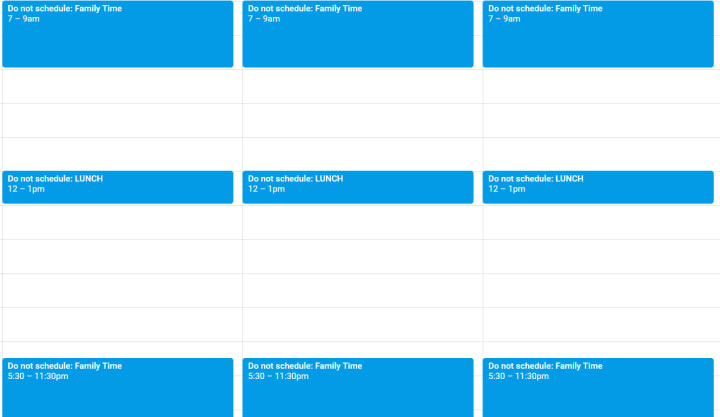
There’s no commute time these days, but there’s still going to be lunch time, family time, and other forms of personal time. Avoid setting up meetings during these times. Your colleagues, reports, or bosses might still accept such meetings out of politeness, so it’s best to anticipate and check ahead of time. Otherwise things can and do become awkward at times.
Why? Besides coming across as a considerate person, you will also benefit from reciprocity — others will also respect your personal time.
Pro-tip: Use calendar blocks for your own no-meeting time or personal time, and help create a culture where folks respect each others’ calendar blocks.
Tip #2: Use a location letting ample light on your face.
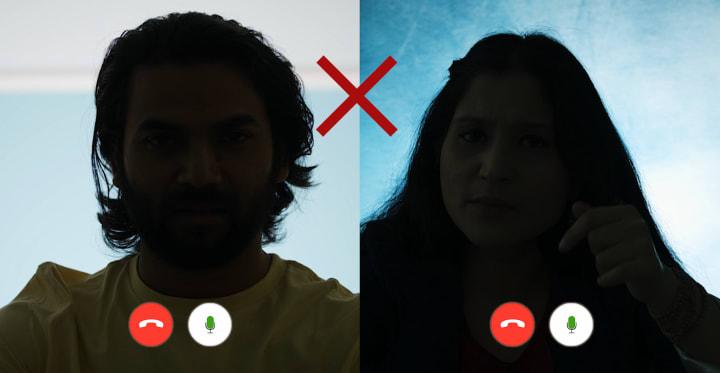
Find a location where you can have sufficient light falling on your face, not behind your head. For example, facing a window or a light source during your call will throw much more light on your face than having that window or light source be behind you.
Why? With better visibility, your key facial expressions, eye gaze, visual cues, and lip movements could be missed. In a video call these are important.

Pro-tip: Consider buying an LED ‘ring light’ kit for your VC setup. In addition to lighting up your face, it can reflect beautiful in you eyes.
Tip #3: Find a clean, non-distracting background.
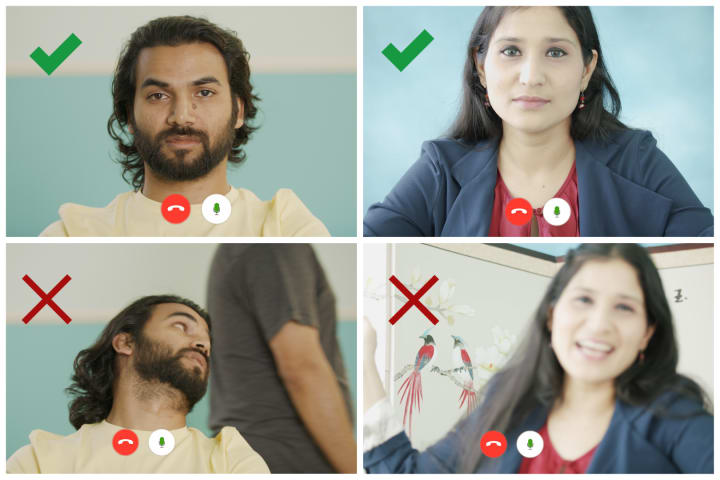
Find a location that allows for a clean background. Best is a solid background that is a few feet behind where you are sitting, not right behind you. If you can’t find such a background, consider buying a backdrop and hanging it from a wall or from light stands.
Why? Of course, less distraction Here are a couple of less obvious reasons:
1) A busy background with sharp patterns can actually make your webcam auto-focus on the background instead of on your face. Worse, it can keep trying to find focus, shifting the focal point between front and back, which can be distracting to the other callers.
2) If there’s passage between you and the backdrop, high chance that your family members, roommates, or visitors would someday enter the frame, which may be undesirable. Especially if you follow tip #8 and use headphones, they may not even know that a call is ongoing.
Tip #4: Dress appropriately.
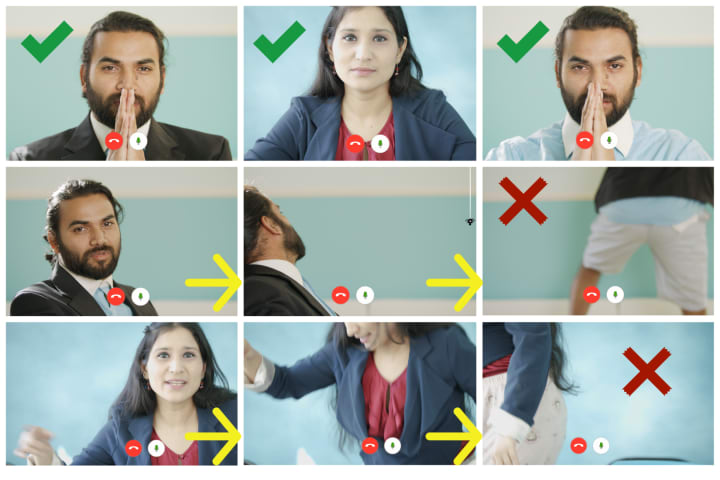
Dress up similar to how you would going into office in-person, even if not the whole shebang. There is clear benefit to dressing lightly; it saves time and hassle. However, wear enough clothing such that if you accidentally or intentionally have to get up, that you continue to look professional.
Why? It can be awkward for yourself, for other callers, or for both parties, to be seen in your pajamas or boxer shorts. After all, this is a professional relationship and there’s a reason you dress the way you do at work.
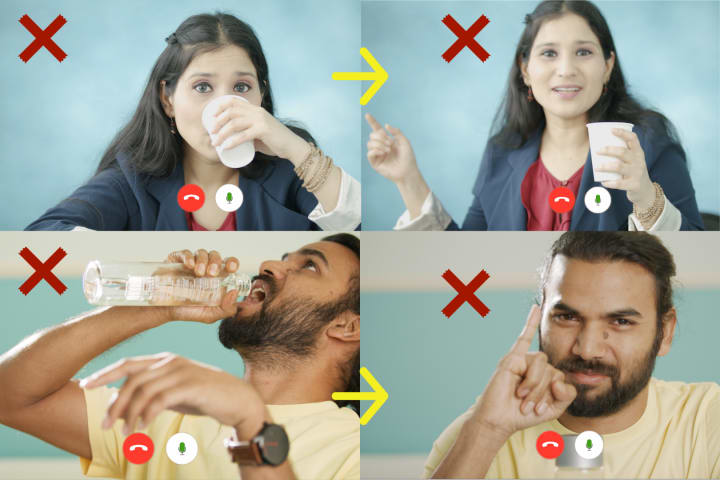
Tip #5: Plan for Bathroom Breaks.
If you have back-to-back meetings, use the bathroom ahead of time, and after that don’t drink excessive amounts of water. That way you won’t need to walk off during the meetings. If you must go and are using a wireless headset, either leave the headset behind, or follow tip #7 and actively mute yourself.
Why? Having to drop off during a critical point where you are to make a decision, give an update, or give a presentation can be highly undesirable. You could lose an opportunity for visibility and impact.
----------------------------------------------------------------------------------------
We are at the mid-point. If you would like to take a break for some lighthearted humor on this topic itself, check out this parody video starring the same actors, i.e. roughly the same set of tips but told inverted, i.e. “10 Things NOT to do in Office Video Calls”.
This is highly optional; feel free to skip to tip #6 below.
Behavior During the Call:
Tip #6: Pay Attention to your Pose.
When actively speaking or listening, pay attention to your pose:
1) Vertical position: Try your best to have the webcam at the eye level. Looking down at the camera makes you look dominating (and also exposes your nostrils, which is usually not flattering). At the same time, looking up to the camera too much comes across as submissive. For a balanced pose, try to have the webcam be close to the eye level.
2) Horizontal position: Stay centered horizontally as best as possible. Sitting skewed to one side of the frame can be distracting to others.
3) Eye gaze: Look toward the camera as much as possible. Looking in a different direction can feel extremely disconnected, without you even realizing. This is common when you are using a video calling gadget such as Portal on the side while you have a laptop or desktop in front of you. It’s easy to forget that participants could be talking to your side-profile.

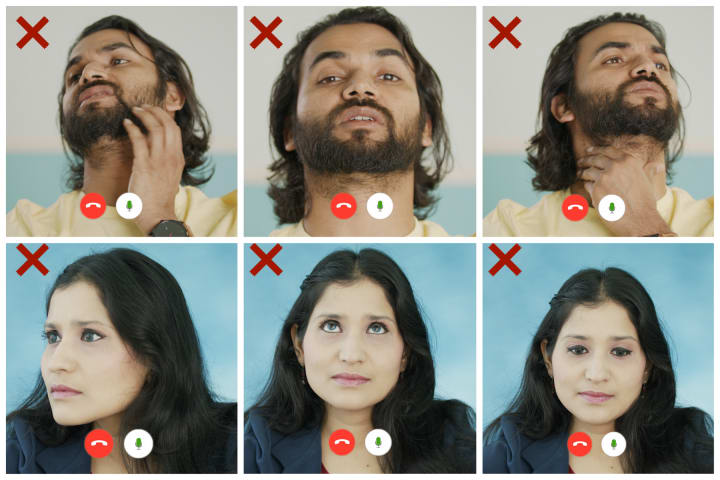
Why? When you use the right pose, other participants would feel as if you were meeting them in person, leading to a more connected VC experience.
Pro-tip: You can get vertical position at the eye level by propping up the laptop with books or laptop stands. To aid further with position and gaze, you can place the chat window centered on your screen and closer to where your laptop or desktop’s camera is. Specifically,
1) If the built-in webcam is above the screen, or if you have an external webcam sitting on top of the screen, make the chat window top-aligned.
2) If you have one of the newer laptops with the webcam below the screen, make the chat window bottom aligned.
However, laptops with webcams below the screen tend to naturally make people look dominating and also expose their nostrils. In these cases I recommend purchasing an external webcam.
Tip #7: Actively Mute and Unmute your Microphone.
Mute your microphone whenever you are not speaking. A good protocol would be — mute by default. Actively unmute yourself right before speaking, and then actively mute yourself as soon as you are done speaking.
Why?
Even if you are generally quiet when not speaking, a few things could cause noise emission during your video calls:
1) You could be eating or drinking, which could create some noise.
2) You could have ambient noise at your location, which can be distracting.
3) If you aren’t using headphones (though, see Tip #8), the noise from your own speakers could create feedback noise for everyone else.
4) If someone in the house needs to communicate with you, or if the doorbell rings, you may not get a chance to mute.
5) If you are using wireless headsets and must go to the restroom, and also forget to mute, it can cause an even bigger embarrassment.
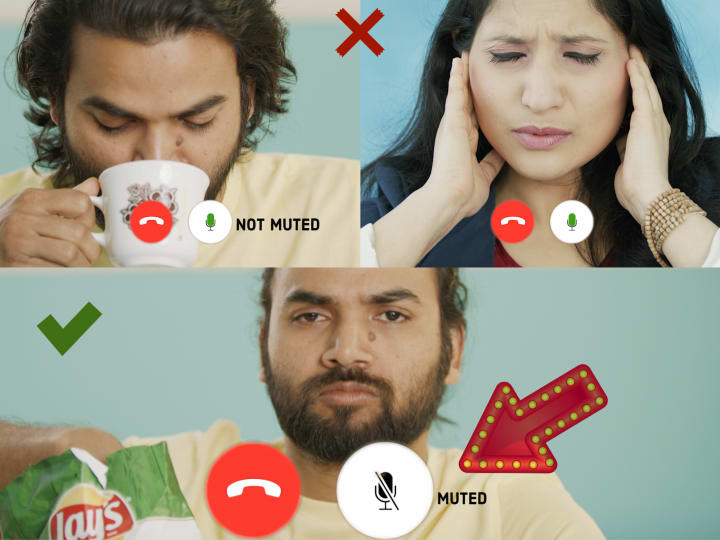
Pro-tip: Most Video Chat clients support dedicated keyboard shortcuts for toggling the mute button. This can help with actively muting and unmuting.
Tip #8: Use Headphones and dedicated Microphones.
For all your meetings, consider using headphones and dedicated microphones (or a combo headset) if at all possible.
Why?
The advantages of using headphones over built-in/external speakers are:
1) You hear the conversations more clearly.
2) Others in your home hear much less of the conversation you are having. They still hear you, but that’s much less distracting than you+others.
3) Because your microphone won’t pick up incoming audio, you will cause much less audio feedback for the other participants.
Similarly, a good quality external microphone that can be placed much closer to your mouth than the laptop’s built-in microphone will not only ensure you are heard more clearly, it will also greatly reduce unwanted reverberation (or reverb). Especially if you are sitting in a large room with less furniture, the reverb can make your voice really dull and unclear.
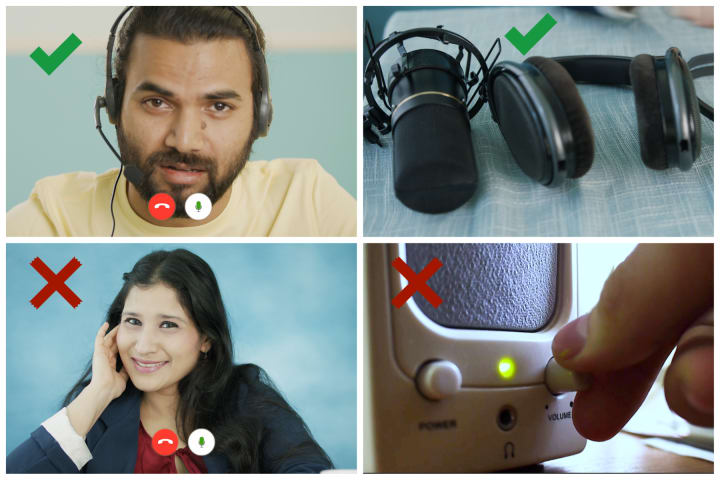
Pro-tip: When choosing headphones, consider picking active noise-cancelling headphones. At the same time, be mindful of the various types of headphones or headsets in the market and your level of comfort with them: in-ear, on-ear, over-ear, to name a few. Strike a balance between features and comfort, given you may have to wear these headphones all day.
Tip #9: Be Energetic and Focused. Avoid Multi-tasking.
Keep energy as high as possible during meetings, and stay focused. Convey this with your body language, pose, and voice.
Why? Bringing in high energy will rub off others in a good way and lead to more productive meetings, lower stress levels, and greater trust. Conversely, low energy is contagious, and can bring the whole meeting down by breeding mistrust and miscommunication, thereby stunting decision-making.
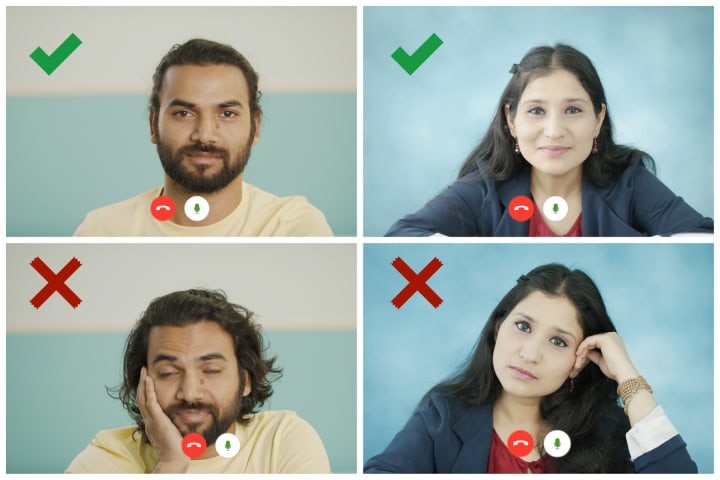
The extreme (and hopefully rare and meme-worthy) cases of lack of focus can happen due to participants actively multi-tasking on unrelated things.
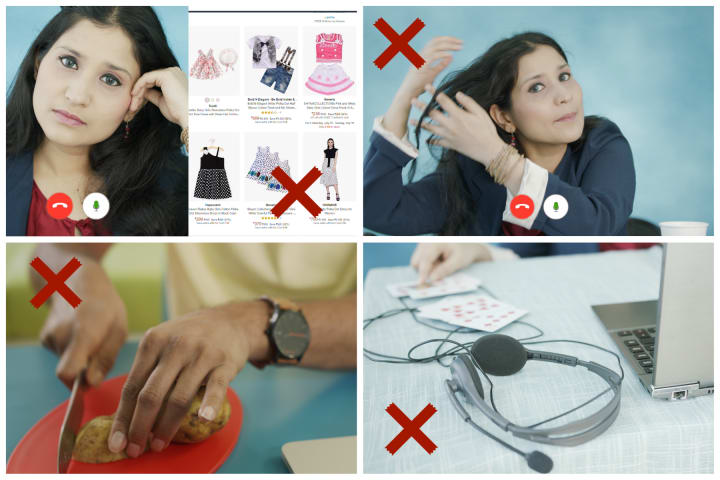
Pro-tip: To ensure high energy and sharp focus, you may want to avoid VCs too early or too late in the day, or during and immediately after lunchtime.
Tip #10: Be a Good VC Listener and a Good VC Speaker
Finally, and perhaps most importantly, make every attempt to be a good VC listener and speaker. These days with remote work we are getting less face-time (and frankly, overall time) with many of our colleagues, and missing out on a whole dimension that comes with in-person communication. This makes it more critical than ever to be effective communicators over VC.
So, what does being a good VC listener and good VC speaker exactly mean?
Good VC Listener:
1) Tactically, this means letting others finish before you interject, even if you find something objectionable in what they are saying, or you feel a strong desire to interject. Instead, keep a notepad and make a note of the points. Speak when your turn comes. Interjecting is particularly bad over VC because of the significant audio lag common in VC calls.
2) At a higher level, good listening also means actively trying to not only listen but to truly understand. A lot of time conflicts arise from misunderstanding. Active listening over video calls can avoid this.
Good VC Speaker:
1) Speak clearly and to the point. To do this, first gather your thoughts, perhaps write out the key points, and then speak. Time is limited, so when you have the floor, use it well.
2) Stop for comments from time to time. Compared to in-person chats, it’s easier to just keep speaking and not realize when to take breaks. Therefore, proactively pause and solicit feedback.
Pro-tip: Some video chat clients support virtually raising hands. In some cases this can be a good way to avoid speaking over each other.
---------------------------------------------------------------------------------------
Setting up for Effective Video Calls
Those were the 10 tips. In addition, you can do a few things as part of your remote work setup to make office video calls even more effective:
1) WiFi: Test your Internet connection for drops; switch service provider if necessary; tether WiFi connection via mobile phone if necessary. Even better, have both ready so you can switch quickly between them if needed.
2) Tech Setup: Invest in a good home tech setup— noise cancelling headphones, high-quality microphones (or a combo headset), and a dedicated Webcam. Even though these come standard with laptops, these accessories are often of better quality/clarity.
3) Read Context: If available, read up any relevant material before the meeting, not during. This will help set the context for a more productive meeting, and help avoid multi-tasking (reading + speaking/listening).
4) Invitees: If you are organizing the VC, be especially mindful of the invitees list. It might be easier to have a bloated list and get a higher participation rate for VC than for in-person meetings, because joining a call or switching between calls is lower cost. You still have critical responsibility to control cost by pruning the list to essential participants only. Office meetings are an expense, so make sure large meetings are worth the expense.
Thank you reader for coming this far. Hope some of this was useful. And thank you Deepak and Roshni for agreeing to be ‘models’ for this writeup.
About the Creator
Keep reading
More stories from Ritendra Datta and writers in Journal and other communities.
Want to Write Better Technical Documents?
Overview If you are in a technical field, chances are that you read and/or write many technical documents. You may have also read documents that felt, at least in parts, too dense, too confusing, too boring, or just plain irrelevant. Here I present one approach to writing better technical documents, so you don’t be that guy whose writing has these issues. Instead, (1) you write by first designing your doc hierarchically, (2) a large audience gets your idea at a high level, (3) a smaller but critical audience appreciates the details and then advances your work, and (4) profit! If this feels interesting, read on.
By Ritendra Datta5 years ago in Journal
Apostolic Succession Explained in Plain Language
One of the most misunderstood aspects of Catholic Church structure is the concept of apostolic succession. Simply put, apostolic succession is the unbroken line of spiritual authority handed down from the apostles, who were personally chosen by Jesus Christ, to the bishops and priests of the Church today. Understanding this concept is essential to grasping why the Catholic Church claims to preserve authentic teaching, sacramental authority, and continuity with Christ Himself.
By Sound and Spirit7 days ago in Journal
How to Succeed at the Benson Directory®
Congratulations and welcome to the Benson Directory® employee #22391! As our newest call handler, you will have the privilege of speaking with dozens of unique and interesting people on a daily basis as well as the opportunity to earn bonuses for high performance. Contained within this handbook you will find a set of ease to follow instructions designed to help you settle in to your new role and begin paving the way to success.
By S. A. Crawford4 days ago in Fiction



Comments
There are no comments for this story
Be the first to respond and start the conversation.