
AI Tools That Automate Boring Tasks and Boost Productivity
Let's be honest - we all have those mundane, repetitive tasks that eat away at our day. You know the ones: scheduling meetings, writing the same type of emails over and over, transcribing audio files, or organizing endless spreadsheets.


Let's be honest - we all have those mundane, repetitive tasks that eat away at our day. You know the ones: scheduling meetings, writing the same type of emails over and over, transcribing audio files, or organizing endless spreadsheets. What if I told you that artificial intelligence could handle most of these mind-numbing chores for you?
After spending months testing dozens of AI tools, I've narrowed down the list to seven game-changers that have genuinely transformed how I work. These aren't just shiny new toys - they're practical solutions that give you back hours of your life every week.
1. Otter.ai - Never Take Meeting Notes Again
Website: otter.ai
Remember frantically scribbling notes during important calls while trying to stay engaged in the conversation? Those days are over. Otter.ai joins your meetings (Zoom, Teams, Google Meet) and automatically transcribes everything in real-time.
But here's where it gets really smart: it doesn't just transcribe - it identifies different speakers, highlights key action items, and even generates meeting summaries. I've been using it for six months, and the accuracy is genuinely impressive, even with technical jargon and multiple accents.
The boring task it eliminates: Manual note-taking and meeting summaries
Time saved: 2-3 hours per week

2. Calendly + AI Scheduling Assistant - End Email Tennis Forever
Website: calendly.com
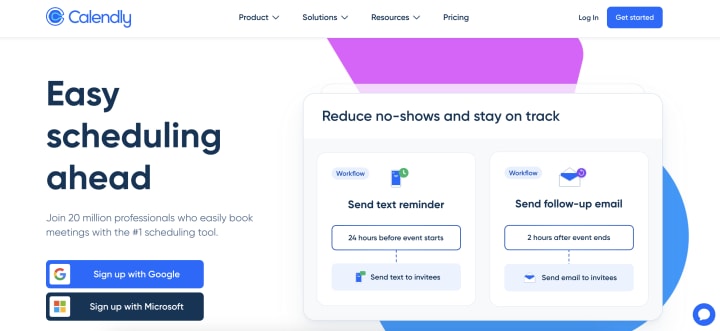
We've all been there: "Does Tuesday at 2 PM work?" "Actually, can we do Wednesday?" "Wednesday's booked, how about Thursday?" This back-and-forth email dance is productivity poison.
Calendly's AI-powered scheduling takes care of this entirely. You set your availability preferences, and it automatically finds time slots that work for everyone involved. The newer AI features even suggest optimal meeting times based on your energy patterns and existing calendar density.
The boring task it eliminates: Scheduling coordination via email
Time saved: 1-2 hours per week
3. Grammarly - Your Personal Writing Assistant
Website: grammarly.com
I'll admit it - I used to think Grammarly was just a fancy spell-checker. I was wrong. This AI writing assistant has evolved into something much more sophisticated. It catches grammar mistakes, sure, but it also suggests tone adjustments, clarity improvements, and even helps with conciseness.
The browser extension works everywhere: emails, Google Docs, social media posts, even in web forms. It's like having a professional editor looking over your shoulder 24/7.
The boring task it eliminates: Proofreading and editing
Time saved: 30-45 minutes per day

4. Zapier - Connect Everything, Automate Everything
Website: zapier.com
Zapier isn't technically an AI tool in the traditional sense, but its automation capabilities feel like magic. You create "Zaps" - automated workflows that connect different apps and services.
For example, when someone fills out a contact form on your website, Zapier can automatically add them to your CRM, send a welcome email, create a task in your project management tool, and notify your team in Slack. All without you lifting a finger.
The platform now includes AI-powered suggestions for workflow creation, making it easier than ever to set up complex automations.
The boring task it eliminates: Manual data entry and app switching
Time saved: 3-5 hours per week

5. Notion AI - Your Smart Workspace Companion
Website: notion.so
If you're already using Notion for project management or note-taking, the AI features are a game-changer. Notion AI can generate content, summarize long documents, translate text, and even help brainstorm ideas.
What I love most is how contextual it is. When you're in a project database, it understands the context and can generate relevant content. Need to write a project brief? Notion AI can draft one based on your existing project details.
The boring task it eliminates: Content creation and document summarization
Time saved: 2-3 hours per week

6. Loom AI - Effortless Video Communication
Website: loom.com
Video messages are incredibly effective for communication, but creating them used to be time-consuming. Loom's AI features have changed that completely.
The platform automatically generates titles for your videos, creates transcripts, and even suggests when to trim content for better engagement. The AI can also generate summaries of longer videos, making it easy for viewers to quickly understand the key points.
The boring task it eliminates: Video editing and manual transcription
Time saved: 1-2 hours per week

7. ChatGPT/Claude - Your Multi-Purpose AI Assistant
Website: openai.com/chatgpt | claude.ai
I couldn't write this list without mentioning the obvious powerhouses. These conversational AI tools can handle an incredible range of boring tasks: writing emails, creating outlines, analyzing data, generating reports, brainstorming ideas, and so much more.
The key is learning how to prompt them effectively. Instead of asking "Write me an email," try "Write a professional follow-up email to a potential client who expressed interest in our services two weeks ago but hasn't responded to our initial proposal."
The boring task it eliminates: Various writing and analytical tasks
Time saved: 4-6 hours per week

8. Walls.io – AI-Powered Social Media Wall Moderation
Website: walls.io
Managing social media content for events, campaigns, or digital displays can be a full-time job-unless you automate it. Walls.io collects and curates user-generated content into a live social media wall and uses AI to moderate posts in real time. That means you get the benefits of audience engagement without the headache of manually filtering out spam, offensive content, or off-brand messaging.
Ideal for marketers, event organizers, and community managers, Walls.io helps you showcase authentic social proof while staying in control of your brand narrative.
The boring task it eliminates: Manual social media moderation and content curation
Time saved: 3-6 hours per event or campaign

9. Kittl - AI-Powered Design Platform
Website: kittl.com
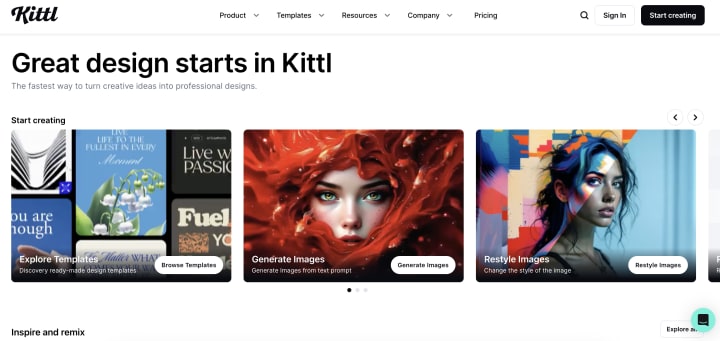
Creating professional-looking visuals consistently can be a big time drain, especially if you're not a trained designer. Kittl makes the process really easy with its user-friendly, AI-powered design platform. From logos to social media posts, you can start with beautiful templates and personalize them in just a few clicks.
Their newest feature, Kittl Flow, steps it up by allowing you to automate entire design workflows with simple prompts. It’s a huge time-saver for marketers, small business owners, and content creators who need high-quality graphics quickly, without switching between multiple tools or hiring extra help.
The boring task it eliminates: Starting designs from scratch and manually recreating brand assets
Time saved: 2-5 hours per campaign or project
Making the Transition: Start Small
Here's my advice: don't try to implement all seven tools at once. Start with the one that addresses your biggest pain point. For most people, that's either meeting notes (Otter.ai) or email scheduling (Calendly).
Once you've integrated one tool successfully and seen the time savings, gradually add others. The goal isn't to use AI for everything - it's to eliminate the tasks that drain your energy so you can focus on work that actually matters.
What’s Next: Agentic AI
While these tools save hours individually, the next frontier is AI agents, systems that can coordinate multiple tools and make decisions without constant input. For example, instead of just transcribing a meeting, an AI agent could summarize it, draft follow-up emails, schedule next steps, and update your project tracker automatically. Tools like AutoGPT and emerging enterprise AI agents are pushing this shift from single-task assistance to fully autonomous workflows.
The Bottom Line
These AI tools aren't perfect, and they won't replace human creativity or critical thinking. But they're incredibly effective at handling the repetitive, time-consuming tasks that bog us down every day.
I've calculated that these seven tools combined save me approximately 15-20 hours per week. That's essentially an extra half-day of productivity - or more importantly, time I can spend on strategic thinking, creative projects, or simply having a life outside of work.
The AI revolution isn't coming - it's here. The question isn't whether these tools will change how we work; it's whether you'll be among the early adopters who benefit most from them.
FAQ: AI Productivity Tools
Q: Are these AI tools expensive?
A: Most offer free tiers with basic functionality. Paid plans typically range from $10-30 per month. Given the time savings, the ROI is usually positive within the first month.
Q: Will AI tools replace human workers?
A: These tools are designed to augment human capabilities, not replace them. They handle boring, repetitive tasks so humans can focus on creative, strategic, and relationship-building work.
Q: How accurate are AI transcription tools like Otter.ai?
A: Modern AI transcription is typically 85-95% accurate in good audio conditions. Accuracy improves significantly when you train the AI to recognize specific speakers and terminology.
Q: Are there privacy concerns with AI tools?
A: Yes, always review privacy policies carefully. Most reputable AI companies encrypt data and offer business plans with enhanced security features. Avoid using these tools with highly sensitive information.
Q: How long does it take to see productivity improvements?
A: Most people notice immediate time savings within the first week of implementation. The real productivity boost comes after 2-3 weeks when using the tools becomes habitual.
Q: Can small businesses benefit from these tools?
A: Absolutely. Small businesses often benefit most because they typically have limited resources for administrative tasks. Many of these tools have free tiers perfect for small teams.
Q: What if I'm not tech-savvy?
A: Most modern AI tools are designed for non-technical users. Start with the simplest ones (like Grammarly or Calendly) and gradually work your way up. YouTube tutorials are available for all major platforms.
Q: Do these tools work on mobile devices?
A: Yes, most have mobile apps or mobile-optimized websites. Some features may be limited on mobile, but core functionality is typically available.
About the Creator
Laslo Povanych
Laslo Povanych is a guest post writer specializing in B2B, SaaS, marketing, and customer service. With a passion for creating actionable, insightful content, he helps brands connect with their audience, build authority, and drive growth.
Keep reading
More stories from Laslo Povanych and writers in Journal and other communities.
The Psychology of Empathy in Customer Support
What makes good service great? Is it answering phones in a few rings or always having the right answer? No, great service goes beyond these simple metrics. After all, anyone can get these right and still make service feel rushed and impersonal.
By Laslo Povanych10 months ago in Journal
Space Optimization Tips for Converting Existing Buildings into Drug Rehabilitation Centers
Introduction Converting an existing building into a drug rehabilitation center is a profoundly impactful initiative that demands meticulous planning and strategic space optimization. This process is not merely about repurposing walls; it is about transforming built environments into sanctuaries that promote healing, dignity, and long-term recovery. Amid rising demands for substance use disorder treatment, institutions and developers are tasked with leveraging existing infrastructures to fulfill therapeutic needs without compromising on quality or functionality. Achieving optimal space utilization requires a blend of creativity, regulatory compliance, and deep understanding of patient care dynamics.
By Fida Hassaina day ago in Journal
Rachel Reviews: Lakefront Wolves by Joseph Deegan
Meet Finn. He's an 18 year old kid who has potential. He's bright with great school scores and he's also an athlete, a footballer of some prowess. He has it all going for him, it would seem, and yet, he's determined to send what could be a well-planned, stable existence firmly off the rails. He drinks, he smokes, he takes drugs, he has violent tendencies and he's in danger of losing not only his mind but all that he holds dear.
By Rachel Deeming4 days ago in BookClub




Comments
There are no comments for this story
Be the first to respond and start the conversation.