
5 Skills You Should Learn Right Away as a Full-Stack Developer
Learn them now, you will regret delaying it


There are tasks you love in every job and some that you would most likely want to delegate to someone else because you don’t feel confident in doing them.
If you are a full-stack developer like me, you probably feel most at home when developing in some kind of JavaScript/TypeScript environment like React, Angular, Vue.js, Express, or any other JavaScript library/framework. At least that is where my strengths lie and why I love my job so much.
When working for a company or for some project, you will realize that there are many more things to do, but which are in fact no less important. Not having a deeper knowledge of those topics will always lead to you trying to avoid those tasks or at least doing those tasks half-hearted and less efficiently.
When you come across one of those tasks you basically have two options:
- Stack Overflow
- Learn the skill
As humans are borne and guided from the foundations of laziness many would prefer quick wins by choosing option one. Instead, you should focus on long-term goals. Initially, it may take you some hours to learn the skill, but it is more efficient to really learn the skill properly. Sooner or later it will payout.
“Everything is hard before it is easy” — J. W. von Goethe
To become a very good developer it is essential to get out of your comfort zone by continuously learning new things. Becoming an expert in daily tasks will save you a lot of time, and eventually, you will find yourself enjoying those tasks when getting better at them.
In this article, I will share 5 skills with you that every developer should have in his/her toolbox to make everyday life easier.
1. Learn Regex
Mastering Regular Expressions (Regex) is one of the most powerful skills to have in your toolbox. They are applicable in almost every programming language so that any developer will learn them sooner or later.
“Learn Once, Write Everywhere”
In a very fast-moving technology world, it is one of the skills which will be most likely used for a very long time to operate string-searching operations to easily implement tasks like:
- User input validation
- Database queries
- Search/Replace in an IDE
Until last, I used Stackoverflow in a combination with helpful pages like Regex101 to build easy regular expressions. This is pretty straightforward for common expressions — like checking an email for validity. But recently I went down a dead-end when trying to create a complex database query for the server of my Web Highlights Chrome extension. I wanted to match any entry that matches the relative path of the given URL. Additionally, hashes should be ignored.
I ended up approaching a friend of mine from which I knew that he is mastering regular expressions. In the end, that is the solution I was looking for:
The problem with regular expressions is that they are completely unreadable at first. If you want to create more complex ones you are forced to understand the syntax properly because Stackoverflow will not help you anymore. We can validate our expression by using Regex101:
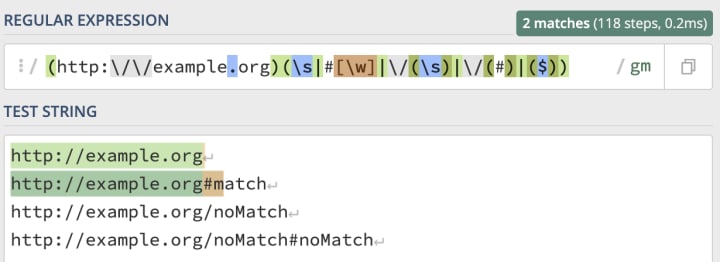
After this experience, I decided to learn regular expressions properly. I can recommend reading the book Mastering Regular Expressions by Jeffrey E. F. Friedl but there are also several free online tutorials to get started with.
Once you master regex’s you will notice that they aren’t as daunting as they seem and you will find many use cases in daily work to apply them. I make use of them every day most of the time just to search for some string in VsCode.
2. Learn Vim
I think every developer has had this situation in a career: Some weird editor inside the terminal opens and you have no idea what to do.
Q: “How do you generate a random string?”
A: “Put a Windows user in front of vim, and tell them to exit”
I remember googling “How to exit Vim?” several times and I assume that almost anyone did. I don’t expect every developer to be an expert in Vim but at least everyone should know how to edit and save some text in a Vim editor. By the time you get used to basic commands and I often use this Vim Cheatsheet to have a quick reference.
The Vim editor is really powerful and once you master it it will make you a faster and more efficient developer. There are many playful games like Vim adventures, apps like Vim Master (Android), or books like Practical Vim to get started with.
I personally loved learning new commands with the app, because I could do it e.g. on the train without having my notebook with me.
3. Learn to Write Documentation
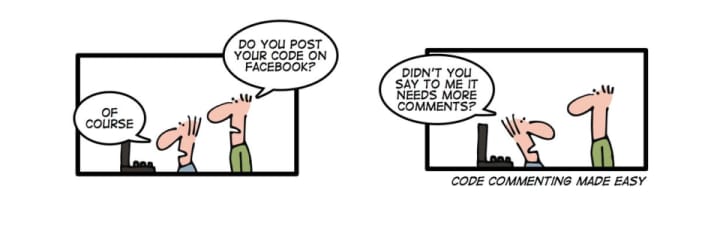
Maybe you have heard of the following phrase:
“Code should be self documenting”
Writing self-explaining clean code is one of the most important skills of any developer. You can achieve this by using naming conventions to prevent comments and to make the logic of the code more readable for humans.
Still, you will not get around writing documentation. A system architecture or an API should always be well-documented to make the work with it easier for others. You will probably also be faced with writing tickets with some software like Jira or Confluence. Those tickets should be self-explaining to make the work with them explicit.
Not knowing how to write documentation properly can be a real pain. Many documentations are written with markdown. Learning how to write Markdown is a really powerful skill because you can do many things with it easily. Those are only a few examples:
- Tables
- Lists
- HTML
- Emojis 😎
It doesn’t take long to learn the syntax and once you know it, you can use it literally everywhere. There are many online editors like StackEdit, that will help you creating Markdown. As a quick reference, this cheatsheet is always helpful.
4. Learn software principles & design patterns
When I started programming I always just went straight to the implementation without thinking about the architecture. Usually, this leads to problems later on in the development. Luckily, there were many developers before you facing similar software design problems so that you can learn from their lessons.
“Design patterns are typical solutions to common problems in software design” — https://refactoring.guru/
In my opinion, the best way to learn about software principles and patterns is to read books because it is not just a skill you can get overnight by completing an online tutorial. If you are completely new to this topic I can recommend Head First Design Patterns by Eric Freeman. This book is written in a very funny and vivid way what makes it easy to read. If you prefer a book that can be used as a reference I recommend the “bible” of software patterns & principles — Clean Code by Robert C. Martin. Even though the examples in both books are written in Java, you can apply them to any other programming language.
5. Learn Git
I was not sure if I should add this skill here because for me it is the most obvious one and I have not seen a good developer not mastering Git.
I have had the pleasure of learning Git very deeply in university so that it is pretty straightforward to me. Still, I have seen many developers struggling with basic git commands during work.
Not mastering Git as a developer is like being a taxidriver without having a driver license.
If you are a visualized learning person like me you can start with using tools like Sourcetree or VsCode extensions to see the Git workflow visualized as a graph. Sooner or later you will only use the command line interface but it helped me to understand what is actually going on in the beginning.
There are many online tutorials on how to get started with Git. To get a deeper understanding you can read ProGit by Scott Chacon and Ben Straub which is recommended by the official Git documentation.
I really hope that you enjoyed reading this article! I am always happy to answer questions and I am open to criticism. Feel free to contact me at any time 😊
Follow me to get more articles about Typescript, Web Components, Frontend Frameworks, Chrome Extensions, and many more topics! 🙏
About the author
Marius Bongarts is a Software Engineering Analyst at Accenture Interactive. He also created the Web Highlights extension, which allows users to organize text highlights and bookmarks with the help of tags and directories.
Disclosure: As an Amazon Associate, I earn from qualifying purchases.
About the Creator
Marius Bongarts
Software Engineering Analyst @ Accenture Interactive. I write about Typescript, Web Components, Frontend Frameworks, Chrome Extensions, and Software Principles.
Keep reading
More stories from writers in Journal and other communities.
The goals I did not achieve
Every writing goal I made for the year is a wash. It has been this way for a while, but I think it's important to be open about my failures and the reality of how life can get in the way. This is especially true considering the several times I have posted on Vocal about my writing goals, how I was changing my approach, and where I was hoping to be for the upcoming year. I will probably do that again in a couple months, but for now, it is time to acknowledge where I am today.
By Kay Husnick23 days ago in Journal
Ludacris and Nelly draw backlash over bookings at MAGA-coded music festival
Ludacris and Nelly headlining a mostly right-wing event is good for them. It’s also great for the genre of hip hop. The two rap veterans have showcased their talents on other stages. Why can’t they perform for mostly MAGA folks and grab that bag?
By Skyler Saunders4 days ago in Beat


Comments
There are no comments for this story
Be the first to respond and start the conversation.