
2 Free Method To Convert Outlook PST to PDF Adobe Acrobat with Attachments
Convert Outlook PST to PDF with Attachments

Due to increased security, convenience of data storage, and cross-platform collaboration, users sometimes have to convert PST to PDF using Adobe Acrobat. The main benefit of converting a PST file to a PDF file with attachments is that you may view your important emails without having to install Microsoft Outlook.
The best platform for accessing crucial data at anytime, anyplace is Adobe Acrobat. The PDF files are portable, more dependable, and secure. PST files, on the other hand, cannot be accessed across many PCs and are not portable. Therefore, you must convert your Outlook PST files into a file that is portable format in order to be able to access them.
PST File Converter is the best method for achieving this to convert PST files to PDF with attachments.
Why is PST to PDF conversion with Attachments necessary for users?
Although there are many factors that drive consumers to convert PST to PDF, just a handful of them are significant.
- Without Outlook, it is impossible to edit an Outlook PST file.
- PDF files are more dependable and safe.
- You can view PDF files at any time, anytime. PST files, however, cannot.
- You can use password-secure PDF files to protect your important email data.
How to Create a PDF File from a PST File?
You must use the techniques listed below to convert Outlook PST files to PDF as there isn't a feature in Microsoft Outlook that allows for this.
2 Free Way To Convert Outlook PST to PDF Adobe Acrobat
1- Using Adobe Acrobat Pro DC
- Hit the Adobe PDF tab on the top toolbar of Outlook by Microsoft after opening it.
- To carry out the conversion job, choose the emails.
- In the Adobe PDF tab, choose the desired messages by clicking on them.
- Select Create New PDF from the drop-down menu.
- To switch from PST to PDF format, just choose where you want to save the file, give it a title, and click the Save icon.
Additionally, using the "Append to existing PDF" option from the drop-down menu enables you to save fresh emails in PDF documents that have already been prepared. Additionally, you may use and set up an automated archive technique to automatically save freshly created emails in PDF format.
2- Using Microsoft Print to PDF
For Windows 11/10 users who have Outlook 2016 and later editions, this solution is excellent. To accomplish the PST to PDF transfer, adhere to the procedures below.
- Select the emails you want to convert from the Outlook PST file in Microsoft Outlook.
- Hit the File icon, followed by the Print button.
- Select a printer, then select Microsoft Print to PDF from the drop-down menu.
- To print, click the Print button.
- You must enter the saving location and filename in this tab's saving field before clicking the Save button.
- The file will be stored at the designated location.
Convert PST to PDF Professionally with Attachments
All you need to do is download the Softaken PST to PDF Converter program to do the process with certainty and without fuss. All of the information in your Outlook PST file can be converted to PDF format in a matter of minutes. It maintains the security of the data. Each and every version of Microsoft Windows and Outlook is suitable for the program.
Steps to PST to PDF Converter:-
- Download and run the PST Converter Tool
- Add PST files/folders to tool
- Scan and show Selected PST file Previews
- Then choose, PDF files from given export options like- HTML, MHTML, and PDF
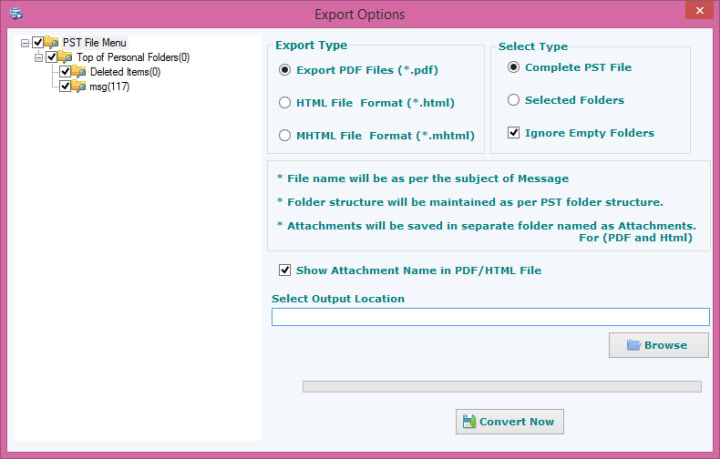
- Select location to save output file
- Click on Convert Now to start the conversion process
Conclusion: The methods mentioned above make it simple to convert PST files to PDF and access your crucial Outlook data across all devices.
About the Creator
Keep reading
More stories from Della Taylor and writers in Journal and other communities.
How to Convert Windows Live Mail to Outlook PST file format?
Windows Live Mail is a powerful email client from Microsoft used by millions of people around the world. It stores emails, contacts, calendar entries and other data in a proprietary format. However, Microsoft is gradually phasing out Windows Live Mail and users are migrating to Outlook. In order to move emails from Windows Live Mail to Outlook, you need to convert the emails to an Outlook PST file.
By Della Taylor3 years ago in Journal
The goals I did not achieve
Every writing goal I made for the year is a wash. It has been this way for a while, but I think it's important to be open about my failures and the reality of how life can get in the way. This is especially true considering the several times I have posted on Vocal about my writing goals, how I was changing my approach, and where I was hoping to be for the upcoming year. I will probably do that again in a couple months, but for now, it is time to acknowledge where I am today.
By Kay Husnick19 days ago in Journal
Why I Felt Alert at Night Even When I Was Exhausted
For a long time, my nights followed a frustrating pattern. By the end of the day, I was clearly exhausted. My body felt heavy. My mind had worked through hours of tasks and conversations. Yet when night arrived, sleep did not.
By illumipure7 days ago in Journal



Comments (3)
Do you want hassle-free solution to convert Outlook PST file to PDF including emails, contacts, calendars, notes and all other Outlook items then utilize easy to use EmailsGuru PST to PDF Converter. Know more- https://www.emailsguru.com/pst/pdf/
Are you having trouble finding a fast and easy solution to convert PST files to PDF format with attachments? Using DataVare PST to PDF Converter, you can convert PST files to PDF. Your PST file can be simply converted to PDF format without any issues. This tool's steps are quite easy and understandable for any type of non-skilled user. Without any restriction, you can easily convert your Outlook PST files into PDF. To see how it performs, you can try its free demo edition. This software gives several features, such as the ability to easily export PST files from any editions of MS Outlook, and supports Windows 11 and earlier versions. Even all editions of Adobe Acrobat are supported by this utility. During the Exporting PST to PDF process, it maintains the integrity of the original data. Read More - https://www.datavare.com/software/pst-to-pdf-converter-expert.html
You can manually convert PST to PDF using Outlook email client but it takes lot of time if you have multiple PSt emails. However, using Xtraxtor PST to PDF Converter you can directly export PSt to PDF in just a few simple clicks. It is able to convert multiple PST files at once with full accuracy. It preserves data integrity and folder hierarchy during the process. You can download its free demo version to check its work efficiency. To Know More Visit Here: https://xtraxtor.com/blog/how-to-convert-pst-to-pdf-with-attachments/